Vvv: Can't delete file after vagrant detroy
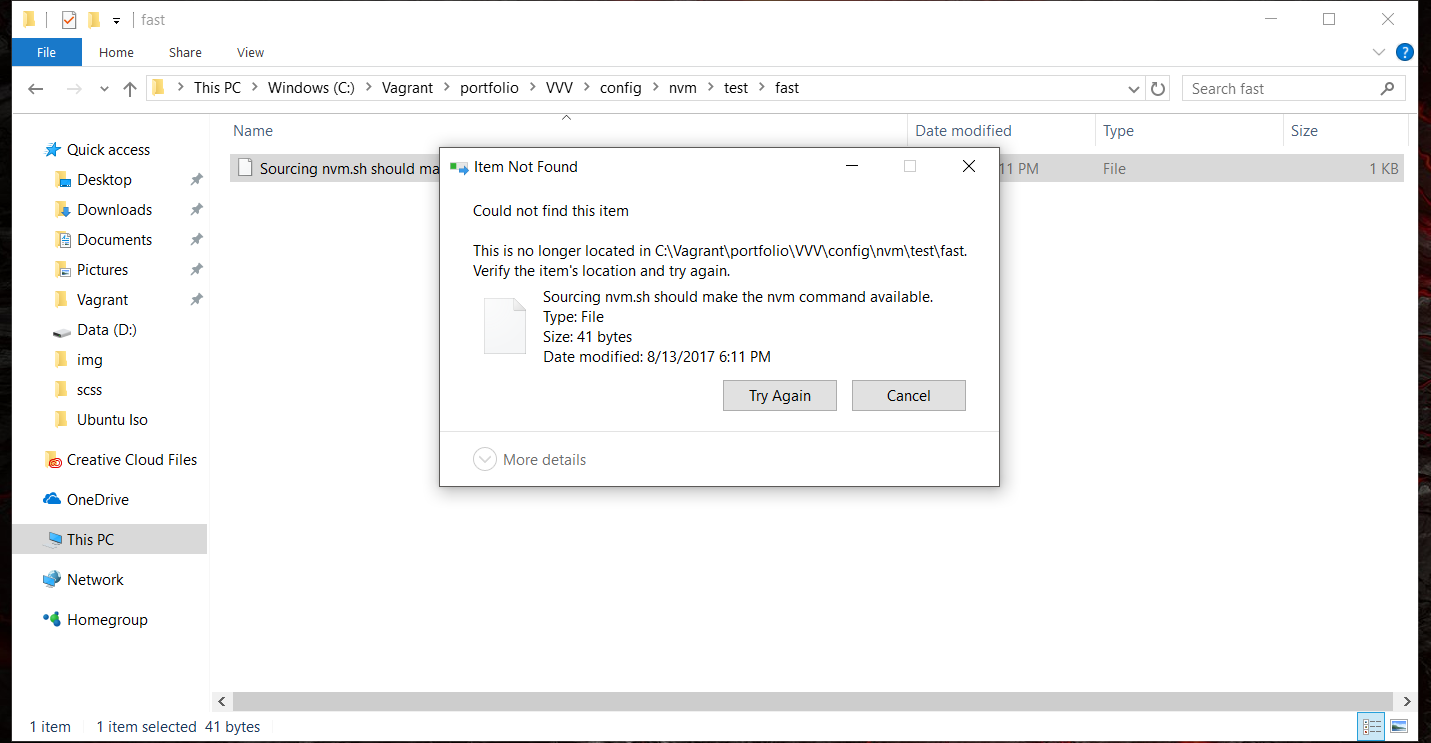
OS: Windows 10
Ruby is installed also have MSYS2 and Mingw64 - (Which I think allowed me to vagrant ssh with out using putty)
After I destroyed the vagrant, I deleted the files left over in the project folder, all except one. You see from the image that it says that the file is no longer located in the in the folder location.
The path is: config>nvm>test>fast
the file name is: "Sourcing nvm.sh should make the nvm command available"
I think it is somehow a symlink file but I am not sure about that and I don't know how to correct this issue
Any help would be appreciated, not a major issues but the folder is pretty much useless I can't delete it and I cant create any more vagrants in it because they don't install correctly.
 caseyallen386
All 5 comments
Can it be deleted from the command line?
 tomjn
on 14 Aug 2017
tomjn
on 14 Aug 2017
I've encountered this issue a few times over the last couple of days (had a corrupted setup, had to start from scratch, and manually remove files). You should be able to remove the directory via command line, give yourself administrative access just to be sure:
rmdir /s /q C:\Vagrant\portfolio\VVV\config
 PorterBytes
on 14 Aug 2017
PorterBytes
on 14 Aug 2017
No its still give the same error message of not being able to find the file.
From: Tom J Nowell notifications@github.com
Sent: Monday, August 14, 2017 6:04 AM
To: Varying-Vagrant-Vagrants/VVV
Cc: Casey Allen; Author
Subject: Re: [Varying-Vagrant-Vagrants/VVV] Can't delete file after vagrant detroy (#1254)
Can it be deleted from the command line?
—
You are receiving this because you authored the thread.
Reply to this email directly, view it on GitHubhttps://github.com/Varying-Vagrant-Vagrants/VVV/issues/1254#issuecomment-322172701, or mute the threadhttps://github.com/notifications/unsubscribe-auth/AKgjZjCQxpBt4MwgcNry3Mqw2FBpeTFbks5sYDfggaJpZM4O157t.
caseyallen386
on 15 Aug 2017
Thanks Matt that worked, using both params.
From: Matt Porter notifications@github.com
Sent: Monday, August 14, 2017 10:17 AM
To: Varying-Vagrant-Vagrants/VVV
Cc: Casey Allen; Author
Subject: Re: [Varying-Vagrant-Vagrants/VVV] Can't delete file after vagrant detroy (#1254)
I've encountered this issue a few times over the last couple of days (had a corrupted setup, had to start from scratch, and manually remove files). You should be able to remove the directory via command line, give yourself administrative access just to be sure:
rmdir /s /q C:\Vagrant\portfolio\VVV\config
—
You are receiving this because you authored the thread.
Reply to this email directly, view it on GitHubhttps://github.com/Varying-Vagrant-Vagrants/VVV/issues/1254#issuecomment-322235940, or mute the threadhttps://github.com/notifications/unsubscribe-auth/AKgjZu3xL9DoSlXhm5soPVbVASRogiPQks5sYHM3gaJpZM4O157t.
caseyallen386
on 15 Aug 2017
This thread has been automatically locked since there has not been any recent activity after it was closed. Please open a new issue for related bugs.
![lock[bot] picture](https://avatars.githubusercontent.com/in/6672?v=4&s=40) lock[bot]
on 22 Feb 2020
lock[bot]
on 22 Feb 2020
Related issues
tomjn
·
3Comments
 rwrobe
·
4Comments
rwrobe
·
4Comments
 zachwills
·
4Comments
zachwills
·
4Comments
 ghost
·
5Comments
ghost
·
5Comments
 neilgee
·
5Comments
neilgee
·
5Comments
Most helpful comment
I've encountered this issue a few times over the last couple of days (had a corrupted setup, had to start from scratch, and manually remove files). You should be able to remove the directory via command line, give yourself administrative access just to be sure:
rmdir /s /q C:\Vagrant\portfolio\VVV\config