Vvv: WordPress database error Disk full
After using my clean VM (with db_share_type: false) for almost a day, I got this weird error in my WP error log:
[18-Jun-2019 12:59:25 UTC] WordPress database error Disk full (/tmp/#sql_12a6_0.MAI); waiting for someone to free some space... (errno: 28 "No space left on device") for query SHOW FULL COLUMNS FROM `wp_postmeta` made by do_action('wp_ajax_heartbeat'), WP_Hook->do_action, WP_Hook->apply_filters, wp_ajax_heartbeat, apply_filters('heartbeat_received'), WP_Hook->apply_filters, wp_refresh_post_lock, wp_set_post_lock, update_post_meta, update_metadata
Also when running df -h in my machine using SSH, I saw that /dev/sda1 was using 100% of its space.
My computer didn't run out of free space of course, but the drive assigned to the VM (10gb) did. I'm wondering how this had happened. I'm using VVV for over two years and this has never happened before. Moreover, I did nothing different today when using the VM
 kmgalanakis
All 27 comments
can you do a screenshot when you use df -h it sounds like the box itself is using LVM.
 benlumia007
on 18 Jun 2019
benlumia007
on 18 Jun 2019
The specific VM is not available anymore. I destroyed it and recreated it.
Don't worry though, I will repeat the same type of work tomorrow so if a similar issue comes up, I will post the screenshot here.
Note that by the time I saw the issue, after doing a vagrant reload, the VM went back to normal, in terms of /dev/sda1 size.
kmgalanakis
on 19 Jun 2019
here you go...
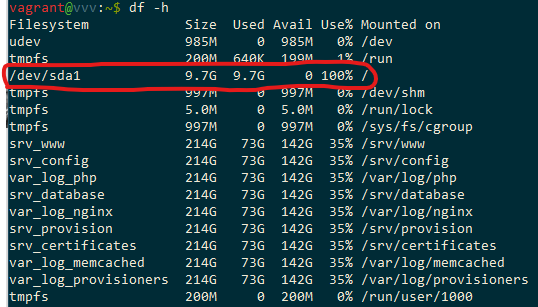
with just a half day of development.
kmgalanakis
on 19 Jun 2019
It might be better to check in the Virtualbox management UI, disk files
expand to fit their contents
On Wed, 19 Jun 2019 at 09:35, Konstantinos Galanakis <
[email protected]> wrote:
here you go...
[image: image]
https://user-images.githubusercontent.com/1268089/59745623-e1e59e80-927d-11e9-9036-86fadadd4660.png—
You are receiving this because you are subscribed to this thread.
Reply to this email directly, view it on GitHub
https://github.com/Varying-Vagrant-Vagrants/VVV/issues/1866?email_source=notifications&email_token=AAAOLZYW3XZCZPG7MMHHGITP3HOSZA5CNFSM4HZDGPA2YY3PNVWWK3TUL52HS4DFVREXG43VMVBW63LNMVXHJKTDN5WW2ZLOORPWSZGODYA7GVQ#issuecomment-503444310,
or mute the thread
https://github.com/notifications/unsubscribe-auth/AAAOLZYO4YDFHRMUSK3NFL3P3HOSZANCNFSM4HZDGPAQ
.
 tomjn
on 19 Jun 2019
tomjn
on 19 Jun 2019
Disk file indeed expand to fit their contents, but the upper size limit for this disk is 10GB and it's all consumed by the VM.
Moreover when I try to do a vagrant halt, I get the following:
$ vagrant halt
==> default: Running action triggers before halt ...
==> default: Running trigger: VVV Pre-Halt...
==> default: Trigger run failed
==> default: The following SSH command responded with a non-zero exit status.
==> default: Vagrant assumes that this means the command failed!
==> default:
==> default: echo; printf $SSH_AUTH_SOCK
==> default:
==> default: Stdout from the command:
==> default:
==> default:
==> default:
==> default:
==> default: Stderr from the command:
==> default:
==> default: printf: usage: printf [-v var] format [arguments]
==> default: Attempting graceful shutdown of VM...
The following SSH command responded with a non-zero exit status.
Vagrant assumes that this means the command failed!

echo; printf $SSH_AUTH_SOCK

Stdout from the command:


Stderr from the command:

printf: usage: printf [-v var] format [arguments]
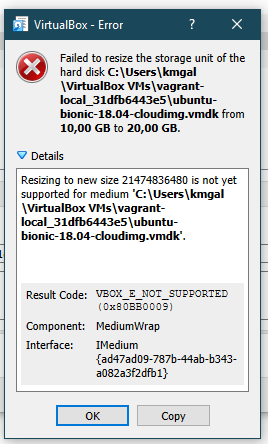
Can you expand the upper limit via Virtualbox?
Until this is resolved your going to see lots of odd errors, they won't be
very useful.
For now the only options are to either free up space, or expand the virtual
disk via VirtualBox
On Wed, 19 Jun 2019 at 09:48, Konstantinos Galanakis <
[email protected]> wrote:
Disk file indeed expand to fit their contents, but the upper size limit
for this disk is 10GB and it's all consumed by the VM.Moreover when I try to do a vagrant halt, I get the following:
$ vagrant halt
==> default: Running action triggers before halt ...
==> default: Running trigger: VVV Pre-Halt...
==> default: Trigger run failed
==> default: The following SSH command responded with a non-zero exit status.
==> default: Vagrant assumes that this means the command failed!
==> default:
==> default: echo; printf $SSH_AUTH_SOCK
==> default:
==> default: Stdout from the command:
==> default:
==> default:
==> default:
==> default:
==> default: Stderr from the command:
==> default:
==> default: printf: usage: printf [-v var] format [arguments]
==> default: Attempting graceful shutdown of VM...
The following SSH command responded with a non-zero exit status.
Vagrant assumes that this means the command failed!echo; printf $SSH_AUTH_SOCK
Stdout from the command:
Stderr from the command:
printf: usage: printf [-v var] format [arguments]
—
You are receiving this because you commented.Reply to this email directly, view it on GitHub
https://github.com/Varying-Vagrant-Vagrants/VVV/issues/1866?email_source=notifications&email_token=AAAOLZ3D4BSOK25H6QTJSKDP3HQDZA5CNFSM4HZDGPA2YY3PNVWWK3TUL52HS4DFVREXG43VMVBW63LNMVXHJKTDN5WW2ZLOORPWSZGODYBAFWY#issuecomment-503448283,
or mute the thread
https://github.com/notifications/unsubscribe-auth/AAAOLZ3664ITY6WROTPPZSDP3HQDZANCNFSM4HZDGPAQ
.
tomjn
on 19 Jun 2019
First of all, I don't really know what eats up so much space, this doesn't make any sense.
Also, unfortunately, I cannot expand the upper limit via Virtualbox
kmgalanakis
on 19 Jun 2019
You appear to have 73GB of stuff in shared folders so having a lot of
database files would make sense.
Either way you're the first person in the history of the project to reach
this, congrats!
I'm in Berlin for WCEU at the moment so my ability to debug and help is
greatly diminished, so it'll be a few days probably before I can properly
look into this myself
On Wed, 19 Jun 2019 at 10:54, Konstantinos Galanakis <
[email protected]> wrote:
First of all, I don't really know what eats up so much space, this doesn't
make any sense.Also, unfortunately, I cannot expand the upper limit via Virtualbox
[image: image]
https://user-images.githubusercontent.com/1268089/59751362-0c892480-9289-11e9-8949-6ebe2a775c90.png—
You are receiving this because you commented.Reply to this email directly, view it on GitHub
https://github.com/Varying-Vagrant-Vagrants/VVV/issues/1866?email_source=notifications&email_token=AAAOLZY6FXK3TBYLRWYPZ5TP3HX6DA5CNFSM4HZDGPA2YY3PNVWWK3TUL52HS4DFVREXG43VMVBW63LNMVXHJKTDN5WW2ZLOORPWSZGODYBFWTY#issuecomment-503470927,
or mute the thread
https://github.com/notifications/unsubscribe-auth/AAAOLZ46RPNXYFWPUMQZSXTP3HX6DANCNFSM4HZDGPAQ
.
tomjn
on 19 Jun 2019
I don't know if I should take this as a compliment or an insult.
Whatever it is, one thing is for sure. I'm not having this 73GB of stuff in the shared folders and I really don't know why this screenshot says so.
As a proof, here is the same screenshot of a fresh machine coming from a clean repo clone
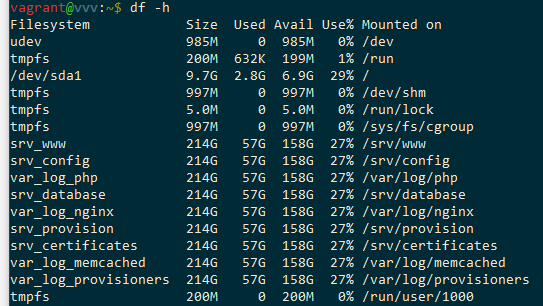
FYI 214GB is the size of the partition the repo files exist and 57GB is the amount of disk space used in this partition (way more than the actual files shared between my fs and the VM's fs).
kmgalanakis
on 19 Jun 2019
OK, I figured out that the disk is getting full due to files inside the /tmp folder.
These files are traces generated by Tideways even though I'm not adding ?enable-tideways to my URL.
I also noticed that when debugging with PHPStorm, the execution stops on tideways-header.php because a path mapping hasn't been set for this file. I get past to this issue by choosing to not stop when path mappings are not set.
kmgalanakis
on 19 Jun 2019
Note that these files are only generated when xdebug is on.
kmgalanakis
on 20 Jun 2019
@mte90 can you look?
On Thu, 20 Jun 2019 at 12:15, Konstantinos Galanakis <
[email protected]> wrote:
Note that these files are only generated when xdebug is on.
—
You are receiving this because you commented.Reply to this email directly, view it on GitHub
https://github.com/Varying-Vagrant-Vagrants/VVV/issues/1866?email_source=notifications&email_token=AAAOLZZIN2QZ4SMP6SWK2RDP3NKDNA5CNFSM4HZDGPA2YY3PNVWWK3TUL52HS4DFVREXG43VMVBW63LNMVXHJKTDN5WW2ZLOORPWSZGODYE7G2I#issuecomment-503968617,
or mute the thread
https://github.com/notifications/unsubscribe-auth/AAAOLZ7HRYXGYHAEIAZPFJTP3NKDNANCNFSM4HZDGPAQ
.
tomjn
on 20 Jun 2019
I am already working on that, someone on twitter reached me confirming issues with phpstorm (that had to downgrade) and tideways.
The point is that this file is loaded also if you are not using tideways from the browser and xdebug has some issues on locating it, probably because it outside the nginx folder scope.
 Mte90
on 20 Jun 2019
Mte90
on 20 Jun 2019
Seems an issue of phpstorm and xdebug that is quite common https://medium.com/takeaway-tech/skipping-files-outside-phpstorm-project-in-xdebug-sessions-b563612b2a0d
Medium
Using auto_prepend_file without trouble with PhpStorm and Xdebug.
 Mte90
on 20 Jun 2019
Mte90
on 20 Jun 2019
@Mte90, I found this workaround yesterday and even though it solved my debugging problem, it didn't affect the creation of those files in the /tmp folder.
If I can help in any way, please ping me.
kmgalanakis
on 20 Jun 2019
Can I get one of this files generated by tideways? What is their name?
Maybe they are only log with an error that is repeated a lot.
Mte90
on 20 Jun 2019
Here is your list of files created in the last couple of hours
and here is one of those files (renamed from trace.1977000381.0b4020.xt to trace.1977000381.0b4020.xt.txt).
trace.1977000381.0b4020.xt.txt
This is not an error, it seems like a full stack trace of a specific operation.
kmgalanakis
on 20 Jun 2019
I think that in the meantime you can disable tideways in your vvv-custom.yml file with removing it so you can use VVV and in the meantime we try to understand what is happening.
Mte90
on 20 Jun 2019
These are not Tideways, but Xdebug traces. So its not related to Tideways at all. The tideways-header.php is always loaded because it is the auto_prepend_file. the enable_tideways check inside the file prevents tideways from being started. What happens here is that you generate Xdebug trace files.
 beberlei
on 20 Jun 2019
beberlei
on 20 Jun 2019
@beberlei is right!
These are xdebug trace files generated due to this https://github.com/Varying-Vagrant-Vagrants/VVV/blob/develop/config/php-config/xdebug.ini#L9
GitHub
An open source Vagrant configuration for developing with WordPress - Varying-Vagrant-Vagrants/VVV
 kmgalanakis
on 20 Jun 2019
kmgalanakis
on 20 Jun 2019
Probably we had 2 different issues that are affecting tideways/xdebug and doing conflicts. The issue of mapping with phpstorm that is an issue of that IDE and the trace that not fix our problem.
We can revert that setting (we already added the doc about phpstorm) and should fix everything finally.
Mte90
on 20 Jun 2019
Thanks for working on this!
kmgalanakis
on 20 Jun 2019
@kmgalanakis if you reprovision with the develop branch and clear out your /tmp folder, is everything good to go?
tomjn
on 20 Jun 2019
@tomjn now xedug traces are not created automatically anymore, but I got this series of errors when provisioning
default: Cleaning apt caches...
    default: Installing/updating npm...
    default: npm
    default:  ERR! path /usr/bin/npm
    default: npm ERR! code EACCES
    default: npm
    default:
    default: ERR! errno -13
    default: npm ERR! syscall unlink
    default: npm ERR! Error: EACCES: permission denied, unlink '/usr/bin/npm'
    default: npm ERR!  { [OperationalError: EACCES: permission denied, unlink '/usr/bin/npm']
    default: npm ERR!   cause:
    default: npm ERR!    { [Error: EACCES: permission denied, unlink '/usr/bin/npm']
    default: npm ERR!
    default:       errno: -13,
    default: npm ERR!      code: 'EACCES',
    default: npm ERR!      syscall: 'unlink',
    default: npm ERR!      path: '/usr/bin/npm' },
    default: npm ERR!   stack: "Error: EACCES: permission denied, unlink '/usr/bin/npm'",
    default: npm ERR!   errno: -13,
    default: npm ERR!
    default:    code: 'EACCES',
    default: npm
    default: ERR!   syscall: 'unlink',
    default: npm
    default:  ERR!   path: '/usr/bin/npm' }
    default: npm
    default: ERR!
    default: npm ERR! The operation was rejected by your operating system.
    default: npm ERR! It is likely you do not have the permissions to access this file as the current user
    default: npm ERR!
    default: npm ERR! If you believe this might be a permissions issue, please double-check the
    default: npm
    default:  ERR! permissions of the file and its containing directories, or try running
    default: npm ERR! the command again as root/Administrator (though this is not recommended).
    default: npm ERR! A complete log of this run can be found in:
    default: npm ERR!     /home/vagrant/.npm/_logs/2019-06-20T14_28_40_849Z-debug.log
    default: Installing/updating npm-check-updates...
    default: npm
    default:  ERR! path /usr/bin/ncu
    default: npm
    default:
    default: ERR! code EACCES
    default: npm
    default:
    default: ERR! errno
    default:  -13
    default: npm
    default:  ERR! syscall unlink
    default: npm
    default:  ERR! Error: EACCES: permission denied, unlink '/usr/bin/ncu'
    default: npm ERR!  { [OperationalError: EACCES: permission denied, unlink '/usr/bin/ncu']
    default: npm ERR!   cause:
    default: npm ERR!    { [Error: EACCES: permission denied, unlink '/usr/bin/ncu']
    default: npm
    default: ERR!      errno: -13,
    default: npm ERR!
    default:       code: 'EACCES',
    default: npm ERR!
    default:       syscall: 'unlink',
    default: npm
    default: ERR!      path: '/usr/bin/ncu' },
    default: npm
    default: ERR!
    default:    stack: "Error: EACCES: permission denied, unlink '/usr/bin/ncu'",
    default: npm ERR!   errno: -13,
    default: npm
    default: ERR!   code: 'EACCES',
    default: npm
    default: ERR!
    default:    syscall: 'unlink',
    default: npm ERR!   path: '/usr/bin/ncu' }
    default: npm
    default:  ERR!
    default:
    default: npm ERR!
    default:  The operation was rejected by your operating system.
    default: npm ERR!
    default:  It is likely you do not have the permissions to access this file as the current user
    default: npm ERR!
    default: npm ERR! If you believe this might be a permissions issue, please double-check the
    default: npm
    default: ERR!
    default:  permissions of the file and its containing directories, or try running
    default: npm ERR! the command again as root/Administrator (though this is not recommended).
    default: npm ERR!
    default:  A complete log of this run can be found in:
    default: npm ERR!     /home/vagrant/.npm/_logs/2019-06-20T14_28_52_186Z-debug.log
    default: ack-grep already installed
Moved to a new ticket because is another issue that doesn't involve the previous stuff.
Mte90
on 22 Jun 2019
Thanks.
kmgalanakis
on 22 Jun 2019
This thread has been automatically locked since there has not been any recent activity after it was closed. Please open a new issue for related bugs.
![lock[bot] picture](https://avatars.githubusercontent.com/in/6672?v=4&s=40) lock[bot]
on 22 Feb 2020
lock[bot]
on 22 Feb 2020
Related issues
 ghost
·
5Comments
ghost
·
5Comments
 caseyallen386
·
5Comments
caseyallen386
·
5Comments
 zachwills
·
4Comments
zachwills
·
4Comments
 rwrobe
·
4Comments
rwrobe
·
4Comments
 ryanfurtner
·
3Comments
ryanfurtner
·
3Comments