Vuetify: [Bug Report] v-autocomplete does not preserve the scroll position
Environment
Vuetify Version: 2.3.7
Vue Version: 2.5.22
Browsers: Chrome 84.0.4147.105
OS: Mac OS 10.15.6
Steps to reproduce
Under certain conditions, v-autocomplete starts skipping to the top/bottom of the list and does not preserve the current scroll position.
Expected Behavior
Should always preserve scroll position
Actual Behavior
Scroll to top/bottom of the list
Reproduction Link
Other comments
See the recording from the current documentation page (v2.3.7) https://drive.google.com/file/d/1FI1o0OOKjQrfO8wwpXI7DFATRVQyI6z-/view
 neupauer
All 11 comments
I can't reproduce this in windows or on macos through browserstack.
 KaelWD
on 31 Jul 2020
KaelWD
on 31 Jul 2020
I don't know to provide steps to reproduce it, but sometimes it happens (we have feedback from customers). My first thought was that the problem is on our site, but after a little investigation of the issue, I recorded the same problem on the Vuetify docs page.
In our case, the setting is similar to the setting on v-autocomplete in docs.
<v-autocomplete ... small-chips deletable-chips multiple>
  <template v-slot:selection="data">
    ...
  </template>
</v-autocomplete
This is likely caused by some specific browser/os/settings/extensions, there isn't anything in the component that's directly affecting scroll position in this scenario.
KaelWD
on 31 Jul 2020
I probably figured out the root cause of this problem. This is because some item has a focus. E.g. the first item has focus ( due to tab or arrows navigation—maybe by default? ), and when someone scrolls down and clicks on the item, the browser jumps up to the focused item.
It happens across all select components (probably with multiple attribute because the panel will remain open after selecting an item)
Right now I was able to test it only on Mac (Chrome, Safari, Firefox)—all the same issue.
See Firefox on MacOS <v-select multiple /> https://drive.google.com/file/d/1-X-qvDTnDtoi75rNfwg5I4VAr2AQoRmB/view?usp=sharing
I think that the focus should follow the user selection/click, but it stays fixed on the previously focused item.
neupauer
on 31 Jul 2020
Ah yeah I see that one. In the original video did you interact with the autocomplete using the keyboard before the video starts?
KaelWD
on 31 Jul 2020
In the original video did you interact with the autocomplete using the keyboard before the video starts?
Most likely yes, at the time I thought it had something to do with the searching. Thank you for your help.
neupauer
on 31 Jul 2020
Hi @KaelWD
Can you estimate when a fix will be available?
Thanks, Tomer
 tomer-epstein
on 24 Aug 2020
tomer-epstein
on 24 Aug 2020
I have the same problem in our project, I have a scrollable container holding all the autocompletes; when opening up one of them, it will show the list of those items and when I try to scroll the container of the autocompletes, the opened autocomplete stays fixed in will not be scrolled by its container. Please take a look at the picture and also the link to the code
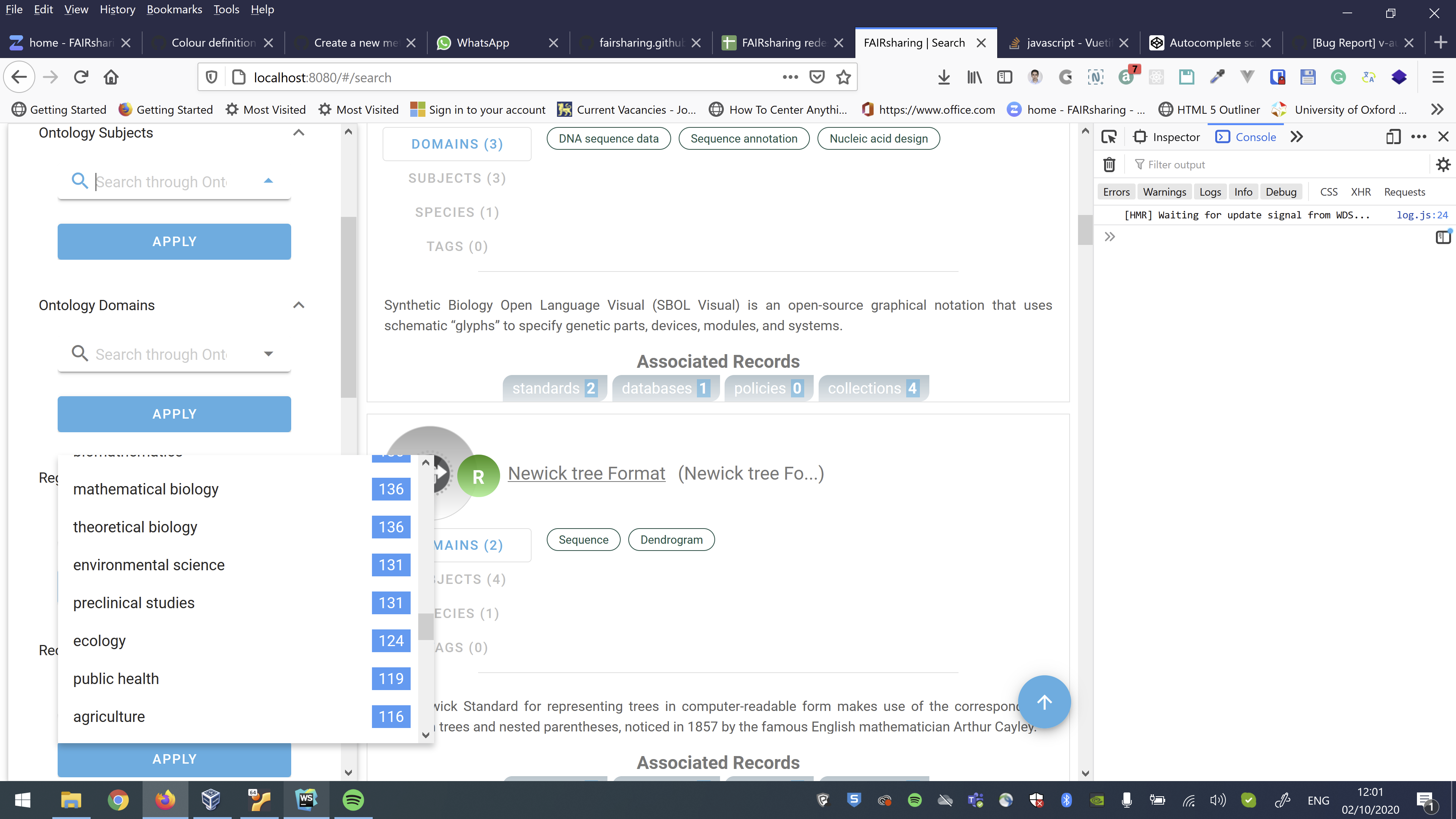
Autocomplete Component: https://github.com/FAIRsharing/fairsharing.github.io/blob/dev/src/components/Records/Search/Input/FilterAutocomplete.vue
AutoComplete Scrollable Holder: https://github.com/FAIRsharing/fairsharing.github.io/blob/dev/src/components/Records/Search/Input/SearchInput.vue
 hoseinmirian
on 2 Oct 2020
hoseinmirian
on 2 Oct 2020
@hoseinmirian not related, see #795
KaelWD
on 2 Oct 2020
When this will be fixed?
The list must be long 200+ Items if you select item nr 198 and close the select then after reopen the scroll position is wrong.
 do-web
on 10 Nov 2020
do-web
on 10 Nov 2020
Hi everybody. To solve this issue, I follow below steps.
- I gave ref to my v-autocomplete component as "autoComplete".
- I started to watch value of autocomplete at wather method and i calculated changing item index at this method.
- After that, I called autocomplete setMenuIndex method like this: this.$refs.autoComplete.setMenuIndex(changedItemIndex)
I have a little problem, i cannot solve for now. If autoselect is multiple and some string searched and choosen from list, I clear search string. After this menu index is also cleared unfortunately. On the other scenarios, it runs perfectly.
I hope this solution helps someone :) I share my codes below.
watch: {
    value: function(newVal, oldVal) {
      try {
        this.changedListItemIndex = this.getChangedListItemIndex(newVal, oldVal);
      }
      catch {
        this.changedListItemIndex = -1;
      }

      if (this.multiple) {
        this.innerSearchingValue = undefined;
      }

      this.$refs.autoComplete.setMenuIndex(this.changedListItemIndex);

      if (this.multiple) {
        this.$nextTick(() => {
          this.$refs.autoComplete.setMenuIndex(this.changedListItemIndex);
        });
      }
      else {
        setTimeout(() => {
          this.$refs.autoComplete.setMenuIndex(this.changedListItemIndex);
        }, 100);
      }
    }
  }
getChangedListItemIndex(newVal, oldVal) {
      let lastChangedItem;
      if (this.multiple && newVal.length > oldVal.length) {
        lastChangedItem = newVal[newVal.length - 1];
      }
      else if (this.multiple) {
        lastChangedItem = oldVal.find(x => !newVal.includes(x));
      }
      else {
        lastChangedItem = newVal;
      }

      let listItemValue;
      if (this.returnObject) {
        listItemValue = lastChangedItem[this.itemValue];
      }
      else {
        listItemValue = lastChangedItem;
      }

      return this.items.findIndex(item => item[this.itemValue] === listItemValue);
    }
<v-autocomplete
    ref="autoComplete"
    :value="value"
    @input="onInput"
    :search-input.sync="innerSearchingValue"
    @update:search-input="onSearchInputUpdate"
 gunduzemreozer
on 16 Nov 2020
gunduzemreozer
on 16 Nov 2020
Related issues
 KuroThing
·
3Comments
KuroThing
·
3Comments
 smousa
·
3Comments
smousa
·
3Comments
 itanka9
·
3Comments
itanka9
·
3Comments
 ricardovanlaarhoven
·
3Comments
ricardovanlaarhoven
·
3Comments
 paladin2005
·
3Comments
paladin2005
·
3Comments