Vuetify: [Feature Request] v-color-picker new prop to hide sliders / show swatches only ?
Problem to solve
In my use case, I'd like to enable the user to only pick a color among a predefined set of colors (aka. swatches) But there is no prop to remove these sliders :
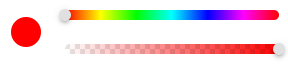
Would it be possible to add this feature ?
From now on I did this :
<v-color-picker
  flat
  hide-canvas
  hide-inputs
  show-swatches/>
which result in this :

Proposed solution
Add a prop hide-sliders (or whatever the name) so that it can be hidden.
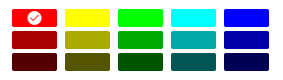
Then it would be possible to have a colorpicker that looks like this (if :swatches is defined of course or it displays the full list) :
 laurent-brisbois
All 10 comments
About design spec,
where is it good to place the color-preview?
I have now 2 ideas, and I want to hear your opinions.
Case1. just hide sliders.
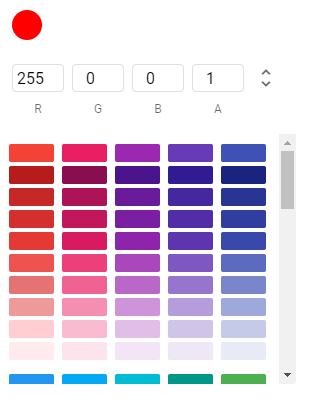
Case2. arrange next to mode(rgba, hsla, hexa)

 ryo-gk
on 8 Jul 2020
ryo-gk
on 8 Jul 2020
@ryo-gk
Is it mandatory to have a color preview ? I mean check the last image of my original post. there is a v and a border on the chosen color in the swatches.
laurent-brisbois
on 9 Jul 2020
@laurent-brisbois
Thank you for your quick reply.
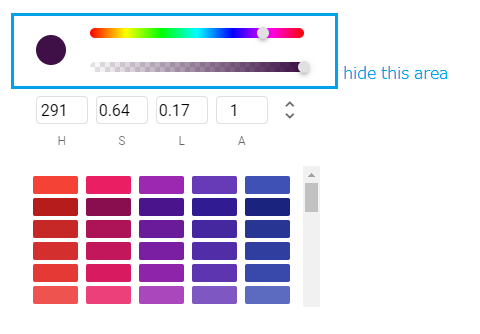
You mean like below images if hide-sliders is true, is my understand right?
ryo-gk
on 9 Jul 2020
@ryo-gk
Yes. And if you hide the rgba too only the swatches remain.
laurent-brisbois
on 9 Jul 2020
Thanks, I'll take this one.
ryo-gk
on 9 Jul 2020
Great suggestion, I'll be watching this closely :) Let me know if I can help with the PR
 tylermmorton
on 19 Jul 2020
tylermmorton
on 19 Jul 2020
@ryo-gk Are you still on it ? :)
laurent-brisbois
on 28 Oct 2020
I would like this too, only I would like to just show the swatches and the transparency slider.
 mattStayner
on 3 Nov 2020
mattStayner
on 3 Nov 2020
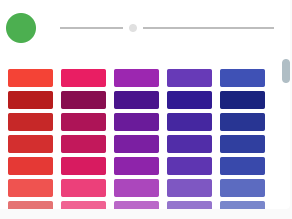
Would love the prop: hide-sliders as well.
I am currently using the disabled prop, as it only seems to disable the sliders of the color picker. The sliders still show, but they are greyed out:
 GTaylorRabbit
on 12 Nov 2020
GTaylorRabbit
on 12 Nov 2020
It seems that @ryo-gk PR is abondoned. That's why I have created a new PR https://github.com/vuetifyjs/vuetify/pull/12618 with almost the same changes as @ryo-gk did.
 Mikilll94
on 15 Nov 2020
Mikilll94
on 15 Nov 2020
Related issues
 ricardovanlaarhoven
·
3Comments
ricardovanlaarhoven
·
3Comments
 dschreij
·
3Comments
dschreij
·
3Comments
 radicaled
·
3Comments
radicaled
·
3Comments
 jofftiquez
·
3Comments
jofftiquez
·
3Comments
 Webifi
·
3Comments
Webifi
·
3Comments
Most helpful comment
@ryo-gk
Yes. And if you hide the rgba too only the swatches remain.