Vuetify: [Bug] Placeholder of VTextField is too emphasized??
Problem to solve
Allow users to distinguish filled input and placeholders.
In the current version (2.2.4), a placeholder of <v-text-field> without input is like the following. I think the placeholder is too black.
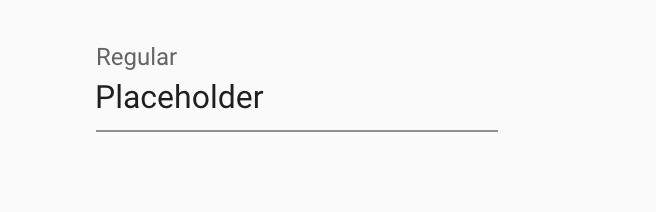
Here is a filled <v-text-field>. I cannot distinguish those easily.

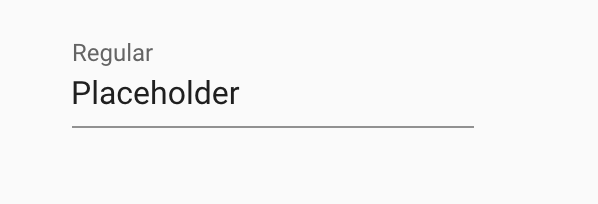
When I unfocused on the element, <v-text-field> is like the following. It's very similar to the first one, which is empty.
CodePen: https://codepen.io/nwtgck/pen/VwYBrPp?editable=true&editors=101
Proposed solution
More light gray for placeholder.
 nwtgck
All 6 comments
b4ad01a4d1308616135fc158c85373ffe88707e6
MD1: https://material.io/archive/guidelines/components/text-fields.html#states-figure-caption-5
MD2 doesn't have placeholders but labels are 60% black
 KaelWD
on 15 Jan 2020
KaelWD
on 15 Jan 2020
@KaelWD Thanks! Will b4ad01a solve this issue?
nwtgck
on 15 Jan 2020
No that's what caused it.
KaelWD
on 15 Jan 2020
MD2 doesn't have placeholders

 ibrahimBeladi
on 15 Jan 2020
ibrahimBeladi
on 15 Jan 2020
Ah right, must have missed it because it doesn't appear in any text or the specs section.
KaelWD
on 15 Jan 2020
@johnleider Thanks!
nwtgck
on 18 Jan 2020
Related issues
 gluons
·
3Comments
gluons
·
3Comments
 ricardovanlaarhoven
·
3Comments
ricardovanlaarhoven
·
3Comments
 Webifi
·
3Comments
Webifi
·
3Comments
 paladin2005
·
3Comments
paladin2005
·
3Comments
 sebastianmacias
·
3Comments
sebastianmacias
·
3Comments
Most helpful comment
No that's what caused it.