Vuetify: [Bug] Select Menu Content misaligned after browser resize
Steps to reproduce
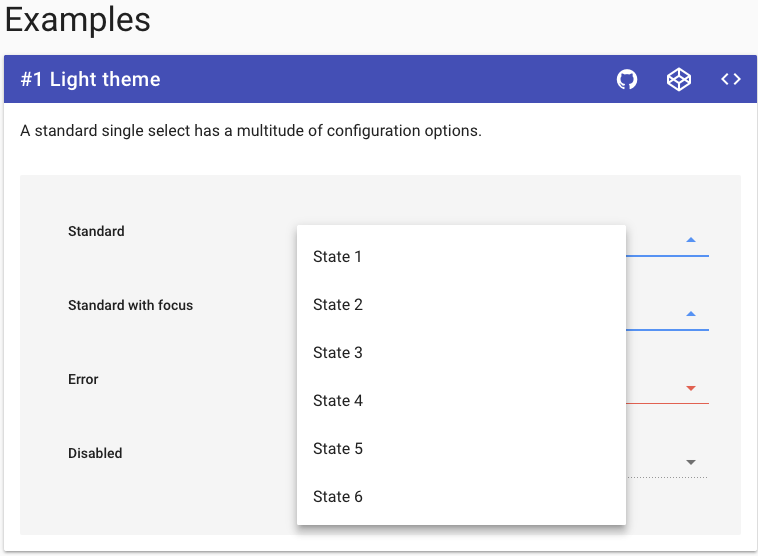
Open the select dropdown, resize the window (causeing the select to resize).
Can be repro'd at https://vuetifyjs.com/components/selects
Versions
Latest versions
Occurs on chrome, ie (I think others as well)
What is expected ?
The select dropdown menu should reposition over the select component
What is actually happening ?
The menu content sometimes does not repositions properly and becomes misaligned
Reproduction Link
https://vuetifyjs.com/components/selects
 JacksMyth
All 5 comments
@johnleider your fix did improve it substantially when resizing the window, but it still occurs (albeit very occasionally). However, when using 'maximize' and 'minimize' the bugs still occurs very frequently
I can still reproduce on the vuetifyjs documentation page, on both chrome and IE
JacksMyth
on 13 Sep 2017
Can I say, common man lol
 johnleider
on 13 Sep 2017
johnleider
on 13 Sep 2017
Ty, I'll take a look
On Sep 13, 2017 5:43 AM, "Nikhil Gangai" notifications@github.com wrote:
@johnleider https://github.com/johnleider your fix did improve it
substantially when resizing the window, but it still occurs (albeit very
occasionally). However, when using 'maximize' and 'minimize' the bugs still
occurs very frequently—
You are receiving this because you were mentioned.
Reply to this email directly, view it on GitHub
https://github.com/vuetifyjs/vuetify/issues/1680#issuecomment-329115688,
or mute the thread
https://github.com/notifications/unsubscribe-auth/AIpOggqxqsIkvb00FhrTxSRS50ieZ0IIks5sh6PGgaJpZM4PTTBR
.
johnleider
on 13 Sep 2017
I have tried multiple approaches to alleviate the issue, however, every solution yields a new potential issue.
Increasing debounce on resize
Creating an additional debounce for onResize method along with deactivating and reactivating the menu
This bug is caused by the width of the content menu being calculated before it has initiated its resize. You'll notice, that when increasing the window size, the issue is not reproduce-able. This is because the menu has a minimum width of its activator width.
johnleider
on 23 Sep 2017
![lock[bot] picture](https://avatars1.githubusercontent.com/in/6672?v=4&s=40) lock[bot]
lock[bot]
Related issues
 ricardovanlaarhoven
·
3Comments
ricardovanlaarhoven
·
3Comments
 sebastianmacias
·
3Comments
sebastianmacias
·
3Comments
 cawa-93
·
3Comments
cawa-93
·
3Comments
 paladin2005
·
3Comments
paladin2005
·
3Comments
 itanka9
·
3Comments
itanka9
·
3Comments