Vuetify: Tabs: missing pagination controls
Steps to reproduce
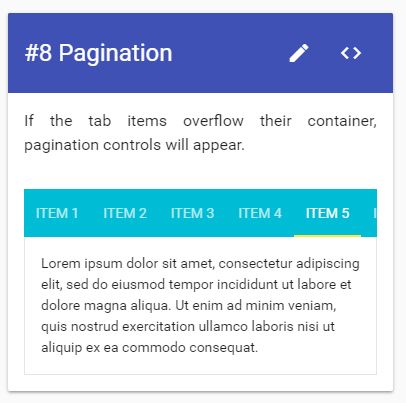
View the pagination example in the official tabs documentation section in a browser.
Versions
Vuetify 0.14, using Windows (several up to date browsers such as Firefox, Edge, Chromium, Electron etc) and Android (FF)
What is expected ?
Expecting to see pagination controls and the ability to navigate the items even on a narrow viewport on desktop with the mouse.
What is actually happening ?
Pagination controls inconsistently show up. Adjusting the viewport width produces inconsistent results (sometimes the pagination pops up but most of the time not) and on mobile no pagination seems to show up (FF on Android). On desktop a narrow viewport produces no pagination and no obvious way to see or navigate to out-of-view menu items.
On mobile:

Desktop browser on Windows:
Reproduction Link
 PeterKnight
All 7 comments
On mobile, there is touch support instead of pagination controls.
I'm looking into desktop issues
 nekosaur
on 13 Aug 2017
nekosaur
on 13 Aug 2017
Can confirm this. In my case, the pagination controls doesn't show up even with normal desktop size (1920*1080).

 johnyluyte
on 14 Aug 2017
johnyluyte
on 14 Aug 2017
Any update on this @nekosaur ?
 johnleider
on 17 Aug 2017
johnleider
on 17 Aug 2017
Fixed in https://github.com/vuetifyjs/vuetify/commit/7c965d7da885115f67d4d40a1925ccc958583218#diff-e311533536694d39f5b051acd1079d03R11
nekosaur
on 17 Aug 2017
This issue is still not fixed. Same problems are coming meanwhile.
 parasaro92
on 13 Apr 2018
parasaro92
on 13 Apr 2018
Please create a new issue using https://issues.vuetifyjs.com and provide the reproduction
 jacekkarczmarczyk
on 13 Apr 2018
jacekkarczmarczyk
on 13 Apr 2018
![lock[bot] picture](https://avatars1.githubusercontent.com/in/6672?v=4&s=40) lock[bot]
lock[bot]
Related issues
 alterhu2020
·
3Comments
alterhu2020
·
3Comments
 SteffenDE
·
3Comments
SteffenDE
·
3Comments
 Webifi
·
3Comments
Webifi
·
3Comments
 cawa-93
·
3Comments
cawa-93
·
3Comments
 sebastianmacias
·
3Comments
sebastianmacias
·
3Comments
Most helpful comment
Fixed in https://github.com/vuetifyjs/vuetify/commit/7c965d7da885115f67d4d40a1925ccc958583218#diff-e311533536694d39f5b051acd1079d03R11