Vuetify: Feature Request: styling for inline form fields
When we include forms with inline items, the spacing changes, as shown in the image below:

It would be nice to have consistent spacing when putting inline text fields on a form. It's not critical, in any way, but presents users with a cleaner, more polished interface.
 jijoel
All 9 comments
I don't quite understand what you are asking for. Can you help clarify a bit? The image looks fine to me, so I assume I'm not understanding properly.
 johnleider
on 17 Jun 2017
johnleider
on 17 Jun 2017
My guess is he's talking about the spacing between Street Address and the inputs below. At a glance it looks to be larger than between Street Address and Country
 nekosaur
on 17 Jun 2017
nekosaur
on 17 Jun 2017
That is correct. The vertical spacing between the Country and Street Address lines is 70 pixels. The spacing between the Street Address and the City is 88 pixels.
The .input-group class has a { margin: 18px 0 }. I think that, when they stack on top of each other, the margin collapses.
I was able to get even spacing using a { margin-top: -18px } on the v-layout. I set this in my project:
.input-group + .layout {
  margin-top: -18px;
}
It looks like the actual margin size is specified by the $input-group-margin variable (_variables.styl:383). I don't know stylus well enough to put in a PR. :-(
jijoel
on 17 Jun 2017
Thank you.
johnleider
on 17 Jun 2017
This can be fixed by adjusting your markup. You need to have everything inside of the grid.
johnleider
on 26 Jun 2017
This can be fixed by adjusting your markup. You need to have everything inside of the grid.
When doing it this way you end up with 2 fields stuck together with no padding or margin between. As you can see from your example:

Which looks almost bearable, until you get validation errors next to a character count, then they almost merge into one another:
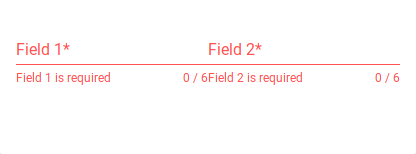
This happens even when applying the m spacing classes to either the v-flex or the v-text-field.
 DougHayward
on 11 Dec 2017
DougHayward
on 11 Dec 2017
If you are using a grid, then you should probably use a grid-list if you want spacing between different flex items, this is how flexbox works. The only difference is that we used to always apply some level of padding between flex items, and now we don't. If you feel you have a legitimate issue, please create a new ticket.
johnleider
on 11 Dec 2017
Thank you, that works perfectly.
DougHayward
on 11 Dec 2017
![lock[bot] picture](https://avatars1.githubusercontent.com/in/6672?v=4&s=40) lock[bot]
lock[bot]
Related issues
 efootstep
·
3Comments
efootstep
·
3Comments
 KuroThing
·
3Comments
KuroThing
·
3Comments
 aaronjpitts
·
3Comments
aaronjpitts
·
3Comments
 cawa-93
·
3Comments
cawa-93
·
3Comments
 itanka9
·
3Comments
itanka9
·
3Comments
Most helpful comment
If you are using a grid, then you should probably use a grid-list if you want spacing between different flex items, this is how flexbox works. The only difference is that we used to always apply some level of padding between flex items, and now we don't. If you feel you have a legitimate issue, please create a new ticket.