Vuetify-module: Material desing icon are not correctly shown
Module version
1.8.3
Describe the bug
Instead of the right icon, i've got a square or a chinese character.
To Reproduce
https://codesandbox.io/s/nuxtjs-vuetify-v0k7i
Steps to reproduce the behavior:
- launch the app
Additional context
I assume it's from this package, because everything works fine on vuetify website . I've also got some old site that used this package in production and today they are also showing this bug. Maybe it's from material design directly ?
 yaki4
yaki4
All 20 comments
Same! Started couples of hours ago
Probably because of V5
https://github.com/Templarian/MaterialDesign-JS/commit/13ec30062055c0db73019b613df84f759b69a37d
 ianfortier
on 9 Mar 2020
ianfortier
on 9 Mar 2020
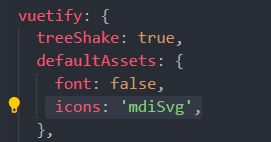
Quick fix:
defaultAssets: {
icons: 'mdiSvg',
},
ianfortier
on 9 Mar 2020
@ianfortier Thanks that solved it. But I did not update my dependencies and the error appeared. I am using Nuxt. What would be the reason of that?
 adrianwix
on 9 Mar 2020
adrianwix
on 9 Mar 2020
@adrianwix I'm not sure but the readme said:
defaultAssets.icons automatically adds the icons stylesheet from a CDN to load all the icons (not optimized for production).
The CDN url is
https://cdn.jsdelivr.net/npm/@mdi/font@latest/css/materialdesignicons.min.css
Which is the latest version. Vuetify use the following versions:
"@mdi/font": "^4.5.95",
"@mdi/js": "^3.8.95",
Source: https://github.com/vuetifyjs/vuetify/blob/master/packages/vuetify/package.json
Would be probably a good idea to set the CDN link to the last V4
ianfortier
on 9 Mar 2020
I can provide a pull request in a bit. Not home at the moment but this definitely broke all of my shit so I need it fixed ASAP.
 AtriLahiji
on 9 Mar 2020
AtriLahiji
on 9 Mar 2020
I fixed references to icons not in vuetify components in most of my projects. Any icons used in components are still broken.
AtriLahiji
on 9 Mar 2020
This error break all my projects, wtf.
 viktorvillalobos
on 10 Mar 2020
viktorvillalobos
on 10 Mar 2020
https://cdn.jsdelivr.net/npm/@mdi/font@latest/css/materialdesignicons.min.css is pointing to 5.x, but the issue seem to have been fixed. Does anyone have any idea on this? 🤔
 usco-otsuki
on 10 Mar 2020
usco-otsuki
on 10 Mar 2020
This seems to be because of jsdeliver cache.
 shanlh
on 10 Mar 2020
shanlh
on 10 Mar 2020
@shanlh You mean the problem is now fixed because of jsdeliver cache? The latest tag is pointing to 5.x, so I think it will simply show wrong icons after clearning the browser cache...
usco-otsuki
on 10 Mar 2020
I still broken because of jsdeliver return v4.9.95, maybe there some server is no update in current.
shanlh
on 10 Mar 2020
How did you check if jsdeliver returns v4.9.95?
I checked the content of materialdesignicons.min.css returned by jsdelivr and it seems to be of v5.0.45...
@font-face{font-family:"Material Design Icons";src:url("../fonts/materialdesignicons-webfont.eot?v=5.0.45")...
It's just strange,I'm from China, and my friends also get v4.9.95 use @mdi/font/@latest/css/materialdesignicons.min.css, but get v5.0.45 when remove ".min".
But you get v5.0.45 now, so I think it's jsdeliver's problem in different CDN node.
shanlh
on 10 Mar 2020
@shanlh Thanks for the info. Strange thing is it started to show correct icons even though v5.0.45 is used.
Because you are getting v4.9.95, icons are shown correctly, right?
usco-otsuki
on 10 Mar 2020
I got v4.9.95 in css, and the css request "materialdesignicons-webfont.woff2?v=4.9.95", but actually got the latest(v5.0.45) font, the "v=4.9.95" is not working.
So the css is not match with the font and icons is broken.
If I got v5.0.45 css, icons will shown correctly, now is incorrect because I got v4.9.95 css because of jsdeliver return me correct font but incorrect css.
Sorry my English is not well 😂
shanlh
on 10 Mar 2020
I see, that makes sense. thanks a lot :)
usco-otsuki
on 10 Mar 2020
Just switched to using vuetify directly using a plugin and Importing icons from @mdi/js to avoid situations like this going forward. Should have expected something like this using a CDN for icons.
AtriLahiji
on 10 Mar 2020
I fix it temporary:
nuxt.config.js
head: {
  link: [
    {
      rel: 'stylesheet',
      type: 'text/css',
      href:
        'https://cdn.jsdelivr.net/npm/@mdi/[email protected]/css/materialdesignicons.min.css'
    }
  ]
},
vuetify: {
  defaultAssets: {
    icons: false
  }
}
Hope to help you
shanlh
on 10 Mar 2020
I would suggest switching to using Vuetify directly as a plugin rather than relying on a package that uses a CDN, as something like this could always happen. Plus you give up offline support with the CDN. Try something like this: https://github.com/SyncEDorg/Pollo/blob/master/plugins/vuetify.js
The moral of the story is don't rely on CDNs :)
AtriLahiji
on 10 Mar 2020
The design spec for Material Design was officially changed so you have to add a new prefix to icons mdi- . The names of icons has changed as well so you'll have to search the page to find the new one. I suggest using Ctrl + F
Icon component: https://vuetifyjs.com/en/components/icons/
Official Material Design Icon Page : https://materialdesignicons.com/
 simeon9696
on 31 Mar 2020
simeon9696
on 31 Mar 2020
Related issues
 jimb0dii
·
3Comments
jimb0dii
·
3Comments
 andrewspy
·
5Comments
andrewspy
·
3Comments
andrewspy
·
5Comments
andrewspy
·
3Comments
 avanishp2
·
3Comments
avanishp2
·
3Comments
 Valar103769
·
6Comments
Valar103769
·
6Comments
Most helpful comment
I fix it temporary:
nuxt.config.js
Hope to help you