Vuetify-module: Images in assets folder not found when using v-img component
Module version
@nuxtjs/[email protected]
[email protected]
Describe the bug
Using "~url" syntax to access an image within assets folder doesn't work inside v-img component.
To Reproduce
Steps to reproduce the behavior:
- Add an image in assets folder
- Access that image inside v-img
Expected behavior
The image should be displayed
Screenshots
Current Code
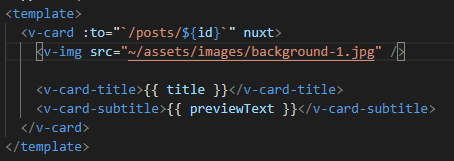
Code Output

Additional context
NA
 jimb0dii
All 3 comments
Hi @jimb0dii Try like this
<v-img :src="require('~/assets/images/background-1.jpg')" />
 Codefa
on 19 Nov 2019
Codefa
on 19 Nov 2019
👍8
Hi @jimb0dii Try like this
<v-img :src="require('~/assets/images/background-1.jpg')" />
Thanks it works.
jimb0dii
on 20 Nov 2019
@jimb0dii please close the issue if it's work's fine. 🙂
Codefa
on 22 Nov 2019
Was this page helpful?
0 / 5 - 0 ratings
Related issues
 MartinMuzatko
·
4Comments
MartinMuzatko
·
4Comments
 andyfensham
·
3Comments
andyfensham
·
3Comments
 filipwronski
·
7Comments
filipwronski
·
7Comments
 morficus
·
4Comments
morficus
·
4Comments
 Ghalnas
·
4Comments
Ghalnas
·
4Comments
Most helpful comment
Hi @jimb0dii Try like this
<v-img :src="require('~/assets/images/background-1.jpg')" />