How can I add a token or something else to header before call vuetable call to sever?
I tried to import and customize axios in main.js
axios.interceptors.request.use((request) => {
  if (request.data && request.headers['Content-Type'] === 'application/x-www-form-urlencoded') {
    request.data = qs.stringify(request.data)
  }
  request.headers['Authorization'] = 'Bearer: ' + store.state.user.main.token
  return request
})
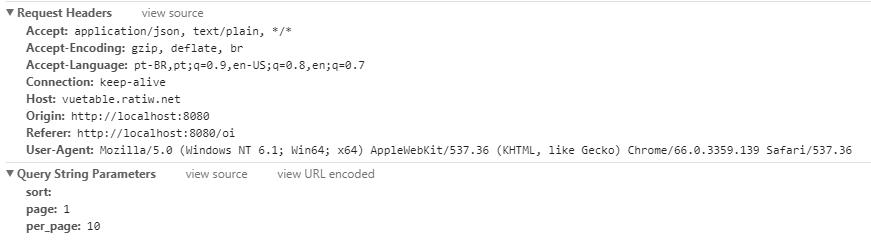
Works for my custom requests on another component, but when its called from vuetable doesn't
My requests

vuetable requests
 hjJunior
All 3 comments
Please try searching old issues about this first.
 ratiw
on 11 May 2018
ratiw
on 11 May 2018
first create a global instance of axios to use it in your project :
$http = axios.create({
    baseURL: API_BASE_URL,
    headers: {
        'Accept': 'application/json',
        'Content-Type': 'application/json',
        'Authorization': 'Bearer ' + store.state.user.main.token
    }
});
then use the configs of the same instance ($http) in your vuetable :
<vuetable ref="vuetable" :http-options="httpOptions"></vuetable>

<script>
    export default {
        data() {
            return {
                httpOptions: {
                    baseURL: $http.defaults.baseURL,
                    headers: {
                        'Accept': $http.defaults.headers['Accept'],
                        'Content-Type': $http.defaults.headers['Content-Type'],
                        'Authorization': $http.defaults.headers['Authorization']
                    }
                }
            };
        }
    }
</script>
 e-abdelbasset
on 18 Jun 2018
e-abdelbasset
on 18 Jun 2018
I had same issue, but in my application the token may change. based on @e-abdelbasset idea, my solution is to use reference types instead of value types:
<vuetable ref="vuetable" :http-options="httpOptions"></vuetable>

<script>
    export default {
        data() {
            return {
                httpOptions: {
                    baseURL: $http.defaults.baseURL,
                    headers: $http.defaults.headers.common
                }
            };
        }
    }
</script>
 kismonguz
on 28 Jul 2019
kismonguz
on 28 Jul 2019
Related issues
 wa05
·
3Comments
wa05
·
3Comments
 larryu
·
6Comments
larryu
·
6Comments
 jdriesen
·
4Comments
jdriesen
·
4Comments
 chrislandeza
·
3Comments
chrislandeza
·
3Comments
 legreco
·
5Comments
legreco
·
5Comments
Most helpful comment
first create a global instance of axios to use it in your project :
then use the configs of the same instance (
$http) in your vuetable :