Vuesax: Buttons component is very weird
- OS Windows
- Node.js 8.12.0
- Vuesax 3.5.10
- Browser Chrome
- Which package manager did you use for the install? npm Vue CLI
The icons it's not centralized when i use vs-radius. When i remove the class below it's back to normal
.includeIconOnly {
    width: 38px!important;
    height: 38px!important;
}
Maybe it has to do with using 'pixels' and 'important'. Should not be use 'rem' to be responsive and decrease along with the browser?
And when we click in the button the color be over the icon... You can see it in your own docs.
 periscuelo
All 6 comments
In version 3.5.12 the icon in button not appear anymore.
It's work fine in 3.5.6 version. I will test 3.5.7 version to see.
periscuelo
on 26 Oct 2018
@periscuelo The acronyms were deleted in the properties vs for example of vs-icon now it is only icon please try to see
 luisDanielRoviraContreras
on 27 Oct 2018
luisDanielRoviraContreras
on 27 Oct 2018
In version 3.5.7 The icons it's not centralized anymore. But yes, appear in 3.5.12 when i adjust the acronyms.
Thanks
periscuelo
on 27 Oct 2018
Could you pass me an image of the error?
luisDanielRoviraContreras
on 27 Oct 2018
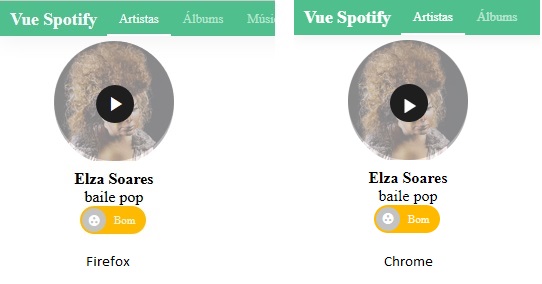


periscuelo
on 27 Oct 2018
I use rem and not pixels to get the sizes, to work better when its be responsive. That's the cause above.
When i seted material icons font size to 16px, everything works normaly. Thanks.
periscuelo
on 31 Oct 2018
Related issues
 fahada95
·
4Comments
fahada95
·
4Comments
 jsinhSolanki
·
3Comments
jsinhSolanki
·
3Comments
 danyakov
·
3Comments
danyakov
·
3Comments
 Cuacha07
·
3Comments
Cuacha07
·
3Comments
 grali
·
4Comments
grali
·
4Comments