Version
2.6.0-beta.2
Reproduction link
https://codepen.io/danyadev/pen/wNGaQo
Steps to reproduce
1) Scroll to end (hide button)
2) Scroll up (show button)
What is expected?
No lags (everything is fine in versions below 2.6-beta.1)
What is actually happening?
Lags while scrolling (if they are not, then increase the number of elements in v-for)
 danyadev
All 13 comments
Did you mean that expected is actually happening and vice-versa?
Also, same lags on Vue 2.5.2 when showing the button by scrolling up from the bottom.
 egormanga
on 27 Jan 2019
egormanga
on 27 Jan 2019
Not seeing any lag with 5000 items... seems to work fine on a phone too. Closing as cannot reproduce.
 yyx990803
on 27 Jan 2019
yyx990803
on 27 Jan 2019
On my weak computer in the application, it is very clearly visible. If possible, please try to check it on a weaker device.
danyadev
on 27 Jan 2019
To clarify, is 2.6.0-beta.1 working ok for you?
yyx990803
on 27 Jan 2019
No
danyadev
on 27 Jan 2019
Also no lags for me on 5000 elements. Lagging on ~50000 of them and more.
egormanga
on 27 Jan 2019
This is most likely because of the revert to queueing updates with microtasks. Your onScroll callback reads a number of things that can cause a reflow, and the update is applied in a microtask right after it, causing a ton a computation happening at the same time the browser is doing the reflow.
This is not something that can be fundamentally "fixed", because Vue has been using microtasks all along before 2.5, and on my machine, even with 10000 items and a 6x CPU throttle I can barely notice the "lag". but there are some workarounds:
If you are targeting low power devices, especially phones, rendering that big a list probably is a problematic design choice. Pagination probably makes more sense with predictable element counts.
Try saving the result of
el.scrollTop + el.offsetHeight >= el.scrollHeightin a variable, and assign it tothis.hideElementin asetTimeout.
yyx990803
on 27 Jan 2019
Hmm, I checked it on 2.4.0 and 2.4.4 and did not notice any lags there, when in 2.6.0-beta.x the lags were very noticeable.
danyadev
on 29 Jan 2019
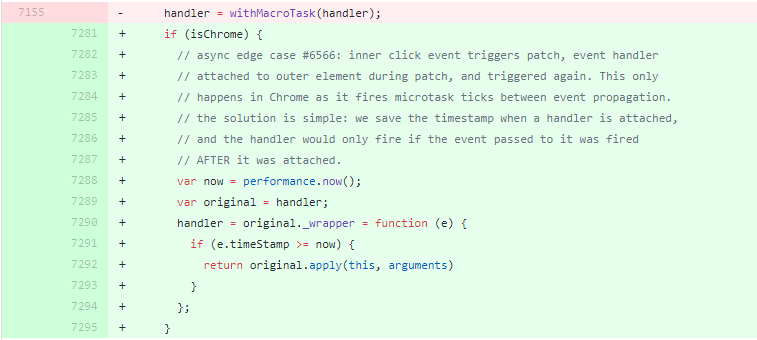
I found the main reason for these lags (the screenshot shows this piece of code, which I found in the commit v2.6.0-beta.1). Is it possible to do something here?
In the application, this frieze is visible much stronger than in the above example. And besides, there are no such lags in other competing applications.
Your possible solutions gave me nothing:
1) My application runs on desktop platforms and part of its functionality is an instant messenger. So otherwise it will not be possible to implement the display of messages.
2) setTimeout does not work, these lags "move" at the moment of changing this variable.
danyadev
on 31 Jan 2019
Have you tried beta.3? It calls performance.now() only once per update.
yyx990803
on 31 Jan 2019
Um, okay. Still, lags are really due to microtasks. So, I have to not use vue 2.6.0 or higher because of performance and abandon my plans for Vue.observer...
danyadev
on 31 Jan 2019
You should probably use a virtual scroller.
yyx990803
on 31 Jan 2019
Hmmm, either you did something, or somehow I fixed it, but there is no more lag on the release build.
UPD: Yes, you did it, on 2.6.0-beta.3 lags remained.
danyadev
on 4 Feb 2019
Related issues
 fergaldoyle
·
3Comments
fergaldoyle
·
3Comments
 hiendv
·
3Comments
hiendv
·
3Comments
 aviggngyv
·
3Comments
aviggngyv
·
3Comments
 paceband
·
3Comments
paceband
·
3Comments
 6pm
·
3Comments
6pm
·
3Comments
Most helpful comment
This is most likely because of the revert to queueing updates with microtasks. Your onScroll callback reads a number of things that can cause a reflow, and the update is applied in a microtask right after it, causing a ton a computation happening at the same time the browser is doing the reflow.
This is not something that can be fundamentally "fixed", because Vue has been using microtasks all along before 2.5, and on my machine, even with 10000 items and a 6x CPU throttle I can barely notice the "lag". but there are some workarounds:
If you are targeting low power devices, especially phones, rendering that big a list probably is a problematic design choice. Pagination probably makes more sense with predictable element counts.
Try saving the result of
el.scrollTop + el.offsetHeight >= el.scrollHeightin a variable, and assign it tothis.hideElementin asetTimeout.