Vue-instantsearch: 'Attribute not configured to be highlighted'
Hi!
Thanks for the great library :)
Question - Been messing around with the highlighting to try to get it to work but keep getting the error that a couple of my attributes are not configured (even though they are). I then console logged the raw return data and the attributes that the warnings are referring to are in fact getting returned (as expected) within the _highlightResult
See screenshot:

My code:
<div slot="header" class="clearfix">
            <span style="line-height: 36px;">
              <ais-highlight :result="result" attribute-name="name"></ais-highlight>
            </span>
          </div>
          <el-row>
            <el-col :xs="24" :sm="12" :md="12" :lg="12">
              <el-row>
                <ais-highlight :result="result" attribute-name="phone"></ais-highlight>
              </el-row>
              <el-row>
                <ais-highlight :result="result" attribute-name="fax"></ais-highlight>
              </el-row>
Weirdly, this isn't happening for all attributes :/
Would appreciate if anyone can help point out if I am missing something obvious.
(Let me know if I am missing any detail above)
 HemalR
All 16 comments
You need to set up the attribute for highlighting, it's a a setting in the dashboard and automatically applies to searchable attributes, unless you turned it off.
You can read more in the doc:
https://www.algolia.com/doc/guides/searching/highlighting-snippeting/
 Haroenv
on 13 Sep 2017
Haroenv
on 13 Sep 2017
@Haroenv I actually already have it configured:
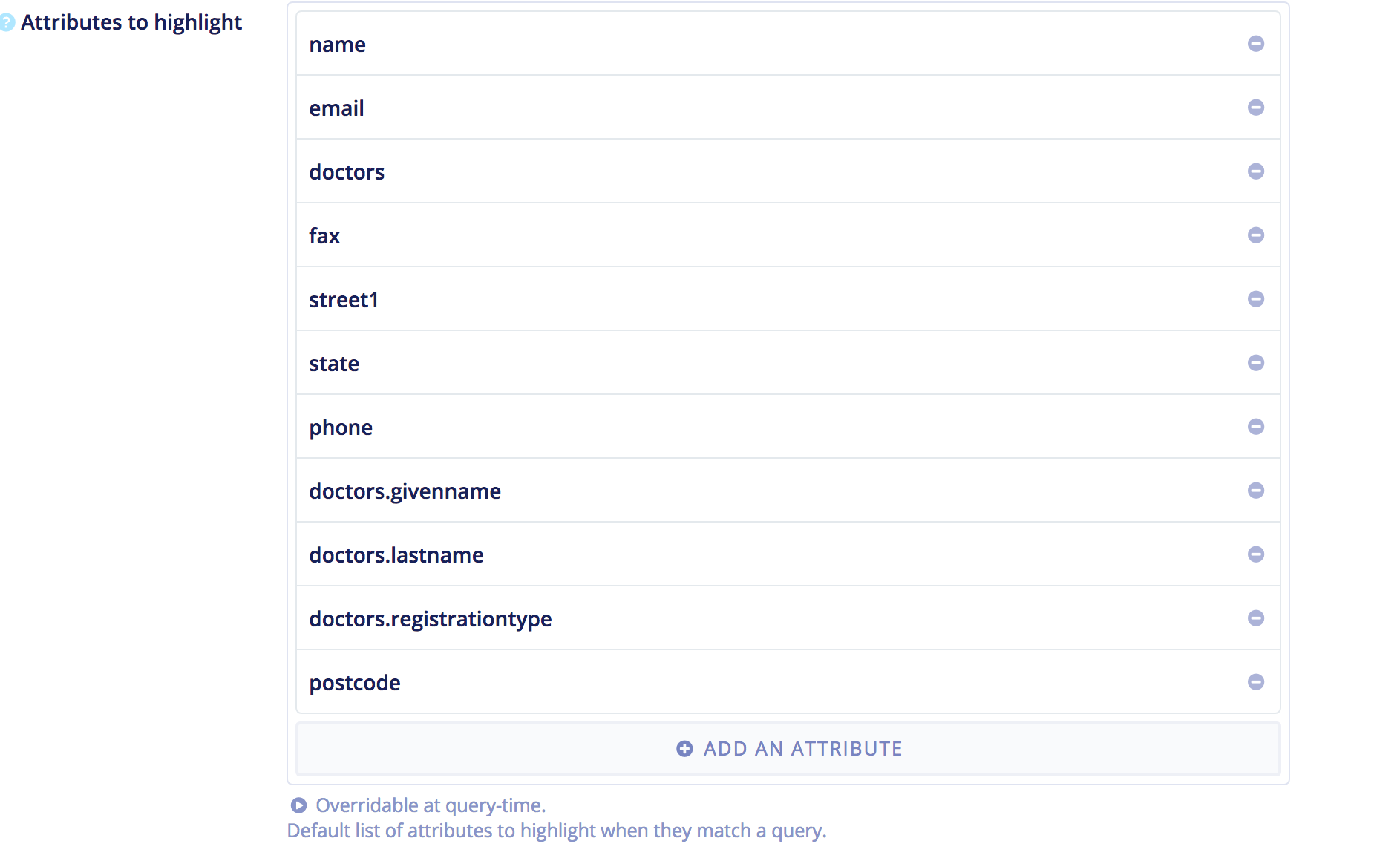
I even double checked this by console logging the raw results, as per the earlier screenshot, which shows the result returning the attributes in question under the _highlightResult object :S
Or am I missing something in how I have configured it?
HemalR
on 13 Sep 2017
Oh, I didn't see that in your first message, sorry. It would be really helpful if you could send us a page with the exact components and app you're having problems with. If you can't send it public, you can send it to [email protected]!
Haroenv
on 13 Sep 2017
Yeah sure! Might be useful to others.
It's a very simple thing at the moment - Basically the nuxt.js boilerplate with the element UI component library + Algolia (the project has its uses, but I am doing it largely to learn Vue plus gain a deeper understanding of whether it will be good for a rewrite of another Algolia dependent app we have.
The one main page of all the code below (the non-commented ais-highlight components are working fine, the commented out ones are the ones throwing the error, don't know why):
<template>
  <ais-index
          index-name="locations"
          :search-store="searchStore"
          :query="query"
          :auto-search="false"
          :query-parameters="queryParameters"
  >
    <el-input
            placeholder="Search..."
            icon="search"
            v-model="query"
            :on-icon-click="handleIconClick">
    </el-input>
    <el-select
            v-model="queryParameters.facetFilters"
            multiple placeholder="Searching all states (Note- filter not wired up yet)"
            :style="{width: '100%'}">
      <el-option
              v-for="state in states"
              :key="state.value"
              :label="state.label"
              :value="state.value">
      </el-option>
    </el-select>
    <ais-results>
      <template scope="{ result }">
        <el-card class="box-card">
          <div slot="header" class="clearfix">
            <span style="line-height: 36px;">
              <ais-highlight :result="result" attribute-name="name"></ais-highlight>
            </span>
          </div>
          <el-row>
            <el-col :xs="24" :sm="12" :md="12" :lg="12">
              <el-row>
                <!--<ais-highlight :result="result" attribute-name="doctors.lastname"></ais-highlight>-->
              </el-row>
              <el-row>
                <!--<ais-highlight :result="result" attribute-name="doctors.givenname"></ais-highlight>-->
              </el-row>
              <el-row>
                <!--<ais-highlight :result="result" attribute-name="street1"></ais-highlight>-->
              </el-row>
              <el-row>
                <!--<ais-highlight :result="result" attribute-name="state"></ais-highlight>-->
              </el-row>
            </el-col>
            <el-col :xs="24" :sm="12" :md="12" :lg="12">
              <h3>Practitioners</h3>
              <ul>
                <li v-for="doc in result.doctors" v-show="doc.lastname">
                  <b>{{doc.lastname}},</b> {{doc.givenname}}
                </li>
              </ul>
            </el-col>
          </el-row>
        </el-card>
      </template>
    </ais-results>
  </ais-index>
</template>

<script>
import algoliaSearch from 'algoliasearch';
import { createFromAlgoliaCredentials } from 'vue-instantsearch';
import algoliaComponent from 'vue-instantsearch';

const client = algoliaSearch('7IC661GRAP', '2c578579f41db4e97b1720be9cd42433');
const index = client.initIndex('locations');

const searchStore = createFromAlgoliaCredentials('<appId>', '<APIKey>');
searchStore._highlightPreTag = '<span class=highlight>';
searchStore._highlightPostTag = '</span>';

export default {
    mixins: [algoliaComponent],
    data() {
    return {
      searchStore,
      states: [{
        value: 'state:WA',
        label: 'WA'
      }, {
        value: 'state.vic',
        label: 'VIC'
      }, {
        value: 'nsw',
        label: 'NSW'
      }, {
        value: 'state.Tasmania',
        label: 'TAS'
      }, {
        value: 'state.south australia',
        label: 'SA'
      }],
      selectedStates: [],
      query: '',
      queryParameters: {
        facetFilters: []
      }
    }
  },
  methods: {
      handleIconClick(ev) {
          console.log(ev);
      }
  },
  mounted() {
    index.search({
      facetFilters: "state:VIC",
      query: 'John'
    }, function(err, content) {
      console.log(content.hits)
    });
    console.log(this.searchStore);
  }
}
</script>

<style>
  .container {
    min-height: 100vh;
    display: flex;
    justify-content: center;
    align-items: center;
    text-align: center;
  }

  .title {
    font-family: "Quicksand", "Source Sans Pro", -apple-system, BlinkMacSystemFont, "Segoe UI", Roboto, "Helvetica Neue", Arial, sans-serif; /* 1 */
    display: block;
    font-weight: 300;
    font-size: 100px;
    color: #35495e;
    letter-spacing: 1px;
  }

  .subtitle {
    font-weight: 300;
    font-size: 42px;
    color: #526488;
    word-spacing: 5px;
    padding-bottom: 15px;
  }

  .links {
    padding-top: 15px;
  }
  .highlight {
    background-color: greenyellow;
  }

  .ais-highlight>em {
    background-color: indianred;
  }
</style>
Hey @HemalR ,
I think that not all your records contain a fax or phone attributes, which probably leads to them not being displayed.
OR, there is a bug in our component :/
In any case, you could directly use result._highlightResult.<attr>.value to display the fields.
Maybe you can try that and see if you get the same errors or if indeed there is a bug in the component.
 rayrutjes
on 13 Sep 2017
rayrutjes
on 13 Sep 2017
"I think that not all your records contain a fax or phone attributes, which probably leads to them not being displayed."
Yes, that might be the case! I didn't realise that would break the setup (vs, for example, not showing any text at all/a null div).
I could try something along the lines of:
                <ais-highlight :result="result"
                               v-if="doctors.lastname"
                               attribute-name="doctors.lastname"></ais-highlight>
Ok update:
Using the v-if conditionals kind of worked! Progress :)
The part that isn't working is that the pre/post tags are not getting sent to the nested properties.
I.e.
This works fine - and the highlighting works:
                <ais-highlight
                        :result="result"
                        v-if="result.state"
                        attribute-name="state"></ais-highlight>
This does not work (i.e. - The text still renders on screen, but the pre/post tags are missing, hence the highlight styling does not work):
              <ais-highlight
                        :result="result"
                        v-if="result.doctors.givenname"
                        attribute-name="doctors.givenname"></ais-highlight>
Any ideas/tests I should do?
HemalR
on 13 Sep 2017
Are you using latest version of Vue IS?
rayrutjes
on 13 Sep 2017
"vue-instantsearch": "^1.0.0"
I think so :/ Only installed it a couple of weeks ago
Update - yes, I am, just double-checked.
HemalR
on 13 Sep 2017
Would it be because the nested elements are part of a v-for loop?
HemalR
on 13 Sep 2017
Yup pretty sure that is it! As per the docs:
"For more complex data structures, it will be necessary to leverage the _highlightResult object directly. For example, consider the case of an array of keywords:"
https://community.algolia.com/vue-instantsearch/components/highlight.html
I'll try it out, update the code here once I have a solution so that others might reference it.
Thanks for your help!
HemalR
on 13 Sep 2017
Code solution (what works for me!):
              <ul>
                <li v-for="doc in result._highlightResult.doctors" v-show="doc.lastname">
                  <span v-html="doc.lastname.value"></span>,
                  <span v-html="doc.givenname.value"></span>
                </li>
              </ul>
Slightly concerned about the v-html, will look into ensuring there are no XSS vulnerabilities...
Thanks for the help! @Haroenv @rayrutjes
HemalR
on 13 Sep 2017
Thanks for using Vue InstantSearch!
Haroenv
on 13 Sep 2017
I do have another query! The Final bit I need to sort out before putting this mini-app in production. It's not a bug, so I didn't put it here and posted it on the forums, but there seems to be much less activity there :/
https://discourse.algolia.com/t/vue-instant-search-facet-filters/2724
Would it be okay for me to open a Github issue for that here?
HemalR
on 13 Sep 2017
Slightly concerned about the v-html, will look into ensuring there are no XSS vulnerabilities...
All data in _highlightResult is already escaped when retrieved from Algolia, so you can safely use that directly in v-html.
And yes, please open a new issue if you have something else 👍
rayrutjes
on 13 Sep 2017
Ah awesome, cheers mate!
HemalR
on 13 Sep 2017
Related issues
 vasilestefirta
·
4Comments
vasilestefirta
·
4Comments
 fi0
·
3Comments
fi0
·
3Comments
 matthewmnewman
·
6Comments
matthewmnewman
·
6Comments
 dulnan
·
5Comments
dulnan
·
5Comments
 foufrix
·
5Comments
foufrix
·
5Comments
Most helpful comment
All data in _highlightResult is already escaped when retrieved from Algolia, so you can safely use that directly in v-html.
And yes, please open a new issue if you have something else 👍