Vue-instantsearch: Question : How to reuse element from result in the script
I do not want to report a bug but simply a question where i could not find answer in the algolia doc.
I'm rendering results on my view page using instantsearch-vue and it works perfectly thank you algolia ! But i want to display them on a map and for that i have to access my _geoloc coordinate in the result i got from algolia.
I can effectively show everything with the html element but how do i use the data from result in the javascript part of my component in order to inject it in my googlemap code.
Thanks in advance and keep on the good work 👍
EDIT : a screenshot of the vueDevtools to precise which element i want to access to :
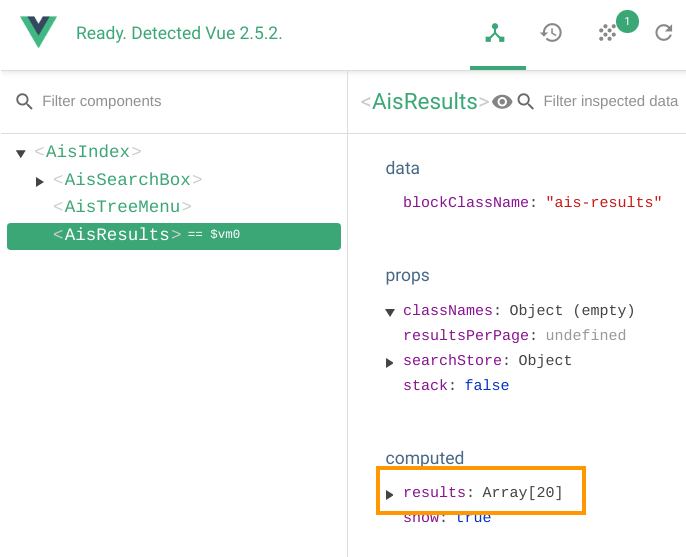
Is there an emit function of this results somewhere that i can access on the parent element ? Or a bus file that store the data to access it from anywhere in my app ?
EDIT2 : Possible methods to do that :
in this file :
https://github.com/algolia/vue-instantsearch/blob/master/src/components/Results.vue
line 78 if it's possible to push it to a bus : https://vuejs.org/v2/guide/components.html#Non-Parent-Child-Communication
 foufrix
All 5 comments
any news on this ?
foufrix
on 28 Oct 2017
not yet, was thinking about it and didn't find an easy way without seachStore @foufrix, maybe @rayrutjes knows a trick?
 Haroenv
on 29 Oct 2017
Haroenv
on 29 Oct 2017
Hi @foufrix ,
The best way to gain more control over your search state is to instantiate the search store manually, and "watch" whatever piece of state.
<template>
  <ais-index :searchStore="searchStore">
    <!-- you can do whatever is needed here with the results -->
    {{ searchStore.results }}
  </ais-index>
</template>
<script>
import { createFromAlgoliaCredentials } from "vue-instantsearch";

searchStore = createFromAlgoliaCredentials("appid", "apikey");
searchStore.indexName = "indexname";

export default {
  data() {
    return {
      searchStore
    };
  }
};
</script>
I hope that helps,
 rayrutjes
on 30 Oct 2017
rayrutjes
on 30 Oct 2017
Working perfectly well i have now access to the results in my component thanks ! Sorry i did not read about Search Store in the doc, was only focusing on components, my bad.
foufrix
on 30 Oct 2017
No problem @foufrix, our docs can be improved on that part for sure.
rayrutjes
on 30 Oct 2017
Related issues
rayrutjes
·
4Comments
 VinceG
·
6Comments
VinceG
·
6Comments
 matthewmnewman
·
6Comments
matthewmnewman
·
6Comments
 vasilestefirta
·
4Comments
vasilestefirta
·
4Comments
 jackwkinsey
·
4Comments
jackwkinsey
·
4Comments
Most helpful comment
Hi @foufrix ,
The best way to gain more control over your search state is to instantiate the search store manually, and "watch" whatever piece of state.
I hope that helps,