Vue-grid-layout: Fixing the layout automically
Good day,
Currently, I am creating a dashboard widget that has three columns. So,
x = 0 ; // Column 1
x = 1 ; // Column 2
x = 2 ; // Column 3
And the width can only be set from 1 until 3.
Based on my observation:
If you set the width to 1, it only occupies column1;
If you set the width to 2, it occupies column1 and column2;
And, if you set the width to 3, it occupies column1 until column3.
So here's my problem, the Google chart widget is located at column1 (x = 0);

Then I want to add another widget to the dashboard that has the following parameters:
x = 1; //column2
y = 0; //row
w = 3; //width
h = 10; //height

And then this happens:
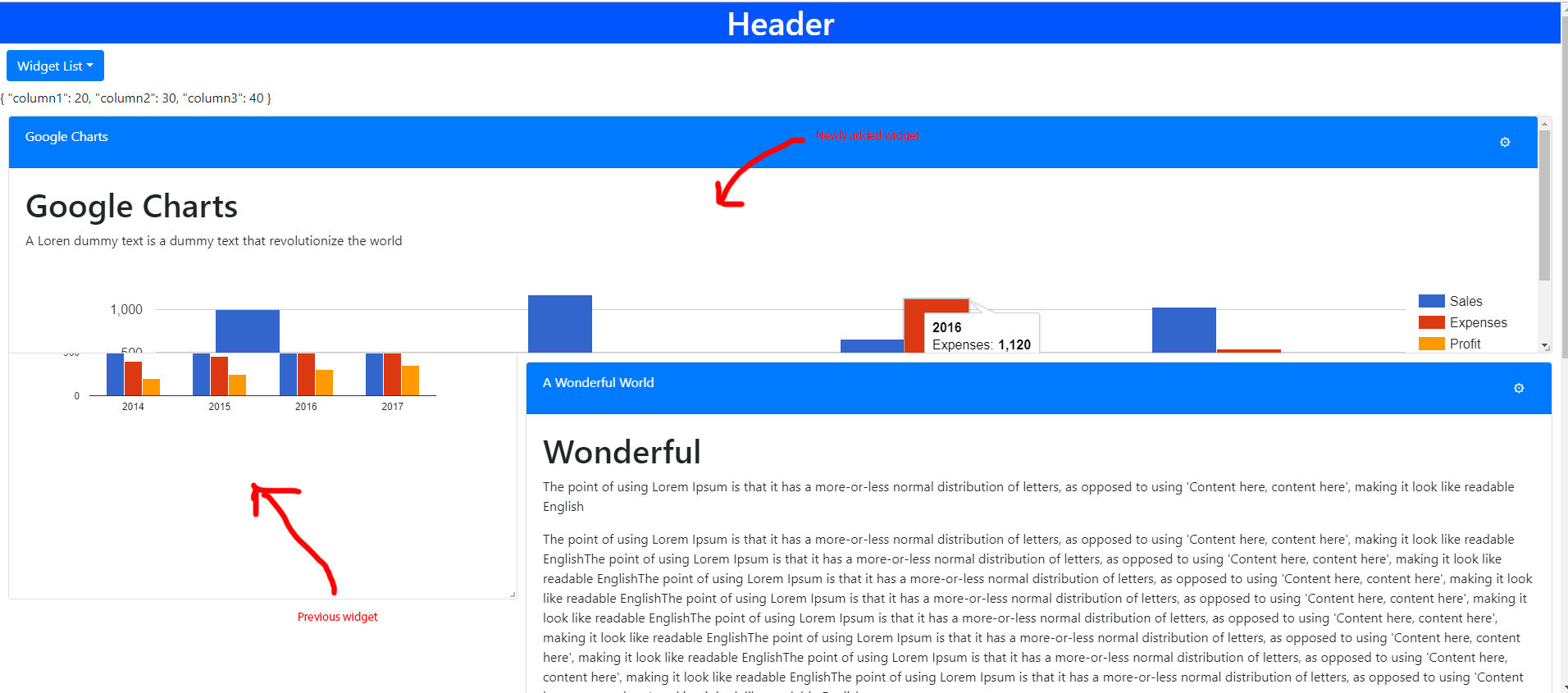
The newly added widget overlaps the Google Chart widget which is located in column1(x = 0) because the width of the newly added widget is 3 but its location is in column2(x = 1).
As said earlier that if you set width to 3, it occupies column1 until column3.
Now, the newly added widget is located on column1 (temporarily), but right now it is located on column2. That's why it overlaps the widget that is located on column1.
/*
The Wonderful widget (location: x=1) is moved to the next row because the newly added widget is located at column2 (x=1).
*/
So in order to fix it, I need to trigger a moved event to fix the layout.
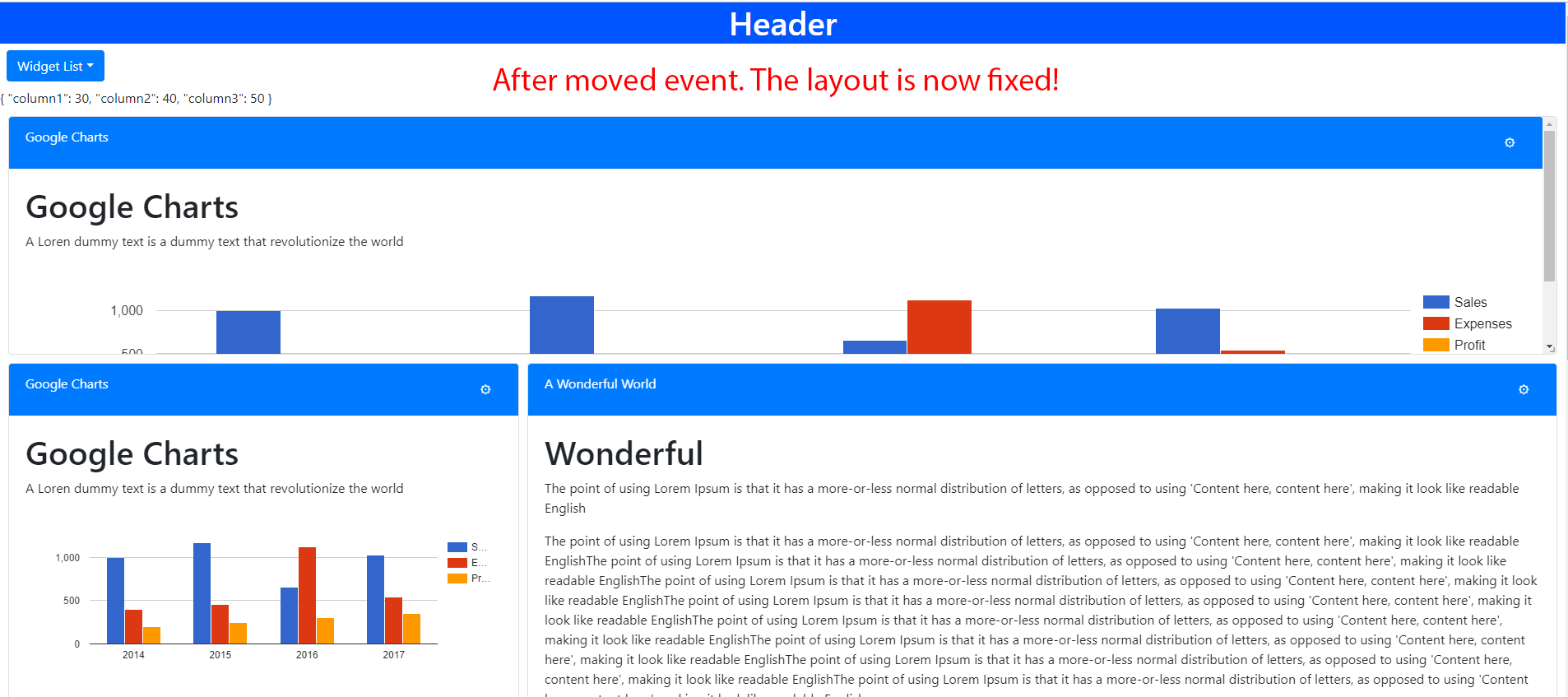
So this will fix my problem, and update each gridItem's values.
Since I am worried about what will be the reaction to the users that are using this functionality and I want them to use this functionality at ease, Is there any way to fix the layout automically without dragging the widget (which triggers the moved event) everytime I added a new widget to the dashboard?
Note: Only by dragging a gridItem will fix the layout. The resized event does not have the ability to fix the layout.
Disclaimer:
I only started working as a frontend developer last September.
 jovanmabilin
All 6 comments
Anyways, already fixed this issue by changing the value of x before it gets add to the dashboard:
if ( payload.x >=1 && payload.w >= 3 ) {
      payload.x = 0;
      payload.w = 3;
}

if ( payload.x >= 2 && payload.w === 2 ) {
       payload.x = 0;
}
Similar problem with you. Is there any easy way to triggers the moved event?
 Lovegoodstudy
on 5 Mar 2019
Lovegoodstudy
on 5 Mar 2019
I've solve the problem by getting the instance of the GridLayout and using the method layoutUpdate. I thought it is a fine solution.
Lovegoodstudy
on 6 Mar 2019
I've solve the problem by getting the instance of the GridLayout and using the method layoutUpdate. I thought it is a fine solution.
Can you explain how you did that? I want to do it, too :)
 Lukasiniho
on 7 Jun 2019
Lukasiniho
on 7 Jun 2019
@Lukasiniho and anyone else who stumbles into this, you can add a ref to the GridLayout and then access the layoutUpdate method by doing this: this.$refs.layout.layoutUpdate()
 jeankvd
on 11 Feb 2021
jeankvd
on 11 Feb 2021
Thank you so much @jeankvd. I think I need to close this issue now because this can be easily solved by accessing the layoutUpdate() method.
jovanmabilin
on 11 Feb 2021
Related issues
 RBrNx
·
3Comments
RBrNx
·
3Comments
 mateo2181
·
6Comments
mateo2181
·
6Comments
 llwinner
·
3Comments
llwinner
·
3Comments
 goalie7
·
6Comments
goalie7
·
6Comments
 gmsa
·
8Comments
gmsa
·
8Comments