Vue-form-generator: field-array
Please add an array component
 develerik
All 5 comments
Here's an example of a custom component that implements an array of objects. You should be able to take this logic and create any type of array you need. It supports adding/removing items from the array, etc. It's styled using Bootstrap 3.
It looks something like this:

And is passed into VFG with the following schema:
{
type: "horse-disciplines",
label: "Disciplines",
model: "attributes.disciplines",
styleClasses: "col-md-6",
values: () => {
return this.values.disciplines;
}
}
The this.values.disciplines is loaded via an AJAX call to retrieve the list, which is just an array of discipline names (Breeding, Draft, etc). The "Rank" is hard-coded into the component... but could just as easily be configured to load dynamic ranks associated to each "discipline".
Here's the full custom field component source:
<template lang="pug">
.wrapper
div.row.form-group
div.col-md-6
label Discipline
div.col-md-6
label Rank
div.row.form-group(v-for="(val, index) in value")
div.col-md-6
//p {{ val.key }}
select.form-control(@input="onInput($event, 'key', index)", :id="getFieldID(schema) + '-' + index", :value="val.key")
option(:value="null", :selected="isEmpty(val.key)", :disabled="true") Select One
option(v-for="item in items", :value="getItemValue(item)", :selected="getItemValue(item) == val.key") {{ getItemName(item) }}
div.col-md-5
//p {{ val.value }}
select.form-control(@input="onInput($event, 'value', index)", :id="getFieldID(schema) + '-' + index + '-number'", :disabled="isEmpty(val.key)", type="text", :value="val.value")
option(:value="null", :selected="isEmpty(val.key)", :disabled="true") Select One
option(v-for="rank in ranks", :value="getItemValue(rank)", :selected="getItemValue(rank) == val.value") {{ getItemName(rank) }}
div.col-md-1
a(href="#", @click.prevent="removeRow(index)", class="btn btn-danger") X
div.row(v-if="value.length < 5")
div.col-md-12
a(href="#", @click.prevent="addRow", class="btn btn-primary") Add Discipline
div.row(v-if="value.length >= 5")
div.col-md-12
p.help-block Up to 5 disciplines allowed
</template>
<script>
import { isObject, isNil, find } from "lodash";
import { abstractField } from 'vue-form-generator';
export default {
mixins: [ abstractField ],
beforeMount() {
// console.log('field-horse-discipline', this.value, this.schema);
if(isNil(this.value)) {
this.value = [
{ key: null, value: null }
]
}
},
data() {
return {
ranks: [
'Rank Not Applicable',
'Prospect',
'Trained',
'Competed or Shown',
'Champion',
]
};
},
computed: {
items: {
cache: false,
get() {
let values = this.schema.values;
if(typeof(values) == "function") {
return this.groupValues(values.apply(this, [this.model, this.schema]));
} else {
return this.groupValues(values);
}
}
}
},
methods: {
onInput($event, key, index) {
let item = _.nth(this.value, index);
console.log('onInput', $event, key, index, item);
item[key] = $event.target.value;
this.$emit('validated', true, []);
},
addRow() {
if(this.value.length >= 5) return;
this.value = _.concat(this.value, [{key: null, value: null}]);
this.$nextTick(function() {
console.log('addRow', this.value);
})
},
removeRow(index) {
if(confirm('Remove this item?')) {
let value = _.filter(this.value, (item, idx) => {
return idx != index;
});
console.log('removeRow', 'filter', value);
this.value = value;
this.$nextTick(function() {
console.log('removeRow', this.value);
})
}
},
isEmpty(value) {
return isNil(value);
},
groupValues(values){
let array = [];
let arrayElement = {};
// console.log('groupValues', values, isNil(values));
if(isNil(values))
return [];
values.forEach((item) => {
arrayElement = null;
if(item.group && isObject(item)) {
// There is in a group.
// Find element with this group.
arrayElement = find(array, i => i.group == item.group);
if(arrayElement){
// There is such a group.
arrayElement.ops.push({
id: item.id,
name: item.name
});
} else {
// There is not such a group.
// Initialising.
arrayElement = {
group:"",
ops:[]
};
// Set group.
arrayElement.group = item.group;
// Set Group element.
arrayElement.ops.push({
id: item.id,
name: item.name
});
// Add array.
array.push(arrayElement);
}
} else {
// There is not in a group.
array.push(item);
}
});
// With Groups.
return array;
},
getItemValue(item) {
if (isObject(item)){
if (typeof this.schema["selectOptions"] !== "undefined" && typeof this.schema["selectOptions"]["value"] !== "undefined") {
return item[this.schema.selectOptions.value];
} else {
// Use 'id' instead of 'value' cause of backward compatibility
if (typeof item["id"] !== "undefined") {
return item.id;
} else {
throw "`id` is not defined. If you want to use another key name, add a `value` property under `selectOptions` in the schema. https://icebob.gitbooks.io/vueformgenerator/content/fields/select.html#select-field-with-object-items";
}
}
} else {
return item;
}
},
getItemName(item) {
if (isObject(item)){
if (typeof this.schema["selectOptions"] !== "undefined" && typeof this.schema["selectOptions"]["name"] !== "undefined") {
return item[this.schema.selectOptions.name];
} else {
if (typeof item["name"] !== "undefined") {
return item.name;
} else {
throw "`name` is not defined. If you want to use another key name, add a `name` property under `selectOptions` in the schema. https://icebob.gitbooks.io/vueformgenerator/content/fields/select.html#select-field-with-object-items";
}
}
} else {
return item;
}
}
}
}
</script>
<style lang="scss" scoped>
.wrapper {
width: 100%;
}
.col-md-6 {
width: 50% !important;
margin-bottom: 10px;
}
</style>
_### NOTE: this is a rough component that was tossed together very quickly to solve a specific need, it appears to work but has not yet been tested by anyone other than myself. Some of the code was copied over from other VFG components and various [unknown] sources._
 zoul0813
on 6 Mar 2018
zoul0813
on 6 Mar 2018
Hi,
I am currently making components to deal with objects and arrays. They can be combined (you can edit an array of objects that contains arrays in keys), really configurable and adaptative.
First simple example with an array of string :
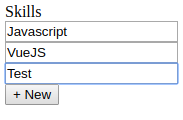
Here is the field configuration :
{
"type": "array",
"label": "Skills",
"model": "skills"
}
Second example with content in a special container component, editing an array of object, that contains 3 keys :

Field configuration :
{
"type": "array",
"label": "Columns",
"model": "columns",
"itemContainerComponent": "WidgetListColumnEditorContainer",
"showRemoveButton": false,
"fieldClasses": "arrayEditor",
"newElementButtonLabelClasses": "button is-primary",
"items": {
"type": "object",
"default": {},
"schema": {
"fields": [{
"type": "input",
"inputType": "text",
"label": "Label",
"model": "label",
},{
"type": "input",
"inputType": "text",
"label": "Field",
"model": "field",
},{
"type": "sourcecode",
"label": "Template",
"model": "template",
}]
}
}
}
Container component :
<template>
<b-collapse class="card" :open="false">
<div slot="trigger" class="card-header" slot-scope="props">
<span class="card-header-title">
<v-icon
:name="props.open ? 'chevron-down' : 'chevron-right'">
</v-icon>
{{model.label}} <{{model.field}}>
</span>
<a class="card-header-icon" @click="showHelp">
<v-icon name="help-circle"></v-icon>
</a>
<a class="card-header-icon" @click="moveUpItem">
<v-icon name="arrow-up"></v-icon>
</a>
<a class="card-header-icon" @click="moveDownItem">
<v-icon name="arrow-down"></v-icon>
</a>
<a class="card-header-icon" @click="removeItem">
<v-icon name="x"></v-icon>
</a>
</div>
<div class="card-content">
<span class="content">
<slot></slot>
</span>
</div>
</b-collapse>
</template>
<script>
export default {
props: ['model', 'schema'],
methods: {
removeItem() {
this.$emit('removeItem');
},
showHelp() {},
moveUpItem() {},
moveDownItem() {},
},
};
</script>
<style scoped>
.card-header {
height: 32px;
}
</style>
I'm working on it right now. I'm trying to make the possibilities endless. It is not ready yet but if I see some people looking for it I might try to release it ASAP. I'd be actually glad to contribute to that project.
Tell me if that looks interesting. Or if it looks too complicated I can try to describe my work better as well :persevere:
 gwenaelp
on 17 Mar 2018
gwenaelp
on 17 Mar 2018
If you can build the component out as a third-party plugin for VFG, we'd be happy to link to it in the project README (similar to the vue-tel-input). I'd recommend prefixing the project with vfg-field- as we'll be switching to this naming convention with the release of v3 (breaking out the optional components in v2 as separate packages).
zoul0813
on 17 Mar 2018
PR #421 updates the docs to link to vfg-field-object ... hopefully this covers your need for an array field. I'm closing this issue for now, feel free to re-open it if vfg-field-object does not solve the problem. If you experience problems with vfg-field-object, please open an issue on that projects repo.
zoul0813
on 20 Mar 2018
@zoul0813 Actually I think to cover the need, as it is an array of objects, you will need the combination of the array field (that I just pushed ;D), and specify that you are handling objects in the array:
{
  type: 'array',
  label: 'Columns',
  model: 'columns',
  items: {
    type: 'object',
    default: {},
  }
}
NOTE : You can specify a schema to the "items" property to have a list of subfields that is fixed.
gwenaelp
on 21 Mar 2018
Related issues
 LouWii
·
4Comments
LouWii
·
4Comments
 sjordan1975
·
5Comments
sjordan1975
·
5Comments
 jaywilburn
·
3Comments
jaywilburn
·
3Comments
 icebob
·
4Comments
icebob
·
4Comments
 blackfyre
·
4Comments
blackfyre
·
4Comments
Most helpful comment
@zoul0813 Actually I think to cover the need, as it is an array of objects, you will need the combination of the array field (that I just pushed ;D), and specify that you are handling objects in the array:
NOTE : You can specify a schema to the "items" property to have a list of subfields that is fixed.