Vue-element-admin: 当v-permission用在el-table-column上的时候
是这样的,用户有权限才显示表格的这一列,所以在el-table-column用v-permission,
但是没有权限的时候还是会显示这一列,我用在el-button上按钮是隐藏的。
这个v-permission不兼容表格吗?el-table-column又自动把它加上了?
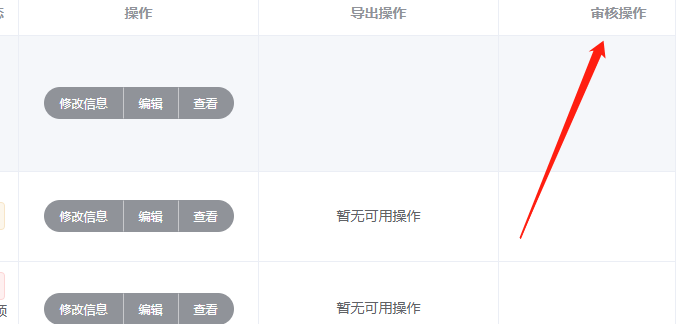
      <el-table-column v-permission="['booksRelease']" label="审核操作" align="center" width="240" class-name="">
        <template slot-scope="scope">
          <el-button-group>
            <el-tooltip v-permission="['booksRelease']" class="item" effect="dark" content="对图书发布状态进行设置" placement="top">
              <el-button :loading="requesting" type="primary" size="small" round @click="release(scope.row)">
                {{ scope.row.release===1?'取消发布':'发布' }}
              </el-button>
            </el-tooltip>
            <el-tooltip v-permission="['booksRelease']" class="item" effect="dark" content="对图书审核状态进行设置" placement="top">
              <el-button :loading="requesting" type="primary" size="small" round @click="openReview(scope.row)">
                审核
              </el-button>
            </el-tooltip>
          </el-button-group>
        </template>
      </el-table-column>
 weituotian
All 5 comments
import checkPermission from '@/utils/permission'
v-if="checkPermission(['booksRelease'])"
 mc7qing
on 14 Dec 2018
mc7qing
on 14 Dec 2018
👍2
还是希望v-permission能做到v-if一样的效果
weituotian
on 14 Dec 2018
通过vue的指令系统是实现不了的,只能通过更底层的v-if来实现。
目前的解决方案只能如楼上所说的那样。
 PanJiaChen
on 27 Dec 2018
PanJiaChen
on 27 Dec 2018
@PanJiaChen 你弄弄肯定行的,这时一个提升个人实力的机会,你可以看看v-if的源码是怎么实现的
weituotian
on 27 Dec 2018
👍1
v-if 是基于ast实现的,所以没可能。
PanJiaChen
on 28 Dec 2018
Was this page helpful?
0 / 5 - 0 ratings
Related issues
 ghost
·
4Comments
ghost
·
4Comments
 Mr-arvin
·
4Comments
Mr-arvin
·
4Comments
 ExtremeYu
·
4Comments
ExtremeYu
·
4Comments
 eladcandroid
·
4Comments
eladcandroid
·
4Comments
 Sihan-Tan
·
4Comments
Sihan-Tan
·
4Comments
Most helpful comment
import checkPermission from '@/utils/permission'
v-if="checkPermission(['booksRelease'])"