Vue-dropzone: Passing formData with additional parameters
I am trying to send some additional form data when i am uploading images. I an triggering the send event from a button.
Please see the code.
Component:
<vue-dropzone
ref="myVueDropzone"
id="dropzone"
@vdropzone-complete="showSuccess"
:options="dropzoneOptions"
v-on:vdropzone-sending="sendingEvent"></vue-dropzone>
<button v-on:click="triggerSend()">Send images</button>
JS:
const getTemplate = () => `
<div class="dz-preview dz-file-preview">
  <div class="dz-image">
    <div data-dz-thumbnail-bg></div>
  </div>
  <div class="dz-details">
    <div class="dz-size"><span data-dz-size></span></div>
    <div class="dz-filename"><span data-dz-name></span></div>
    <div class="dz-description"><input type="text" data-dz-description></input></div>// Additional Field
  </div>
  <div class="dz-progress"><span class="dz-upload" data-dz-uploadprogress></span></div>
  <div class="dz-error-message"><span data-dz-errormessage></span></div>
  <div class="dz-success-mark"><i class="fa fa-check"></i></div>
  <div class="dz-error-mark"><i class="fa fa-close"></i></div>
</div>
`;
export default {
  data() {
    return {
      dropzoneOptions: {
        autoProcessQueue: false,
        previewTemplate: getTemplate(),
        maxFilesize: 4096,
        url: "URL HERE",
        acceptedFiles: "image/*,.mp4,.mov,.wmv",
        addRemoveLinks: true,
        headers: {
          Authorization: "Bearer " + localStorage.getItem("default_auth_token")
        },
        dictDefaultMessage:
          "<i class='fas fa-cloud-upload-alt'></i><br/>Drop your files"
      }
    };
  },
  components: {
    vueDropzone: vue2Dropzone
  },
  methods: {
    triggerSend() {
      this.sendingEvent();
    },
    sendingEvent(file, xhr, formData) {
      console.log(formData);
      formData.append("description", this.description);
      formData.append("clientId", this.$store.state.clientId);
      this.$refs.myVueDropzone.autoProcessQueue = true;
      this.$refs.myVueDropzone.processQueue();
    },
  }
};
Here is the error i am getting.
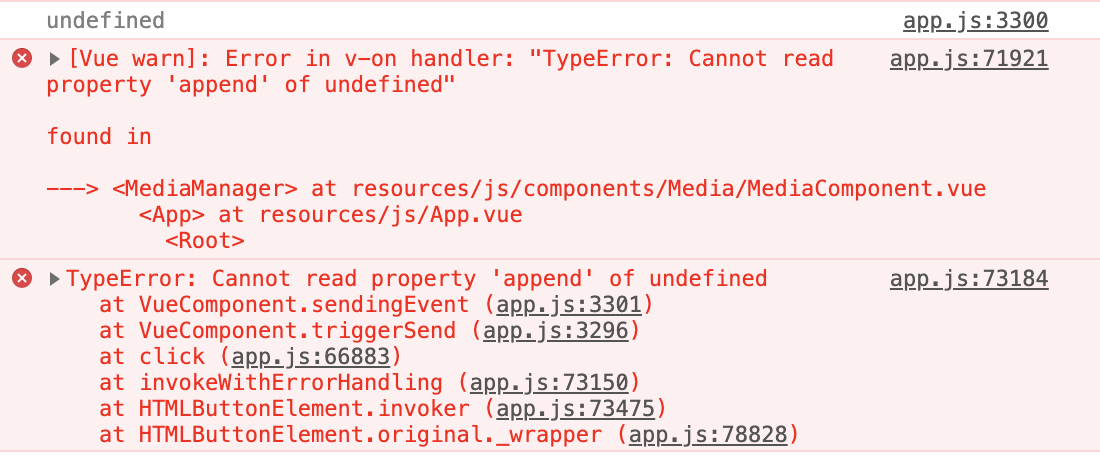
This is driving me crazy! Is there anything I have missed or need to add?
 stevenhardy-digital
All 4 comments
@medicsteven Doesn't seem anything wrong in your script. Need to copy your script to component locally to test more. I'll try it meanwhile..
 vrajroham
on 4 Jul 2019
vrajroham
on 4 Jul 2019
@vrajroham Thank you for your reply! I will look forward to hearing back from you soon!
stevenhardy-digital
on 5 Jul 2019
@medicsteven Just found the issue and it is a logical exception in your code.
Stacktrace
You can see, you are calling
sendingEvent()fromtriggerSend()which is incorrect. sendingEvent() is automatically called when queue is processed.Along with this, you have called
this.$refs.myVueDropzone.autoProcessQueue = true;andthis.$refs.myVueDropzone.processQueue();insendingEvent()which is completely wrong, because the event sending is broadcsted when we executethis.$refs.myVueDropzone.processQueue();
Solution
Just add
this.$refs.myVueDropzone.processQueue();totriggerSend(). i.e. Process the queue when button is clickedSimply as below,
methods: {
    triggerSend() {
      this.$refs.myVueDropzone.processQueue();
    },
    sendingEvent(file, xhr, formData) {
      console.log(formData);
      formData.append("description", this.description);
      formData.append("clientId", this.$store.state.clientId);
    },
  }
Let me know if this works or not.
Thanks 😄
vrajroham
on 5 Jul 2019
@vrajroham This worked! Thank you so much!
stevenhardy-digital
on 5 Jul 2019
Related issues
 hubertokf
·
4Comments
hubertokf
·
4Comments
 kyoukhana
·
5Comments
kyoukhana
·
5Comments
 morance
·
3Comments
morance
·
3Comments
 Shhu
·
5Comments
Shhu
·
5Comments
 zhangzhen
·
3Comments
zhangzhen
·
3Comments
Most helpful comment
@medicsteven Just found the issue and it is a logical exception in your code.
Stacktrace
You can see, you are calling
sendingEvent()fromtriggerSend()which is incorrect. sendingEvent() is automatically called when queue is processed.Along with this, you have called
this.$refs.myVueDropzone.autoProcessQueue = true;andthis.$refs.myVueDropzone.processQueue();insendingEvent()which is completely wrong, because the event sending is broadcsted when we executethis.$refs.myVueDropzone.processQueue();Solution
Just add
this.$refs.myVueDropzone.processQueue();totriggerSend(). i.e. Process the queue when button is clickedSimply as below,
Let me know if this works or not.
Thanks 😄