Vue-dropzone: How to upload file in amazon s3?
Is it works with accessKeyId & secretAccessKey?
 rbajaniya
All 17 comments
Yes! You can upload files to S3 directly from browser.
Check documentation here, to see how it works.
As this is JavaScript library, so you can't use your accessKeyId and SecretKet for security reasons.
You need to create an API endpoint on your server which will return pre-signed url for AWS S3 file upload.
Hope the documentation will help you better.
 vrajroham
on 31 Jan 2018
vrajroham
on 31 Jan 2018
I'm sharing my code please have a look. Am I doing something wrong?
<vue-dropzone ref="myVueDropzone" id="dropzone" :options="{
      url: 'http://s3-us-west-2.amazonaws.com/airflowbucket1/obexpense/expenses'
      }"
      :awss3="{
        signingURL: 'http://localhost:3010'
      }"
      v-on:vdropzone-s3-upload-error="s3UploadError"
      v-on:vdropzone-s3-upload-success="s3UploadSuccess">
    </vue-dropzone>
The url we are sending in the options props is that mandatory?
From my own server I'm generating my signature as follows but after that it's giving error POST http://s3-us-west-2.amazonaws.com/airflowbucket1/obexpense/expenses net::ERR_INCOMPLETE_CHUNKED_ENCODING
my signature -
{
    "signature": {
        "Content-Type": "",
        "acl": "public-read-write",
        "success_action_status": "201",
        "X-Amz-Algorithm": "*",
        "X-Amz-Credential": "*",
        "X-Amz-Date": "20180131T110128Z",
        "Policy": "*",
        "X-Amz-Signature": "*",
        "key": ""
    },
    "postEndpoint": "//s3-us-west-2.amazonaws.com/airflowbucket1/obexpense/expenses"
}
@rbajaniya Little correction,
Here is the issue, url: 'http://s3-us-west-2.amazonaws.com/airflowbucket1/obexpense/expenses'.
In url you need to provide your server url, where your s3 file location will be submitted once file is uploaded to AWS S3. Once file is uploaded to S3 you need to store that URL somewhere, for this reason url is used.
vrajroham
on 31 Jan 2018
@vrajroham
I think s3 file location callback on v-on:vdropzone-s3-upload-success="s3UploadSuccess" event and url should not mandatory for s3 upload.
rbajaniya
on 31 Jan 2018
The core library itself don't support AWS S3 upload. This is the feature
which we have added on the top of core library in Vue component. That's why
the url is important as it's mandatory in dropzone itself.
On Jan 31, 2018 6:47 PM, "rbajaniya" notifications@github.com wrote:
@vrajroham https://github.com/vrajroham
I think s3 file location callback on v-on:vdropzone-s3-upload-
success="s3UploadSuccess" event and url should not mandatory for s3
upload.—
You are receiving this because you were mentioned.
Reply to this email directly, view it on GitHub
https://github.com/rowanwins/vue-dropzone/issues/287#issuecomment-361929243,
or mute the thread
https://github.com/notifications/unsubscribe-auth/AME1nUJ4rKA5f6S-AxMkcRKSSw-BQyMxks5tQGf-gaJpZM4RzuIM
.
vrajroham
on 31 Jan 2018
I'm used your example https://rowanwins.github.io/vue-dropzone/docs/dist/#/aws-s3-upload It's not working.
Request post on mysigninurl which is set in Enter your URL Signer Endpoint (POST request will be sent to endpoint) but after callback file not upload on amazon.
rbajaniya
on 1 Feb 2018
Is there any error/warning in console?
vrajroham
on 1 Feb 2018
Network Error : Could not send request to AWS (Maybe CORS errors)
urlsigner.js:20:8
Network Error : Could not send request to AWS. (Maybe CORS error)
rbajaniya
on 1 Feb 2018
Check your network tab in browser dev tools and see the requests sent to your signing url server and AWS server. Provide some more details so that I can help.
vrajroham
on 1 Feb 2018
If I'm Enable cross-origin resource sharing then request send to amazon
Request URL:https://s3.us-west-2.amazonaws.com/airflowbucket1/obexpense/expenses
Request Method:POST
Status Code:405 Method Not Allowed
Remote Address:52.218.200.232:443
Referrer Policy:no-referrer-when-downgrade
and get back response error 405 Method Not Allowed
<Error><Code>MethodNotAllowed</Code><Message>The specified method is not allowed against this resource.</Message><Method>POST</Method><ResourceType>OBJECT</ResourceType><RequestId>E284EA9301C5A0C3</RequestId><HostId>R+HVY+YUYx3u6/7UgT5zVSth1kqPmbvWIPL0rVI8I+2FzOYU7Km2qUxIC9XszceQYLBd4ouI9pQ=</HostId></Error>
rbajaniya
on 1 Feb 2018
It seems you have problem with S3 Bucket Policy. Try allowing options too in policy.
vrajroham
on 1 Feb 2018
I'm Check S3 Bucket Policy also file upload successfully using aws-sdk plugin.
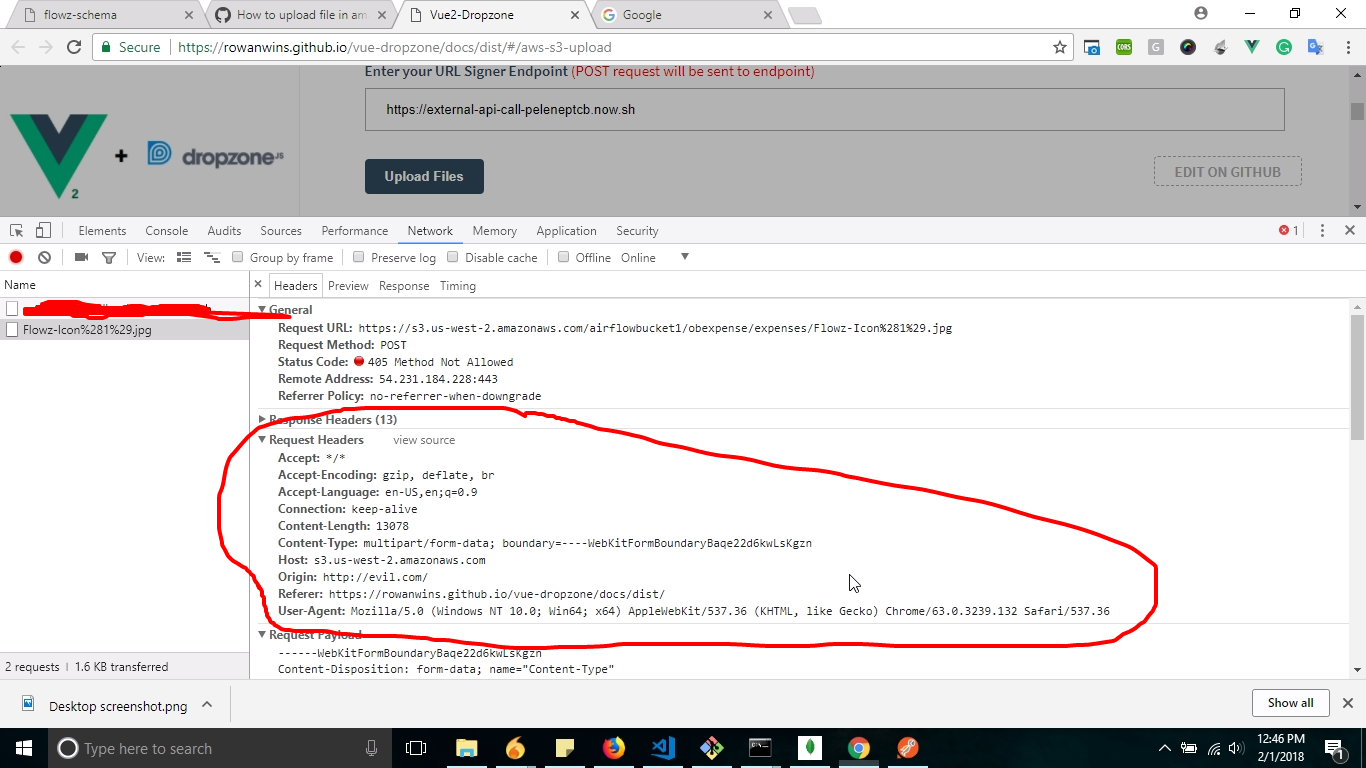
I think request should passed Authorization in request header. I'm shared request screenshot look at picture please.
rbajaniya
on 1 Feb 2018
I have just been struggling with the same issue. The solution I found was to change the type of request
POST -> PUT
Wait for response code 201 -> 200
I hope that this might help. Hopefully this could be changed by options?
 evanoberholster
on 22 Feb 2018
evanoberholster
on 22 Feb 2018
@rbajaniya @evanoberholster I think the solution is to check your requst URL. It should be just the bucket address, not the "eventual URL" you are trying to create (which should be the key). E.g. instead of https://s3.us-west-2.amazonaws.com/airflowbucket1/obexpense/expenses/Flowz-Icon%281%29.jpg, it should be https://s3.us-west-2.amazonaws.com/airflowbucket1, and the key would be obexpense/expenses/Flowz-Icon%281%29.jpg. That solved the problem for me.
 tylercollier
on 5 Mar 2018
tylercollier
on 5 Mar 2018
@evanoberholster how did you change the type of request to PUT? think I have the same issue but don't know where to change this...
 jezperp
on 20 Aug 2018
jezperp
on 20 Aug 2018
@jezperp specify it in the configuration-options:
dropzoneOptions: {
method: "PUT"
}
 getsetbro
on 29 Nov 2018
getsetbro
on 29 Nov 2018
Sounds like this issue is resolved with correct config, thanks to those who have helped.
 rowanwins
on 29 Nov 2018
rowanwins
on 29 Nov 2018
Related issues
 pdt590
·
3Comments
pdt590
·
3Comments
 stevenhardy-digital
·
4Comments
stevenhardy-digital
·
4Comments
 vesper8
·
4Comments
vesper8
·
4Comments
 awacode21
·
5Comments
awacode21
·
5Comments
 ServerJunge
·
5Comments
ServerJunge
·
5Comments