Vue-devtools: Dark theme not being saved. Reverts to Light on page reload.
Select dark theme in Settings
Reload page and theme reverts to light.
 aeyachts99
All 5 comments
Hello, your issue has been closed because it does not conform to our issue requirements. In order to ensure every issue provides the necessary information for us to investigate, we require the use of the Issue Helper when creating new issues. Thank you!
 vue-bot
on 27 Mar 2019
vue-bot
on 27 Mar 2019
This is likely the same issue I had where settings weren't being stored in localStorage, due to me setting chrome to block 3rd party cookies, which also affects extensions.
I resolved this by adding vue-devtools to the allow list on the chrome cookies setting page (chrome://settings/content/cookies).
chrome-extension://{vue-devtools extension id}
Hopefully that helps anyone else in the same boat.
 seanmurrin
on 29 Mar 2019
seanmurrin
on 29 Mar 2019
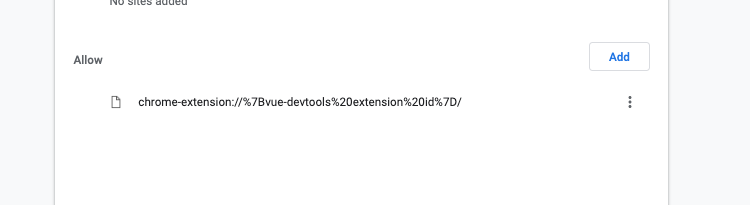
I'm not sure I'm entering this correctly. This is what I have which isn't working.
aeyachts99
on 29 Mar 2019
I'm not sure I'm entering this correctly. This is what I have which isn't working.
you need to use the extension id (found on extensions settings page - chrome://extensions/). {vue-devtools extension id} is just a placeholder for example.
this is what mine looks like - chrome-extension://nhdogjmejiglipccpnnnanhbledajbpd/
seanmurrin
on 29 Mar 2019
Thanks, that sorted it.
aeyachts99
on 29 Mar 2019
Related issues
 stiltet
·
3Comments
stiltet
·
3Comments
 trollderius
·
3Comments
trollderius
·
3Comments
 ispal
·
4Comments
ispal
·
4Comments
 mitramejia
·
3Comments
mitramejia
·
3Comments
 mikaelhadler
·
3Comments
mikaelhadler
·
3Comments
Most helpful comment
This is likely the same issue I had where settings weren't being stored in localStorage, due to me setting chrome to block 3rd party cookies, which also affects extensions.
I resolved this by adding vue-devtools to the allow list on the chrome cookies setting page (chrome://settings/content/cookies).
chrome-extension://{vue-devtools extension id}Hopefully that helps anyone else in the same boat.