Vue-devtools: Vuex modules don't load with 'Autoload Vuex state'
Version
5.3.1
Browser and OS info
Chrome 78.0.3904.70
Steps to reproduce
1 - Open a chrome
2 - Navigate to app
3 - Open Chrome Devtools
4 - Enable 'Autoload state vuex'
5 - Refresh to force reload modules
What is expected?
All modules loaded automatic
What is actually happening?
No modules loaded in listing
https://drive.google.com/file/d/1zz1MDxu3bKo4DfuF2oja8LxeuIAQkdbB/view?usp=sharing
 mikaelhadler
All 3 comments
Do you have a minimal runnable reproduction of the issue?
 Akryum
on 30 Oct 2019
Akryum
on 30 Oct 2019
hi @Akryum . Thank you great extension!
I have same error.
If you implement using https://github.com/vuex-orm/vuex-orm,
foo/bar/query and module are cut under module.
sample code
https://codesandbox.io/s/vue-template-ci6qb
https://github.com/wilf312/vuedevtool_test
background page error message
parent[parts.pop()] = res.getters[key]
https://github.com/vuejs/vue-devtools/blob/dev/packages/app-frontend/src/views/vuex/module.js#L224

Please excuse me if you may not understand or you feel bad with my poor English. :bow:
 wilf312
on 30 Oct 2019
wilf312
on 30 Oct 2019
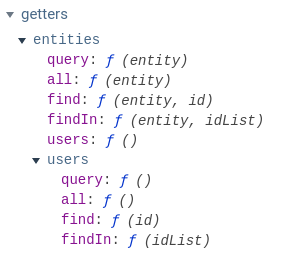
The devtools now supports displaying getters which have the same name as a child module:
Akryum
on 30 Oct 2019
Related issues
 pxwee5
·
3Comments
pxwee5
·
3Comments
 ablipan
·
5Comments
ablipan
·
5Comments
 stiltet
·
3Comments
stiltet
·
3Comments
 Gedminas
·
3Comments
Gedminas
·
3Comments
 phromo
·
4Comments
phromo
·
4Comments
Most helpful comment
The devtools now supports displaying getters which have the same name as a child module: