Vue-devtools: Duplicate Component Trees
Version
4.1.4
Browser and OS info
Chrome 65.0.3325.146 / macOS 10.13.3
Steps to reproduce
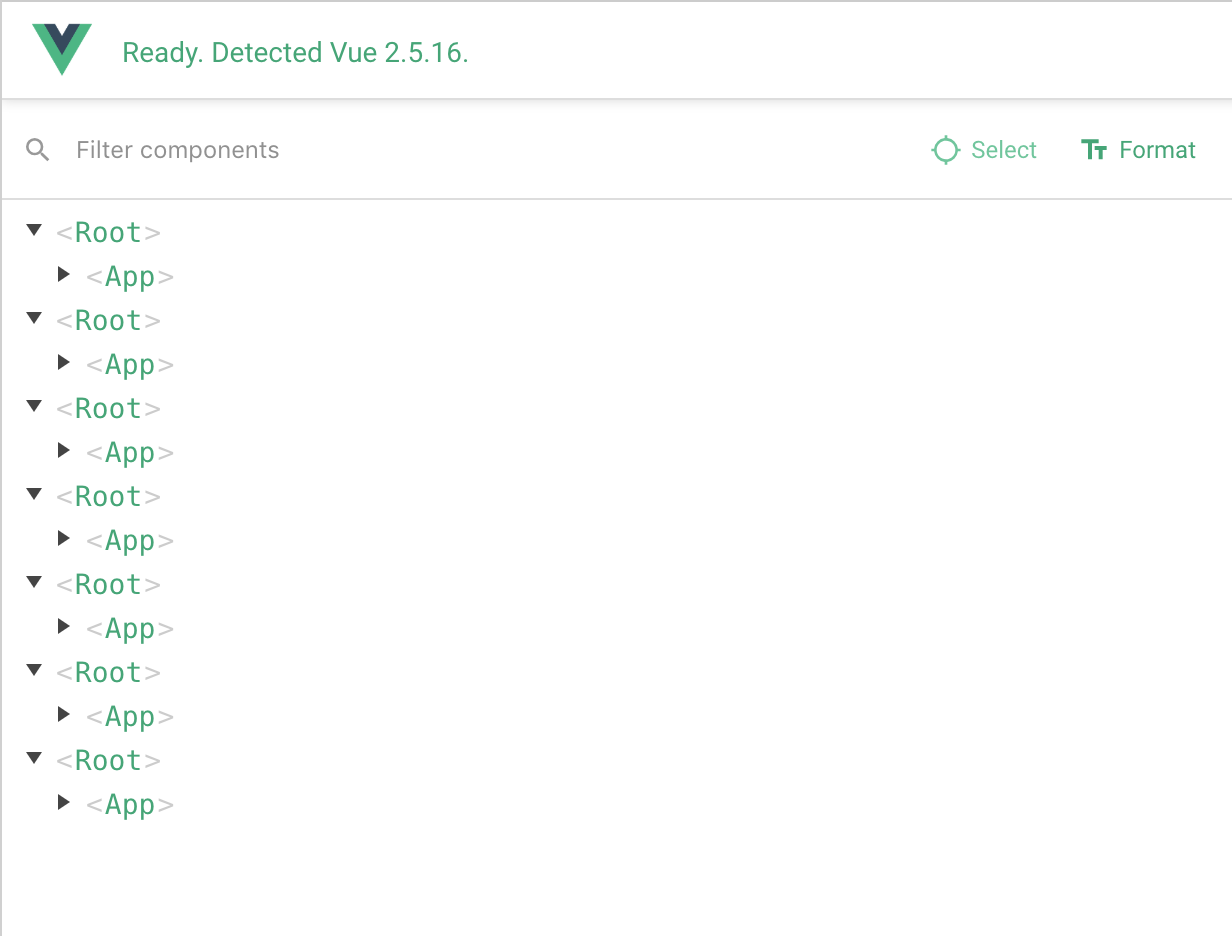
Open the vue-devtools extension, and navigate to the "Components" tab. You should see several identical Components trees (three, in my experience). For example:
<Root>
  <MyApp>
<Root>
  <MyApp>
<Root>
  <MyApp>
What is expected?
vue-devtools should display a single Component tree, as per previous version of the extension.
What is actually happening?
vue-devtools displays several duplicate Component trees.
This bug also appears on Chrome 64.x, and Firefox 58.x. It appears to have been introduced in vue-devtools version 4.1.4.
 monooso
All 56 comments
I have the same issue. As for me, it's happening when several of my components "import Vue from 'vue'"
 aguingand
on 12 Mar 2018
aguingand
on 12 Mar 2018
I've got the same behaviour, introduced only in 4.1.4. The 4.1.3 devtools showed just a single component (as expected).
Interacting with any one of the component trees in the component view mirrors that action across all duplicated copies. (ie. expanding a collapsed node in copy 1, expands the same node in all other copies at the same time).
 joelbradbury
on 13 Mar 2018
joelbradbury
on 13 Mar 2018
One other thing to note. Interactions are mirrored, as described by @joelbradbury, _however_ (and it's an important however) setting a property value in one of the component trees doesn't necessarily set it in all of the component trees.
That's a real problem, and it's bitten me a couple of times already.
monooso
on 13 Mar 2018
I've got the same behaviour.
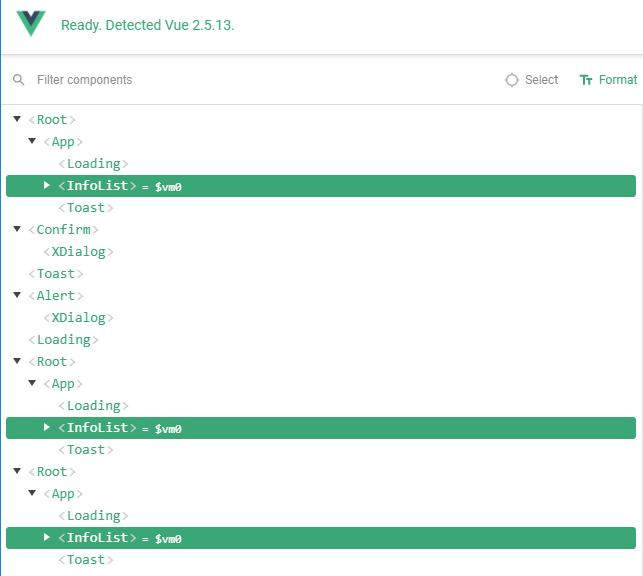
But my old project seems well.
I tried to copy package.json, yarn.lock, and all webpack configs, but still got the bug.

 mirari
on 20 Mar 2018
mirari
on 20 Mar 2018
I'm having the same issue of multiple <Root> and components.
 ericcirone
on 20 Mar 2018
ericcirone
on 20 Mar 2018
Same issues.
Also experiencing instability in some scenarios when trying to use the component name search. It just freezes the whole vue-devtools and requires a restart of the whole browser. Might be unrelated issue though, and worth separate item?
 badpunman
on 22 Mar 2018
badpunman
on 22 Mar 2018

same issue
 rawbin-
on 22 Mar 2018
rawbin-
on 22 Mar 2018
Im seeing this issue too
 caseyprovost
on 3 Apr 2018
caseyprovost
on 3 Apr 2018
Same here.vue-devtools version at 4.1.4.
Everything seemed fine until I pressed the refresh btn,then I got Duplicate Component Trees.

 vintotsai
on 16 Apr 2018
vintotsai
on 16 Apr 2018
I am having the same issue. I am using Vue 2.5.16 and the lasted version of the chrome extension.
 adriancast
on 23 Apr 2018
adriancast
on 23 Apr 2018
Having the same issue with Vue 2.5.2
 AliArdaOrhan
on 2 May 2018
AliArdaOrhan
on 2 May 2018
What's going on for this issue?
 majorcool
on 8 May 2018
majorcool
on 8 May 2018
I am still having the same issue :(
adriancast
on 8 May 2018
metoo :)
 netstuff
on 8 May 2018
netstuff
on 8 May 2018
Still exist
 JH46666
on 15 May 2018
JH46666
on 15 May 2018
Having the same issue!
 justinkames
on 15 May 2018
justinkames
on 15 May 2018
Same issue here.
 KristofferBerg
on 15 May 2018
KristofferBerg
on 15 May 2018
Any update on timeline for fixing this?
ericcirone
on 15 May 2018
Mee too.
 diazemiliano-zz
on 15 May 2018
diazemiliano-zz
on 15 May 2018
Mee too....
I almost thought there was a problem with my code, but too many people had the same problem. It didn't seem to be my code.
 caryxiao
on 16 May 2018
caryxiao
on 16 May 2018
Any update on this? Is there a fix available yet just waiting to be merged or something?
Edit: Oh my bad, didn't saw that @ericcirone was already asking for this
 c1nema
on 16 May 2018
c1nema
on 16 May 2018
Because of this issue, I was using the Electron based DevTools for a while now. I opened the DevTools within Chrome for the first time again and the bug went away?! I dont get it

( I got 2 seperate Vue instances so this is correct )
c1nema
on 16 May 2018
Same issue but it not happening with all Vue apps I make, only some of them :|
 adnanshussain
on 22 May 2018
adnanshussain
on 22 May 2018
Same issue here. Happened after I added a md-menu from vue-material.
 oliver-ni
on 27 May 2018
oliver-ni
on 27 May 2018
same issue here. i am also using vue-material
 jsantoru
on 29 May 2018
jsantoru
on 29 May 2018
I am using vue-material,and I got same issue too...
 whuper
on 31 May 2018
whuper
on 31 May 2018
This also happens when I use vue-material
 mswaidan
on 31 May 2018
mswaidan
on 31 May 2018
me too
 rachardking
on 5 Jun 2018
rachardking
on 5 Jun 2018
hey all, I've just re-installed the vue devtools extension, and the problem with duplicate component trees went away. Can we confirm this is the correct fix, does this work for anyone else?
 Deg5112
on 8 Jun 2018
Deg5112
on 8 Jun 2018
v4.1.5 solve?
 lusess123
on 8 Jun 2018
lusess123
on 8 Jun 2018
[4.1.4] Same issue here with SSR and vue-material, nearly impossible to use, too much root nodes to be usable.
What about this thread?
 Linzdigr
on 15 Jun 2018
Linzdigr
on 15 Jun 2018
Me too!
 cycold
on 15 Jun 2018
cycold
on 15 Jun 2018
Same here, different amount of roots on different pages
 ArStah
on 15 Jun 2018
ArStah
on 15 Jun 2018
I've got this also, I only import Vue in one location.
Sometimes it's fine, but usually there's 3 instances of the root.
 Cookizza
on 22 Jun 2018
Cookizza
on 22 Jun 2018
I have faced this issue since months ago, and today I found the reason is that I used event bus in the router:
router.afterEach(function(to, from) {
  eventBus.$emit("route-changed", to);
});
After I remove the above code and refract it in the component by watch $route, the duplicated roots and apps just go away.
majorcool
on 24 Jun 2018
On my side I use router.beforeResolve to call asyncData hook declared in navigable components for Server Side Rendering (as in https://ssr.vuejs.org/guide/data.html#client-data-fetching). The number of duplicated root elements depends on route component called.
Any idea on what's going on?
Linzdigr
on 1 Jul 2018
same issue for long days
 sunchenguang
on 5 Jul 2018
sunchenguang
on 5 Jul 2018
hi, @majorcool how did you find out that was the cause (for your case)? I'm curious to understand what cause this duplication problem
 b4dnewz
on 11 Jul 2018
b4dnewz
on 11 Jul 2018
same here :( Any Updates?
 DavidLambauer
on 19 Jul 2018
DavidLambauer
on 19 Jul 2018
Me too!
 Mmzer
on 25 Jul 2018
Mmzer
on 25 Jul 2018
WOOHOO! Can't wait for this to finally be pushed out. Thanks @Akryum
ericcirone
on 25 Jul 2018
Eeeeeeah man!! Finally!! When the new version will be released?
ArStah
on 25 Jul 2018
Could someone try the master branch to see if the issue is resolved for you?
 Akryum
on 25 Jul 2018
Akryum
on 25 Jul 2018
@Akryum I cloned, npm install, npm run build. Load unpacked from shells/chrome. The problem is still there.
ericcirone
on 26 Jul 2018
@ericcirone Do you have a reproduction repository for me to check?
Akryum
on 26 Jul 2018
@Akryum So i was messing around with the code and I fixed the issue, at least in my instance. I was looking back at 4.1.3 source since that works fine and was looking at the differences in the scan() function.
So all i changed was not setting instance to be instance.$root
This is the scan function i am using now, and it is working as intended.
function scan () {
  rootInstances.length = 0
  let inFragment = false
  let currentFragment = null
  walk(document, function (node) {
    if (inFragment) {
      if (node === currentFragment._fragmentEnd) {
        inFragment = false
        currentFragment = null
      }
      return true
    }
    const instance = node.__vue__
    if (instance) {
      if (instance._isFragment) {
        inFragment = true
        currentFragment = instance
      }

      // respect Vue.config.devtools option
      let baseVue = instance.constructor
      while (baseVue.super) {
        baseVue = baseVue.super
      }
      if (baseVue.config && baseVue.config.devtools) {
        // give a unique id to root instance so we can
        // 'namespace' its children
        if (typeof instance.__VUE_DEVTOOLS_ROOT_UID__ === 'undefined') {
          instance.__VUE_DEVTOOLS_ROOT_UID__ = ++rootUID
        }
        rootInstances.push(instance)
      }

      return true
    }
  })
  flush()
}

ericcirone
on 26 Jul 2018
@Akryum I do not have anything public that you could use to reproduce the issue. It's all private code. Sorry
ericcirone
on 26 Jul 2018
@ericcirone Could you try this branch? https://github.com/vuejs/vue-devtools/tree/fix-duplicate-roots
Akryum
on 26 Jul 2018
@Akryum yup give me a sec
ericcirone
on 26 Jul 2018
@Akryum yup that still works.

ericcirone
on 26 Jul 2018
If you refresh you don't loose <Root>?
Akryum
on 26 Jul 2018
@Akryum I just refreshed a bunch (both browser refresh and vue-devtools refresh button) All looks fine.
ericcirone
on 26 Jul 2018
So it looks like it's definitively fixed this time! :smile_cat:
Akryum
on 26 Jul 2018
Is this going to be pushed to the Chrome Extension anytime soon?
 justin1364
on 7 Aug 2018
justin1364
on 7 Aug 2018
I am still having this problem in 5.0.0 beta 1 :( this happens only when I filter components tree, otherwise it's fine
 sqal
on 10 Sep 2018
sqal
on 10 Sep 2018
The problem persists in 4.1.5 beta :(
 powext
on 13 Oct 2018
powext
on 13 Oct 2018
Related issues
 mikaelhadler
·
3Comments
mikaelhadler
·
3Comments
 sithuaung
·
4Comments
sithuaung
·
4Comments
 ispal
·
4Comments
ispal
·
4Comments
 trollderius
·
3Comments
trollderius
·
3Comments
 yyx990803
·
3Comments
yyx990803
·
3Comments
Most helpful comment
So it looks like it's definitively fixed this time! :smile_cat: