Hello!
I have a question.
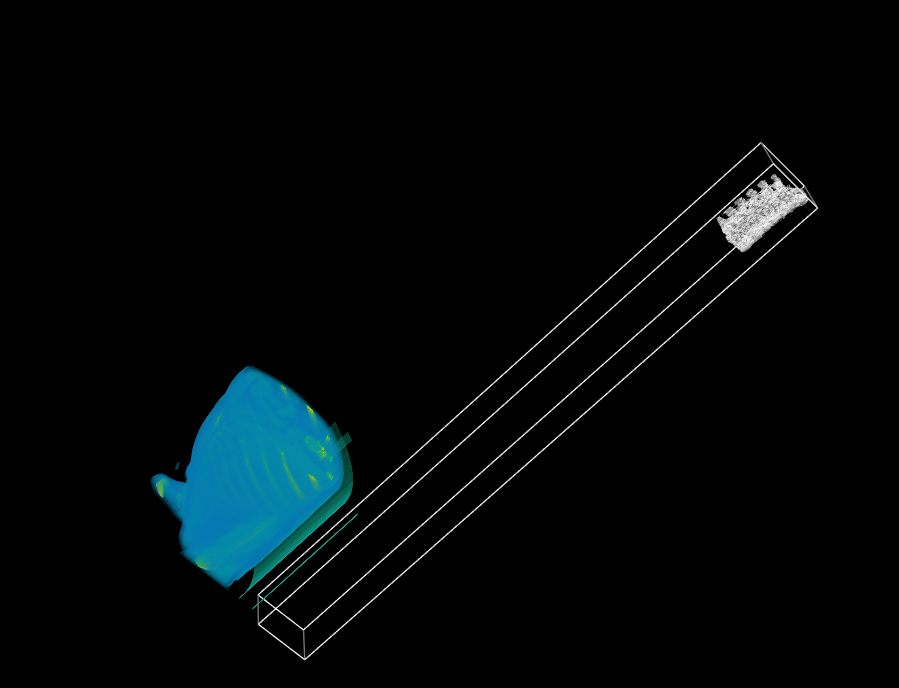
I rendered the VTI file a volume and overlaid the segmented STL on it.
However, the following problem occurred. The positions of the two rendered objects are different.

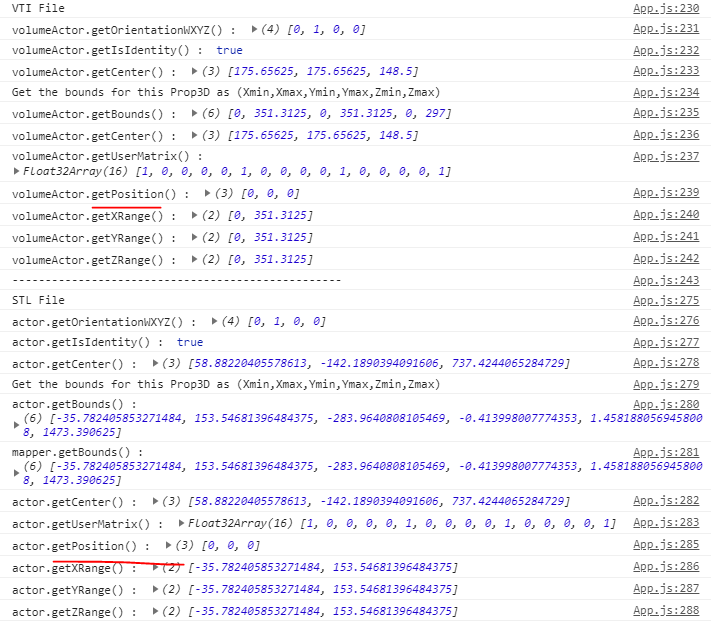
I found the following information through the console to solve this problem.

The center () values in the bounding box are different from each other. So I tried to change the position value by referring to the following link.
https://kitware.github.io/vtk-js/api/Common_DataModel_BoundingBox.html#getCenter-x-y-z
I want to adjust the center () value of the bounding box, but I have difficulty using it. Can you help me with this?
Here are some of my code:
import vtkActor from 'vtk.js/Sources/Rendering/Core/Actor';
import vtkMapper from 'vtk.js/Sources/Rendering/Core/Mapper';
.
.
.
stlreader.setUrl(stlToLoad).then(() => {
      stlreader.loadData().then(() => {

        // renderer.addMapper(mapper);
        renderer.resetCamera();
        renderer.addActor(actor);
        // const bounds = actor.getBounds();
        // bounds.setMinPoint(1, 1, 1);
        // renderer.bounds();

        // actor.setCenter(0, 0, 0);
        // renderer.setBounds(0, 351.3125, 0, 351.3125, 0, 297)
        renderer.getActiveCamera().elevation(70);
        renderWindow.render();

        console.log("STL File")
        console.log("actor.getOrientationWXYZ() : ", actor.getOrientationWXYZ())
        console.log("actor.getCenter() : ", actor.getCenter())
        console.log("Get the bounds for this Prop3D as (Xmin,Xmax,Ymin,Ymax,Zmin,Zmax)")
        console.log("actor.getBounds() : ", actor.getBounds())
        console.log("actor.getCenter() : ", actor.getCenter())
        // console.log("actor.getMinPoint() : ", actor.getMinPoint())
        // console.log("actor.getMaxPoint() : ", actor.getMaxPoint())
        console.log("actor.getPosition() : ", actor.getPosition())
        console.log("actor.getXRange() : ", actor.getXRange())
        console.log("actor.getYRange() : ", actor.getXRange())
        console.log("actor.getZRange() : ", actor.getXRange())
        console.log("actor.computeMatrix() : ", actor.computeMatrix())
        // actor.getCenter();

        this.setState({
          renderWindow
        });
      });
    })
    actor.setMapper(mapper);
    // actor.getCenter();
    mapper.setInputConnection(stlreader.getOutputPort());
Thank you!
 rjsgml5698
All 4 comments
The outline filter was used to obtain the following results. Please ask me if there is a way.
rjsgml5698
on 16 May 2019
actor.setPosition(x, y, z)
 jourdain
on 16 May 2019
jourdain
on 16 May 2019
Well ... I've set it up that way.
However, the value of getPosition () for both volumeActor / actor is (0,0,0).
Is there something I'm misunderstanding?
rjsgml5698
on 17 May 2019
I adjusted the position as follows. I will think about matching the exact location.
Thanks!!
rjsgml5698
on 17 May 2019
Related issues
 doczoidberg
·
5Comments
doczoidberg
·
5Comments
 mix3d
·
5Comments
mix3d
·
7Comments
mix3d
·
5Comments
mix3d
·
7Comments
 BotellaA
·
3Comments
rjsgml5698
·
6Comments
BotellaA
·
3Comments
rjsgml5698
·
6Comments
Most helpful comment
actor.setPosition(x, y, z)