Is there a way to revert? A setting somewhere? I can also just patch the logo with each update. I really prefer the old one.
 sdaitzman
All 40 comments
Mac instructions:
- Find a PNG of an icon you like
- Open in preview app
- Select the image with
CMD+A - Copy the image to clipboard with
CMD+C - Find VSCodium in /Applications and right click then click "get info"
- In the very top of the window, click the logo beside the name of the app, and press CMD+V to paste an image over it and override it
- Relaunch app.
 rublev
on 16 Aug 2020
rublev
on 16 Aug 2020

Old logo for anyone else who comes here looking for it.
sdaitzman
on 16 Aug 2020
You can also copy the old icons file (from an earlier release <1.48) to /Applications/VSCodium.app/Contents/Resources/VSCodium.icns.
This unfortunately does not change all the other times, the logo shows up. Like when you open VSCodium with no files open. Or as tab icon. etc.
I am fully aware that this is an unpopular question, and I therefor ask with all due respect to the awesome people providing us with VSCodium: Is there a way to restore the old icon in all places?
 maelcum
on 16 Aug 2020
maelcum
on 16 Aug 2020
@maelcum you should be able to follow @rublev ‘s instructions
sdaitzman
on 16 Aug 2020
@sdaitzman: Changing the application icon of the program shown in Finder is not the problem. That can be done by either @rublev's instructions, or my own as described above. I am talking about the logo showing up in different places. Like when all open tabs are closed. Or when you go to Help > Welcome.
maelcum
on 16 Aug 2020
Ah, my bad, I misunderstood. I thought you meant that the new icon was still showing up in macOS when referenced at other sizes due to the way iconsets are handled.
Hmm, I think that might require modifying the build of the .app itself. I can try taking a look later!
sdaitzman
on 16 Aug 2020
Thank you!
when referenced at other sizes due to the way iconsets are handled.
This can be rectified when copying the VSCodium.icns to /Applications/VSCodium.app/Contents/Resources/VSCodium.icns (instead of copy/pasting the finder icon).
maelcum
on 16 Aug 2020
Is it possible on Windows ?
 siffreinsg
on 17 Aug 2020
siffreinsg
on 17 Aug 2020
Is it possible on Windows ?
For me it works when copying
C:\Program Files\VSCodium\resources\app\resources\win32\code_70x70.png
and
C:\Program Files\VSCodium\resources\app\resources\win32\code_150x150.png
from an old release to the current release.
maelcum
on 17 Aug 2020
Is it possible on Windows ?
For me it works when copying
C:\Program Files\VSCodium\resources\app\resources\win32\code_70x70.png
and
C:\Program Files\VSCodium\resources\app\resources\win32\code_150x150.png
from an old release to the current release.
Thanks!
siffreinsg
on 17 Aug 2020
For Ubuntu 20.04, replacing vscodium.png in /ush/share/pixmaps with the old icon (found in this thread) worked.
 cd4d
on 21 Aug 2020
cd4d
on 21 Aug 2020
old icon wasn't pretty either but at least it fitted nicely with all my apps. This new monstrosity looks like a godzilla trying to eat the mouse pointer before I click it! :-)


 tborychowski
on 21 Aug 2020
tborychowski
on 21 Aug 2020
We don't plan on reverting or swapping out the logo for a while. If small edits seem appropriate (e.g. too large on the menu bar), add a comment to #471 or start a fresh issue about the edit. PRs always welcome.
 stripedpajamas
on 21 Aug 2020
stripedpajamas
on 21 Aug 2020
I do not understand why this was closed. We tried to be very respectful about the decision for a new icon, alas it did not find everyones appreciation. The thread was solely about restoring the old icon and - with one exception - nobody was insulting the icon - that was a surprise for the most of us - in any way.
Closing the thread is just an unfriedly and inconsiderate move. It feels like this discussion is not appreciated and thus is shut down to silence our voices. This is not the open source way. And no way to deal with user feedback. I am appalled.
maelcum
on 21 Aug 2020
@maelcum I see your point. I will reopen this issue and name it accordingly for anyone looking for options to maintain the old logo locally.
stripedpajamas
on 21 Aug 2020
Hey all. I'm the author of the new logo. For anyone that wants to use the old one, one good way to do it is to look at the main PR that was submitted with it, it contains the main directory paths of the images for all operating systems along with the diffs. Also look at the related issues talking about fixing the paths for VS Codium.
Please do keep in mind that currently the official VS Code from Microsoft contains an icon padding issue/bug that affects downstream. I'm working on the final fix for macOS and an improvement for Linux, so if you plan to do the substitution I would suggest to wait for the upcoming icon padding fix PR (our side) so you guys can not only get the correct paths but a fix that solves our end (VS Codium) and make the local swap easier and more efficient for you.
Also, once you get all the paths that you need, one possible easier solution would be to get all the old icon images and use a script to substitute the new ones locally. You can do this with a Bash Script on Linux, a Bat Script or AutoHotkey on Windows and AppleScript on macOS.
 cristianovitorino
on 21 Aug 2020
cristianovitorino
on 21 Aug 2020
Not sure if it's the right place to ask but since the author of the icon is here: could you provide an alternate version of the new icon in the same blue as the old one?
I think some criticisms are due to the green color that is clashing with the overall theme of the application. There is no green in the UI thus having an optional blue icon would make it more streamlined.
cd4d
on 21 Aug 2020
Not sure if it's the right place to ask but since the author of the icon is here: could you provide an alternate version of the new icon in the same blue as the old one?
I think some criticisms are due to the green color that is clashing with the overall theme of the application. There is no green in the UI thus having an optional blue icon would make it more streamlined.
I'm not sure if your question relates to this issue, in any case you can open a new one if required.
I suggest you make a poll. If it's indeed a popular idea, I can make a color change and submit a SVG and PNG for you folks no problem : )
Please do @ me when you feel the poll well represents people thoughts on the issue.
cristianovitorino
on 21 Aug 2020
I'm not sure if your question relates to this issue, in any case you can open a new one if required.
I suggest you make a poll. If it's indeed a popular idea, I can make a color change and submit a SVG and PNG for you folks no problem : )
Please do @ me when you feel the poll well represents people thoughts on the issue.
For anyone interested, I made a poll in #481
cd4d
on 22 Aug 2020
Thanks to sdaitzman for making the old icon available, the one that looks like Codium.
 dg01d
on 22 Aug 2020
dg01d
on 22 Aug 2020
Please, let us respect the work that has gone into the new logo without any witty remarks and focus this thread on restoring the old logo for the ones that prefer it, whatever platform.
Thank you, stripedpahamas for reopening the issue, and estrata for your generous support and the good stride in which you take this thread.
maelcum
on 22 Aug 2020
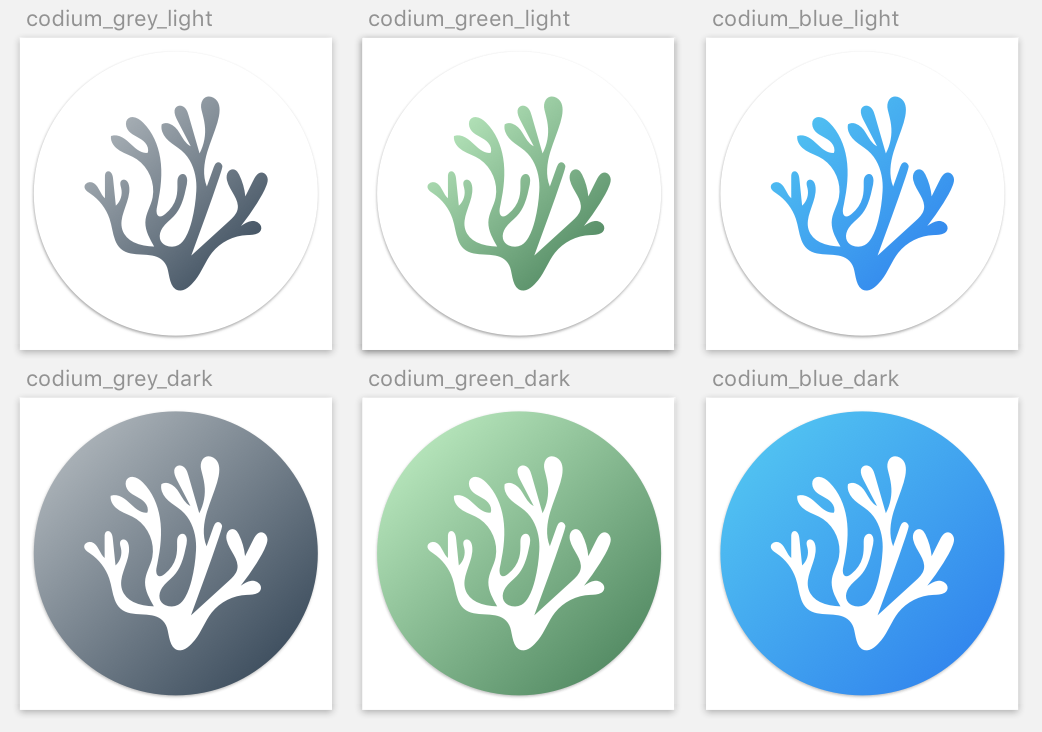
For anyone who'd like them, the full set of old icons originally proposed by @jorgeelalto and designed by @jaredreich which created a cohesive and elegant branding for vscodium way back in #4 are in the attached zip file.
dg01d
on 1 Sep 2020
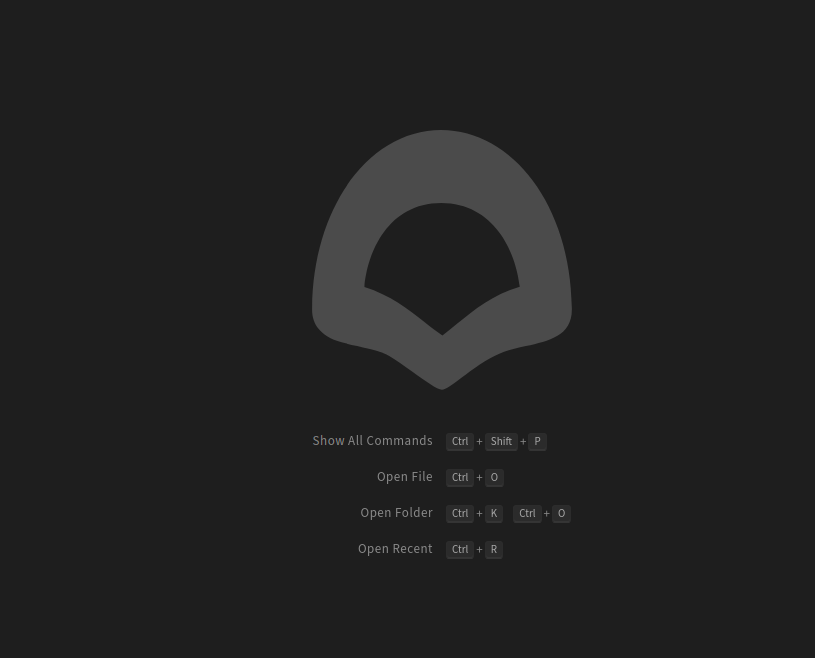
Hello, how do I replace the icon on the start page of VSCodium(see pic) with the old one?
 brch-cndy
on 1 Sep 2020
brch-cndy
on 1 Sep 2020
Hi @brch-cndy,
That appears to be handled in:
workbench/contrib/welcome/code-icon.svg
I don't know what system you're on (looks like linux?) but on macos this can be changed to the Codium icon by replacing the existing file in /Applications/VSCodium.app/Contents/Resources/app/out/vs/workbench/contrib/welcome/code-icon.svg with the attached file (it needs to be renamed to code-icon.svg)
EDIT: also needs to be changed in:-
/Applications/VSCodium.app/Contents/Resources/app/out/vs/workbench/contrib/update/browser/media
and
/Applications/VSCodium.app/Contents/Resources/app/out/vs/workbench/browser/parts/titlebar/media
EDIT2:
I'm terribly sorry, @brch-cndy, that doesn't appear to work, at least not in macos.
If you have more luck, please let me know.
dg01d
on 1 Sep 2020
No luck, unfortunately. So sad.
brch-cndy
on 1 Sep 2020
Old logo files are available in #4. I'm the original creator of them so if you need something else let me know and I may be able to dig up more related files.
I don't get why the logo got changed anyway, this felt pretty solved after #4.
 jaredreich
on 5 Sep 2020
jaredreich
on 5 Sep 2020
Just wanted to thank you, @jaredreich, the #4 icons are just beautiful and really convey the idea of a Codium.
I don't even know what the new one is supposed to be conveying, perhaps a lack of imagination.
dg01d
on 6 Sep 2020
@brch-cndy @dg01d The location for the opening logo is /usr/share/codium/resources/app/out/vs/workbench/browser/parts/editor/media/letterpress-dark.svg on Ubuntu but will give you a path hint for macos
 cas--
on 7 Sep 2020
cas--
on 7 Sep 2020

YES!!!
Thank you @cas-- similar location indeed /Applications/VSCoodium.app/Contents/Resources/app/out/vs/workbench/browser/parts/editor/media/
restored the old beautiful (& smaller, more professional) svgs and … it looks fabulous
dg01d
on 7 Sep 2020
For anyone else looking, this is the last release with the old icon: https://github.com/VSCodium/vscodium/releases/tag/1.47.2
I was able to use that release to fix the icons on my Mac (these instructions are for Mac only, you'll need to figure it out yourself on other platforms).
- Download the
.dmgfile from that release and unpack it. - There are 5 Svgs in
/Volumes/VSCodium/VSCodium.app/Contents/Resources/app/out/vs/workbench/browser/parts/editor/media, copy them to/Applications/VSCodium.app/Contents/Resources/app/out/vs/workbench/browser/parts/editor/media:
cp -f /Volumes/VSCodium/VSCodium.app/Contents/Resources/app/out/vs/workbench/browser/parts/editor/media/* /Applications/VSCodium.app/Contents/Resources/app/out/vs/workbench/browser/parts/editor/media/
- now to change the app icon itself, it's quickest to just use Finder.
- right-click the version 1.47.2 VSCodium app in
/Volumes/VSCodiumand click "Get info" - click the app icon in the info window, it should get a focus ring.
cmd-cto copy it. - Now go right-click on your current version of VSCodium in
/Applicationsand click "Get info" - click the app icon, then
cmd-vto paste the blue codium icon over the new one.
- right-click the version 1.47.2 VSCodium app in
- If you had VSCodium open, quit and reopen it. This should have fixed the finder/dock/app switcher icon, and also fixed the blank tab background icon.
Happy codi(um)ng!
If it weren't for the fiddly nature of app icons on macOS, I would have made a quick bash script to do this stuff for you. If anyone can see a way to reliably script changing the app icon, this could be turned into a pretty quick little script that can be run after installing a new version in the future.
 chadlavi
on 11 Sep 2020
chadlavi
on 11 Sep 2020
@chadlavi
You can skip steps 3 and 4 by copying the icons from the old version to the new, as described in the posts above. Just do a
cp -f /Volumes/VSCodium/VSCodium.app/Contents/Resources/*.icns /Applications/VSCodium.app/Contents/Resources/
This also restores the file type icons.
So in sum, to restore the old icon, those two lines should suffice:
cp -f /Volumes/VSCodium/VSCodium.app/Contents/Resources/app/out/vs/workbench/browser/parts/editor/media/* /Applications/VSCodium.app/Contents/Resources/app/out/vs/workbench/browser/parts/editor/media/
cp -f /Volumes/VSCodium/VSCodium.app/Contents/Resources/*.icns /Applications/VSCodium.app/Contents/Resources/
@maelcum thanks, maybe I am experiencing a Big Sur dev beta bug. Simply copying over the .icns didn't actually change the icon displayed in finder, the dock, or the app switcher for me.
chadlavi
on 11 Sep 2020
@maelcum thanks, maybe I am experiencing a Big Sur dev beta bug. Simply copying over the
.icnsdidn't actually change the icon displayed in finder, the dock, or the app switcher for me.
@chadlavi Works here on Catalina (Dock, App Switcher, Finder, even the background of an empty VSCodium session). Have no Big Sur to test. Sorry.
maelcum
on 11 Sep 2020
Also works on Mojave.
dg01d
on 11 Sep 2020
since @maelcum's solution works on stable macOS releases, here's a simple little repo that can be used to do the swap: https://github.com/chadlavi/vscodium-icon
chadlavi
on 11 Sep 2020
That is awesome @chadlavi.
Attached is a .zip file of all the #4 icons in icns format. You can use any one of these to replace vscodium-icon/icns/VSCodium.icns
I used the dark-green version of the old icon from the #4 icons, because its so pretty.
dg01d
on 11 Sep 2020
I wish one day before updating ui component, company would prompt a poll to user ask to vote for the main logo, then letting them choose which logo version they want to choose, it's so frustrating when you wake up to a day where something you've loved had been replaced by something that's not for your taste ...
 nicovrg
on 19 Nov 2020
nicovrg
on 19 Nov 2020
I wish one day before updating ui component, company would prompt a poll to user ask to vote for the main logo, then letting them choose which logo version they want to choose, it's so frustrating when you wake up to a day where something you've loved had been replaced by something that's not for your taste ...
- VS Codium is not a company.
- I don’t like the new logo either, so I replaced it by the old one, too.
- A single search in this repository using the _logo_ keyword brings you to https://github.com/VSCodium/vscodium/issues/491
 meduzen
on 19 Nov 2020
meduzen
on 19 Nov 2020
I wish one day before updating ui component, company would prompt a poll to user ask to vote for the main logo, then letting them choose which logo version they want to choose, it's so frustrating when you wake up to a day where something you've loved had been replaced by something that's not for your taste ...
- VS Codium is not a company.
- I don’t like the new logo either, so I replaced it by the old one, too.
- A single search in this repository using the _logo_ keyword brings you to #491
- Sorry you're 100% right, vscodium is not a company, that's why i use it btw, i was talking about apps in general
- I've replaced the logo, it's not a big deal, i just wish one day we dont need to bother with this and have the choice!
nicovrg
on 19 Nov 2020
PRs welcome if anyone can figure out a clean way to allow "post build" icon changes easily.
I'll be closing down this issue since we've reverted the logo back to the classic Codium one (should be in next release).
I will point out that there's a new vote to update the Codium logo for Big Sur in #591
To be involved with votes going forward, for now the best approach is to "watch" this repo. In the future we may be able to clobber VSCodium updates (such as links to open votes) onto the existing MS changelog screen that appears after updates.
stripedpajamas
on 30 Dec 2020
Related issues
 hypercube33
·
22Comments
hypercube33
·
22Comments
 in-in
·
20Comments
in-in
·
20Comments
 penyuan
·
26Comments
cristianovitorino
·
80Comments
penyuan
·
26Comments
cristianovitorino
·
80Comments
 jannik-mohemian
·
17Comments
jannik-mohemian
·
17Comments
Most helpful comment
Old logo for anyone else who comes here looking for it.