Vscodium: Command line extension install fails
Describe the bug
Installing extensions from the command line fails.
Please confirm that this problem is VSCodium-specific
- [x] This bug doesn't happen if I use Microsoft's Visual Studio Code. It only happens in VSCodium.
Please confirm that the issue/resolution isn't already documented
- [x] I checked the Docs page and my issue is not mentioned there.
To Reproduce
Steps to reproduce the behavior:
- install as described at https://vscodium.com/ for Ubuntu 18.04
- run in a terminal
codium --install-extension editorconfig.editorconfig
Installing extensions...
Cannot read property 'length' of null
Failed Installing Extensions: editorconfig.editorconfig
Expected behavior
Installing extensions...
Installing extension 'editorconfig.editorconfig' v0.15.1...
Extension 'editorconfig.editorconfig' v0.15.1 was successfully installed.
Desktop (please complete the following information):
- OS: Ubuntu 18.04
- Architecture: x86_64
- Version: 1.46.0
 cloos
cloos
All 9 comments
Same happens on codium-1.46.0-1591900444.el7.x86_64 on Fedora 32 x86_64 when trying to install ms-vscode.cpptools. Downgrade to codium-1.45.1-1589539729.el7.x86_64 fixed this.
 im-0
on 16 Jun 2020
im-0
on 16 Jun 2020
I'm having a similar issue. It doesn't tell me it failed, but it doesn't actually add the extension.
Even if it's present in my ~/.vscode/extensions folder, it's not loaded in VSCodium.
Downgrading to 1.45.1 fixed it for me.
 jeromegn
on 16 Jun 2020
jeromegn
on 16 Jun 2020
Seems to be related to https://github.com/VSCodium/vscodium/issues/421.
Workaround: https://github.com/VSCodium/vscodium/blob/master/DOCS.md#extensions-marketplace
im-0
on 17 Jun 2020
Probably related to the new store yes. However, even installing with a VSIX fails for me.
I'm specifically trying to install the rust-analyzer extension.
jeromegn
on 17 Jun 2020
Same issue on macOS Catalina. But I should mention installation within VSCodium very fast, like all extensions just disabled and built-in
 dalisoft
on 19 Jun 2020
dalisoft
on 19 Jun 2020
This workaround https://github.com/VSCodium/vscodium/issues/418#issuecomment-643664182 works for this issue too
 ps1dr3x
on 30 Jun 2020
ps1dr3x
on 30 Jun 2020
same here
➜  ~ vscodium --install-extension Shan.code-settings-sync
Installing extensions...
Cannot read property 'length' of null
In gui cant even find any extension with sync word:
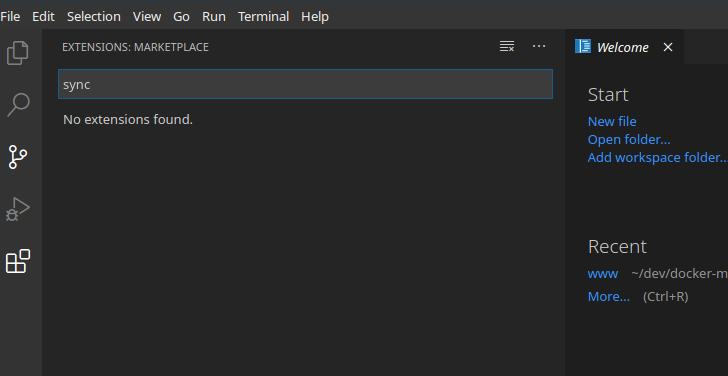
 gukandrew
on 10 Jul 2020
gukandrew
on 10 Jul 2020
I think this problem had the same cause as https://github.com/eclipse/openvsx/issues/143. It should work now, please verify.
 spoenemann
on 16 Jul 2020
spoenemann
on 16 Jul 2020
actually as I can see open-vsx.org does not have as many extensions as official repo marketplace.visualstudio.com has... I cant even find Settings Sync, SqlLite manager plugin etc...
gukandrew
on 18 Jul 2020
Related issues
 Shatur95
·
4Comments
Shatur95
·
4Comments
 nulldowntime
·
5Comments
nulldowntime
·
5Comments
 MatiasConTilde
·
4Comments
MatiasConTilde
·
4Comments
 jaredreich
·
7Comments
jaredreich
·
7Comments
 sdaitzman
·
3Comments
sdaitzman
·
3Comments
Most helpful comment
This workaround https://github.com/VSCodium/vscodium/issues/418#issuecomment-643664182 works for this issue too