Vscodium: 1.44.0 release even though there's no 1.44.0 tag on Github
Describe the bug
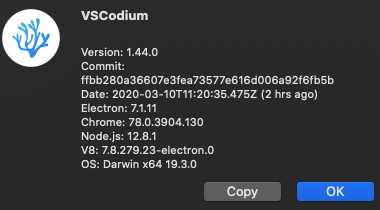
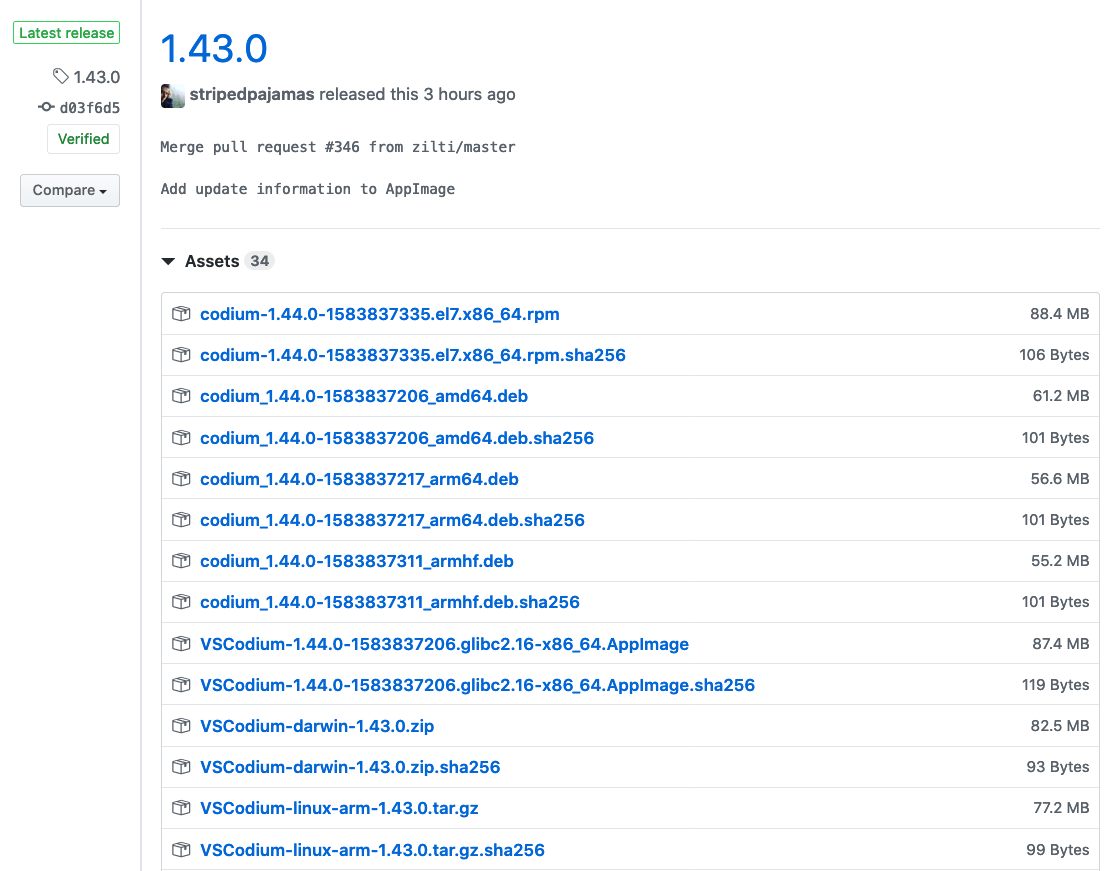
VSCodium updated itself to 1.44.0 even though the latest tag is 1.43.0. There are mixed versions of assets under 1.43.0 tag, both 1.43.0 and 1.44.0.
Please confirm that this problem is VSCodium-specific
Can't verify, I don't use Microsoft's Visual Studio Code.
Please confirm that the issue/resolution isn't already documented
- irrelevant, I think
To Reproduce
Steps to reproduce the behavior:
- Allow VSCodium to update itself as of now.
Expected behavior
Latest version matching the latest release on Github, 1.43.0.
Screenshots
Desktop (please complete the following information):
- OS: Mac OS
- Architecture: x64
- Version: good question
Additional context
n/a
 nulldowntime
All 5 comments
Is the latest release based on insiders? I got the insiders release notes
 GammaGames
on 10 Mar 2020
GammaGames
on 10 Mar 2020
I'm not sure what happened, but I think it's more a confusion on the vscode side of things -- I only see up to 1.43.0 tagged https://github.com/microsoft/vscode/tags
During our build, we checkout the latest tag and use that as our version. Maybe yesterday they had a 1.44.0 tag but have since deleted it? I'm not sure how we ended up in this mess. When they add the 1.44.0 tag we will rebuild and cut a "new" release.
@GammaGames AFAIK insiders releases aren't tagged, and we always check out the latest tag before building... so it _shouldn't_ be insiders unless something upstream is messed up.
Will close this and wait for something to happen upstream as I don't think there are any corrective actions we can take here that wouldn't result in problems with existing users.
 stripedpajamas
on 10 Mar 2020
stripedpajamas
on 10 Mar 2020
This was very confusing (release title and linux package is 1.43, but the version inside the about dialog and release notes were for 1.44).
When cutting a build may I suggest not using the latest tag automatically, but to have it hard coded in a file in this repo?
 hrj
on 11 Mar 2020
hrj
on 11 Mar 2020
This was probably due an upstream screw up: microsoft/vscode#92403. They force updated the 1.43.0 tag in their repo so everything should build fine now.
 tyrak
on 11 Mar 2020
tyrak
on 11 Mar 2020
However, this issue and #352 are both, IMHO, valid descriptions of an existing issue.
There are 1.44 and 1.43 assets shown on the release page. Version string in about dialog still shows 1.44.0.
Upstream seems to have gotten their act together with a "1.43.0" release. Version string seems correct in that about dialog.
 scottfurry
on 12 Mar 2020
scottfurry
on 12 Mar 2020
Related issues
 jannik-mohemian
·
17Comments
jannik-mohemian
·
17Comments
 cristianovitorino
·
80Comments
cristianovitorino
·
80Comments
 hypercube33
·
22Comments
hypercube33
·
22Comments
 in-in
·
20Comments
in-in
·
20Comments
 penyuan
·
26Comments
penyuan
·
26Comments
Most helpful comment
I'm not sure what happened, but I think it's more a confusion on the vscode side of things -- I only see up to 1.43.0 tagged https://github.com/microsoft/vscode/tags
During our build, we checkout the latest tag and use that as our version. Maybe yesterday they had a 1.44.0 tag but have since deleted it? I'm not sure how we ended up in this mess. When they add the 1.44.0 tag we will rebuild and cut a "new" release.
@GammaGames AFAIK insiders releases aren't tagged, and we always check out the latest tag before building... so it _shouldn't_ be insiders unless something upstream is messed up.
Will close this and wait for something to happen upstream as I don't think there are any corrective actions we can take here that wouldn't result in problems with existing users.