Vscodium: Trojan:Win32/Detplock reported by Windows Security
Describe the bug
Just updated to VSCodium 1.42.1. Upon opening greeted to Windows Defender Security telling me the file %VSCodium_Dir%\resourcesappnode_modules.asar.unpacked\spdlogbuildRelease\spdlog.node has a trojan in it.
Please confirm that this problem is VSCodium-specific
Not 100% on if VSCode has it or not, I don't use it on this particular computer.
Please confirm that the issue/resolution isn't already documented
- [x] I checked the Docs page and my issue is not mentioned there.
To Reproduce
Steps to reproduce the behavior:
- (Using portable version) Update from 1.42.0 via download of zip
- Open from scratch
- Greet Windows Security as it helpfully tells you that a Node module in the unpacked asar has a trojan.
Expected behavior
spdlog.node not having a trojan, or at least confirmation that is is a false positive.
Desktop (please complete the following information):
- OS: Windows 10 Home 1903
- Architecture x64
- Version 1.42.1
Additional context
Don't know if it's only the zip or if it's in the installer, or if spdlog itself was compromised. Also unable to do the mpcmdrun process outline on MS website to update definitions due to access denied error that I cannot resolve because I can't take ownership of mpcmdrun.exe to do so.
 apollolux
All 35 comments
I have the same problem today after updating. Hopefully the devs can inform us if there is a problem on their end or microsoft security is seeing a false positive.
 EricEon
on 16 Feb 2020
EricEon
on 16 Feb 2020
Same here
 ppoetsma
on 16 Feb 2020
ppoetsma
on 16 Feb 2020
I confirm the detection by Windows Security of a trojan with VSCodium.
No issue with Visual Studio Code.
 lanzorg
on 16 Feb 2020
lanzorg
on 16 Feb 2020
This file blocking causing extensions not working properly.
 festum
on 16 Feb 2020
festum
on 16 Feb 2020
Well that sounds bad! Based on the filepath, it would seem Defender doesn't like https://www.npmjs.com/package/spdlog but I'm not sure why or why Visual Studio Code would not be detected.
I would suppose that it doesn't help VSCodium's "score" that the Windows binaries aren't signed, and the VSCode ones are. That (besides the license / telemetry differences) is the only significant difference I can think of between the two apps.
To everyone in this thread experiencing the issue: is there a workaround or is the application completely unusable for you?
 stripedpajamas
on 17 Feb 2020
stripedpajamas
on 17 Feb 2020
Additionally, can an affected user provide their copy of resources\app\node_modules.asar.unpacked\spdlog\build\Release\spdlog.node so I can examine it? I will want to compare it with the non-Windows versions, as well as throw it at some other security scanners.
stripedpajamas
on 17 Feb 2020
I seem to have found a workaround: put the spdlog.node from the 1.42.0 zip in the spdlog folder and somehow it's working and not getting flagged by Windows Security! 7-zip is showing the 1.42.0 version as having a SHA-256 starting with 83B45F and the 1.42.1 version starting with BE3164. I don't know what the actual difference between the two files would be otherwise.
apollolux
on 17 Feb 2020
Here is a copy of the inconveniencing file. It was also detected by Windows Defender on my system.
 Zenohate
on 17 Feb 2020
Zenohate
on 17 Feb 2020
I seem to have found a workaround: put the spdlog.node from the 1.42.0 zip in the spdlog folder and somehow it's working and not getting flagged by Windows Security!
This workaround worked for me too. Thanks.
 ijmac3
on 17 Feb 2020
ijmac3
on 17 Feb 2020
I seem to have found a workaround: put the spdlog.node from the 1.42.0 zip in the spdlog folder and somehow it's working and not getting flagged by Windows Security! 7-zip is showing the 1.42.0 version as having a SHA-256 starting with 83B45F and the 1.42.1 version starting with BE3164. I don't know what the actual difference between the two files would be otherwise.
Works for me too ! Thx !
 LaBaude32
on 17 Feb 2020
LaBaude32
on 17 Feb 2020
I can confirm this bug.
Copy of spdlog.node from VSCodium 1.42.0 win x64 portable, not flagged as malicious by Windows Defender.
 kodx
on 17 Feb 2020
kodx
on 17 Feb 2020
Thank you all for your patience with this so far. Some updates/references:
spdlog.node file from 1.42.1 zip: https://www.virustotal.com/gui/file/be316480660f832c5d8d7d6a2d794708925323c39254a65e7b53e697893acbfe/detection
spdlog.node file from 1.42.0 zip: https://www.virustotal.com/gui/file/83b45f3855234ad7127f816df6cdeef18f6631317a39f4bfbd13ef85484dae59/detection
I don't see any significant changes in the vscode repo between 1.42.1 and 1.42.0: https://github.com/microsoft/vscode/compare/1.42.0%E2%80%A61.42.1
And no updates have landed in the actual spdlog repo since Nov: https://github.com/microsoft/node-spdlog/commits/master
Nothing out of the ordinary happened during the 1.42.1 win32 VSCodium build (not sure if this log is publicly accessible, hoping that it is): https://dev.azure.com/vscodium/ed707451-9762-44df-8afc-12fe5bf926e7/_apis/build/builds/612/logs/30
Build-time compilation of native node modules has always been a bit flaky, but I've never seen the produced files cause red-flags with security scanners. Native modules are different for OS/arch/node version combinations, and I do say that sometime in November, MS started using Node 12 (while VSCodium is still using Node 10): https://github.com/microsoft/vscode/commit/14c3b2e4865d32e8755fd2e71a42ca2a7d27d2e5#diff-cc8a2965e27fe75945ee81cba2157e0d. This would affect the produced spdlog.node file, but I still don't have an answer as to why a "malicious" spdlog.node file was produced.
Next steps:
- I
will be examininghave examined the system and user installs' spdlog.node file and they are both the same hash and therefore also seen as malicious - I
will sendhave sent up a PR to use Node 12 for our builds to better align with what MS is doing in their builds. I am confirming the produced spdlog.node files are not flagged as malicious before merging in.
stripedpajamas
on 17 Feb 2020
Here's the message I got from bitdefender, according to bitdefender it's Trojan.GenericKD.42592584 not sure if that helps at all but I thought I would post it here just in case. 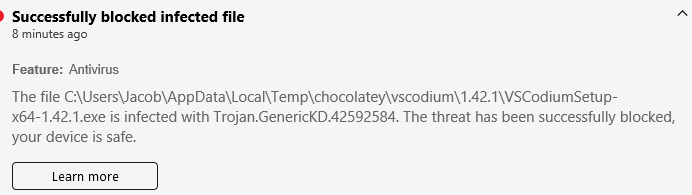
 JacobTravers
on 18 Feb 2020
JacobTravers
on 18 Feb 2020
I also got this while trying to download the 1.42.0 spdlog mentioned above:

JacobTravers
on 18 Feb 2020
I also got this while trying to download the 1.42.0 spdlog mentioned above:
Virustotal my archive with full path report:
https://www.virustotal.com/gui/file/f6a3e2c0ee51bdd2d3d13e2b24ec476ddfc4a5a93cc85e1bde64c4b68f90762e/detection
virustotal single file spdlog.node report:
https://www.virustotal.com/gui/file/83b45f3855234ad7127f816df6cdeef18f6631317a39f4bfbd13ef85484dae59/detection
My guess - file path is flagged, not the file itself.
kodx
on 18 Feb 2020
My guess - file path is flagged, not the file itself.
Any suggestions on a path forward if this is the case ?
stripedpajamas
on 18 Feb 2020
For what it's worth, I personally believe it's been false positives all along likely due to one or more recent definitions/signatures updates to Windows Security and/or various antivirus apps that may coincidentally have similar release timing.
apollolux
on 18 Feb 2020
@apollolux I am assuming the same, since there is nothing malicious in spdlog.node etc.
Suggested in #174 was that signing the code would give us better chances of not being flagged by AV, but I haven't had time to implement that yet.
stripedpajamas
on 18 Feb 2020
I've confirmed that freshly generated spdlog.node (with Node 12, as a part of #335) is still flagged: https://www.virustotal.com/gui/file/3f7d1ead6d98ad5366b454fff494a70568dfd34bc669c10b991c12c46627e1b7/detection
I will be investigating code signing after build to see what difference that will make. Other suggestions welcome; it looks bad to be flagged by antivirus 😞
stripedpajamas
on 19 Feb 2020
I will be investigating code signing after build to see what difference that will make. Other suggestions welcome; it looks bad to be flagged by antivirus 😞
Another option would be contacting an AV companies to remove this path from bases, but it would be a lot of work and may be useless(they can just reject any requests).
Maybe contact another open source developers to ask them, how they fix similar problems if have any?
kodx
on 19 Feb 2020
That's very scary stuff. I chose to delete the file and after a restart, my Project Manager extension stopped working.
I wanted to support this project but first day I get virus alarm and important addons stop working? Sorry, I need this for work. I'm back to VSC.
 Therealskythe
on 19 Feb 2020
Therealskythe
on 19 Feb 2020
Totally understandable, @Therealskythe . Definitely deleting the false-positive file will result in degraded functionality, so that makes sense.
stripedpajamas
on 19 Feb 2020
Microsoft reacts quite quickly to reports of false positives, so reposting it is definitely the way to go!
 Rondom
on 20 Feb 2020
Rondom
on 20 Feb 2020
@Rondom do you know the process to report false positives for Windows Defender? I'm a mac user so have very little context here.
stripedpajamas
on 20 Feb 2020
Here is something interesting. I deleted it and when I downloaded the zip file Windows Defender caught it. I marked it as accepted and then restored the UserSetup install. Since then it hasn't flagged the installed VSCodium User Setup the second time around yet.
 TroySchmidt
on 20 Feb 2020
TroySchmidt
on 20 Feb 2020
Yeah I had a similar experience on a test machine, after "allowing" and redownloading, the zip, user, and system setups behaved properly and Defender didn't flag anything.
Still I am curious if there is an option to report the false positive more broadly.
stripedpajamas
on 20 Feb 2020
Uploaded the file to Microsoft and waiting for response:

File Hash (SHA256): BE316480660F832C5D8D7D6A2D794708925323C39254A65E7B53E697893ACBFE
 super0xbad1dea
on 20 Feb 2020
super0xbad1dea
on 20 Feb 2020
Feedback from Microsoft
Analyst comments:
We have removed the detection. Please follow the steps below to clear cached detection and obtain the latest malware definitions.
- Open command prompt as administrator and change directory to c:\Program Files\Windows Defender
- Run “MpCmdRun.exe -removedefinitions -dynamicsignatures”
- Run "MpCmdRun.exe -SignatureUpdate"
Alternatively, the latest definition is available for download here: https://www.microsoft.com/en-us/wdsi/definitions
Thank you for contacting Microsoft.
super0xbad1dea
on 20 Feb 2020
I'm also having similar issues with bitdefender, so I've submitted a link to VSCodiumSetup-x64-1.42.1.exe as false positive to them. Hopefully that fixes it.
Update: automated reply here
Dear Arran Short,

Thank you for your file submission.

The file has been automatically sent to our laboratories for specialized analysis. If the file is indeed a False Positive, the detection will be removed in the next 72 hours and the modification will be implemented in the product through a Signature Update. Please keep your Bitdefender up-to-date.

Please be informed that this is an automated process. Reply to this email if you have any other issues regarding your Bitdefender product and one of our engineers will take over.

Have a nice day!
 sub6as
on 20 Feb 2020
sub6as
on 20 Feb 2020
Thank you both @sub6as @super0xbad1dea for reporting.
I don't think there is anything more on this issue we can do besides implement signing the build artifacts which is covered by #174
If there are no objections, I'll close this issue out and focus on setting up the code signing.
stripedpajamas
on 20 Feb 2020
I reported in the very first post that running the MpCmdRun.exe update procedures DO NOT WORK if you can't take ownership of the file. Manual definitions update is NOT a guarantee.
apollolux
on 21 Feb 2020
@apollolux wouldn't Windows Defender receive the updated definitions when it next checks for updates with MS?
stripedpajamas
on 21 Feb 2020
I would assume so, unless it does some aggressive caching or doesn't update often. Unfortunately that means that those of us who can't perform the manual update have to wait for Defender to trigger it or find a way to trigger it within the Defender app.
apollolux
on 22 Feb 2020
Well, after updating the definitions for windows security and reinstalling version 1.42.1, no more notifications identifying spdlog.node as a trojan.
EricEon
on 22 Feb 2020
@Delli in #345 you mentioned possible post-production steps; can you elaborate?
stripedpajamas
on 27 Feb 2020
Related issues
 cdata
·
88Comments
cdata
·
88Comments
 amankkg
·
24Comments
amankkg
·
24Comments
 JayAndCatchFire
·
18Comments
JayAndCatchFire
·
18Comments
 daniel-molina
·
78Comments
daniel-molina
·
78Comments
 in-in
·
20Comments
in-in
·
20Comments
Most helpful comment
Thank you all for your patience with this so far. Some updates/references:
spdlog.node file from 1.42.1 zip: https://www.virustotal.com/gui/file/be316480660f832c5d8d7d6a2d794708925323c39254a65e7b53e697893acbfe/detection
spdlog.node file from 1.42.0 zip: https://www.virustotal.com/gui/file/83b45f3855234ad7127f816df6cdeef18f6631317a39f4bfbd13ef85484dae59/detection
I don't see any significant changes in the vscode repo between 1.42.1 and 1.42.0: https://github.com/microsoft/vscode/compare/1.42.0%E2%80%A61.42.1
And no updates have landed in the actual spdlog repo since Nov: https://github.com/microsoft/node-spdlog/commits/master
Nothing out of the ordinary happened during the 1.42.1 win32 VSCodium build (not sure if this log is publicly accessible, hoping that it is): https://dev.azure.com/vscodium/ed707451-9762-44df-8afc-12fe5bf926e7/_apis/build/builds/612/logs/30
Build-time compilation of native node modules has always been a bit flaky, but I've never seen the produced files cause red-flags with security scanners. Native modules are different for OS/arch/node version combinations, and I do say that sometime in November, MS started using Node 12 (while VSCodium is still using Node 10): https://github.com/microsoft/vscode/commit/14c3b2e4865d32e8755fd2e71a42ca2a7d27d2e5#diff-cc8a2965e27fe75945ee81cba2157e0d. This would affect the produced spdlog.node file, but I still don't have an answer as to why a "malicious" spdlog.node file was produced.
Next steps:
will be examininghave examined the system and user installs' spdlog.node file and they are both the same hash and therefore also seen as maliciouswill sendhave sent up a PR to use Node 12 for our builds to better align with what MS is doing in their builds. I am confirming the produced spdlog.node files are not flagged as malicious before merging in.