Vscodium: Live Share's sign in does not work
Describe the bug
When signing in either through Microsoft or GitHub with Live Share, the connection process does not go through.
From Microsoft: AADSTS50011: The reply URL specified in the request does not match the reply URLs configured for the application: 'a3037261-2c94-4a2e-b53f-090f6cdd712a'.
From GitHub: Unsupported redirection domain.
Please confirm that this problem is VSCodium-specific
- [X] This bug doesn't happen if I use Microsoft's Visual Studio Code. It only happens in VSCodium.
Please confirm that the issue/resolution isn't already documented
- [X] I checked the Docs page and my issue is not mentioned there.
To Reproduce
Steps to reproduce the behavior:
- Go to 'Live Share' tab
- Click on 'Start Collaboration Session'
- Click on 'Sign in with Microsoft'
- Sign in with the browser
- See error in the browser (VSCodium hangs on 'signing in...')
Expected behavior
I expected to sign in and use Live Share.
Screenshots

Desktop (please complete the following information):
- OS: ArchLinux
- Architecture: Linux laptop 5.4.15-arch1-1 #1 SMP PREEMPT Sun, 26 Jan 2020 09:48:50 +0000 x86_64 GNU/Linux
- Version: 1.41.1
Additional context
N/A
 lodi-g
All 13 comments
Temporary workaround:
Copy the link from VSCodium login, replace vscodium: with vscode:
If you still have a redirect error, copy the user code from the address bar and use it with the sign in with user code option (via Alt+P) on vscodium
 forward2k
on 3 Feb 2020
forward2k
on 3 Feb 2020
@lodi-g I think @forward2k 's temporary workaround is as good as we can get here -- since the extension/website assumes a "vscode:" protocol, manual intervention is needed to tell it about VSCodium. Will close this out for now.
 stripedpajamas
on 20 Feb 2020
stripedpajamas
on 20 Feb 2020
Hi this doesn't seem to work for me, nor am I unable to find the option where I can put in the user code. Is it possible to elaborate?
 hoshsadiq
on 27 Apr 2020
hoshsadiq
on 27 Apr 2020
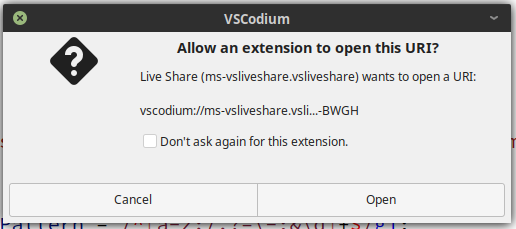
So just to elaborate on my part, when I change to vscodium: with vscode:, it asks for xdg-open to launch VSCodium, which I allow, but then allows as OP mentioned, it stays on Signing In.... For some reason it doesn't seem to receive the call from the browser.
hoshsadiq
on 27 Apr 2020
So to add more, I'm able to get VSCodium to bring up below screen, but still nothing.
hoshsadiq
on 27 Apr 2020
So just to elaborate on my part, when I change to
vscodium:withvscode:, it asks forxdg-opento launch VSCodium, which I allow, but then allows as OP mentioned, it stays onSigning In.... For some reason it doesn't seem to receive the call from the browser.
same here on Mac OS X 10.13

 purifyyourhome
on 3 May 2020
purifyyourhome
on 3 May 2020
@stripedpajamas could we please reopen this and possibly find a solution?
hoshsadiq
on 18 May 2020
Try logging in with your user code
Step 1: Go to this URL
Step 2: Login with microsoft account and copy the code.
Step 3: Open command palette in VSCodium and type _user code_. In the popup box, just enter the code.
This sould work in most cases
 Vrishtrix
on 5 Jun 2020
Vrishtrix
on 5 Jun 2020
One additional step to the comment from @Vrishtrix.
To copy the code: click first on "Having trouble? Click here for user code directions",
(I was actually copying it from the url 🤦 )
The whole instructions are in: https://docs.microsoft.com/en-us/visualstudio/liveshare/use/vscode#sign-in-using-a-user-code
 nicosierra
on 29 Jul 2020
nicosierra
on 29 Jul 2020
reference-link for a somedayTM own remote option: #266
 GitMensch
on 6 Nov 2020
GitMensch
on 6 Nov 2020
Anyone got a clue about github login? All the comments here assume microsoft login from what I can tell.
 bendem
on 1 Dec 2020
bendem
on 1 Dec 2020
Alright, workaround provided in https://github.com/MicrosoftDocs/live-share/issues/3218 works:
- go to https://insiders.liveshare.vsengsaas.visualstudio.com/auth/login and sign in with github
- click the user code link and copy the user code
- use the code in vscodium under the command
Live Share: Sign In With User Code
bendem
on 1 Dec 2020
That workaround is listed here already: https://github.com/VSCodium/vscodium/issues/320#issuecomment-639345453 :-)
GitMensch
on 1 Dec 2020
Related issues
 JayAndCatchFire
·
18Comments
JayAndCatchFire
·
18Comments
 jannik-mohemian
·
17Comments
jannik-mohemian
·
17Comments
 cdata
·
88Comments
cdata
·
88Comments
 hypercube33
·
22Comments
hypercube33
·
22Comments
 linsui
·
20Comments
linsui
·
20Comments
Most helpful comment
Try logging in with your user code
Step 1: Go to this URL
Step 2: Login with microsoft account and copy the code.
Step 3: Open command palette in VSCodium and type _user code_. In the popup box, just enter the code.
This sould work in most cases