Vscode: SCM: Setting to render the repository row in single repo view
- VSCode Version: 1.47.0
- OS Version: Windows 10v2004b19041.329
Steps to Reproduce:
- open any repository
Expected: in SCM sidebar name of repository and its current status
Actual: just input field for commit and "Changes" list
Does this issue occur when all extensions are disabled?: Yes
 SailorMax
All 9 comments
 yhatt
on 10 Jul 2020
yhatt
on 10 Jul 2020
This option was requested, because of user focus, when he fill commit description, on top part of window. Look at bottom part of window in this moment is not comfortably - #38785
SailorMax
on 10 Jul 2020
Actually this removal made confusion also for me. User should change the direction of moving eyes to operate sync button, left or bottom, by depending on the number of opening repositories.
Even if opening a single repository, having an option to show the new source control tree view with the same look as opening multiple repositories may be great.
yhatt
on 10 Jul 2020
I also believe "scm.alwaysShowProviders" should be brought back due do User Usability
 LeonnardoVerol
on 10 Jul 2020
LeonnardoVerol
on 10 Jul 2020
We will not bring back the providers view, since it provides no extra information.
Even if opening a single repository, having an option to show the new source control tree view with the same look as opening multiple repositories may be great.
I like this idea. Let's add a setting to simply render the repository in the tree. We can even do some search alias so people find this setting when they search for alwaysShowProviders
 joaomoreno
on 12 Jul 2020
joaomoreno
on 12 Jul 2020
@joaomoreno This feature was broken by removing "scm.alwaysShowProviders" in latest build. Can you add this "feature-request" to next (july) build plan? To do not wait restoration too long...
thank you.
SailorMax
on 13 Jul 2020
It's already assigned to the July milestone.
joaomoreno
on 13 Jul 2020
When you say "We will not bring back the providers view, since it provides no extra information" is this only because the information is surfaced at the bottom of VS Code? If so I do understand that thinking but it's much more helpful to have it at the top where you're actually looking while handling commits / changes etc.
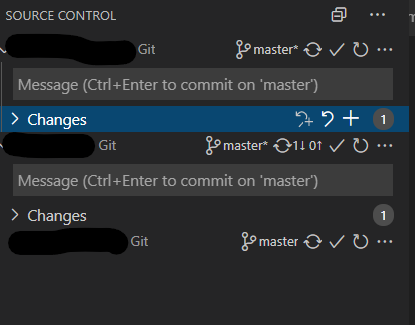
Also, as others have suggested, it's pretty jarring when jumping between two projects to have it suddenly disappear. Take this example:
Multiple repo project (repo names redacted):
Single rep project:
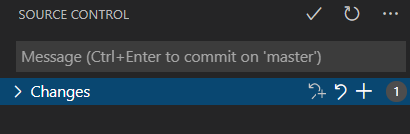
I'm less bothered about the repo name (since there's only one and I usually know which project I'm editing!) but the sync button showing the number of changes is very useful.
 bbceg
on 28 Jul 2020
bbceg
on 28 Jul 2020
Setting name: scm.alwaysShowRepositories
joaomoreno
on 3 Aug 2020
Related issues
 jsftw86
·
361Comments
jsftw86
·
361Comments
 stoffeastrom
·
380Comments
stoffeastrom
·
380Comments
 mariusa
·
219Comments
mariusa
·
219Comments
 Tyriar
·
200Comments
Tyriar
·
200Comments
 Brakkar
·
364Comments
Brakkar
·
364Comments
Most helpful comment
I also believe "scm.alwaysShowProviders" should be brought back due do User Usability