Vscode: Source control showing nothing
source control showing nothing after the latest update (September 2019 version 1.39)
 alvin30595
All 40 comments
It is the same here. I maintain the clearcase scm plugin, but my SourceControlResourceGroup isn't shown in the scm viewer. There is no exception at first glance. Is there anything new to do?
 fr43nk
on 10 Oct 2019
fr43nk
on 10 Oct 2019
same problem with the TFVC extension
git projects seems to work
 admir86
on 10 Oct 2019
admir86
on 10 Oct 2019
Can confirm TFVC showing the source control as blank for me as well.
Running
MacOs: 10.14.6
VSCode: 1.39.0
Azure Repos: 1.149.2
 zatchgordon
on 10 Oct 2019
zatchgordon
on 10 Oct 2019
Same issue with Azure Repos, blank screen. Pending changes number on source control icon is showing correctly however.
 funkhu
on 10 Oct 2019
funkhu
on 10 Oct 2019
Just upgraded VSCode, I am also experiencing this issue. It correctly displays the number of files with pending changes but nothing is being displayed regardless if its tree or list view.
Running
OS: Windows_NT x64 10.0.17763
VSCode: 1.39.0
Source Control: SVN
 roldeguz
on 10 Oct 2019
roldeguz
on 10 Oct 2019
Mine is showing the same thing. It will show changes the first time but eventually it all disappears and any new files will never show. My changelists are shown but anything outside a changelist is empty.
 CoreyBlair
on 10 Oct 2019
CoreyBlair
on 10 Oct 2019
Not good, sorry for the breakage everyone! A fix is coming asap.
@alvin30595 @CoreyBlair Which SCM provider are you using?
@roldeguz I can't repro this with the SVN SCM provider, seems to work for me.
I'll give TFVC a try.
 joaomoreno
on 10 Oct 2019
joaomoreno
on 10 Oct 2019
Never mind, just reproduced it with SVN.
joaomoreno
on 10 Oct 2019
The issue here is that these SCM providers provide folders as resources, which breaks the tree rendering. Unfortunately there's no better fix but to block the tree usage from the API and only allow Git for now. I'll fix this in master and create a candidate PR for a recovery release asap.
Too bad this wasn't caught in our insider release. :cry:
Until the recovery build is released, there is no better workaround than to use 1.38, here are the links:
- Windows
- Windows 32 bit
- macOS (don't forget to disable updates, as this will auto update itself)
- Linux
joaomoreno
on 10 Oct 2019
Thanks for the update @joaomoreno
I already downgraded to 1.38 and will be monitoring this for future announcements.
roldeguz
on 10 Oct 2019
@joaomoreno Does that mean that tree view will be available for git only (in 1.39.2 or in future releases too?)? Can there be any workaround e.g. like . file?
 Yanpas
on 11 Oct 2019
Yanpas
on 11 Oct 2019
We discussed in the stand-up and we must take it.
 alexdima
on 11 Oct 2019
alexdima
on 11 Oct 2019
Verification:
- Install SVN and the SVN extension
- Run
svn co https://svn.apache.org/repos/asf/subversion/site/staging/docs/release-notes/to checkout that repository - Open the
release-notesfolder in VS Code - Make some changes
The changes should appear fine in the SCM view and there should not be a button to toggle to tree view.
joaomoreno
on 15 Oct 2019
Looks like this issue is back in Nightly be68a4e14c28cc81cdf422739af23123b3c91fd2
 timdang
on 16 Oct 2019
timdang
on 16 Oct 2019
Upgraded to 1.39.2 and can confirm that its working for me now.
roldeguz
on 17 Oct 2019
@joaomoreno Looks like this is broken again in the newest Insiders 5aec74ad3b55bb9463e717ec950e665288accd0f
timdang
on 18 Oct 2019
@timdang What do you mean? What are the steps to reproduce?
joaomoreno
on 21 Oct 2019
@joaomoreno The issue went away for a few builds after your commit (#82275), but then came back a few days later after a few updates to the insiders branch.
Source Control panel is once again blank.
Version: 1.40.0-insider
Commit: 82ca6ba87f450245f665ab7a5f3a686e2cd00045
Date: 2019-10-21T05:39:31.415Z
Electron: 6.0.12
Chrome: 76.0.3809.146
Node.js: 12.4.0
V8: 7.6.303.31-electron.0
OS: Darwin x64 19.0.0
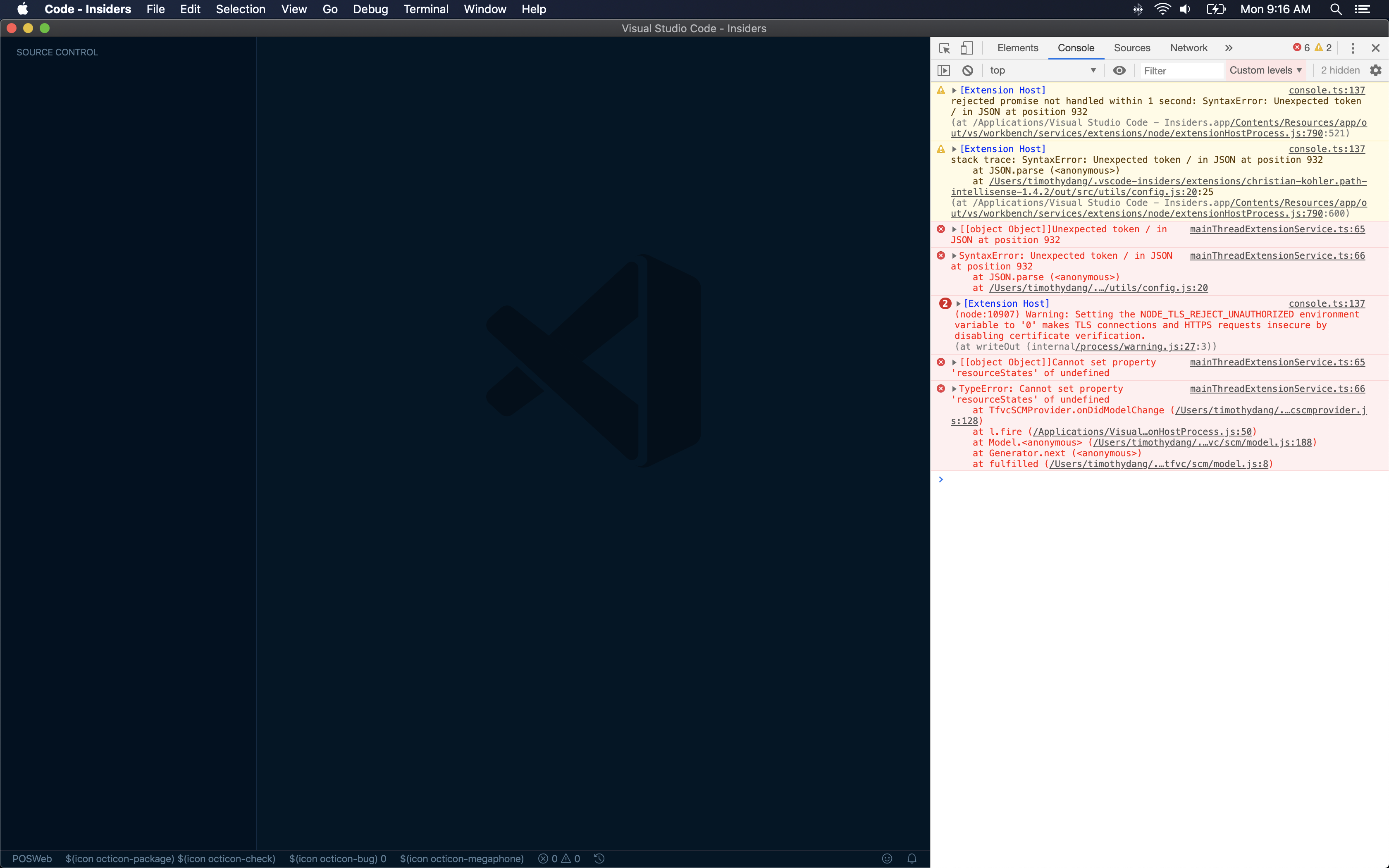
Might be specific to this particular SCM extension?
-1571674770228.log
timdang
on 21 Oct 2019
@timdang Yes that seems unrelated to our changes, but specific to that extension.
I can't understand from the screenshot whether the whole VS Code UI breaks down.
joaomoreno
on 22 Oct 2019
I updated to 1.39.2, but using a git repo I still don't see the git options when making a change (also checked 1.38.1 to see that it is working correctly there).
Edit: after another restart it does work in 1.39.2.
Version: 1.39.2 (system setup)
Commit: 6ab598523be7a800d7f3eb4d92d7ab9a66069390
Date: 2019-10-15T15:35:18.241Z
Electron: 4.2.10
Chrome: 69.0.3497.128
Node.js: 10.11.0
V8: 6.9.427.31-electron.0
OS: Windows_NT x64 10.0.17134
 ar-jan
on 22 Oct 2019
ar-jan
on 22 Oct 2019
@joaomoreno No. Not the whole UI. Source Control Panel is blank again, just like it was due to this issue.
timdang
on 22 Oct 2019
Hmm, I had the same issue as shown in @timdang's image on the left - the source control panel was blank and didn't show anything. For me the fix was as simple as right clicking on the panel. This brought up a context menu, in which I could select my repository. Now it seems to be back to normal again.
Might not be a fix for everyone's problem, but could be worth a try :-).
 donalffons
on 23 Oct 2019
donalffons
on 23 Oct 2019
@timdang Can you check @donalffons suggestion?
Also can you open exactly the same repository in our latest stable 1.39.2? Does the issue reproduce there?
joaomoreno
on 23 Oct 2019
@joaomoreno Per @donalffons - Contextual menu only shows:
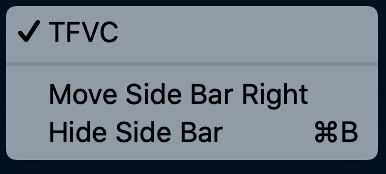
The rest of the Extension is working (albeit the icons are broken). The status bar menu at the bottom still links to the repo, gives me build status, links to work items.
Same repository is open in 1.39.2 stable, which works fine. As I previously mentioned, as soon as you committed the last fix, Insiders was working for me. Then, a few days later, (after some other changes I guess), Insiders is not working again.
Do you know if there was any changes to when onDidModelChange gets called on these types of extensions? Cause that's when the extension throws an error in the console.
timdang
on 23 Oct 2019
@timdang I'm having an incredibly hard time getting a local workspace in TFS. I have an Azure DevOps account. I have Java. I have TEE. I can't create a local workspace. How did you create yours?
joaomoreno
on 24 Oct 2019
I set up the workspace using the command line following these instructions:
https://docs.microsoft.com/en-us/visualstudio/mac/tf-version-control
timdang
on 24 Oct 2019
‘tf workspace -new WhateverIWantToCallIt...`
timdang
on 24 Oct 2019
I couldn't get it to work. So I've been setting this up on Windows for 2 hours and now I hit this:
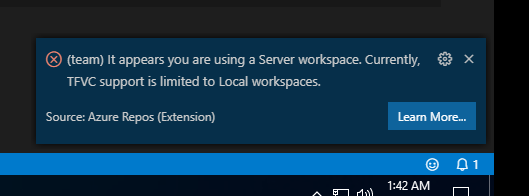
I am sure I'm using a local workspace. Argh...
joaomoreno
on 24 Oct 2019
@timdang I gave up trying to reproduce this. I decided to simply read the source. The error you show in the screenshot seems unrelated to our SCM changes. It shows a real issue they have in their sources: there is no guarantee that this won't be undefined when onDidModelChange fires. I've given them a PR: https://github.com/microsoft/azure-repos-vscode/issues/586
I don't think this will fix what you're seeing though...
joaomoreno
on 24 Oct 2019
@joaomoreno I appreciate all your efforts. Guess I'll try to play around with it more and see what I can figure out.
Tried your PR locally, and you're right - it doesn't fix the blank panel issue for me. Thank you so much anyway!
timdang
on 24 Oct 2019
@joaomoreno This article helped me out setting up TF
https://gist.github.com/counterlogik/8191caf05ee119b93073c6dd14c0c7fa
Edit: Couple side notes:
1) I did use homebrew to install tee-clc brew install tee-clc as well as followed the instructions from the link.
2) The biggest hurdle for me was realizing you need to downgrade java to a certain version. This super stinks because tee-clc isn't supported anymore so it may never reach a future java version
Last edit: Finally, and this didn't happen to me before so it my not happen to you, now when I start ups vsCode I get a message saying Welcome to version 1.149.2 of the Azure Repos extension! and in order to get the Azure Repos extension to work, I need to click the "Learn More..." button or else it will never initiate for that session.
zatchgordon
on 25 Oct 2019
Thanks for that link @zatchgordon. I was stuck in the correct tf workfold command syntax and was able to pull through thanks to that link. I can now reproduce the issue! Looking a bit more into it now.
joaomoreno
on 28 Oct 2019
Moving discussion to https://github.com/microsoft/vscode/issues/83440
joaomoreno
on 28 Oct 2019
I know this issue is closed, but I am still experiencing it with VSCode version 1.39.2 and Git repositories: the "Source Control" pane is empty with no obvious error logging in Output.
I found that I could reliably fix the problem by unsetting "scm.alwaysShowProviders": true or by explicitly setting it to false.
 jmurty
on 29 Oct 2019
jmurty
on 29 Oct 2019
I, too, am still experiencing this on 1.39.2. I'm not sure what the change was, but it seems to have to do with watching for changes because I can hit the refresh icon in the git panel and the changes will be picked up.
 smarth55
on 30 Oct 2019
smarth55
on 30 Oct 2019
@jmurty @smarth55 Can you reproduce this in the insider release?
joaomoreno
on 30 Oct 2019
Hi @joaomoreno I could not reproduce this in the insider release, the source control panel worked fine with or without the scm.alwaysShowProviders setting. Insider release details:
Version: 1.40.0-insider
Commit: 93ee2fc3121b7f66ddf568c051f3bfff7db8d618
Date: 2019-10-31T05:39:25.980Z
I double-checked version 1.39.2 to make sure I wasn't misreporting and the issue is still there, including when I reload the app with all extensions disabled. I did notice this error notification when the issue occurred in my 1.39.2 version, which I had missed previously:

Clicking on the notification did nothing, but it only appeared when the SCM panel failed to load correctly.
jmurty
on 31 Oct 2019
Just encountered this issue too. One minute it was working, the next it wasn't. "scm.alwaysShowProviders": true seems to work. I'm not getting any errors either.
Version: 1.40.1
Commit: 8795a9889db74563ddd43eb0a897a2384129a619
Date: 2019-11-13T16:47:44.719Z
Electron: 6.1.2
Chrome: 76.0.3809.146
Node.js: 12.4.0
V8: 7.6.303.31-electron.0
OS: Darwin x64 18.7.0
 traed
on 20 Nov 2019
traed
on 20 Nov 2019
I just faced this issue as well. Toggling scm.alwaysShowProviders on and off again fixed the problem for me.
Version: 1.40.1
Commit: 8795a9889db74563ddd43eb0a897a2384129a619
Date: 2019-11-13T16:47:44.719Z
Electron: 6.1.2
Chrome: 76.0.3809.146
Node.js: 12.4.0
V8: 7.6.303.31-electron.0
OS: Darwin x64 19.0.0
 gnbaron
on 20 Nov 2019
gnbaron
on 20 Nov 2019
I just faced this issue as well. Toggling
scm.alwaysShowProviderson and off again fixed the problem for me.Version: 1.40.1
Commit: 8795a98
Date: 2019-11-13T16:47:44.719Z
Electron: 6.1.2
Chrome: 76.0.3809.146
Node.js: 12.4.0
V8: 7.6.303.31-electron.0
OS: Darwin x64 19.0.0
Thanks so much, works for me too.
 bradfox2
on 20 Nov 2019
bradfox2
on 20 Nov 2019
Related issues
 Tyriar
·
187Comments
Tyriar
·
187Comments
 Tekbr
·
191Comments
Tekbr
·
191Comments
 ozsay
·
247Comments
ozsay
·
247Comments
 ghost
·
234Comments
ghost
·
234Comments
 hsdk123
·
263Comments
hsdk123
·
263Comments
Most helpful comment
I just faced this issue as well. Toggling
scm.alwaysShowProviderson and off again fixed the problem for me.