Vscode: intellisense become very slow using 1.24.1
Issue Type: Performance Issue
When I upgrade to v1.24.1, intellisense become very slow and code syntax highlights are also slow than previous version
VS Code version: Code 1.24.1 (24f62626b222e9a8313213fb64b10d741a326288, 2018-06-13T17:41:50.128Z)
OS version: Darwin x64 17.4.0
System Info
|Item|Value|
|---|---|
|CPUs|Intel(R) Core(TM) i5-5250U CPU @ 1.60GHz (4 x 1600)|
|GPU Status|2d_canvas: enabled
flash_3d: enabled
flash_stage3d: enabled
flash_stage3d_baseline: enabled
gpu_compositing: enabled
multiple_raster_threads: enabled_on
native_gpu_memory_buffers: enabled
rasterization: enabled
video_decode: enabled
video_encode: enabled
vpx_decode: enabled
webgl: enabled
webgl2: enabled|
|Load (avg)|3, 3, 3|
|Memory (System)|8.00GB (0.30GB free)|
|Process Argv|/Applications/Visual Studio Code.app/Contents/MacOS/Electron|
|Screen Reader|no|
|VM|0%|
Process Info
CPU %   Mem MB     PID  Process
   13      123     869  code main
    0      106     871     gpu-process
    0       74     873     shared-process
    0      369    6404     window (SyncFlowRepo.jsx — just-webui)
    0       82    6407       extensionHost
   95      311    6411         electron_node electronForkStart.js tsserver.js
    0       49    6425           electron_node typingsInstaller.js tsserver.js typesMap.js
    0       41    6408       watcherService
    1       74    6588     shared-process
    0        0    6591     /bin/ps -ax -o pid=,ppid=,pcpu=,pmem=,command=
    0        0    6592     /bin/ps -ax -o pid=,ppid=,pcpu=,pmem=,command=
Workspace Info
|  Window (SyncFlowRepo.jsx — just-webui)
|    Folder (just-webui): 413 files
|      File types: js(117) scss(73) jsx(49) vm(38) html(26) json(25) css(15)
|                  md(13) tpl(8) woff(6)
|      Conf files: package.json(12) webpack.config.js(1);
Extensions (4)
Extension|Author (truncated)|Version
---|---|---
EditorConfig|Edi|0.12.4
hjson|lak|0.3.0
vscode-language-pack-zh-hans|MS-|1.24.3
js-jsx-snippets|sky|0.0.9
 yibn2008
All 15 comments
(Experimental duplicate detection)
Thanks for submitting this issue. Please also check if it is already covered by an existing one, like:
![vscodebot[bot] picture](https://avatars2.githubusercontent.com/in/2406?v=4&s=40) vscodebot[bot]
on 14 Jun 2018
vscodebot[bot]
on 14 Jun 2018
I've seen the same issue. It can be slow, but more often it just doesn't work. I'm working with Javascript (a mix of ES6/ES7/React/Node, no Typescript unless it's hidden somewhere deep in node_modules).
Navigation broke at the same time, and feels closely related. Command-clicking variables and functions, even defined in the same file, often doesn't work. If I right-click and Go to Definition (or press F12), I get No definition found. When it does work, I'll often get a prompt to choose among multiple links which all go to the same definition:
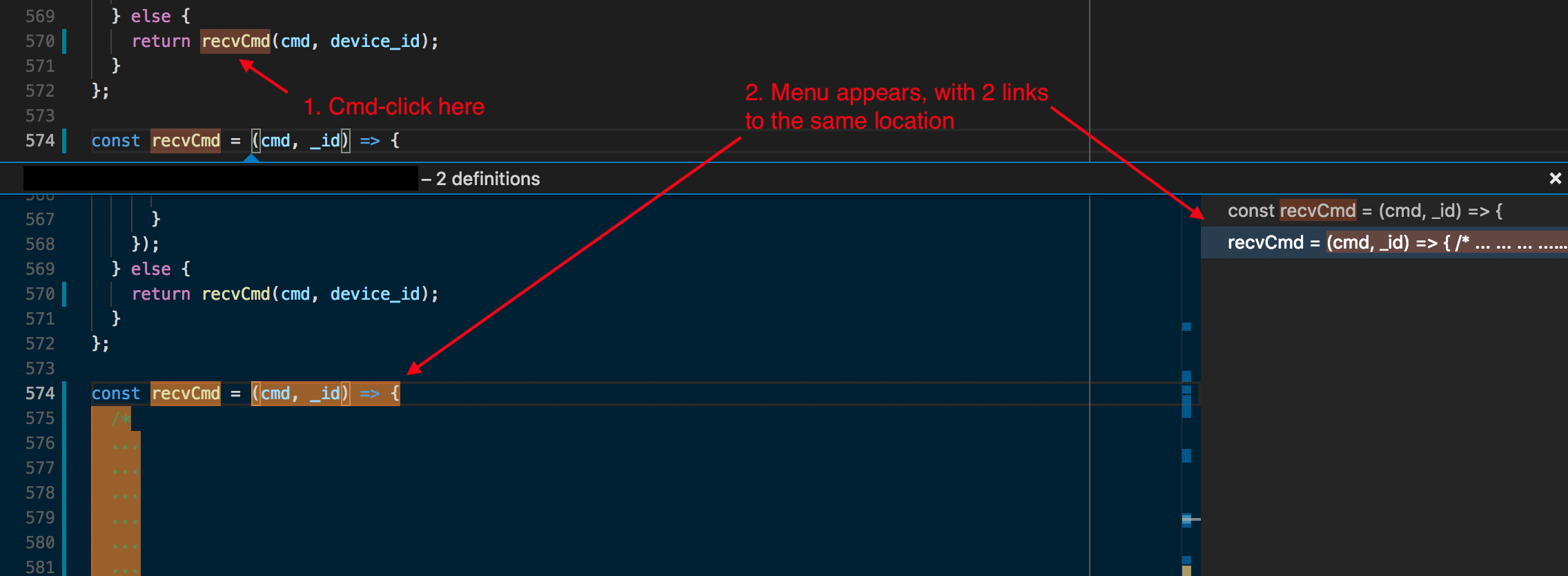
I just downloaded 1.25.0-insider and disabled all extensions, and I still see the same behavior.
I'd be happy to provide more info or open separate issues as needed. Thanks!
 mkerley
on 14 Jun 2018
mkerley
on 14 Jun 2018
I have downgraded to 1.23.1, and the fast intelliSense comes back again :)
Even though I have totally uninstall all extensions and reinstalled 1.24.1, the intelliSense still very slow (some time doesn't work). It seems only 1.23.1 (or earlier version) works on my Mac.
yibn2008
on 14 Jun 2018
@yibn2008
- What type of code are you working in? Does a specific action trigger this?
- Do you see this in VS Code insiders?
- Please share an example project that demonstrates the issue
 mjbvz
on 15 Jun 2018
mjbvz
on 15 Jun 2018
I want to add a +1 to this. in 1.24.1, my Intellisense in JavaScript dies every ~30 seconds or so. Running TypeScript: Restart TS Server resolves the issue (once it restarts), but it will die again a short while later. Downgrading to 1.23.1 has resolved for now.
I am working in an EmberJS project with nothing that crazy going on, only a few tens of files, so it should be fairly reproducible with not much effort. I have a fair few extensions, so it could be related to that. I have not tested with extensions disabled yet.
EDIT: Hmm I would like to change my input to "tentative" as I am still encountering some issues on 1.23.1, so perhaps it is just the project I am working on.
 peabnuts123
on 15 Jun 2018
peabnuts123
on 15 Jun 2018
@mjbvz I am working on a React and NodeJS project, it's a large project that contains over 200 source files (NodeJS and React with ES6 and jsx support) and more than 80 dependencies. When I type codes like div>xxx>yyy, the emmet hints doesn't appear immediately, but after a few seconds.
I tried to reproduce on some large React/NodeJS open source projects, but the results are not stable. I noticed that the "Code Helper" process will occupy a high CPU (almost 100%) when intellisense doesn't work
yibn2008
on 15 Jun 2018
Same problem here. Emmet, prettier not working & very high CPU using even after close VS Code it still uses high CPU. It stops after end process from task manager in windows 10.
 anaetrezve
on 15 Jun 2018
anaetrezve
on 15 Jun 2018
This may have something to do with VS Code type checking stuff that was previously opened and now closed. Before this version, Code would stop checking files that have been closed. Now it keeps the problems report around even if you didn't want to.
On top of this, the exclude glob doesn't seem to be working.
 mflux
on 18 Jun 2018
mflux
on 18 Jun 2018
I have got the reason. This is because of "Auto Rename Tag" extension. After disabling it, now I don't see that problem.
anaetrezve
on 18 Jun 2018
I have this problem too on both Windows and Mac, but only when working with JS/TS projects. My netcore projects seem to work fine. I'd be happy to contribute any debugging data to help debug.
 arthurlockman
on 20 Jun 2018
arthurlockman
on 20 Jun 2018
@yibn2008 Are you seeing this in VS Code insiders with all extensions disabled? Do you have an small example project that you can share
mjbvz
on 20 Jun 2018
I believe I've found the offending extension: https://marketplace.visualstudio.com/items?itemName=rbbit.typescript-hero
Uninstalling this one fixed it for me (I think).
arthurlockman
on 21 Jun 2018
I fixed the performance issue by uninstalling Angular Essentials (ID johnpapa.angular-essentials) extension pack for VS code.
Part of mentioned package is Path Intellisense (ID christian-kohler.path-intellisense) extension. When I tried to install it separately, it also causes the slow down.
 ma-zal
on 25 Jun 2018
ma-zal
on 25 Jun 2018
Closing as we have not heard back from original issue opener on if this reproduces in VS Code insiders with all extensions disabled
mjbvz
on 25 Jun 2018
我有个想法:vscode 可以根据不同的项目选择加载不同的插件; go项目加载go相关的插件,web项目加载web相关的插件。 你们觉得怎么样?
 herrdu
on 26 Jun 2018
herrdu
on 26 Jun 2018
Related issues
 TurkeyMan
·
411Comments
TurkeyMan
·
411Comments
 Perkovec
·
191Comments
Perkovec
·
191Comments
 ozsay
·
247Comments
ozsay
·
247Comments
 Tekbr
·
191Comments
Tekbr
·
191Comments
 Tyriar
·
200Comments
Tyriar
·
200Comments
Most helpful comment
I have got the reason. This is because of "Auto Rename Tag" extension. After disabling it, now I don't see that problem.