Vscode: Windows update failed: Access is denied
Log from %HOME%\AppData\Local\Tempvscode-inno-updater.log
Apr 13 11:27:40.666 INFO Starting: C:\Program Files\Microsoft VS Code\Code.exe, false
Apr 13 11:27:40.670 INFO Checking for running Code.exe processes... (attempt 1)
Apr 13 11:27:40.670 INFO Code.exe is running, wait a bit
Apr 13 11:27:41.148 INFO Checking for running Code.exe processes... (attempt 2)
Apr 13 11:27:41.153 INFO Code.exe is running, wait a bit
Apr 13 11:27:41.654 INFO Checking for running Code.exe processes... (attempt 3)
Apr 13 11:27:41.666 INFO Code.exe is not running
Apr 13 11:27:41.666 INFO Starting update, silent = false
Apr 13 11:27:41.691 INFO do_update: "C:\\Program Files\\Microsoft VS Code\\Code.exe", _
Apr 13 11:27:41.692 INFO move_update: "C:\\Program Files\\Microsoft VS Code\\unins000.dat", _
Apr 13 11:27:41.696 INFO Delete: "Code.exe" (attempt 1)
Apr 13 11:27:41.744 INFO Delete: "Code.exe" (attempt 2)
Apr 13 11:27:41.945 INFO Delete: "Code.exe" (attempt 3)
Apr 13 11:27:42.396 INFO Delete: "Code.exe" (attempt 4)
Apr 13 11:27:43.197 INFO Delete: "Code.exe" (attempt 5)
Apr 13 11:27:44.448 INFO Delete: "Code.exe" (attempt 6)
Apr 13 11:27:46.249 INFO Delete: "Code.exe" (attempt 7)
Apr 13 11:27:48.700 INFO Delete: "Code.exe" (attempt 8)
Apr 13 11:27:51.901 INFO Delete: "Code.exe" (attempt 9)
Apr 13 11:27:55.952 INFO Delete: "Code.exe" (attempt 10)
Apr 13 11:28:00.953 INFO Delete: "Code.exe" (attempt 11)
Apr 13 11:28:00.953 ERRO Access is denied. (os error 5)
On Windows 10 64 bit
 ryanolsonx
All 142 comments
(Experimental duplicate detection)
Thanks for submitting this issue. Please also check if it is already covered by an existing one, like:
![vscodebot[bot] picture](https://avatars2.githubusercontent.com/in/2406?v=4&s=40) vscodebot[bot]
on 13 Apr 2018
vscodebot[bot]
on 13 Apr 2018
This is a puzzle to me, because we know Code isn't running... so why can't the updater remove Code... unless it is really running?
@ryanolsonx @gitDylanHub @OfficerHalf @SwingCoder911
Can you run this little app I've created, while Code is running? rust-playground.zip
It will output all running process numbers and names. Something like this:

Does Code appear in that list, for you? Can you show me the output of the app in your system?
 joaomoreno
on 25 Apr 2018
joaomoreno
on 25 Apr 2018
I'll do you one better. I'm attaching the output of that before running the update, while running the update, and at the point when I get the error message.
pre-update.txt
mid-update2.txt
error.txt
It certainly doesn't look like Code is running. That doesn't necessarily mean that some other process isn't preventing its deletion, though.
 OfficerHalf
on 25 Apr 2018
OfficerHalf
on 25 Apr 2018
@OfficerHalf Awesome, it's great that you can reliably reproduce it. Any thoughts on who might be preventing that deletion? Just to confirm, the setup runs elevated, correct? Does the inno-updater.exe process also run elevated?
joaomoreno
on 25 Apr 2018
Well, there are at least two pieces of security software running on my machine: ESET Security and CrowdStrike Falcon (though CrowdStrike is a recent addition, and I think this issue was present before it was installed), neither of which I have any control over. There are also various other controls in place as this is a managed Enterprise installation of Windows. I have co-workers that use Code without issue though so I doubt it's those. My guess was more along the lines of zombie processes spawned by Code that were still holding some resource.
A quick check in the task manager shows that all three update processes (inno_updater.exe, CodeSetup-insider-guid.exe, and CodeSetup-insider-guid.tmp) are elevated.
OfficerHalf
on 25 Apr 2018
OK. I just need you to use the task manager and find those zombie processes and what is their full command line.
joaomoreno
on 25 Apr 2018
FindZombieHandles reports nothing. I'm at a loss.
OfficerHalf
on 25 Apr 2018
And can you manually delete the executable file yourself, in the file explorer?
joaomoreno
on 25 Apr 2018
I can delete it manually. Even attempted to do so during the update, though it still failed with a complaint that the file didn't exist. Make up your mind, updater... 😁
OfficerHalf
on 26 Apr 2018
The updater, as admin, can't. Yet you can easily delete it. 🤔 Did you get an elevation prompt to delete the file?
joaomoreno
on 26 Apr 2018
I was not asked to elevate. I just get the usual 'are you sure you want to delete this' prompt.
OfficerHalf
on 26 Apr 2018
Same issue that was originally reported here with the most recent update as well. So, had this issue on 1.22 and again now on 1.23. Be kind of annoying if I have to uninstall and download to get the latest features. Definitely a work related only issue though, can update on my personal easily. Probably good old McAfee locking everything down in the registries with some unique rule.
 gitDylanHub
on 8 May 2018
gitDylanHub
on 8 May 2018
@OfficerHalf Hope you're still here and facing the issue! I have one more ask for you. Can you reproduce it and upon seeing the error message popup, can you use Process Hacker and figure out whether inno_updater.exe is indeed elevated?
joaomoreno
on 29 May 2018
Though I have no idea what changed, I'm actually no longer able to reproduce this. If it shows back up I'll let you know, but I'm not using Insiders on my work machine anymore - mostly because of this bug (I didn't want to get as many update notifications that I couldn't do anything about).
I installed Insiders 1.23.0 and successfully updated to 1.24.0.
OfficerHalf
on 29 May 2018
Too bad... a lot of other users are hitting it too (see duplicate issues linked), I was hoping we could narrow down further why this happens.
My current thinking is that inno_updater.exe actually wouldn't run as elevated, even though it would be spawned from an elevated process. Which is something I clearly can't repro:

joaomoreno
on 29 May 2018
@scragly @amitesh-gaurav @Clarkey @azarc3 @abmagil @Austen-Oberheu @DeltaIndiana @nickdeppe @maddes @alvarofelipe12 @ojintoad @LouieK22
I'm pinging all of you since you all reported the same error Access is denied. I want to ask you to try to reproduce it, so we get more info from it.
In order to reproduce it, close Code, open the C:\Program Files\Microsoft VS Code\resources\app\product.json and change the commit field to outdated. Start Code, you should get an update flow. If the issue reproduces and you get the dialog which asks you to send us the log file, please do the following:
- Open Process Hacker
- Enable the
Elevation,IntegrityandCommand linecolumns in Process Hacker - Search for any
Code.exeprocesses running. If they are running, copy the full command line of each and show me. - Check what is the elevation and integrity of the
inno_updater.exe, does it match its parent?
Thanks for your help here, looking forward to learn more about this and fixing it!
joaomoreno
on 30 May 2018
@joaomoreno on my machine, the C:\Program Files\Microsoft VS Code\app folder does not exist...
This is after a couple more failed upgrades (same symptoms as https://github.com/Microsoft/vscode/issues/49460#issue-321192492) if that provides any insight.
 abmagil
on 31 May 2018
abmagil
on 31 May 2018
@abmagil Please completely remove VS Code, reinstall it and give the above steps a try. Thanks!
joaomoreno
on 1 Jun 2018
@joaomoreno same story with a fresh install.
- I went through "Add or Remove Programs", found "Microsoft Visual Studio Code" and uninstalled it.
- I then went to https://code.visualstudio.com/ and downloaded the Stable version for windows.
- I followed all installation steps, then went to the path you mentioned. Here is what I see:
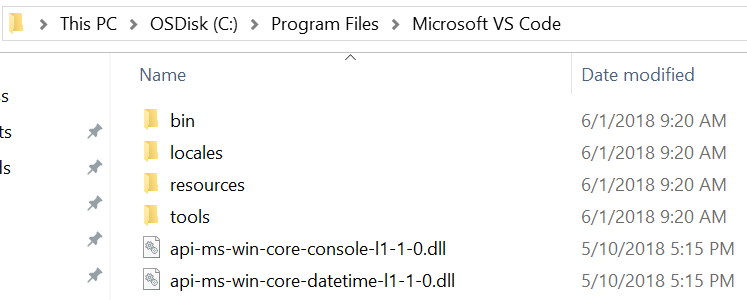
abmagil
on 1 Jun 2018
Oh man, sorry about that. It's in resources\app. I've updated the original post.
joaomoreno
on 1 Jun 2018
I updated the json file and reopened code, but the update flow didn't kick in automatically. I kicked off an update flow from the gear in the lower left which went through successfully. I am currently running 1.23.1
I will keep an eye on this ticket and, if the problem rears its head again, return to the steps you listed.
abmagil
on 1 Jun 2018
@abmagil That's great to know, looking forward to it!
joaomoreno
on 4 Jun 2018
I was able to repro this again. Guess it working was a fluke.
- inno_updater.exe is elevated
- inno_updater.exe Command Line:
"C:\DevTools\VSCodeStable\tools\inno_updater.exe" "C:\DevTools\VSCodeStable\Code.exe" false - There are no Code.exe (or Code-Insiders.exe) processes.
I can't check 'Integrity' as I'm not able to run Process Hacker due to the security suite my company has running on my machine. This info is all from the bog-standard Task Manager.
OfficerHalf
on 4 Jun 2018
security suite my company has running on my machine
The problem could very well be related to this.
@scragly @amitesh-gaurav @Clarkey @azarc3 @abmagil @Austen-Oberheu @DeltaIndiana @nickdeppe @maddes @alvarofelipe12 @ojintoad @LouieK22
Guys/gals, are your machines also managed by a corporation?
joaomoreno
on 5 Jun 2018
Mine is, yes.
On Tue, Jun 5, 2018 at 4:03 AM João Moreno notifications@github.com wrote:
security suite my company has running on my machine
The problem could very well be related to this.
@scragly https://github.com/scragly @amitesh-gaurav
https://github.com/amitesh-gaurav @Clarkey https://github.com/Clarkey
@azarc3 https://github.com/azarc3 @abmagil https://github.com/abmagil
@Austen-Oberheu https://github.com/Austen-Oberheu @DeltaIndiana
https://github.com/DeltaIndiana @nickdeppe
https://github.com/nickdeppe @maddes https://github.com/maddes
@alvarofelipe12 https://github.com/alvarofelipe12 @ojintoad
https://github.com/ojintoad @LouieK22 https://github.com/LouieK22Guys/gals, are your machines also managed by a corporation?
—
You are receiving this because you were mentioned.
Reply to this email directly, view it on GitHub
https://github.com/Microsoft/vscode/issues/47841#issuecomment-394603217,
or mute the thread
https://github.com/notifications/unsubscribe-auth/ABY2am8zMCEy_VUN9RlABFcjCa5EGleDks5t5i1egaJpZM4TTz7T
.
 maddes
on 5 Jun 2018
maddes
on 5 Jun 2018
Mine as well, I managed to solve this by manually running the installer.
 mcleary
on 5 Jun 2018
mcleary
on 5 Jun 2018
Mine is not
 LouieK22
on 5 Jun 2018
LouieK22
on 5 Jun 2018
Hello, i'm sorry but that PC is property of my company and the technic support guy say thats not possible to do that procedure.
 alvarofelipe12
on 6 Jun 2018
alvarofelipe12
on 6 Jun 2018
You can still use the old update mechanism with the following setting:
"update.enableWindowsBackgroundUpdates": false
Though it would be pretty cool if we could make the background updates work on your machines... I would need some more feedback, like what I mentioned above in https://github.com/Microsoft/vscode/issues/47841#issuecomment-393101777
joaomoreno
on 6 Jun 2018
Just updated to 1.24.0 without issue this time with the in-client updater. My PC is not managed by a corporation.
Just as a note though, which could be unrelated, I'm not sure; I actually had seemingly the exact same issue as before with a Git for Windows update recently.
 scragly
on 7 Jun 2018
scragly
on 7 Jun 2018
Sorry, I'm a little late getting back to you. Yes, my machine is a company machine, and we are also running CrowdStrike Falcon.
 nickdeppe
on 12 Jun 2018
nickdeppe
on 12 Jun 2018
Hi - we've been having the same problem on various machines. Machines are a mix of corporate managed and personally managed machines, and they are running Windows 10 Pro or Enterprise with MSFT security tools (nothing else added).
The frequent error is due to a refusal to proceed because the "resources" directory is not empty due to something behind by an extension.
Trace:
Jun 12 18:33:58.992 INFO Starting: C:\Program Files\Microsoft VS Code\Code.exe, false
Jun 12 18:33:58.994 INFO Checking for running Code.exe processes... (attempt 1)
Jun 12 18:33:58.994 INFO Code.exe is running, wait a bit
Jun 12 18:33:59.493 INFO Checking for running Code.exe processes... (attempt 2)
Jun 12 18:33:59.504 INFO Code.exe is running, wait a bit
Jun 12 18:34:00.005 INFO Checking for running Code.exe processes... (attempt 3)
Jun 12 18:34:00.019 INFO Code.exe is running, wait a bit
Jun 12 18:34:00.520 INFO Checking for running Code.exe processes... (attempt 4)
Jun 12 18:34:00.532 INFO Code.exe is not running
Jun 12 18:34:00.532 INFO Checking for possible conflicting running processes... (attempt 1)
Jun 12 18:34:00.542 INFO Inno Updater v0.4.3
Jun 12 18:34:00.542 INFO Starting update, silent = false
Jun 12 18:34:00.614 INFO do_update: "C:\\Program Files\\Microsoft VS Code\\Code.exe", _
Jun 12 18:34:00.615 INFO move_update: "C:\\Program Files\\Microsoft VS Code\\unins000.dat", _
Jun 12 18:34:00.615 INFO Delete: "api-ms-win-core-console-l1-1-0.dll" (attempt 1)
Jun 12 18:34:00.616 INFO Delete: "api-ms-win-core-datetime-l1-1-0.dll" (attempt 1)
Jun 12 18:34:00.616 INFO Delete: "api-ms-win-core-debug-l1-1-0.dll" (attempt 1)
Jun 12 18:34:00.617 INFO Delete: "api-ms-win-core-errorhandling-l1-1-0.dll" (attempt 1)
Jun 12 18:34:00.617 INFO Delete: "api-ms-win-core-file-l1-1-0.dll" (attempt 1)
Jun 12 18:34:00.617 INFO Delete: "api-ms-win-core-file-l1-2-0.dll" (attempt 1)
Jun 12 18:34:00.618 INFO Delete: "api-ms-win-core-file-l2-1-0.dll" (attempt 1)
Jun 12 18:34:00.618 INFO Delete: "api-ms-win-core-handle-l1-1-0.dll" (attempt 1)
Jun 12 18:34:00.619 INFO Delete: "api-ms-win-core-heap-l1-1-0.dll" (attempt 1)
Jun 12 18:34:00.619 INFO Delete: "api-ms-win-core-interlocked-l1-1-0.dll" (attempt 1)
Jun 12 18:34:00.619 INFO Delete: "api-ms-win-core-libraryloader-l1-1-0.dll" (attempt 1)
Jun 12 18:34:00.619 INFO Delete: "api-ms-win-core-localization-l1-2-0.dll" (attempt 1)
Jun 12 18:34:00.620 INFO Delete: "api-ms-win-core-memory-l1-1-0.dll" (attempt 1)
Jun 12 18:34:00.620 INFO Delete: "api-ms-win-core-namedpipe-l1-1-0.dll" (attempt 1)
Jun 12 18:34:00.621 INFO Delete: "api-ms-win-core-processenvironment-l1-1-0.dll" (attempt 1)
Jun 12 18:34:00.621 INFO Delete: "api-ms-win-core-processthreads-l1-1-0.dll" (attempt 1)
Jun 12 18:34:00.621 INFO Delete: "api-ms-win-core-processthreads-l1-1-1.dll" (attempt 1)
Jun 12 18:34:00.622 INFO Delete: "api-ms-win-core-profile-l1-1-0.dll" (attempt 1)
Jun 12 18:34:00.622 INFO Delete: "api-ms-win-core-rtlsupport-l1-1-0.dll" (attempt 1)
Jun 12 18:34:00.622 INFO Delete: "api-ms-win-core-string-l1-1-0.dll" (attempt 1)
Jun 12 18:34:00.623 INFO Delete: "api-ms-win-core-synch-l1-1-0.dll" (attempt 1)
Jun 12 18:34:00.623 INFO Delete: "api-ms-win-core-synch-l1-2-0.dll" (attempt 1)
Jun 12 18:34:00.623 INFO Delete: "api-ms-win-core-sysinfo-l1-1-0.dll" (attempt 1)
Jun 12 18:34:00.624 INFO Delete: "api-ms-win-core-timezone-l1-1-0.dll" (attempt 1)
Jun 12 18:34:00.624 INFO Delete: "api-ms-win-core-util-l1-1-0.dll" (attempt 1)
Jun 12 18:34:00.625 INFO Delete: "api-ms-win-crt-conio-l1-1-0.dll" (attempt 1)
Jun 12 18:34:00.625 INFO Delete: "api-ms-win-crt-convert-l1-1-0.dll" (attempt 1)
Jun 12 18:34:00.625 INFO Delete: "api-ms-win-crt-environment-l1-1-0.dll" (attempt 1)
Jun 12 18:34:00.626 INFO Delete: "api-ms-win-crt-filesystem-l1-1-0.dll" (attempt 1)
Jun 12 18:34:00.626 INFO Delete: "api-ms-win-crt-heap-l1-1-0.dll" (attempt 1)
Jun 12 18:34:00.627 INFO Delete: "api-ms-win-crt-locale-l1-1-0.dll" (attempt 1)
Jun 12 18:34:00.627 INFO Delete: "api-ms-win-crt-math-l1-1-0.dll" (attempt 1)
Jun 12 18:34:00.627 INFO Delete: "api-ms-win-crt-multibyte-l1-1-0.dll" (attempt 1)
Jun 12 18:34:00.628 INFO Delete: "api-ms-win-crt-private-l1-1-0.dll" (attempt 1)
Jun 12 18:34:00.628 INFO Delete: "api-ms-win-crt-process-l1-1-0.dll" (attempt 1)
Jun 12 18:34:00.629 INFO Delete: "api-ms-win-crt-runtime-l1-1-0.dll" (attempt 1)
Jun 12 18:34:00.629 INFO Delete: "api-ms-win-crt-stdio-l1-1-0.dll" (attempt 1)
Jun 12 18:34:00.629 INFO Delete: "api-ms-win-crt-string-l1-1-0.dll" (attempt 1)
Jun 12 18:34:00.630 INFO Delete: "api-ms-win-crt-time-l1-1-0.dll" (attempt 1)
Jun 12 18:34:00.630 INFO Delete: "api-ms-win-crt-utility-l1-1-0.dll" (attempt 1)
Jun 12 18:34:00.631 INFO Delete: "bin" (attempt 1)
Jun 12 18:34:00.632 INFO Delete: "blink_image_resources_200_percent.pak" (attempt 1)
Jun 12 18:34:00.632 INFO Delete: "Code.exe" (attempt 1)
Jun 12 18:34:00.638 INFO Delete: "Code.VisualElementsManifest.xml" (attempt 1)
Jun 12 18:34:00.638 INFO Delete: "CodeSignSummary.md" (attempt 1)
Jun 12 18:34:00.638 INFO Delete: "content_resources_200_percent.pak" (attempt 1)
Jun 12 18:34:00.639 INFO Delete: "content_shell.pak" (attempt 1)
Jun 12 18:34:00.639 INFO Delete: "d3dcompiler_47.dll" (attempt 1)
Jun 12 18:34:00.639 INFO Delete: "ffmpeg.dll" (attempt 1)
Jun 12 18:34:00.640 INFO Delete: "icudtl.dat" (attempt 1)
Jun 12 18:34:00.640 INFO Delete: "libEGL.dll" (attempt 1)
Jun 12 18:34:00.641 INFO Delete: "libGLESv2.dll" (attempt 1)
Jun 12 18:34:00.641 INFO Delete: "locales" (attempt 1)
Jun 12 18:34:00.654 INFO Delete: "msvcp140.dll" (attempt 1)
Jun 12 18:34:00.655 INFO Delete: "natives_blob.bin" (attempt 1)
Jun 12 18:34:00.655 INFO Delete: "node.dll" (attempt 1)
Jun 12 18:34:00.657 INFO Delete: "pdf_viewer_resources.pak" (attempt 1)
Jun 12 18:34:00.657 INFO Delete: "resources" (attempt 1)
Jun 12 18:34:01.367 INFO Delete: "resources" (attempt 2)
Jun 12 18:34:01.568 INFO Delete: "resources" (attempt 3)
Jun 12 18:34:02.019 INFO Delete: "resources" (attempt 4)
Jun 12 18:34:02.820 INFO Delete: "resources" (attempt 5)
Jun 12 18:34:04.071 INFO Delete: "resources" (attempt 6)
Jun 12 18:34:05.872 INFO Delete: "resources" (attempt 7)
Jun 12 18:34:08.323 INFO Delete: "resources" (attempt 8)
Jun 12 18:34:11.524 INFO Delete: "resources" (attempt 9)
Jun 12 18:34:15.575 INFO Delete: "resources" (attempt 10)
Jun 12 18:34:20.576 INFO Delete: "resources" (attempt 11)
Jun 12 18:34:26.628 INFO Delete: "resources" (attempt 12)
Jun 12 18:34:33.829 INFO Delete: "resources" (attempt 13)
Jun 12 18:34:42.280 INFO Delete: "resources" (attempt 14)
Jun 12 18:34:52.082 INFO Delete: "resources" (attempt 15)
Jun 12 18:35:03.333 INFO Delete: "resources" (attempt 16)
Jun 12 18:35:16.134 INFO Delete: "resources" (attempt 17)
Jun 12 18:35:30.585 INFO Delete: "resources" (attempt 18)
Jun 12 18:35:46.786 INFO Delete: "resources" (attempt 19)
Jun 12 18:36:04.837 INFO Delete: "resources" (attempt 20)
Jun 12 18:36:24.838 INFO Delete: "resources" (attempt 21)
Jun 12 18:36:46.889 INFO Delete: "resources" (attempt 22)
Jun 12 18:37:11.090 INFO Delete: "resources" (attempt 23)
Jun 12 18:37:37.541 INFO Delete: "resources" (attempt 24)
Jun 12 18:38:06.343 INFO Delete: "resources" (attempt 25)
Jun 12 18:38:37.594 INFO Delete: "resources" (attempt 26)
Jun 12 18:39:11.395 INFO Delete: "resources" (attempt 27)
Jun 12 18:39:11.396 ERRO The directory is not empty. (os error 145)
Extension (all folders in path starting from and including "resources" only contain the sub-folder indicated in the path - the last folder is empty).
C:\Program Files\Microsoft VS Code\resources\app\extensions\markdown\node_modules\highlight.js\docs
We love the tool.
Thx.
 casmrv
on 13 Jun 2018
casmrv
on 13 Jun 2018
@joaomoreno , I was getting the same error
Access denied os error(5)
When i was trying to update vs code insiders , but after reading the this whole thread I disabled the malwarebytes protection software on my PC completely , and Voila , the update completed super smooth.
I think these protection softwares are the root cause behind this update error.
 kryptonian41
on 13 Jun 2018
kryptonian41
on 13 Jun 2018
I've had this problem since 1.22.2 (trying to upgrade to 1.23). I'm in a corporate environment with a bunch of security stuff installed and have had the same issues with:
...
10:21:48.097 INFO Delete: "Code.exe" (attempt 11)
Jun 14 10:21:48.097 ERRO Access is denied. (os error 5)
As an additional data point, I tried setting update.enableWindowsBackgroundUpdates to false, which launched the installer when updating from within the client. However this also failed to update Code.exe with an access denied error. Manually downloading the installer (1.24.1) and launching it worked.
 villintehaspam
on 14 Jun 2018
villintehaspam
on 14 Jun 2018
Having the same issue since 1.24.0, both on my work PC _and_ my home PC. Getting the same Access Denied errors for Code.exe as the original poster. Manually downloading the update and applying it worked for 1.24.0, but I am reporting this now instead of ignoring it like last time, so I did not try to manually update to 1.24.1.
Jun 14 08:44:21.961 INFO Starting: C:\Program Files\Microsoft VS Code\Code.exe, false
Jun 14 08:44:21.966 INFO Checking for running Code.exe processes... (attempt 1)
Jun 14 08:44:21.972 INFO Code.exe is running, wait a bit
Jun 14 08:44:22.472 INFO Checking for running Code.exe processes... (attempt 2)
Jun 14 08:44:22.487 INFO Code.exe is running, wait a bit
Jun 14 08:44:22.987 INFO Checking for running Code.exe processes... (attempt 3)
Jun 14 08:44:23.001 INFO Code.exe is running, wait a bit
Jun 14 08:44:23.501 INFO Checking for running Code.exe processes... (attempt 4)
Jun 14 08:44:23.515 INFO Code.exe is not running
Jun 14 08:44:23.515 INFO Checking for possible conflicting running processes... (attempt 1)
Jun 14 08:44:23.529 INFO Inno Updater v0.4.3
Jun 14 08:44:23.530 INFO Starting update, silent = false
Jun 14 08:44:23.589 INFO do_update: "C:\\Program Files\\Microsoft VS Code\\Code.exe", _
Jun 14 08:44:23.589 INFO move_update: "C:\\Program Files\\Microsoft VS Code\\unins000.dat", _
Jun 14 08:44:23.590 INFO Delete: "Code.exe" (attempt 1)
Jun 14 08:44:23.641 INFO Delete: "Code.exe" (attempt 2)
Jun 14 08:44:23.842 INFO Delete: "Code.exe" (attempt 3)
Jun 14 08:44:24.292 INFO Delete: "Code.exe" (attempt 4)
Jun 14 08:44:25.093 INFO Delete: "Code.exe" (attempt 5)
Jun 14 08:44:26.344 INFO Delete: "Code.exe" (attempt 6)
Jun 14 08:44:28.145 INFO Delete: "Code.exe" (attempt 7)
Jun 14 08:44:30.595 INFO Delete: "Code.exe" (attempt 8)
Jun 14 08:44:33.796 INFO Delete: "Code.exe" (attempt 9)
Jun 14 08:44:37.848 INFO Delete: "Code.exe" (attempt 10)
Jun 14 08:44:42.848 INFO Delete: "Code.exe" (attempt 11)
Jun 14 08:44:42.849 ERRO Access is denied. (os error 5)
I _can_ run Process Hacker however when the bug occurs, and following the procedure from this comment, I can see there are no Code.exe processes running when the error dialog is shown.

In case the command lines are important, here they are, in order:
C:\Users\bmiller\AppData\Local\Temp\vscode-update-x64\CodeSetup-stable-24f62626b222e9a8313213fb64b10d741a326288.exe /verysilent /update="C:\Users\bmiller\AppData\Local\Temp\vscode-update-x64\CodeSetup-stable-24f62626b222e9a8313213fb64b10d741a326288.flag" /nocloseapplications /mergetasks=runcode,!desktopicon,!quicklaunchicon

"C:\Users\bmiller\AppData\Local\Temp\is-UDDQA.tmp\CodeSetup-stable-24f62626b222e9a8313213fb64b10d741a326288.tmp" /SL5="$7322B2,45792428,159232,C:\Users\bmiller\AppData\Local\Temp\vscode-update-x64\CodeSetup-stable-24f62626b222e9a8313213fb64b10d741a326288.exe" /verysilent /update="C:\Users\bmiller\AppData\Local\Temp\vscode-update-x64\CodeSetup-stable-24f62626b222e9a8313213fb64b10d741a326288.flag" /nocloseapplications /mergetasks=runcode,!desktopicon,!quicklaunchicon

"C:\Users\bmiller\AppData\Local\Temp\vscode-update-x64\CodeSetup-stable-24f62626b222e9a8313213fb64b10d741a326288.exe" /SPAWNWND=$1221CC /NOTIFYWND=$7322B2 /verysilent /update="C:\Users\bmiller\AppData\Local\Temp\vscode-update-x64\CodeSetup-stable-24f62626b222e9a8313213fb64b10d741a326288.flag" /nocloseapplications /mergetasks=runcode,!desktopicon,!quicklaunchicon

"C:\Users\bmiller\AppData\Local\Temp\is-CVUNE.tmp\CodeSetup-stable-24f62626b222e9a8313213fb64b10d741a326288.tmp" /SL5="$480A92,45792428,159232,C:\Users\bmiller\AppData\Local\Temp\vscode-update-x64\CodeSetup-stable-24f62626b222e9a8313213fb64b10d741a326288.exe" /SPAWNWND=$1221CC /NOTIFYWND=$7322B2 /verysilent /update="C:\Users\bmiller\AppData\Local\Temp\vscode-update-x64\CodeSetup-stable-24f62626b222e9a8313213fb64b10d741a326288.flag" /nocloseapplications /mergetasks=runcode,!desktopicon,!quicklaunchicon

"C:\Program Files\Microsoft VS Code\tools\inno_updater.exe" "C:\Program Files\Microsoft VS Code\Code.exe" false
Let me know if you need anything else, I can reproduce this at will.
 Fulg
on 14 Jun 2018
Fulg
on 14 Jun 2018
Same here, started happening a few weeks ago.
LOG
Jun 14 15:04:43.773 INFO Starting: C:\Program Files\Microsoft VS Code\Code.exe, false
Jun 14 15:04:43.775 INFO Checking for running Code.exe processes... (attempt 1)
Jun 14 15:04:43.783 INFO Code.exe is running, wait a bit
Jun 14 15:04:44.284 INFO Checking for running Code.exe processes... (attempt 2)
Jun 14 15:04:44.292 INFO Code.exe is running, wait a bit
Jun 14 15:04:44.793 INFO Checking for running Code.exe processes... (attempt 3)
Jun 14 15:04:44.800 INFO Code.exe is running, wait a bit
Jun 14 15:04:45.300 INFO Checking for running Code.exe processes... (attempt 4)
Jun 14 15:04:45.307 INFO Code.exe is not running
Jun 14 15:04:45.307 INFO Checking for possible conflicting running processes... (attempt 1)
Jun 14 15:04:45.315 INFO Inno Updater v0.4.3
Jun 14 15:04:45.315 INFO Starting update, silent = false
Jun 14 15:04:45.522 INFO do_update: "C:\\Program Files\\Microsoft VS Code\\Code.exe", _
Jun 14 15:04:45.522 INFO move_update: "C:\\Program Files\\Microsoft VS Code\\unins000.dat", _
Jun 14 15:04:45.523 INFO Delete: "api-ms-win-core-console-l1-1-0.dll" (attempt 1)
Jun 14 15:04:45.524 INFO Delete: "api-ms-win-core-datetime-l1-1-0.dll" (attempt 1)
Jun 14 15:04:45.524 INFO Delete: "api-ms-win-core-debug-l1-1-0.dll" (attempt 1)
Jun 14 15:04:45.525 INFO Delete: "api-ms-win-core-errorhandling-l1-1-0.dll" (attempt 1)
Jun 14 15:04:45.525 INFO Delete: "api-ms-win-core-file-l1-1-0.dll" (attempt 1)
Jun 14 15:04:45.526 INFO Delete: "api-ms-win-core-file-l1-2-0.dll" (attempt 1)
Jun 14 15:04:45.527 INFO Delete: "api-ms-win-core-file-l2-1-0.dll" (attempt 1)
Jun 14 15:04:45.528 INFO Delete: "api-ms-win-core-handle-l1-1-0.dll" (attempt 1)
Jun 14 15:04:45.528 INFO Delete: "api-ms-win-core-heap-l1-1-0.dll" (attempt 1)
Jun 14 15:04:45.529 INFO Delete: "api-ms-win-core-interlocked-l1-1-0.dll" (attempt 1)
Jun 14 15:04:45.530 INFO Delete: "api-ms-win-core-libraryloader-l1-1-0.dll" (attempt 1)
Jun 14 15:04:45.530 INFO Delete: "api-ms-win-core-localization-l1-2-0.dll" (attempt 1)
Jun 14 15:04:45.531 INFO Delete: "api-ms-win-core-memory-l1-1-0.dll" (attempt 1)
Jun 14 15:04:45.531 INFO Delete: "api-ms-win-core-namedpipe-l1-1-0.dll" (attempt 1)
Jun 14 15:04:45.532 INFO Delete: "api-ms-win-core-processenvironment-l1-1-0.dll" (attempt 1)
Jun 14 15:04:45.532 INFO Delete: "api-ms-win-core-processthreads-l1-1-0.dll" (attempt 1)
Jun 14 15:04:45.533 INFO Delete: "api-ms-win-core-processthreads-l1-1-1.dll" (attempt 1)
Jun 14 15:04:45.533 INFO Delete: "api-ms-win-core-profile-l1-1-0.dll" (attempt 1)
Jun 14 15:04:45.534 INFO Delete: "api-ms-win-core-rtlsupport-l1-1-0.dll" (attempt 1)
Jun 14 15:04:45.534 INFO Delete: "api-ms-win-core-string-l1-1-0.dll" (attempt 1)
Jun 14 15:04:45.534 INFO Delete: "api-ms-win-core-synch-l1-1-0.dll" (attempt 1)
Jun 14 15:04:45.535 INFO Delete: "api-ms-win-core-synch-l1-2-0.dll" (attempt 1)
Jun 14 15:04:45.535 INFO Delete: "api-ms-win-core-sysinfo-l1-1-0.dll" (attempt 1)
Jun 14 15:04:45.536 INFO Delete: "api-ms-win-core-timezone-l1-1-0.dll" (attempt 1)
Jun 14 15:04:45.536 INFO Delete: "api-ms-win-core-util-l1-1-0.dll" (attempt 1)
Jun 14 15:04:45.537 INFO Delete: "api-ms-win-crt-conio-l1-1-0.dll" (attempt 1)
Jun 14 15:04:45.537 INFO Delete: "api-ms-win-crt-convert-l1-1-0.dll" (attempt 1)
Jun 14 15:04:45.538 INFO Delete: "api-ms-win-crt-environment-l1-1-0.dll" (attempt 1)
Jun 14 15:04:45.538 INFO Delete: "api-ms-win-crt-filesystem-l1-1-0.dll" (attempt 1)
Jun 14 15:04:45.539 INFO Delete: "api-ms-win-crt-heap-l1-1-0.dll" (attempt 1)
Jun 14 15:04:45.539 INFO Delete: "api-ms-win-crt-locale-l1-1-0.dll" (attempt 1)
Jun 14 15:04:45.540 INFO Delete: "api-ms-win-crt-math-l1-1-0.dll" (attempt 1)
Jun 14 15:04:45.540 INFO Delete: "api-ms-win-crt-multibyte-l1-1-0.dll" (attempt 1)
Jun 14 15:04:45.541 INFO Delete: "api-ms-win-crt-private-l1-1-0.dll" (attempt 1)
Jun 14 15:04:45.542 INFO Delete: "api-ms-win-crt-process-l1-1-0.dll" (attempt 1)
Jun 14 15:04:45.542 INFO Delete: "api-ms-win-crt-runtime-l1-1-0.dll" (attempt 1)
Jun 14 15:04:45.542 INFO Delete: "api-ms-win-crt-stdio-l1-1-0.dll" (attempt 1)
Jun 14 15:04:45.543 INFO Delete: "api-ms-win-crt-string-l1-1-0.dll" (attempt 1)
Jun 14 15:04:45.544 INFO Delete: "api-ms-win-crt-time-l1-1-0.dll" (attempt 1)
Jun 14 15:04:45.544 INFO Delete: "api-ms-win-crt-utility-l1-1-0.dll" (attempt 1)
Jun 14 15:04:45.544 INFO Delete: "bin" (attempt 1)
Jun 14 15:04:45.546 INFO Delete: "blink_image_resources_200_percent.pak" (attempt 1)
Jun 14 15:04:45.547 INFO Delete: "Code.exe" (attempt 1)
Jun 14 15:04:45.551 INFO Delete: "Code.VisualElementsManifest.xml" (attempt 1)
Jun 14 15:04:45.551 INFO Delete: "CodeSignSummary-ca435f23-0cec-45ec-b54b-27be2e2f3403.md" (attempt 1)
Jun 14 15:04:45.552 INFO Delete: "content_resources_200_percent.pak" (attempt 1)
Jun 14 15:04:45.552 INFO Delete: "content_shell.pak" (attempt 1)
Jun 14 15:04:45.553 INFO Delete: "d3dcompiler_47.dll" (attempt 1)
Jun 14 15:04:45.557 INFO Delete: "ffmpeg.dll" (attempt 1)
Jun 14 15:04:45.558 INFO Delete: "icudtl.dat" (attempt 1)
Jun 14 15:04:45.559 INFO Delete: "libEGL.dll" (attempt 1)
Jun 14 15:04:45.559 INFO Delete: "libGLESv2.dll" (attempt 1)
Jun 14 15:04:45.568 INFO Delete: "locales" (attempt 1)
Jun 14 15:04:45.591 INFO Delete: "msvcp140.dll" (attempt 1)
Jun 14 15:04:45.592 INFO Delete: "natives_blob.bin" (attempt 1)
Jun 14 15:04:45.592 INFO Delete: "node.dll" (attempt 1)
Jun 14 15:04:45.597 INFO Delete: "pdf_viewer_resources.pak" (attempt 1)
Jun 14 15:04:45.597 INFO Delete: "resources" (attempt 1)
Jun 14 15:04:48.973 INFO Delete: "snapshot_blob.bin" (attempt 1)
Jun 14 15:04:48.974 INFO Delete: "ucrtbase.dll" (attempt 1)
Jun 14 15:04:48.974 INFO Delete: "ui_resources_200_percent.pak" (attempt 1)
Jun 14 15:04:48.975 INFO Delete: "vcruntime140.dll" (attempt 1)
Jun 14 15:04:48.976 INFO Delete: "views_resources_200_percent.pak" (attempt 1)
Jun 14 15:04:48.977 INFO Rename: "api-ms-win-core-console-l1-1-0.dll" (attempt 1)
Jun 14 15:04:48.978 INFO Rename: "api-ms-win-core-datetime-l1-1-0.dll" (attempt 1)
Jun 14 15:04:48.978 INFO Rename: "api-ms-win-core-debug-l1-1-0.dll" (attempt 1)
Jun 14 15:04:48.979 INFO Rename: "api-ms-win-core-errorhandling-l1-1-0.dll" (attempt 1)
Jun 14 15:04:48.980 INFO Rename: "api-ms-win-core-file-l1-1-0.dll" (attempt 1)
Jun 14 15:04:48.981 INFO Rename: "api-ms-win-core-file-l1-2-0.dll" (attempt 1)
Jun 14 15:04:48.982 INFO Rename: "api-ms-win-core-file-l2-1-0.dll" (attempt 1)
Jun 14 15:04:48.984 INFO Rename: "api-ms-win-core-handle-l1-1-0.dll" (attempt 1)
Jun 14 15:04:48.985 INFO Rename: "api-ms-win-core-heap-l1-1-0.dll" (attempt 1)
Jun 14 15:04:48.986 INFO Rename: "api-ms-win-core-interlocked-l1-1-0.dll" (attempt 1)
Jun 14 15:04:48.987 INFO Rename: "api-ms-win-core-libraryloader-l1-1-0.dll" (attempt 1)
Jun 14 15:04:48.988 INFO Rename: "api-ms-win-core-localization-l1-2-0.dll" (attempt 1)
Jun 14 15:04:48.988 INFO Rename: "api-ms-win-core-memory-l1-1-0.dll" (attempt 1)
Jun 14 15:04:48.990 INFO Rename: "api-ms-win-core-namedpipe-l1-1-0.dll" (attempt 1)
Jun 14 15:04:48.991 INFO Rename: "api-ms-win-core-processenvironment-l1-1-0.dll" (attempt 1)
Jun 14 15:04:48.993 INFO Rename: "api-ms-win-core-processthreads-l1-1-0.dll" (attempt 1)
Jun 14 15:04:48.994 INFO Rename: "api-ms-win-core-processthreads-l1-1-1.dll" (attempt 1)
Jun 14 15:04:48.995 INFO Rename: "api-ms-win-core-profile-l1-1-0.dll" (attempt 1)
Jun 14 15:04:48.996 INFO Rename: "api-ms-win-core-rtlsupport-l1-1-0.dll" (attempt 1)
Jun 14 15:04:48.997 INFO Rename: "api-ms-win-core-string-l1-1-0.dll" (attempt 1)
Jun 14 15:04:48.998 INFO Rename: "api-ms-win-core-synch-l1-1-0.dll" (attempt 1)
Jun 14 15:04:48.999 INFO Rename: "api-ms-win-core-synch-l1-2-0.dll" (attempt 1)
Jun 14 15:04:49.000 INFO Rename: "api-ms-win-core-sysinfo-l1-1-0.dll" (attempt 1)
Jun 14 15:04:49.001 INFO Rename: "api-ms-win-core-timezone-l1-1-0.dll" (attempt 1)
Jun 14 15:04:49.002 INFO Rename: "api-ms-win-core-util-l1-1-0.dll" (attempt 1)
Jun 14 15:04:49.003 INFO Rename: "api-ms-win-crt-conio-l1-1-0.dll" (attempt 1)
Jun 14 15:04:49.004 INFO Rename: "api-ms-win-crt-convert-l1-1-0.dll" (attempt 1)
Jun 14 15:04:49.005 INFO Rename: "api-ms-win-crt-environment-l1-1-0.dll" (attempt 1)
Jun 14 15:04:49.006 INFO Rename: "api-ms-win-crt-filesystem-l1-1-0.dll" (attempt 1)
Jun 14 15:04:49.007 INFO Rename: "api-ms-win-crt-heap-l1-1-0.dll" (attempt 1)
Jun 14 15:04:49.008 INFO Rename: "api-ms-win-crt-locale-l1-1-0.dll" (attempt 1)
Jun 14 15:04:49.010 INFO Rename: "api-ms-win-crt-math-l1-1-0.dll" (attempt 1)
Jun 14 15:04:49.011 INFO Rename: "api-ms-win-crt-multibyte-l1-1-0.dll" (attempt 1)
Jun 14 15:04:49.012 INFO Rename: "api-ms-win-crt-private-l1-1-0.dll" (attempt 1)
Jun 14 15:04:49.013 INFO Rename: "api-ms-win-crt-process-l1-1-0.dll" (attempt 1)
Jun 14 15:04:49.014 INFO Rename: "api-ms-win-crt-runtime-l1-1-0.dll" (attempt 1)
Jun 14 15:04:49.015 INFO Rename: "api-ms-win-crt-stdio-l1-1-0.dll" (attempt 1)
Jun 14 15:04:49.016 INFO Rename: "api-ms-win-crt-string-l1-1-0.dll" (attempt 1)
Jun 14 15:04:49.017 INFO Rename: "api-ms-win-crt-time-l1-1-0.dll" (attempt 1)
Jun 14 15:04:49.018 INFO Rename: "api-ms-win-crt-utility-l1-1-0.dll" (attempt 1)
Jun 14 15:04:49.019 INFO Rename: "bin" (attempt 1)
Jun 14 15:04:49.020 INFO Rename: "blink_image_resources_200_percent.pak" (attempt 1)
Jun 14 15:04:49.021 INFO Rename: "Code.exe" (attempt 1)
Jun 14 15:04:49.072 INFO Rename: "Code.exe" (attempt 2)
Jun 14 15:04:49.273 INFO Rename: "Code.exe" (attempt 3)
Jun 14 15:04:49.724 INFO Rename: "Code.exe" (attempt 4)
Jun 14 15:04:50.525 INFO Rename: "Code.exe" (attempt 5)
Jun 14 15:04:51.777 INFO Rename: "Code.exe" (attempt 6)
Jun 14 15:04:53.578 INFO Rename: "Code.exe" (attempt 7)
Jun 14 15:04:56.029 INFO Rename: "Code.exe" (attempt 8)
Jun 14 15:04:59.231 INFO Rename: "Code.exe" (attempt 9)
Jun 14 15:05:03.282 INFO Rename: "Code.exe" (attempt 10)
Jun 14 15:05:08.283 INFO Rename: "Code.exe" (attempt 11)
Jun 14 15:05:08.284 ERRO Acesso negado. (os error 5)
 sergio-domingues
on 14 Jun 2018
sergio-domingues
on 14 Jun 2018
@Fulg Great details. It would be very interesting to find out whether we could detect such a scenario... why would access be denied in your machine? Also, when the error happens, does C:\\Program Files\\Microsoft VS Code\\Code.exe exist?
joaomoreno
on 15 Jun 2018
@joaomoreno, C:\\Program Files\\Microsoft VS Code\\Code.exe exists when the error occurs.
I ran the update with Process Monitor opened, figuring it might give another clue to the failure:

I have saved the entire log (filtered by the strings "code" and "updater" in the process names), you can get it here.
I am happy to try other things if you want.
On a related note: the dialog box for this error is shown _under_ the progress window, but maybe that should be reported separately. It is not always apparent that the error occurred since only the progress window is topmost (the error dialog is not).
Fulg
on 15 Jun 2018
I am getting the same issue. It has happened so far for the last 2 updates for Insiders. I have had to reinstall it twice now due to it erroring me out. I get the same "Access is denied. (os error 5)" error code at the bottom of the log. Getting the same error log as sergio-domingues
 DesignatedJM02
on 18 Jun 2018
DesignatedJM02
on 18 Jun 2018
The same here. What I think strange is that I did the update as administrator, and there the VS Code is 1.24.1, but for my normal user, it's still showing the old version 1.24.0. My laptop is corporate managed with Windows 7 64bit.
 marcelomgarcia
on 18 Jun 2018
marcelomgarcia
on 18 Jun 2018
Interesting detail: as I tried to test other cases, the 1.24.1 update _actually succeeded_, so it seems this is a somewhat random problem. I wanted to check if another process was somehow keeping a handle on the old Code.exe (antivirus or whatever).
I tried to force another update by changing the commit field in C:\Program Files\Microsoft VS Code\resources\app\product.json but that did not help, the update succeeded again. Hopefully the information I posted before will be helpful, as it seems I cannot reproduce the issue anymore.
Fulg
on 18 Jun 2018
Sorry, but I'm confused now. Is this a random problem or is it related with people who has their laptop managed by the employer? A second question is: why the user VS Code isn't updated when I do the update as administrator? Is this another issue? I'm using Windows 7 Pro 64-bit.
marcelomgarcia
on 20 Jun 2018
@marcelomgarcia, sorry if my comments confused you. What I I meant is that I had the error constantly (I could not update from 1.24.0 to 1.24.1), and in the process of investigating possible causes, the problem just _stopped occurring_ despite no configuration changes on my part. My PC is still managed by my organization, even though we have Admin-level accounts.
It seems that if you keep retrying, eventually you will succeed. This probably means it is a subtle timing problem in the upgrade process, which occurs more often for some people than others.
@joaomoreno, I managed to reproduce the problem again while writing this comment (I think this proves the bug is indeed random!), this time adding more bits to the Process Monitor log. You can find it here.
Interestingly, I see now there are multiple attempts at deleting the file (is this new from 1.24.1?), all of them fail, but there are also several BUFFER OVERFLOW errors:

Hope this helps.
Fulg
on 20 Jun 2018
These are great insights!
joaomoreno
on 21 Jun 2018
I had this issue just now on Windows 10 64 Bit, error code os error 5. Was not able to try the update again because file Code.exe did not exist.
 meloncatty
on 21 Jun 2018
meloncatty
on 21 Jun 2018
Something I noticed that can help anyone while this is being fixed, and also may help with diagnosing this is that once the VS Code application has finished installing the update, and the little popup comes up in the bottom right telling you to 'Restart to apply Updates', just closing the window manually and restart applies the update no problem
Nope, just failed with the update that I just needed to install, exe was deleted and had to reinstall again. Any progress on this?
 Ayplow
on 22 Jun 2018
Ayplow
on 22 Jun 2018
I got something else for you to try out today. I just pushed user installable Windows setup packages to our build pipeline. This should let you install VS Code without administrator privileges, in your LOCALAPPDATA folder while keeping those nice background updates.
So, I ask you this:
- Install the Insiders User Setup: https://vscode-update.azurewebsites.net/latest/win32-x64-user/insider
- Make sure it runs fine.
- Similarly to the suggestion above, open the
%localappdata%\Programs\Microsoft VS Code\resources\app\product.jsonand change thecommitfield tooutdated. - Restart Code, an update should happen
Does the update succeed in this setup? If so, please give it a few more retries just to make sure it succeeds consistently. If not, hit me up with the log file so I can take a look.
Thanks, looking forward for the experiment results 🤓
joaomoreno
on 25 Jun 2018
@joaomoreno, that new Insiders build succeeds for me when installing forced updates 5 out of 5 times. The old 1.24.1 on the same machine succeeded only once out of 5 (new) attempts.
Not a fan of installing apps in %localappdata%, but if you must...
BTW, I should have mentioned this earlier: on my machine UAC is partially gimped and set to Never Notify (it is still active however). My account has Admin privileges on the local PC but I don't run VS Code elevated.
Fulg
on 26 Jun 2018
@Fulg That is great news.
BTW, I should have mentioned this earlier: on my machine UAC is partially gimped and set to Never Notify (it is still active however). My account has Admin privileges on the local PC but I don't run VS Code elevated.
That's interesting, I'll try that setup locally.
Anyone else wants to provide some more feedback?
joaomoreno
on 26 Jun 2018
I can't reproduce this at all any more. The last 4 updates have applied with no issue
Ayplow
on 28 Jun 2018
anyone who solved this problem?
 leeseean
on 29 Jun 2018
leeseean
on 29 Jun 2018
I had the same problem and disabled MalwareBytes as a user suggested earlier. This solved it for me. After some testing around I found MalwareBytes Ransomware protection to be the cause of the issue for me.
Tested with 1.25.0 Insiders but maybe it could help on other versions, too.
Hopefully, this is the same issue as I have not been able to delete or modify the VSCode executable itself after running the update.
 FossoresLP
on 30 Jun 2018
FossoresLP
on 30 Jun 2018
I tried with the insider build (1.26) but the update failed. However, I too have MalwareBytes installed and, according to their forum, their ransomware protection appears to cause this kind of problems for many users with various applications. https://forums.malwarebytes.com/topic/229748-mb-3512522-prevents-some-programs-updating/ As I have recently experienced problems with updating other programs in addition to VS Code, I believe that my problems are not due to any flaw in VS Code.
 aroberge
on 6 Jul 2018
aroberge
on 6 Jul 2018
Similar problem; similar solution -- in case it helps someone:
Neither in-Code updates nor exe download worked for me under normal or elevated UAC. ESET turned out to be the culprit. Installs without issue when real-time protection is fully disabled.
[ Win10x64, Dell Inspiron 7000 ]
 bezoris
on 6 Jul 2018
bezoris
on 6 Jul 2018
Something strange going on here..... Both my servers (HPE Blade) running (repspectively) Win 2016 Stable and Win 2019 Preview. Updating 1.24 -> 1.25 failed on both. Whats worth noting is that update on Win10 Desktop (Lenovo laptop) went without an issue.
 cloudenv
on 9 Jul 2018
cloudenv
on 9 Jul 2018
Like @bezoris I also have ESET, though I can't disable it. The 'user installable Windows setup packages' build seemed to work, though.
OfficerHalf
on 9 Jul 2018
I've had the same issue with 1.24.1 and now 1.25. Same error that others have described, with the installer failing after being unable to delete code.exe. I have an employer managed machine as well. As a work around, I've found the following to solve the issue on both machines I've tried it on ...
After the installer opens and shows the green progress bar, once it cycles ~3 times I cut and paste code.exe out of the folder. I had to allow the move by clicking through an elevation prompt, but otherwise the update worked right away both times. My idea was giving it enough time to recognize code.exe exists, but have code.exe disappear before it gives up trying to delete it itself.
Maybe that will help some of you out!?
 jbeyer16
on 9 Jul 2018
jbeyer16
on 9 Jul 2018
Same issue for latest update (1.25~). Is this an issue only for windows users?
 daditangs
on 10 Jul 2018
daditangs
on 10 Jul 2018
@daditangs I can't say anything for Mac OS but on Linux the internal updater is not really used. Most applications are centrally managed using a package manager and at least on ArchLinux it is used for VSCode, too.
FossoresLP
on 10 Jul 2018
vscode-inno-updater-normal.log
vscode-inno-updater-insider.log
I had a problem to update to the latest version just now. Also had the same problem with the previous update.
I also tried to install the insider version, still had the update problem.
I have malwarebytes installed as some others said above.
Edit:
https://forums.malwarebytes.com/topic/229748-mb-3512522-prevents-some-programs-updating/?page=2&tab=comments#comment-1255633
There's a new update on MalwareBytes just today that is supposed to fix the issue with ransomware protection preventing update on programs.
 andray-zakovski
on 10 Jul 2018
andray-zakovski
on 10 Jul 2018
Just uninstall it after updating Malware bytes, then re-install VS Code, works perfectly.
 OscarArango
on 10 Jul 2018
OscarArango
on 10 Jul 2018
There's a new update on MalwareBytes just today that is supposed to fix the issue with ransomware protection preventing update on programs.
This is pretty cool.
joaomoreno
on 11 Jul 2018
@FossoresLP
I already got the latest update. Indeed, based on the comments above, I needed to download the exe installer and reinstall. However, with my colleague, he did not experience this issue on his laptop (same as mine)
daditangs
on 12 Jul 2018
I uninstalled Visual Studio Code and checked for Malwarebytes updates. I was already up to date. I reinstalled VSC and I'm back in business. Everything appears in order. Also here's the error message I received.
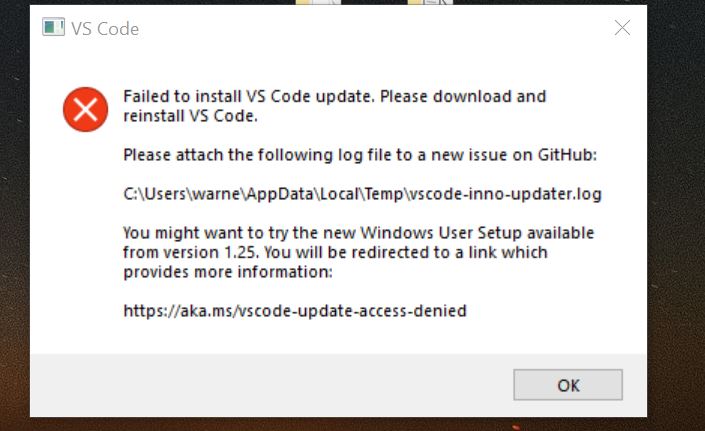
 warnerm06
on 12 Jul 2018
warnerm06
on 12 Jul 2018
Redirecting here is good to raise awareness. But ultimately, it forces everyone to scroll through the comments to figure out why they landed here.
A better UX would be to:
- allow VSCode to update in background - this means 1) do not nag me on every instance, every time whether I want to update or not. 2) do not require admin permissions to do so.
- upgrade vscode the next time it restarts silently (maybe make it configurable)
When in doubt, follow Chrome's auto-update behavior.
Please do not let VSCode become the next Adobe Flash. :pray:
 mrchief
on 12 Jul 2018
mrchief
on 12 Jul 2018
A better UX would be to:
- allow VSCode to update in background - this means 1) do not nag me on every instance, every time whether I want to update or not. 2) do not require admin permissions to do so.
- upgrade vscode the next time it restarts silently (maybe make it configurable)
@mrchief This is exactly what the link you just followed pointed to: https://github.com/Microsoft/vscode/issues/47841#issuecomment-399941682. That comment suggests you use the user installable package: https://vscode-update.azurewebsites.net/latest/win32-x64-user/insider which will not ask for permission to update, nor credentials, it just updates in the background.
joaomoreno
on 13 Jul 2018
Updating MailwareBytes did the trick.
 jdriesen
on 13 Jul 2018
jdriesen
on 13 Jul 2018
@joaomoreno Well that didn’t happen exactly it was supposed to. I simply landed at the last comment. In fact, even now, on ios safari, it takes you one comment above your intended comment.
But even assuming technology worked the way it’s supposed to, it’d take a lot to connect the dots. Install failed, some page opened and why am I looking at some random github issue?
The developer in me admires this marvel idea, the end user in me is horrified at the new direction this UX is going!! 😂
mrchief
on 13 Jul 2018
Disabling Malwarebytes while running installer worked for me
 softsmith
on 15 Jul 2018
softsmith
on 15 Jul 2018
I attempted to use the joaomoreno's insiders User setup method, which didn't work (lost during update). After that I tried disabling MWB ransomware protection as others have mentioned - that worked instantly! Note - it seems you don't have to completely disable MWB, only the ransomware module.
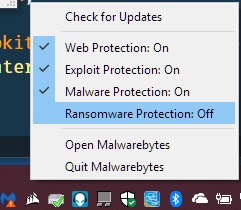
 DeathLoveCrymo
on 16 Jul 2018
DeathLoveCrymo
on 16 Jul 2018
I don't have malwarebytes and I also have this error:
Failed to install VS Code update. Please download and reinstall VS Code.
Please attach the following log file to a new issue on GitHub:C:\Users\beabri01\AppData\Local\Tempvscode-inno-updater.log
You might want to try the new Windows User Setup available from version 1.25. You will be redirected to a link which provides more information:
 bcbeatty
on 18 Jul 2018
bcbeatty
on 18 Jul 2018
@bcbeatty Do you have another kind of anti-virus/malware?
joaomoreno
on 19 Jul 2018
Just windows defender
bcbeatty
on 20 Jul 2018
Faced this issue while updating VS Code today:
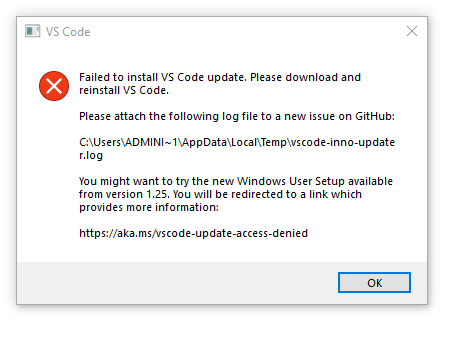
VS Code current version:
Version: 1.25.0
Commit: 0f080e5267e829de46638128001aeb7ca2d6d50e
Date: 2018-07-05T13:11:58.697Z
Electron: 1.7.12
Chrome: 58.0.3029.110
Node.js: 7.9.0
V8: 5.8.283.38
Architecture: x64
OS-Windows 10 64-bit
Symantec Endpoint protection is installed. Turned it off, still unable getting same issue.
 windlessStorm
on 20 Jul 2018
windlessStorm
on 20 Jul 2018
Same here, no additional AV is installed, pretty clean system, same problem
 crackagrack
on 21 Jul 2018
crackagrack
on 21 Jul 2018
Microsoftee brilliance at work yet again
F* this
 robertcatgithub
on 23 Jul 2018
robertcatgithub
on 23 Jul 2018
I'm having the same problem with the most recent update - all other updates went seamlessly as far as I am aware.
I am not using MalwareBytes but I am using BitDefender (free edition) - disabling its Protection Shield did not help.
 TynesideGroup
on 24 Jul 2018
TynesideGroup
on 24 Jul 2018
same issue found today:
Version 1.24.1
Commit 24f62626b222e9a8313213fb64b10d741a326288
Date 2018-06-13T17:51:32.889Z
Shell 1.7.12
Renderer 58.0.3029.110
Node 7.9.0
Architecture x64
Target version: 1.25.1
Jul 25 10:24:43.139 INFO Starting: C:\Program FilesMicrosoft VS CodeCode.exe, false
Jul 25 10:24:43.144 INFO Checking for running Code.exe processes... (attempt 1)
Jul 25 10:24:43.144 INFO Code.exe is running, wait a bit
Jul 25 10:24:43.652 INFO Checking for running Code.exe processes... (attempt 2)
Jul 25 10:24:43.668 INFO Code.exe is running, wait a bit
Jul 25 10:24:44.198 INFO Checking for running Code.exe processes... (attempt 3)
Jul 25 10:24:44.213 INFO Code.exe is running, wait a bit
Jul 25 10:24:44.717 INFO Checking for running Code.exe processes... (attempt 4)
Jul 25 10:24:44.733 INFO Code.exe is running, wait a bit
Jul 25 10:24:45.245 INFO Checking for running Code.exe processes... (attempt 5)
Jul 25 10:24:45.386 INFO Code.exe is running, wait a bit
Jul 25 10:24:45.908 INFO Checking for running Code.exe processes... (attempt 6)
Jul 25 10:24:45.929 INFO Code.exe is running, wait a bit
Jul 25 10:24:46.445 INFO Checking for running Code.exe processes... (attempt 7)
Jul 25 10:24:46.468 INFO Code.exe is not running
Jul 25 10:24:46.468 INFO Checking for possible conflicting running processes... (attempt 1)
Jul 25 10:24:46.587 INFO Inno Updater v0.4.4
Jul 25 10:24:46.587 INFO Starting update, silent = false
Jul 25 10:24:46.945 INFO do_update: "C:\Program Files\Microsoft VS Code\Code.exe", _
Jul 25 10:24:46.945 INFO move_update: "C:\Program Files\Microsoft VS Code\unins000.dat", _
Jul 25 10:24:46.945 INFO Delete: "Code.exe" (attempt 1)
Jul 25 10:24:46.996 INFO Delete: "Code.exe" (attempt 2)
Jul 25 10:24:47.197 INFO Delete: "Code.exe" (attempt 3)
Jul 25 10:24:47.648 INFO Delete: "Code.exe" (attempt 4)
Jul 25 10:24:48.448 INFO Delete: "Code.exe" (attempt 5)
Jul 25 10:24:49.699 INFO Delete: "Code.exe" (attempt 6)
Jul 25 10:24:51.500 INFO Delete: "Code.exe" (attempt 7)
Jul 25 10:24:53.951 INFO Delete: "Code.exe" (attempt 8)
Jul 25 10:24:57.184 INFO Delete: "Code.exe" (attempt 9)
Jul 25 10:25:02.765 INFO Delete: "Code.exe" (attempt 10)
Jul 25 10:25:07.958 INFO Delete: "Code.exe" (attempt 11)
Jul 25 10:25:07.959 ERRO Access is denied. (os error 5)
 amtywang
on 25 Jul 2018
amtywang
on 25 Jul 2018
Just got it, I have all the standard internal bloatware installed. Failing to rename "Resources". I believe I was on 0707dd4940b3fdbea8339595de478f354f6dda83.
 JacksonKearl
on 1 Aug 2018
JacksonKearl
on 1 Aug 2018
 sbatten
on 8 Aug 2018
sbatten
on 8 Aug 2018
@JacksonKearl @sbatten Do you have any antivirus set up? How about OneDrive?
joaomoreno
on 9 Aug 2018
@joaomoreno I haven't set up anything other than the standard stuff for domain joined computers. This includes "Windows Defender Advanced Threat Protection" antivirus, @dbaeumer and @sbatten would know more about if that could be the culprit here. I don't have any OneDrive set up.
JacksonKearl
on 9 Aug 2018
@joaomoreno Defender and Defender ATP are both enabled as these are corp machines. I don't currently have OneDrive configured on this machine. I just got this again today on my user install.
sbatten
on 9 Aug 2018
@joaomoreno there is a zombie process that I cannot kill.
command line: "C:\Users\stbatt\AppData\Local\ProgramsMicrosoft VS Code InsidersCode - Insiders.exe" "c:\Users\stbatt\AppData\Local\ProgramsMicrosoft VS Code Insidersresources\app\out\bootstrap" --type=extensionHost
sbatten
on 9 Aug 2018
@joaomoreno FWIW. I got tired of dealing with this issue and started updating by manually uninstalling the old version then downloading and installing the new version, and this time _I still got an access denied_ error when updating Code.exe from the full installer. As usual this was a random occurrence, simply clicking Retry from the installer solved the problem. It is as if Code.exe stays locked for (say) 30 seconds after the process exited.
So this is not strictly a bug in the updater, the same sequence of events can be reproduced outside the VSCode self-update mechanism if you are quick enough.
Fulg
on 14 Aug 2018
Running into this also with OneDrive + Defender
 KevinTCoughlin
on 16 Aug 2018
KevinTCoughlin
on 16 Aug 2018
@Fulg Yeah it's a tough issue for me to track down, since its hard to reproduce.
It is as if Code.exe stays locked for (say) 30 seconds after the process exited.
Yeah, I just haven't figured out why that is... Do you think it's just a matter of increasing the retry timeouts?
joaomoreno
on 17 Aug 2018
All of this discussion doesn't solve the problem or right explanation of the problem: That is with some installers, which I don't understand cause problem, but many problem comes from electron packer, that when making try to uninstall not fully exited or already doesn't seen in task manager app occasionally making the
 gruber123
on 17 Aug 2018
gruber123
on 17 Aug 2018
Oh, And deleting such files only shows disappeared F5 brings them back (until reboot) after reboot thay may disappear or can be deleted successfully, none application of unlocking doesn't successed with them, some sophisticated progs shows that exist handle on system that cannot not be unlocked
gruber123
on 17 Aug 2018
@joaomoreno I would look into adding Handle (from the ever resourceful Mark Russinovitch) to the VSCode package and use it in the updater in case of failure to create a log that explains _why_ the file is still locked, and who is locking it. This might give a clue and point to the real culprit.
I am happy to try this locally since I can readily reproduce the problem, however I haven't looked into what is required to make a custom VSCode build from source.
Fulg
on 17 Aug 2018
@Fulg That's a great idea. I'd be very interested if you used that locally and figure something out.
I'll look into embedding that into our updater and call it whenever things cramp up.
joaomoreno
on 20 Aug 2018
I discovered that if you ignore the updater's prompt for a restart, and instead close Code using the [x] at the top right, the update then proceeds correctly.
 nigeb123
on 23 Aug 2018
nigeb123
on 23 Aug 2018
I hit this issue today. While following the instructions in https://github.com/Microsoft/vscode/issues/47841#issuecomment-399941682, the update proceeded as expected, but I received _many_ instances of the error shown in the image with different filename listed. Hitting Retry on each seemed to work as I did not notice any repeated files, but it was annoying. After a couple dozen Retrys, I Aborted. Will probably uninstall and reinstall.
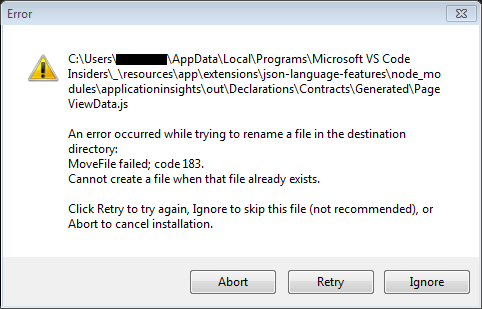
 brbecker
on 24 Aug 2018
brbecker
on 24 Aug 2018
Same access error - encountered many times before. Download/Reinstall works but in place update should also work as offered. Why it's it fixed already?
vscode-inno-updater.log
 JerseyAd
on 27 Aug 2018
JerseyAd
on 27 Aug 2018
Why it's it fixed already?
Because it seems to be pretty hard to figure out the root cause.
joaomoreno
on 27 Aug 2018
Guys, I'm taking a different approach to updating Code in the background especially wrt deleting the old version.
The current implementation tries to delete the old version, and if it gets stuck in a file/folder it keeps retrying until it succeeds. If it never succeeds, due to an antivirus program or any other reason, it just throws its hands up and gives up. This leaves a broken installation behind. Not great.
The new implementation will first attempt to get exclusive handles on all the files to be deleted. Once all handles are acquired, it promptly deletes the files; this should succeed since the handles are exclusive. Once that's done, all folders get deleted. Then, the update is applied. This will not prevent the background update from not working due to antivirus, etc... but (1) it should reduce the chances of that happening and (2) it prevents broken installations, which seems crucial by now.
I'll keep the issue open since I don't have a reproducible case. We'll close it eventually if issues stop coming in and/or if people confirm that this helps their setup.
joaomoreno
on 30 Aug 2018
@joaomoreno FYI - the last couple of Insider updates have had this problem for me. I could not delete the Code-Insiders.exe file until I rebooted my PC.
 mcollier
on 30 Aug 2018
mcollier
on 30 Aug 2018
@mcollier A new one just came out. Let me know how that goes. It could still fail, but it shouldn't brick your installation.
joaomoreno
on 31 Aug 2018
I tested the new update with a locked file and it behaved nicely and the installation was kept intact. However a locked directory makes the installation still fail. You can lock a directory easily by opening a Windows Command prompt (cmd.exe) on it.
 dbaeumer
on 31 Aug 2018
dbaeumer
on 31 Aug 2018
I started with version 1.27.0-insider. VS Code prompted for an update. The update eventually failed. Screenshots and log file should be attached.
vscode-inno-updater-1535724318.log


mcollier
on 31 Aug 2018
Version: 1.25.1
Commit: 1dfc5e557209371715f655691b1235b6b26a06be
Date: 2018-07-11T15:43:53.668Z
Electron: 1.7.12
Chrome: 58.0.3029.110
Node.js: 7.9.0
V8: 5.8.283.38
Architecture: x64
attempted to auto-update
Microsoft Defender is my anti-virus
I downloaded the update from https://code.visualstudio.com/docs/?dv=win and Installed without uninstalling, I had no issue
bcbeatty
on 31 Aug 2018
@mcollier Thanks for experimenting. Two asks for you:
- Did the installation get broken? It should not have broken this time.
- If you use Process Hacker, you can find the runnaway
Code - Insiders.exeprocess and see which other process has an open handle to it. Which one is it?
joaomoreno
on 1 Sep 2018
Occurring to me today, fails to update via the internal "Close and Update" button, as well as manually X-ing the window and trying to allow the update to proceed.
Version: 1.25.1
Commit: 1dfc5e557209371715f655691b1235b6b26a06be
Date: 2018-07-11T15:43:53.668Z
Electron: 1.7.12
Chrome: 58.0.3029.110
Node.js: 7.9.0
V8: 5.8.283.38
Architecture: x64
After a restart, the files unlocked, I uninstalled manually and downloaded from the site fresh. Not ideal, but...
 grrttedwards
on 1 Sep 2018
grrttedwards
on 1 Sep 2018
@joaomoreno Can you clarify "broken"? The update didn't work, but VS Code - Insiders still functions. It just continues to notify me to restart to update.
I can't find 'Code - Insiders.exe' with Process Hacker.
mcollier
on 4 Sep 2018
but VS Code - Insiders still functions
That's it :+1:
joaomoreno
on 5 Sep 2018
I faced this issue multiple times. Running a windows 10 enterprise installation.
vscode-inno-updater.log
 firstcodeninja
on 5 Sep 2018
firstcodeninja
on 5 Sep 2018
I've been getting this too just as I switch to the user install.
I used information I learned by having the same issue with the Twitch program and checked the System process (PID4) and sure enough, there it was; open file handle for Code.exe. Just have no idea WHY this happens. (Yes yes, something about system taking over the handle for another program when 'something' happens. Just no idea what program and why it needs to have an open file handle on the exe.)
....never managed to get past this stage with Twitch either.
 WindFox
on 6 Sep 2018
WindFox
on 6 Sep 2018
This is still happening to me.
vscode-inno-updater-1536343392.log
 gurpreetshanky
on 7 Sep 2018
gurpreetshanky
on 7 Sep 2018
Introduction
This is also happening to me. Ever since I installed the User-specific version of Insiders starting with 1.26.0. I finally got fed up with it and uninstalled it and then fresh installed 1.27.0. I know that 1.28.0 is out, but I'm still having the same issues.
System Information
Anti-Virus Information
I am using Trend Micro Maximum Security anti-virus. I am using Folder Shield (which protects against ransomware), _BUT_ the installation directory where VS Code Insiders resides is _NOT_ protected by Folder Shield. (And, I've turned Folder Shield off to make sure that this is not causing an issue.) I also completely exited Trend Micro Maximum Security in an attempt to have the update succeed--no dice.
Video Card
I am running a laptop system with dual Nvidia GeForce 680M video cards running the latest available drivers. (I just installed the latest driver today--I was two versions behind. The same behavior of installation occurred with the old driver as it does with the new driver.) Why do I mention video card? Because I know, especially for Nvidia, how intrusive some of its programs are--adding a "filter driver" type driver entries that operate even on the level of folders and files throughout all of Windows Explorer which seeming have _nothing_ to do with graphics.... I have no idea why they register their software so deeply into the system for things which seem to have nothing to do with graphics display. (But, I'm not a video driver programmer--so what do I know?)
My Recent Findings
There seem to be two scenarios that can happen. So let's take them one at a time.
Updating from Within Visual Studio Code - Insiders
When attempting to update from within Visual Studio Code - Insiders, I get the Error dialog many others have gotten, with the message:
C:\Users\<my_user_name>\AppData\Local\Programs\Microsoft VS Code Insiders\tools\inno_updater.exeAn error occurred while trying to replace the existing file: DeleteFailed; code 32.
The process cannot access the file because it is being used by another process.
I used ProcessExplorer and searched the open handles on my system. It turns out that the SYSTEM process (pid 4) has an open, exclusive handle to this file. Attempting to close the handle via ProcessExplorer results in another error message from ProcessExplorer: Error opening process: The handle is invalid. (Even though I opened ProcessExplorer as an elevated process, it's likely I still wouldn't have the rights to close a handle opened by SYSTEM, not sure, but that's the only reason I could think of other than the obvious reason stated by the error message; but if I've learned anything using Windows over the last 30 years is that error messages don't always tell you the whole story.)
Rebooting the Machine and Attempting an Upgrade via a Download of the New Installer
This, too, didn't work. In this case, the installer showed the same error dialog, but this time for Code - Insiders.exe. And, like for inno_updater.exe, the SYSTEM process (pid 4) is holding a lock on this file (and several others if you're patient enough to click Skip on each such occurrence of the error). In order to attempt to resolve this issue, I took the _drastic_ steps of:
- Navigate to the installation location of Visual Studio Code - Insiders in my user directory
- Remove all inherited folder permissions on the installation directory and copying the inherited permissions an explicit permissions granted at this folder location. (Note, this covers the location of
inno_updater.exe, too.) - Changed the
SYSTEMaccount's access to the folder from Allow, Full Control to Deny, Full Control - Reboot.
This did not work. (NOTE: looking in ProcessExplorer, the SYSTEM process runs under the context of NT AUTHORITY\SYSTEM, which is why I sought to deny access to the VS Code Insiders location.)
So, the only way I can get an updated copy of Visual Studio Code - Insiders to install is to:
- Uninstall Visual Studio Code - Insiders from Apps & Features. Uninstallation "succeeds", but I get a dialog that says that some files could not be deleted and that I would need to remove them manually. That makes sense given various files have locks on them by the
SYSTEMprocess. - Reboot the computer. Since after the reboot VS Code Insiders is not technically installed anymore, the
SYSTEMprocess does not open handles to those files after the reboot. - Delete the remaining installation files left behind after uninstalling.
- Install the updated Visual Studio Code - Insiders build.
I don't know that my log file is going to tell you anything more useful than anyone else's. All attempts to prevent/circumvent the file handles opened by the SYSTEM process have been unsuccessful. I'll do some Bing'ing to see if anyone else has a method of preventing SYSTEM from opening handles on certain files.
One thing I haven't tried--and maybe I'll do that real quick after submitting this comment--is disabling my anti-virus software's Windows Service and rebooting. I'm not sure that that would work, however, as I do have it loaded as part of the Boot process to protect my computer even before Windows is fully up and running. But I'll try anyway and report back.
 fourpastmidnight
on 8 Sep 2018
fourpastmidnight
on 8 Sep 2018
NOTE: This is also happening with regular VS Code (e.g. not Insiders edition).
fourpastmidnight
on 8 Sep 2018
OK, so I disabled the Trend Micro Solution Platform service and rebooted. I opened Visual Studio Code - Insiders and checked for updates and then clicked Restart to install updates. No dice. 😞 I got the following error dialog:
Failed to install VS Code update.
Updates may fail due to anti-virus software and/or runaway processes. Please try restarting your machine before attempting to update again.
If update fails repeatedly, please attach the following log file to a new issue on GitHub[.]
Looking at the log file, even though I performed the update process starting from within VS Code Insiders, it appears that the failure was as a result of being unable to obtain a lock on Code - Insiders.exe (again, because, SYSTEM is holding open a handle on this file). So, my "two scenarios" listed above are a little incorrect in that it's not based on where/how an update is performed, but only on which files are trying to be updated. In most cases (>90%), Code - Insiders.exe is trying to be replaced. In some smaller amount of cases, it's inno_updater.exe which is trying to be replaced. I would venture that we should forget about inno_updater.exe for the moment and focus only on Code - Insiders.exe. Also, it's likely that determining the reason for one would also determine the reason for the other.
I'll post my log file (only changing my username in the logfile), but again, I don't think it'll be all that helpful. The most reliable method to updating VS Code User installation is the 4 step method I posted above: Uninstall, Reboot, Delete leftover files, Install new version. Ugh. What a pain.
I think for now I'll go back to a machine-wide installation. I never had issues with that. Hopefully, you guys will be able to figure this out; it sounds like it's been a tricky bugger to get to the bottom of. Let me know if there's anything else I can provide to aid in your efforts, as the User install does seem to be a better installation option for this type of program.
fourpastmidnight
on 8 Sep 2018
Still happening with VS Code Insiders v1.27.0 (trying to update to 1.28.0). Interestingly, I noticed that after the update to 1.28.0 failed, the Add/Remove programs dialog indicates that 1.28.0 is installed (it isn't).

mcollier
on 11 Sep 2018
I have the same issue for the latest release.
Sep 14 06:21:27.768 ERRO Failed to create file handle: The process cannot access the file because it is being used by another process.
 spences10
on 14 Sep 2018
spences10
on 14 Sep 2018
Hitting this also. Fresh, Stock machine, no fancy antivirus.
vscode-inno-updater-1536905729.log
 shanselman
on 14 Sep 2018
shanselman
on 14 Sep 2018
Same error for me while running vscode with user priviliges (while my user is local administrator)
Closed vscode and restarted with 'run as administrator' > no error showing up
Closing vcscode again > setup starts
 BAEMoO
on 14 Sep 2018
BAEMoO
on 14 Sep 2018
I did forget to mention that updating also failed when running VS Code (regular and Insiders) with elevated privileges and without, as well as running the actual installer itself with/without elevated privileges. TBH, I completely expected that given the file locks opened by SYSTEM.
fourpastmidnight
on 14 Sep 2018
So this just happened to me today on my home machine (the one I described above in earlier comments) with the non user-only installation of VS Code Insiders edition. Additionally, I do not experience this problem on my work computer; updates on that computer have occurred flawelessly. My work computer is an HP zBook.
fourpastmidnight
on 18 Sep 2018
Update: restarting VS Code Insiders (non user-only instalation) and re-attempting the update was successful.
fourpastmidnight
on 18 Sep 2018
Why it's it fixed already?
Because it seems to be pretty hard to figure out the root cause.
This is how I got this problem and how I fixed it. After the version 1.26 came out I downloaded manually the User Installer and it gave me an access denied error because I tried to install it to Program Files folder (C:\Program FilesMicrosoft VS Code\ ) so I opened the installer with run as administrator option. Running Code started to prompt this access denied error all the time (after version 1.27 came out, I suppose) so I did some googling and ended up here. Then I googled some more and I decided reinstall it to the default folder (AppData) so I don't have to use run as administrator option to run the installer. Now it's working fine.
 drinksu
on 19 Sep 2018
drinksu
on 19 Sep 2018
I had a bit of an epiphany on Friday. I had installed the Vivaldi browser on both my work and home computers. By default, the Vivaldi browser also gets installed into the %userprofile%\AppData\Local folder. On my work PC, I have no problems updating the browser. But on my home PC, the updates _always_ fail due to—can you guess?—locked files! Locked by the SYSTEM process. The same exact reason that updates to the user installations of VS Code and VS Code Insiders fail.
One thing that's worth checking out is what installer technology is being used by Vivaldi. Is the installer technology the same as that being used by VS Code? If so, then maybe it's something specific to the installer.
Ruling out any installer issues with respect to the installation location, it would seem most likely that this issue is machine-specific, I'm sorry to report, because for the life of me I'm unable to determine why this particular machine is behaving in such a manner.
fourpastmidnight
on 30 Sep 2018
1.27.2 is the second version I haven't been able to update and had to install from downloaded installer. Same errors as everyone else. Tried disabling some startup items and restarting...didn't help.
 devuxer
on 9 Oct 2018
devuxer
on 9 Oct 2018
Same problem here. Stock Windows 10 Pro on a Surface Pro 4, joined to a work domain. No fancy antivirus. SYSTEM has a handle on the file, and I can't stop that. Rebooting doesn't fix.
This seems to have a tenuous association with work computers. Does that suggest being joined to a domain relates to the problem?
 arencambre
on 11 Oct 2018
arencambre
on 11 Oct 2018
@arencambre,
My laptop does connect to a domain when I'm at work, though I've experienced the problem even when I'm at home and not connected to a domain.
devuxer
on 11 Oct 2018
It also happens on my home computer, which is not in a domain.
 Morten242
on 11 Oct 2018
Morten242
on 11 Oct 2018
I had a bit of an epiphany on Friday. I had installed the Vivaldi browser on both my work and home computers. By default, the Vivaldi browser also gets installed into the
%userprofile%\AppData\Localfolder. On my work PC, I have no problems updating the browser. But on my home PC, the updates _always_ fail due to—can you guess?—locked files! Locked by the SYSTEM process. The same exact reason that updates to the user installations of VS Code and VS Code Insiders fail.One thing that's worth checking out is what installer technology is being used by Vivaldi. Is the installer technology the same as that being used by VS Code? If so, then maybe it's something specific to the installer.
Ruling out any installer issues with respect to the installation location, it would seem most likely that this issue is machine-specific, I'm sorry to report, because for the life of me I'm unable to determine why this particular machine is behaving in such a manner.
I also run Vivaldi and have the SAME issue! I thought it was just me!
 brotherdust
on 11 Oct 2018
brotherdust
on 11 Oct 2018
@arencambre It does not seem to be highly correlated to domain-joined computers. My domain-joined work computer has no issues updating VS Code (regular or Insiders) nor Vivaldi (which also installs into %userprofile%\AppData\Local). My home computer, on the other hand, which is _NOT_ domain-joined exhibits this behavior for both applications.
Therefore, as I stated previously, this issue is not a VS Code-specific issue, but is probably a machine-specific issue. (I'm leaning towards ruling out the installer because it's not the installer which has a problem, rather, it's the SYSTEM account holding a lock on files which need to be replaced causing the installer to fail.) The top culprit is the Anti-Virus program in use and/or it's configuration. I haven't been able to resolve the issue by changing my anti-virus configuration, however.
In my case, on my work computer they use Sophos Anti-Virus--again, this computer _does not_ have an issue updating VS Code. On my home computer, I'm running Trend Micro Maximum Security, the latest version.
It may be helpful if others also list their anti-virus program in use to see if there are any program and/or configuration commonalities that could help determine why the SYSTEM process is holding locks on these files.
fourpastmidnight
on 11 Oct 2018
Here's my setup:
- Latest VS Code (non-insider) User installed
- Windows 10 1809 (2H18)
- Windows Defender for anti-virus
- NOT domain joined
Both my laptop and my desktop are set up the same as above and exhibit the same problem. I just uninstalled VS Code User and installed VS Code System. Seems to have fixed the problem.
brotherdust
on 11 Oct 2018
@brotherdust Thanks for the info. Yes, the system-wide installation does not exhibit this problem (to my knowledge) because it's installed to %Program Files%. I, too, have resorted to using the system-wide installation on my home computer due to the update issues.
One question: since you're running Windows 10 1809 and Windows Defender, did you enable the new anti-ransomware folder protection feature? Trend Micro has a similar feature that's been around for a while now and I am using it on some folders (though, not the %userprofile%\AppData folder). If so, is it possible for you to list the locations you've enabled it for (just use the well-known folder names such as Documents, Pictures, etc., not the full path to those folders. And also note if you've used the feature on other not well-known folders, e.g. C:\some-other-folder—I don't want to know the actual path, just whether or not you're using the feature outside of well-known folders as well).
fourpastmidnight
on 11 Oct 2018
Hm...I also have Vivaldi...
On Thu, Oct 11, 2018 at 12:39 PM Craig E. Shea notifications@github.com
wrote:
@brotherdust https://github.com/brotherdust Thanks for the info. Yes,
the system-wide installation does not exhibit this problem (to my
knowledge) because it's installed to %Program Files%. I, too, have
resorted to using the system-wide installation on my home computer due to
the update issues.One question: since you're running Windows 10 1809 and Windows Defender,
did you enable the new anti-ransomware folder protection feature? Trend
Micro has a similar feature that's been around for a while now and I am
using it on some folders (though, not the %userprofile%\AppData folder).
If so, is it possible for you to list the locations you've enabled it for
(just use the well-known folder names such as Documents, Pictures, etc.,
not the full path to those folders. And also note if you've used the
feature on other not well-known folders, e.g. C:\some-other-folder—I
don't want to know the actual path, just whether or not you're using the
feature outside of well-known folders as well).—
You are receiving this because you commented.
Reply to this email directly, view it on GitHub
https://github.com/Microsoft/vscode/issues/47841#issuecomment-429090684,
or mute the thread
https://github.com/notifications/unsubscribe-auth/AAALTIOQysz_b7HuDyD8HVckEYfIPxe8ks5uj55ogaJpZM4TTz7T
.
--
Scott Hanselman
Donate to fight diabetes: http://hnsl.mn/fightdiabetes
shanselman
on 12 Oct 2018
But I don't think vivaldi's the cause though (I don't have it).
Also had this issue before 1809 so it's not because of the anti-ransomware feature.
Morten242
on 12 Oct 2018
No no, I’m not saying Vivaldi is the cause; I’m saying that Vivaldi installs into a similar location as VS Code and that it, too, fails to update in the same way as VS Code. So there's an element of commonality in the behavior of updating both of these applications.
Regards
Sent from my Windows 10 phone
From: Mårten Nordheim
Sent: Friday, October 12, 2018 2:50
To: Microsoft/vscode
Cc: Craig E. Shea; Comment
Subject: Re: [Microsoft/vscode] Windows update failed: Access is denied(#47841)
But I don't think vivaldi's the cause though (I don't have it).
Also had this issue before 1809 so it's not because of the anti-ransomware feature.
—
You are receiving this because you commented.
Reply to this email directly, view it on GitHub, or mute the thread.
fourpastmidnight
on 12 Oct 2018
So, this worked on my Dell XPS 13 but still fails on my Asus Transformer Pro
spences10
on 12 Oct 2018
Will give Vivaldi a try... @shanselman is this happening to you on every update?
joaomoreno
on 15 Oct 2018
I don't have Vivaldi installed and am also having this issue
 jcotton42
on 16 Oct 2018
jcotton42
on 16 Oct 2018
Ever since I switched to the user-based installation this is now happening to me ever since. vscode is incapable of updating itself now, always claiming it cannot access Code.exe.
What I have noticed though (whenever I remember to check) is that the System process (pid 4) has a lock on Code.exe which remains locked even when vscode and the udpater exit. I can't even delete the file by hand at this point. Occasionally new locks are added within System when the update process attempts to run again. Needless to say when that happens not even the manually downloaded installer can do anything until I restart the machine.
 mknejp
on 17 Oct 2018
mknejp
on 17 Oct 2018
I'm also having this exact same issue. I need to download the new installer from the website, reboot, and install it first thing for it to succeed. This was the issue I posted weeks ago: https://github.com/Microsoft/vscode/issues/58743#issue-360564253
 axmccx
on 17 Oct 2018
axmccx
on 17 Oct 2018
@Morten242 Well, it may still be a "ransomware feature". As I mentioned earlier, I use Trend Micro Maximum Security which has had a "ransomware folder protection" feature since late 2017 (so, since around Windows 1803, possibly even 1709) and I've been using it on my Documents, Pictures and some other folders. So, it's not so much whether you're using _the_ Windows ransomware folder protection feature, but whether or not you're using _a_ ransomware folder protection feature of some software security suite which _may_ be interfering (even though, in my case particularly, I'm not protecting %AppData%).
And as far as Vivaldi, for the 3rd time, I'm not saying it's _causing_ anything, but that it _also_ exhibits the same update failure behavior as VS Code (SYSTEM process holding a lock on critical files causing updates to fail), which is leading me to believe that this issue may be more specific to a machine configuration than an actual problem with VS Code itself (or Vivaldi, for that matter).
fourpastmidnight
on 18 Oct 2018
@fourpastmidnight Except, all I have is Defender and I did not turn on the ransomware protection and I still get this on VSCode and Twitch (Starting to think Discord as well now unless they are truly pushing daily updates with no changelog)
WindFox
on 18 Oct 2018
@Windfox Cool! It's just one more thing to potentially rule out. Thanks!
fourpastmidnight
on 19 Oct 2018
same issue with me with the exact same description from other members.
Edit> It's really bad for as i can't even uninstall vscode or reinstall it because both inno_updater and code are being used by System, even after restarting the machine.
 pushqrdx
on 28 Oct 2018
pushqrdx
on 28 Oct 2018
Can we change the name of this issue? This isn't about Windows Update.
arencambre
on 28 Oct 2018
Thanks for all the info guys, will continue investigating this. Meanwhile, I'll lock this thread so everyone sees this:
If you're having this issue constantly, disable background updates with
"update.enableWindowsBackgroundUpdates": false
Related issues
 mrkiley
·
3Comments
mrkiley
·
3Comments
 lukehoban
·
3Comments
lukehoban
·
3Comments
 curtw
·
3Comments
curtw
·
3Comments
 omidgolparvar
·
3Comments
omidgolparvar
·
3Comments
 trstringer
·
3Comments
trstringer
·
3Comments
Most helpful comment
Redirecting here is good to raise awareness. But ultimately, it forces everyone to scroll through the comments to figure out why they landed here.
A better UX would be to:
When in doubt, follow Chrome's auto-update behavior.
Please do not let VSCode become the next Adobe Flash. :pray: