Vscode: A little confusing visual effect of highlighting for snippet tabstop
- VSCode Version: 1.21.0-ins
- OS Version: win7x64
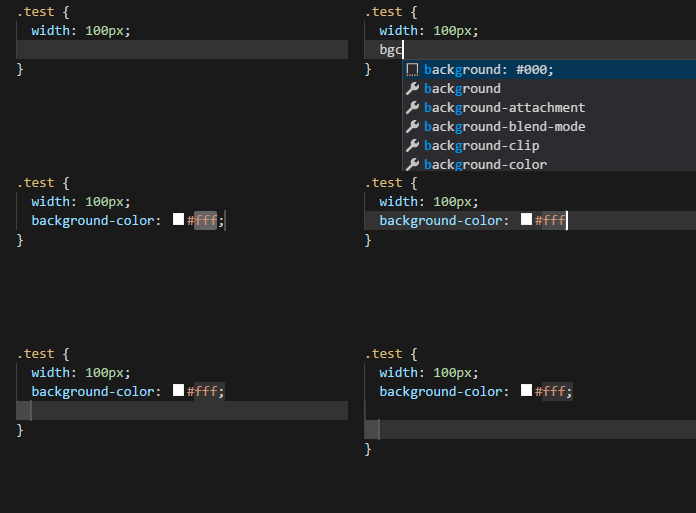
Type "bgc", expand it, then "Right Arrow", delete semicolon, and after that when first tabstop contacts with second tabstop - it visually fixes, even after you moved to new line typing "Enter".
 user3323
All 24 comments
Same issue reported to me at https://github.com/Dart-Code/Dart-Code/issues/1173.
 DanTup
on 27 Aug 2018
DanTup
on 27 Aug 2018
I have been battling with this for the last month or so and recently decided to look around the internet for a way to turn off this "white select-not-select that breaks autocomplete" feature that seemingly has no name. 😱
Any assistance, resolution or explanation would be much appreciated.
 lukepighetti
on 4 Sep 2018
lukepighetti
on 4 Sep 2018
This problem also occurs when editing python files, causing auto-completion to fail.
 czfadmin
on 14 Sep 2018
czfadmin
on 14 Sep 2018
@alexandrudima Do you know if there is a workaround for this? I've had quite a few reports about this, it feels very broken. If we use "tabstops" in our completion snippets, they're treated the same as placeholders and when the user tabs into them, it just completely breaks code completion until the user presses <escape>.
I'm not sure if it's a real bug or we're doing something wrong, but it keeps coming up:
DanTup
on 16 Oct 2018
For what its worth I have this problem no matter whether I'm using Flutter, Typescript, Javascript, HTML, whatever. I'm a little surprised that this doesn't have more visibility, I don't believe there is anything unique about my configuration?
lukepighetti
on 16 Oct 2018
What happens here is that the final placeholder is being "merged" in the first placeholder. That shouldn't happen. Pressing Enter inside a placeholder however will not cancel snippet mode but continue expanding that placeholder.
 jrieken
on 17 Oct 2018
jrieken
on 17 Oct 2018
@jrieken Should there be a different between a "tab stop" and a placeholder? The Dart issue seems slightly different to the gif above (which shows two), it seems like when the user tabs to the "tab stop" it behaves like a placeholder, so continuing typing leaves the user in snippet mode.
https://github.com/Microsoft/vscode/issues/57251 has a better description - I closed it as a dupe of this, but it's possible that was incorrect.
DanTup
on 17 Oct 2018
Should there be a different between a "tab stop" and a placeholder?
There is no functional difference between a tab stop or a placeholder so I don't think that they should have a different representation. The only tabstop that is different is the final tabstop because (1) it will not grow and (2) it will end snippet mode when being reached.
re https://github.com/Microsoft/vscode/issues/43270#issuecomment-430517645: the decorations don't actually merge but the final tab stop is somewhat behind the cursor. When using a stronger color ("editor.snippetFinalTabstopHighlightBorder": "#003cff") this is becomes visible
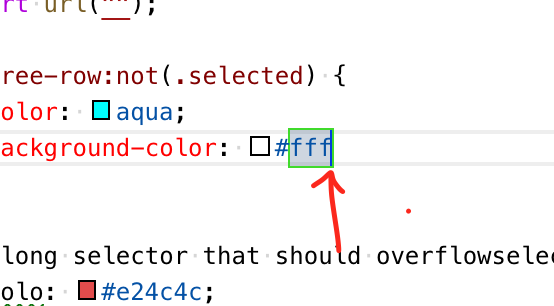
Not sure what's best here. We could experiment with making the final tabstop wider or somehow more prominent but it might look ugly then...
jrieken
on 17 Oct 2018
The only tabstop that is different is the final tabstop because (1) it will not grow and (2) it will end snippet mode when being reached.
Ok, I understand this better now. The SnippetString class has an appendTabstop() method so I assumed they were different - but the logic above makes some sense. I think my issue is likely that I have two "tabstops"s then:
completionText.appendTabstop(); // Put a tap stop between parens since there are optional args.
completionText.appendText(")");
completionText.appendTabstop();
I wanted the user to be able to tab out of the parens (there are optional arguments for this function) but if they start typing in the first tabstop, I wanted it to leave snippet mode (so ideally, I think "tabstops" should be a different concept, and leave snippet mode when the user types the first character in them, but otherwise they can tab on to the next).
That said, I think I can solve the main issue here, I just need to decide which tabstop is most useful to keep and ditch the other. Thanks for the info!
DanTup
on 17 Oct 2018
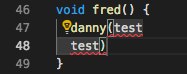
@jrieken Actually, this isn't working still. My SnippetString looks like danny($1) and I'm assigning that to insertText of a completion, but it seems like there's some additional tabstop appearing after it and where $1 is it still does not leave snippet mode:
if (label.indexOf("danny") !== -1)
    console.log(`insertText is ${completionText.value}`);
completion.insertText = completionText;
insertText is danny($1)
DanTup
on 17 Oct 2018
Yes - there is always the final tab stop ($0) which is append to the end if omitted.
jrieken
on 17 Oct 2018
Aha! I was just calling appendTabstop() which starts at 1. Explicitly passing 0 seems to fix it. I think that solves my issues, thanks!
DanTup
on 18 Oct 2018
Two things in this issue
- pressing
deletedoesn't move the cursor but changes the model -> the snippet controller should listen to both events: cursor move, content change - reaching the final tab stop ends snippet mode. we are only checking this when pressing tab or when arrowing around. In this case the final tab stop moves, not the selection, which means we need to detect that as well
jrieken
on 6 Mar 2019
I have pushed a change to fix this. The new logic, checking if the final tab stop moved under the cursor might introduce some new behaviour but from the looks its an improvement to how snippets work
jrieken
on 6 Mar 2019
@jrieken do you have any opinions on the best way to handle this? Consider I want to insert placeholder arguments for a function:
forEach(${1:func})$0
This inserts func as a placeholder. However in this case, the argument is a function, so the user wants to type some code in there:
forEach((f) {
  someThing();
});
However, they're stuck in snippet mode while typing all this, so they have the whole block highlighted and code completion won't work. Maybe instead of blocking completion, it could just break out of snippet mode if completion is activated (explicitly, or by a trigger character)?
(I can open an issue if you think there's a reasonable request here, but not sure it's worth adding to the file otherwise).
DanTup
on 11 Mar 2019
Completion isn't blocked, quick suggestions are. You must leaving snippet mode explicitly via Escape, something implicit like completion started won't work because nested snippets are a thing.
jrieken
on 11 Mar 2019
@jrieken You're right! I was sure I tested this as I wrote that, however it seems to work in testing again now with the above example. Oh well, no change needed then! :-)
DanTup
on 11 Mar 2019
We will revert the changes made here (https://github.com/Microsoft/vscode/pull/73031) because they have caused regressions. A better fix is needed instead
jrieken
on 29 Apr 2019
This is acknowledged but given the very low number of reports and the complexity of the fix I have decided to this as it is.
jrieken
on 4 Mar 2020
@jrieken Pardon me, but this is a huge problem and very annoying for users. It is impossible to get a proper autocomplete after you autocomplete once, as afterwards everything is highlighted and you need to press extra ESC in order to deselect... This is pretty annoying and counter productive.

Please reconsider you decision.
 Sh1d0w
on 10 Mar 2020
Sh1d0w
on 10 Mar 2020
@Sh1d0w Please re-read this issue to understand what it is about
jrieken
on 10 Mar 2020
@Sh1d0w thanks for the gif - I hadn't noticed that bug (I don't use the main snippet). It's the same issue described here, but it's caused by using the wrong placeholder ($1 instead of $0`) in the Dart snippet. I've opened https://github.com/Dart-Code/Dart-Code/issues/2296 for it.
DanTup
on 10 Mar 2020
@DanTup Thanks for the quick reaction. Just FYI it is not problem only with the main snippet, it is problem with every Flutter widget (I am using Flutter VSCode dart extension), and if I enable placeholder auto insert option, I get stuck there as well once I autocomplete a widget suggestion.
Should we open an issue somewhere else or this one will resolve that issue as well?
Sh1d0w
on 10 Mar 2020
Yeah, those are the problematic ones because of this issue. The main snippet was a trivial error - it had a "tab stop" in the middle of the body, which triggers this issue, but it really should've been the "final tab stop" (which means it exits this snippet mode immediately).
When completing something that has arguments, and one of those arguments is a function, I don't really have a fix and think (without changes to VS Code) the only options are either:
- Allow you to tab between argument placeholders, but if you start typing code (eg. a function) you'll be stick in this weird snippet mode
- Don't insert argument placeholders, and require you to type all arguments yourself (though this is made more painful by the bad display of arguments in signature help)
If anyone has suggestions for a better fix though, I'm all ears. This has been quite an annoyance for many years.
DanTup
on 10 Mar 2020
Related issues
 jez9999
·
234Comments
jez9999
·
234Comments
 Tyriar
·
200Comments
Tyriar
·
200Comments
 jsftw86
·
361Comments
jsftw86
·
361Comments
 mariusa
·
219Comments
Tyriar
·
314Comments
mariusa
·
219Comments
Tyriar
·
314Comments
Most helpful comment
This problem also occurs when editing python files, causing auto-completion to fail.