Vscode: Why is there no Chinese after the update?
- VSCode Version: Code 1.13.0 (376c52b955428d205459bea6619fc161fc8faacf, 2017-06-08T16:43:13.058Z)
- OS Version: Windows_NT ia32 10.0.14393
- Extensions:
|Extension|Author|Version|
|---|---|---|
|php-intellisense|felixfbecker|1.3.0|
|crane|HvyIndustries|0.3.6|
|phpcomments|Yurun|0.0.1|;
 Yurunsoft
All 23 comments
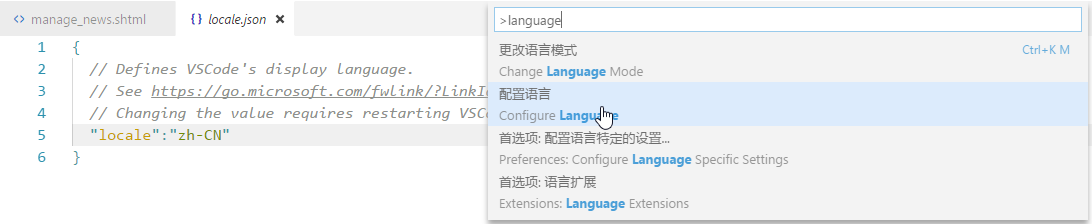
可能是这次更新的问题,我找到解决方法了
https://code.visualstudio.com/docs/getstarted/locales
Yurunsoft
on 9 Jun 2017
更新后我也有这种问题 也是这种办法解决了
 cyea
on 9 Jun 2017
cyea
on 9 Jun 2017
But it should be in Chinese automatically.
 popcorner
on 9 Jun 2017
popcorner
on 9 Jun 2017
@popcorner
+1
 zce
on 9 Jun 2017
zce
on 9 Jun 2017
@popcorner
+1
 bestvow
on 9 Jun 2017
bestvow
on 9 Jun 2017
@popcorner +10086
Yurunsoft
on 9 Jun 2017
@Yurunsoft @bestvow @chenyeah 请问你们之前是否有修改过 locale.json?另外你们的系统语言是中文吗?更新之前 VS Code 显示为中文,但是更新之后就变成英文了?
 rebornix
on 9 Jun 2017
rebornix
on 9 Jun 2017
@rebornix 没修改过,系统语言是中文
Yurunsoft
on 9 Jun 2017
以前安装好之后就直接是中文了,所以没动过locale.json,但是这次更新之后就直接变英文了
 abc45628
on 9 Jun 2017
abc45628
on 9 Jun 2017
Summary of this issue:
- On both macOS and Windows, after updating to latest version of stable, the display language falls to English even if the system display language is others (at least Chinese).
- If users have opened/edited
locale.json, then they don't run into this issue.
I tested electron.app.getLocale() on my Windows and it return an empty string, our locale detection fails. cc @bpasero @dbaeumer
rebornix
on 9 Jun 2017
I would be surprised if this was an Electron issue simply because we did not update Electron during this milestone.
@rebornix Does it make a difference to start from Dock vs Terminal?
 bpasero
on 9 Jun 2017
bpasero
on 9 Jun 2017
@bpasero whether launching from dock or terminal, it displays English always.
rebornix
on 9 Jun 2017
@bpasero I did some further testing and electron.app.getLocale() returns an empty string even when running under an English locale. So something did change in Electron. I will check if this happened in 1.12 already.
 dbaeumer
on 9 Jun 2017
dbaeumer
on 9 Jun 2017
This was caused by us not wating for app ready anymore when loading the loader. The call app.getLocale() only returns a valid result after the app is ready.
To workaround this problem for now do the following:
- either start code from a terminal and pass the locale using the --locale switch. E.g. code --locale=de to switch to a German UI
- Configure the local using
F1 > Configure Localecommand.
dbaeumer
on 9 Jun 2017
The bad change is https://github.com/Microsoft/vscode/commit/174fafae53ec26bc3dc1216080061449b17fb080
 jrieken
on 9 Jun 2017
jrieken
on 9 Jun 2017
Pushed a revert commit https://github.com/Microsoft/vscode/commit/5194bbbe8e1793fdd407c8d7da93d6d6cda88f19 to make us wait again for the appReady-event and only then ask for the locale
jrieken
on 9 Jun 2017
Will/How much this affect(s) the startup performance?
 jens1o
on 9 Jun 2017
jens1o
on 9 Jun 2017
Verified on source that we know get the right app locale again.
dbaeumer
on 9 Jun 2017
me too!
 zmyjs
on 9 Jun 2017
zmyjs
on 9 Jun 2017
System.Console.WriteLine("me too!");
 sharp-summit
on 9 Jun 2017
sharp-summit
on 9 Jun 2017
Adding verified-label based on the last three comments
jrieken
on 14 Jun 2017
上次更新后已经习惯英文界面了,突然换回来还有点不适应……捂脸
 AxisRay
on 18 Jun 2017
AxisRay
on 18 Jun 2017
中国人自带简繁转换,程序猿工具自带中英转换
 Chanzhaoyu
on 24 Jun 2017
Chanzhaoyu
on 24 Jun 2017
Related issues
 jez9999
·
234Comments
jez9999
·
234Comments
 Brakkar
·
364Comments
Brakkar
·
364Comments
 ozsay
·
247Comments
ozsay
·
247Comments
 TurkeyMan
·
411Comments
TurkeyMan
·
411Comments
 niagr
·
246Comments
niagr
·
246Comments
Most helpful comment
可能是这次更新的问题,我找到解决方法了
https://code.visualstudio.com/docs/getstarted/locales