Vscode: Git Credential Manager for Windows keeps appearing when launching VS Code
- VSCode Version: Code 1.12.2 (19222cdc84ce72202478ba1cec5cb557b71163de, 2017-05-10T13:20:36.315Z)
- OS Version: Windows_NT ia32 10.0.14393
- Extensions: none
Steps to Reproduce:
- Open visual studio code
- Login
- App Keeps asking for your credential, despite having entered them or cancel the action.
 milodude
All 35 comments
What are you logging in to? Can you post a screenshot?
 Tyriar
on 16 May 2017
Tyriar
on 16 May 2017
I'm logged in at github with this account. I enter my credentials in here

But keeps asking me for the user and password. This used to dissapear once I hit cancel but with latest version keeps appearing and does not go away.
milodude
on 16 May 2017
Similar problem, but related to the GitHub authentication window. I opened a folder that is a GitHub repo, and this dialog keeps popping up constantly even though I dismiss it or cancel it.

VSCode information:

 dend
on 19 May 2017
dend
on 19 May 2017
26573
 joaomoreno
on 19 May 2017
joaomoreno
on 19 May 2017
I updated to VS Code 1.16.0 just now and now I'm getting this window spamming me. It opens up 7 of them at a time. I close them all, then in a few minutes it spams them out again.
I should add that I've never seen this window before and I've never done anything git-related in VS Code.
 jazoom
on 8 Sep 2017
jazoom
on 8 Sep 2017
Hi, i have the same issue.
 thevexx
on 10 Sep 2017
thevexx
on 10 Sep 2017
Samesies
 mark-conn
on 11 Sep 2017
mark-conn
on 11 Sep 2017
I'm having the same issue and I never do anything git related from vs code
 roxalech
on 13 Sep 2017
roxalech
on 13 Sep 2017
+1 is there anyway to uninstall this credential manager i'd rather just set it in CLI.
 FahdW
on 14 Sep 2017
FahdW
on 14 Sep 2017
Same here!!! It's very annoying. I just updated to the latest release, but it just started again. It used to do it a long time ago, then it quit, but now it's going again
 RogerStoner
on 14 Sep 2017
RogerStoner
on 14 Sep 2017
I am having the exact same issue. Is there a way to disable the credential manager through VS Code?
 lucaswalter
on 16 Sep 2017
lucaswalter
on 16 Sep 2017
I found out a way to get rid of it on Stack Overflow, here is a link to the solution. It worked for me, there are a few options, just play around and see which one works for you. If you don't want to permanently disable, here is another link that might help, i didn't try it tho.
RogerStoner
on 16 Sep 2017
Having the same issue. Updated to VS Code 1.16.1, and the popup shows regardless of if I enter my credentials or click cancel
 kgriffiths
on 21 Sep 2017
kgriffiths
on 21 Sep 2017
@kgriffiths , did you try the solution on Stack Overflow that i posted?
RogerStoner
on 21 Sep 2017
Fresh install of VS code, Git for windows, ... on a Windows 10 machine and the Git cred management flow is still broken. Happens on my other machine as well.
- start VS code on a repo previously cloned from GitHub
- in the git source control window click the refresh/sync button at the bottom
- Notice the GitHub cred window come up. Enter username and PAT
- Nothing useful happens
- Notice little tiny drop down at the top of the VS code window asking for GitHub username, and then password. Enter username and PAT
- Operation seems to succeed.
- randomly go back to step 3
Sometimes the creds entered directly into VS Code work for a while (days), sometimes it is minutes until you have to do the dance again. The answers suggested above basically involve turning off syncing or the cred manager. That seems to just defer the problem. Is there a real answer here?
 jeffmcaffer
on 25 Sep 2017
jeffmcaffer
on 25 Sep 2017
Now I managed to disable the auto fetch and got rid of the popup that never accepted user / PAT ...
And so far I couldn't make VSCode work with github at all although the repo works terrific with github through eclipse and github desktop. If I recall right this issue has been there since last year. What's on here ?
 aino-gautam
on 25 Sep 2017
aino-gautam
on 25 Sep 2017
I managed to disable and now it asks me in PowerShell for login details. So it's working perfectly now.
FahdW
on 25 Sep 2017
Things to check when this occurs:
- Output of:
git config credential.helper - Check if the OS's Credential Manager / Keychain has an entry for github.com
- Output/behavior of (when on Windows, run from Powershell):
echo "url=https://github.com/Microsoft/vscode\n\n" | git credential fill(run with your repository URL)
 chrmarti
on 26 Sep 2017
chrmarti
on 26 Sep 2017
I did the echo at a point when my system was prompting me for creds and there were none. I did not get a chance to check the OS (Windows in my case) cred manager before ending up entering my creds in the prompts directly in VS Code. After entering the creds into the VS code prompts, the echo and Windows Cred Manager both had values. Next time it happens (seems random) I'll check the Windows Cred Manager first to see if somehow the creds are getting dropped.
jeffmcaffer
on 26 Sep 2017
The problem came back and it appears that the GitHub creds are gone from the windows cred manager. So, the cred prompt is legit but that leaves two questions
- why are the creds disappearing
- why do I get a GitHub branded login prompt that does not actually work
On the first I did some poking around and found @whoisj talking about debugging cred manager issues in https://github.com/Microsoft/Git-Credential-Manager-for-Windows/issues/58. Seems like some good steps. I have not had a chance to try but wanted to let others know so they can do so as well. One possibile theory is that this happens when waking up my machine with VS Code running. Code attempts git fetch and fails as the internet may still be connecting. Then the creds get removed from the store.
For the second one I am puzzled. At one point I was clearly getting a GCM prompt (it said Git Credential Manager) but now I get one that is clearly GitHub branded. That (ironically) may be after having installed GCM separately (as opposed to what may have come with VS Code). That GitHub one simply does not appear to do anything. It happily takes my creds but auth does not succeed.
jeffmcaffer
on 27 Sep 2017
@jeffmcaffer the creds are likely being dropped at Git's request. Git requests that credentials get erased if a network operation using them fails with a 400 class error. I personally hit an issue where GitHub was throttling me (or at least it seemed like they were) because VSCode was being so aggressive with git-fetch operations. Disabling auto-fetch stopped this from happening.
Regarding the branding change, there are many Git credential helpers - but only one Git Credential Manager for Windows [GCM]. The GCM was granted GitHub branding and multi-factor authentication support by GitHub a little over a year ago. If you're GCM was older than that, or if you were using another helper then the branding change seems expected.
 whoisj
on 27 Sep 2017
whoisj
on 27 Sep 2017
Thanks @whoisj. This clarifies a number of things.
- the GitHub branding is expected and that is "the right thing". I'm not sure how I got in a situation of seeing the unbranded version of the dialog at one point in there.
- The GitHub plugin for GCM actually requires the real password and then does the 2fa dance. I was erroneously putting my PAT in there expecting that to work. It does not.
- Disabling auto-fetch is an option but I still actually do Git operations and would be prompted then anyway so that just masks it for a bit
- The core problem of credentials being dropped seems like it is a networking thing I see. Perhaps when my machine wakes up and has WIFI but not actual internet connectivity (happens when I get to work and the machine is doing the corp net auth dance). For that, I'm am trying
git config --global credential.preserve 1in the hopes that that will stop Git from telling GCM to drop its creds.
jeffmcaffer
on 27 Sep 2017
Here I found the solution to my problem => stackoverflow
Seems modifying "git.enabled" option to false at settings.json file does the trick. You can modify it in File=>Preferences=>Settings; Then you can do a quick search by pressing shift + f with git.enabled.
Thanks everybody that took the time to answer my question.
milodude
on 27 Sep 2017
@milodude Setting git.autofetch to false would keep the Git integration enabled and might be a better workaround.
The preferred solution is still to fix the problem without disabling the feature. If @jeffmcaffer 's approach works, we might just pass that config property with -c on each fetch command.
chrmarti
on 2 Oct 2017
@chrmarti if credential.preserve is passed, then any git credential erase commands will get ignored, and the user will just receive a wash of fetch failure notices, never being prompted for a new credential.
On Windows, the better solution might be to use credential.preserve = 1 until you've reached two failed attempts. Then on the third omit the option and let Git ask the user for updated values.
OR VSCode could run git credential-manager get and send the request info via stdin to the process. In this way VSCode would completely control the experience and timing of things.
whoisj
on 2 Oct 2017
@whoisj I think it would be fine if the commands we run automatically never remove the credentials. We would run user triggered commands unchanged, so when the credentials indeed expire these commands will have the credentials removed and the user will be asked for new credentials at a time when the user's attention already is on running a git command.
That should be a much better user experience than currently where the user is asked for credentials at a random point in time.
chrmarti
on 2 Oct 2017
That seems pretty reasonable. So far I have not been prompted for creds so it is looking promising. This is lending credence to the idea that creds are being removed as a result of automated operations while my network is not fully up. In essence VS Code's automated activity should never CAUSE my creds to be removed so @chrmarti approach has the right user semantics as well.
Side note, this issue is marked Closed yet we are actively talking about approaches/solutions. There are several other related issues. Might want to triage these into one...
jeffmcaffer
on 2 Oct 2017
Thanks @jeffmcaffer! Reopening this one for the discussed approach.
chrmarti
on 2 Oct 2017
The git credential manager have deleted my credentials many times when using VSCode, I have to input password again and again. I will try to use "credential.preserve = 1".
https://github.com/Microsoft/vscode/issues/26154
 kzhui125
on 4 Oct 2017
kzhui125
on 4 Oct 2017
I have set "git config --global credential.preserve 1", it helps, my credentials are not deleted now.
But the window still pops out.

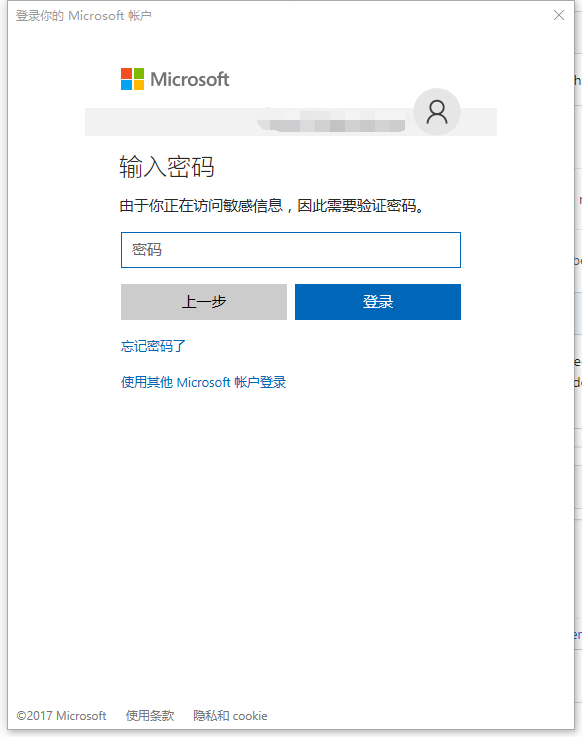
here is my git log:
git.log
20:33:11.922374 ...zureAuthority.cs:184 trace: [ValidateCredentials] server returned: 'Unable to connect to remote server
@kzhui125 For how long have you run with that setting? Does it prompt you as often as it did without?
chrmarti
on 11 Oct 2017
@chrmarti
just now, I opened 7 repositories, two window pop out.

22:24:58.540961 ...zureAuthority.cs:184 trace: [ValidateCredentials] server returned: 'Unable to connect to remote server
22:25:16.230625 ...zureAuthority.cs:184 trace: [ValidateCredentials] server returned: 'Unable to connect to remote server
If I only open one or two repos, the window hardly ever pop out.
kzhui125
on 11 Oct 2017
This is what I do for now:
- Adding
"git.autofetch": falseto setting.json - Whenever my credentials change I set it back to true
"git.autofetch": true - On
git pushthe credential manager pops up and I set my new credentials - Then go back to setting.json and set autofetch back to false:
"git.autofetch": false.
 j-o-d-o
on 12 Oct 2017
j-o-d-o
on 12 Oct 2017
The GCM accepts several configuration settings, one of them turns of interactivity. If you're confident that you do not want to see the prompts you can set git config credential.interactive never and the GCM won't ask. However, if you do not have valid credentials set the authentication will just fail. Please note that altering the git-config will affect Git from the console as well.
Another option, and I'm not certain this is possible, is to have VSCode inject an environment variable on your behalf which tells the GCM to not prompt when VSCode is asking. This can be done by setting GCM_INTERACTIVE to NEVER.
whoisj
on 23 Oct 2017
We will disable auto fetching in November.
Closing this as once that is done, the issue is with each credential manager, not Code.
joaomoreno
on 23 Nov 2017
Related issues
 philipgiuliani
·
3Comments
philipgiuliani
·
3Comments
 omidgolparvar
·
3Comments
omidgolparvar
·
3Comments
 trstringer
·
3Comments
trstringer
·
3Comments
 NikosEfthias
·
3Comments
NikosEfthias
·
3Comments
 sirius1024
·
3Comments
sirius1024
·
3Comments
Most helpful comment
Here I found the solution to my problem => stackoverflow
Seems modifying "git.enabled" option to false at settings.json file does the trick. You can modify it in File=>Preferences=>Settings; Then you can do a quick search by pressing shift + f with git.enabled.
Thanks everybody that took the time to answer my question.