Vscode: [Insiders] File icons missing
- VSCode Version: 1.11.0-insider (Commit d489c30378579fc4980d5bc272c7eb65a7c576ab)
- OS Version: Windows Server 2008 R2
Steps to Reproduce:
- Open Visual Studio Code
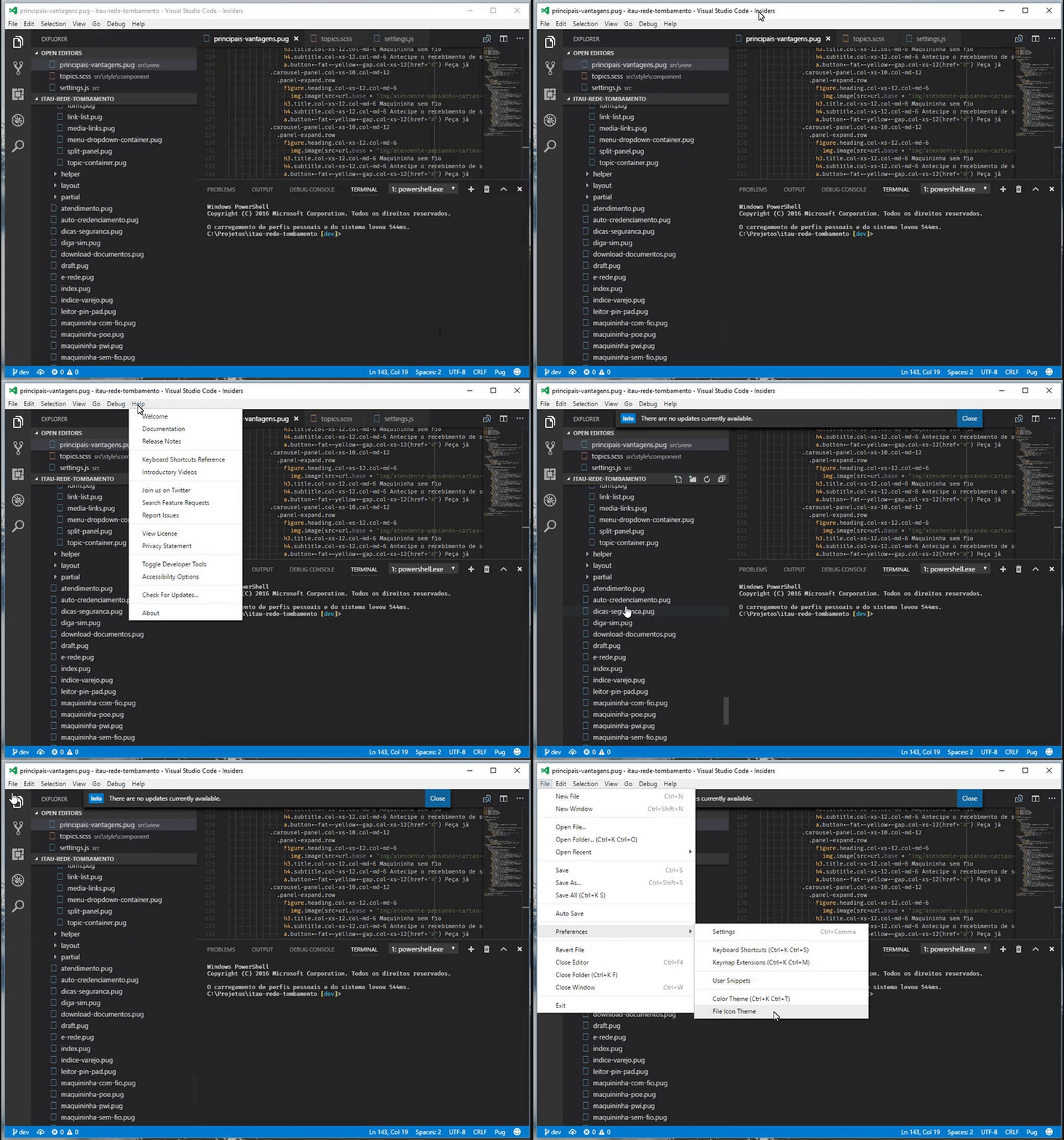
- Select File -> Preferences -> File Icon Theme
- Select "Minimal (Visual Studio Code)"
The space for the icons is now present but the icons itself are missing. The debug console shows the following error messages:
/C:/Program%20Files%20(x86)Microsoft%20VS%20Code%20Insidersresourcespp%0Extensionstheme-defaults%0Fileiconsimagesocument_16x.svg:1 GET file:///C:/Program%20Files%20(x86)Microsoft%20VS%20Code%20Insidersresourcespp%0Extensionstheme-defaults%0Fileiconsimagesocument_16x.svg net::ERR_FILE_NOT_FOUND
/C:/Program%20Files%20(x86)Microsoft%20VS%20Code%20Insidersresourcespp%0Extensionstheme-defaults%0Fileiconsimages%0FolderOpen_16x.svg:1 GET file:///C:/Program%20Files%20(x86)Microsoft%20VS%20Code%20Insidersresourcespp%0Extensionstheme-defaults%0Fileiconsimages%0FolderOpen_16x.svg net::ERR_FILE_NOT_FOUND
/C:/Program%20Files%20(x86)Microsoft%20VS%20Code%20Insidersresourcespp%0Extensionstheme-defaults%0Fileiconsimages%0Folder_16x.svg:1 GET file:///C:/Program%20Files%20(x86)Microsoft%20VS%20Code%20Insidersresourcespp%0Extensionstheme-defaults%0Fileiconsimages%0Folder_16x.svg net::ERR_FILE_NOT_FOUND
The issue is not limited to the built-in icon set but also occurs when using a different plugin for icons (in my case, https://github.com/hellopao/vscode-seti-icons.git). The files are located in the given folders, albeit the mentioned folders above are not completly correct (I am not sure if that is the real issue or if there is some problem with the console output). The issue is also not caused by an extension as running VS code using the code-insiders --disable-extensions command yields the same result.
 lafe
lafe
All 15 comments
Same problem here, with any icon-set. Seems like the slashes in the icon file path are being eaten...
 kumarharsh
on 28 Mar 2017
kumarharsh
on 28 Mar 2017
Yup, the back-slashes are not escaped under Windows. That's the problem I think. @bpasero?
kumarharsh
on 28 Mar 2017
Same problem:

It is making the GET request like this:
file:///C:/Program%20Files%20(x86)Microsoft%20VS%20Code%20Insidersresourcespp%0Extensionstheme-setiiconsseti.woff and that gives a ERR_FILE_NOT_FOUND
 ghost
on 28 Mar 2017
ghost
on 28 Mar 2017
Notice that the path has "resourcespp" instead of "resourcesapp"
 JWess
on 28 Mar 2017
JWess
on 28 Mar 2017
I can also repro wit today's insider update.

and tabs

 seanmcbreen
on 28 Mar 2017
seanmcbreen
on 28 Mar 2017

icons missing after update to the latest insiders version
 aflext
on 29 Mar 2017
aflext
on 29 Mar 2017
@systemmetaphor I got the same issue. How did you find out details about the GET request? I would like to know the way to debug these things. Feeling curious! 🤔
 keerthivasan-r
on 29 Mar 2017
keerthivasan-r
on 29 Mar 2017
I think this issue is that there is only one backslash \ in the path for the icon file
there should be two backslashes \\ or a slash / for a path on Windows
@aeschli
 Emeryao
on 29 Mar 2017
Emeryao
on 29 Mar 2017
@keerthivasan-r - Help | Toggle Developer Tools. Notice the little red error icon? If the Console isn't already displayed on the bottom click on the error icon to display it.
 shawnoster
on 29 Mar 2017
shawnoster
on 29 Mar 2017
So, there is a mistake in the URI to access the svg file. It should probably be this
C:\Program Files (x86)\Microsoft VS Code Insiders\resources\app\extensions\theme-defaults\fileicons\images to access the SVG document
keerthivasan-r
on 29 Mar 2017
Even after today's update I'm with this issue as well
 AssisrMatheus
on 29 Mar 2017
AssisrMatheus
on 29 Mar 2017
@AdowTatep That is what usually happens when issues get closed after the daily build ran.
 jrieken
on 29 Mar 2017
jrieken
on 29 Mar 2017
Still broken after todays update.
Developer Tools console

 VitorLuizC
on 29 Mar 2017
VitorLuizC
on 29 Mar 2017
There hasn't been an Insider build since the fix was pushed.
If you want to ensure it's fixed, you could build from source and see if the issue still remains (I did, can confirm it's fixed).
 equinox
on 29 Mar 2017
equinox
on 29 Mar 2017
Thanks @Equinox!
fyi the insider builds runs on week days at around 6am GMT which means word done by us (Zurich or Redmond) on that day appears on the next day.
jrieken
on 29 Mar 2017
Related issues
 sirius1024
·
3Comments
sirius1024
·
3Comments
 DovydasNavickas
·
3Comments
DovydasNavickas
·
3Comments
 borekb
·
3Comments
borekb
·
3Comments
 trstringer
·
3Comments
trstringer
·
3Comments
 ryan-wong
·
3Comments
ryan-wong
·
3Comments
Most helpful comment
There hasn't been an Insider build since the fix was pushed.
If you want to ensure it's fixed, you could build from source and see if the issue still remains (I did, can confirm it's fixed).