Vscode: vs code does not reload opened file changed by 'Beyond Compare'
- VSCode Version: Code 1.10.2 (8076a19fdcab7e1fc1707952d652f0bb6c6db331, 2017-03-08T14:02:52.799Z)
- OS Version: Windows_NT ia32 6.1.7601
- Extensions:
|Extension|Author|Version|
|---|---|---|
|xml|DotJoshJohnson|1.7.0|
|url-encode|flesler|1.1.0|
|vscode-JS-CSS-HTML-formatter|lonefy|0.2.2|
|theme-mild|radub|0.1.3|
|Ruby|rebornix|0.10.4|
|Align|steve8708|0.2.0|
|change-case|wmaurer|1.0.0|;
Steps to Reproduce:
- Open same file in 'VS code' and 'Beyond Compare'
- Change file content in 'Beyond Compare'
- 'VS code' does not refresh content of the file
 xxjapp
All 24 comments
However, file changed by Notepad2 can be auto reloaded by VS code.
xxjapp
on 9 Mar 2017
Please see if you can find any logged output that could help us find the source of the issue:
- run
code --verbosefrom the command line and attach the output - in Code select Help | Toggle Developer Tools and select the Console
- attach any output you see in the Console you can find
Thanks!
 bpasero
on 9 Mar 2017
bpasero
on 9 Mar 2017
Had the same issue here today while switching branch in Git. That used to work fine but now my open files didn't get refreshed. I had to completely close and reopen VSCode to make the changes happen.
 maroy1986
on 9 Mar 2017
maroy1986
on 9 Mar 2017
I noticed when I change the git branch, files don't get reloaded if they were edited in VS Code.
That is not the behaviour I expected. SublimeText reloads all files from disk, independently if they were edited or not.
Please add editor.autoReload option to control this behaviour.
 dmlemos
on 23 Mar 2017
dmlemos
on 23 Mar 2017
My current version of VS code is 1.11.1.
I noticed that the VS code editor do not refresh when an external program update a file (copy, save, etc). If the opened file is currently focused in the editor and change externally, it does not refresh.
The workaround to refresh the opened and focused file in VS code is to select another opened file and get back to the edited/updated opened file.
Steps to reproduce:
- Open a file in VS Code.
- Open the same file in Notepass++, change it and save it.
- Get back to VS Code.
Expected result: The change is visible in VS Code.
I found this while trying to debug a file under the node_module that is copied from another server package during the build process.
Please, give us a solution to automatically refresh opened and focused file in VS Code editor when an external program change it.
 SteveLemire
on 12 Apr 2017
SteveLemire
on 12 Apr 2017
Seems related to #7532
maroy1986
on 12 Apr 2017
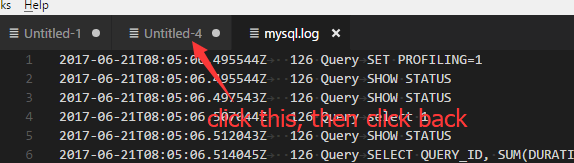
I noticed this problem too. When a file is changed externally, the document view will not refresh the file content. By the way, it can be refreshed manually by switching the document tag.
@xxjapp "However, file changed by Notepad2 can be auto reloaded by VS code." --- I can't reproduce your case. Maybe you have switched the document tag?
 snys98
on 21 Jun 2017
snys98
on 21 Jun 2017
Does this reproduce when you:
- try our latest insider build: http://code.visualstudio.com/Download#insiders
- configure
"files.useExperimentalFileWatcher": true - restart
bpasero
on 21 Jun 2017
No, I still need to switched the document tag to refresh it.
Version 1.14.0-insider
Commit a49a42680a4269b79c4e80f6d754bbded03a0593
Date 2017-06-21T05:15:42.843Z
Shell 1.6.6
Renderer 56.0.2924.87
Node 7.4.0
My test file is a mysql log file.
snys98
on 21 Jun 2017
@snys98 what does "switching the document tag" mean?
bpasero
on 21 Jun 2017
Ops...
snys98
on 22 Jun 2017
Did the problem get fixed by using "files.useExperimentalFileWatcher": true?
 nexional
on 29 Aug 2017
nexional
on 29 Aug 2017
Dear nexional
The problem did not get fixed by using "files.useExperimentalFileWatcher": true.
The only workable method now is snys98's method.
The following is my version information:
----------------------------
バージョン 1.16.1
コミット 27492b6bf3acb0775d82d2f87b25a93490673c6d
日付 2017-09-14T16:38:23.027Z
シェル 1.7.3
レンダラー 58.0.3029.110
Node 7.9.0
アーキテクチャ x64
----------------------------
xxjapp
on 22 Sep 2017
"files.useExperimentalFileWatcher" is true.

file initial status in vs code

file initial status in beyond compare
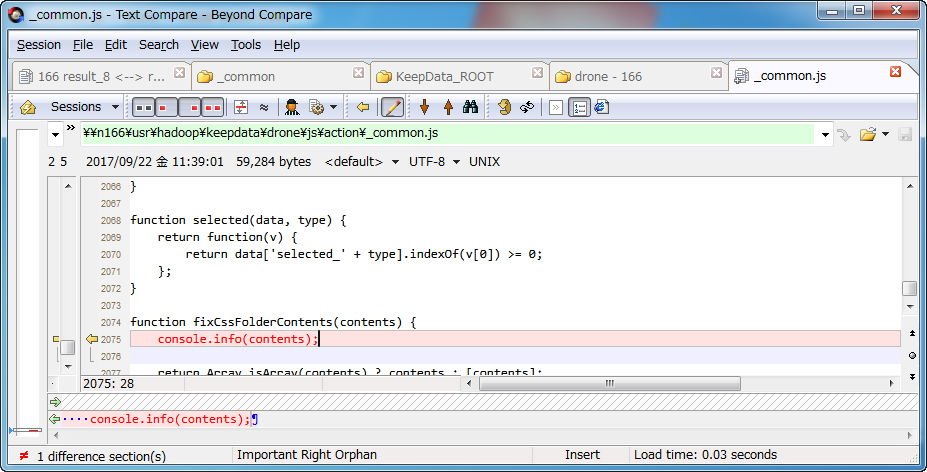
input '123' in vs code

beyond compare gets updated

add '456' in beyond compare

vs code did not get updated

xxjapp
on 22 Sep 2017
@bpasero This issue is still existing
 lingdaLi
on 23 Oct 2017
lingdaLi
on 23 Oct 2017
This need to be fixed. At the moment nothing in the editor gets refreshed if you edit the files outside the editor. If you switch branch and have edits in the open files they won't refresh either. HUGE problem!
 utklasad
on 23 Nov 2017
utklasad
on 23 Nov 2017
This is a problem while working with git. Every time you pull a repo, the files that you have opened in VSCode wont reload, or tell you changes were made.
 manuelvsousa
on 2 Dec 2017
manuelvsousa
on 2 Dec 2017
I'm seeing the same issue on Debian Stretch (9) using VS Code 1.19.3. I perform git operations on the command line and checking out a different branch is not reflected in files that are opened. If checking out a branch that has a file removed, the tab does show that the file has been deleted.
 HankB
on 29 Jan 2018
HankB
on 29 Jan 2018
"files.useExperimentalFileWatcher": true, solve this problem! Thanks!!
 IgorKurkov
on 9 Feb 2018
IgorKurkov
on 9 Feb 2018
Setting "files.useExperimentalFileWatcher": true", and restarting VSCode worked for me.
 mathiaswking
on 13 Feb 2018
mathiaswking
on 13 Feb 2018
I tried it and it seemed to work at first. Today it did not. (VS Code
1.20.1 on Debian Stretch)
On Tue, Feb 13, 2018 at 6:54 AM, Mathias Westerdahl <
[email protected]> wrote:
Setting "files.useExperimentalFileWatcher": true", and restarting VSCode
worked for me.—
You are receiving this because you commented.
Reply to this email directly, view it on GitHub
https://github.com/Microsoft/vscode/issues/22266#issuecomment-365258203,
or mute the thread
https://github.com/notifications/unsubscribe-auth/ADLOfsKS1IFoL0rxo_V2p2n3ulHxLcRPks5tUYXpgaJpZM4MXkqJ
.
--
'03 BMW F650CS - hers
'98 Dakar K12RS - "BABY K" grew up.
'93 R100R w/ Velorex 700 (MBD starts...)
'95 Miata - "OUR LC"
polish visor: apply squashed bugs, rinse, repeat
Beautiful Sunny Winfield, Illinois
HankB
on 23 Feb 2018
@xxjapp can you retry your scenario with Beyond Compare with our insiders release, we now refresh the active editors when VS Code gets focus back.
You can give our preview releases a try from: https://code.visualstudio.com/insiders/
bpasero
on 18 Apr 2018
@bpasero Thanks for your answer.
It seems that the following version of vs code no longer has the problem.
Visual Studio Code
---------------------------------------------
バージョン 1.22.2
コミット 3aeede733d9a3098f7b4bdc1f66b63b0f48c1ef9
日付 2018-04-12T16:38:45.278Z
シェル 1.7.12
レンダラー 58.0.3029.110
Node 7.9.0
アーキテクチャ x64
---------------------------------------------
@xxjapp great, closing.
bpasero
on 20 Apr 2018
Related issues
 jsftw86
·
361Comments
jsftw86
·
361Comments
 mariusa
·
219Comments
mariusa
·
219Comments
 fabiopicchi
·
192Comments
fabiopicchi
·
192Comments
 TurkeyMan
·
411Comments
TurkeyMan
·
411Comments
 filfat
·
246Comments
filfat
·
246Comments
Most helpful comment
@bpasero This issue is still existing