Vscode: Integrated terminal does not launch when project folder contains special/unicode characters
- VSCode Version: 1.3.0-insider
- OS Version: Windows 10 Home

Steps to Reproduce:
- Open a folder with special characters;
- Try to open the integrated Terminal;
 VitorLuizC
All 33 comments
@VitorLuizC can you paste in some of the problem characters? Also do you have any terminal-specific settings set in your settings.json?
 Tyriar
on 15 Jun 2016
Tyriar
on 15 Jun 2016
My folder's name is "Paçoca", so the "ç" is the only special character, and no I didn't have any terminal-specific settings in my settings.json.
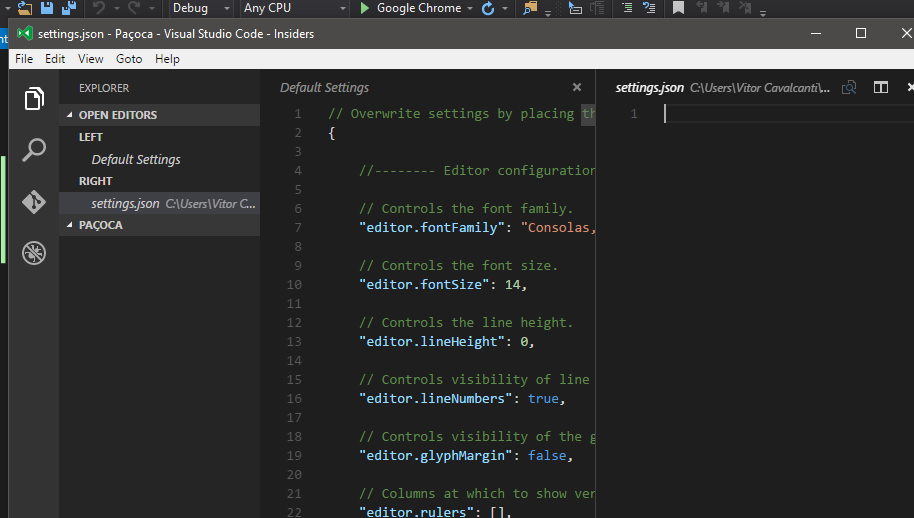
I've tried to open integrated terminal in another folder without special characters("Pacoca") and it worked.
VitorLuizC
on 15 Jun 2016
Seems fine on stable and insiders on Linux:

Perhaps it's only happening on Windows?
Tyriar
on 15 Jun 2016
I don't know if it matters but that folder is inside my OneDrive folder.
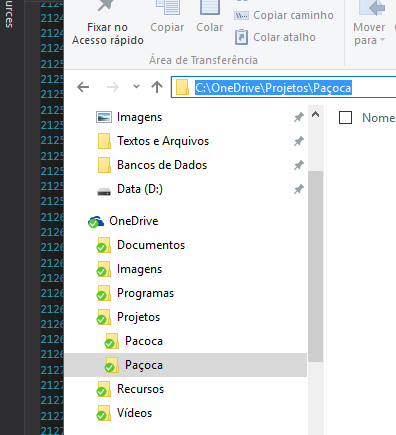
After a new test i've checked that doesn't matter.
VitorLuizC
on 15 Jun 2016
Chinese folder or Japanese folder so does on Windows 10!!
 ZCShou
on 16 Jun 2016
ZCShou
on 16 Jun 2016
Must be a windows thing, I'll try have a look at this for v1.3
Tyriar
on 16 Jun 2016
Can confirm it effects on a new installation of v1.2.1 and on windows.
Folders causing this for me is when opened as "root" and containing swedish letters (åäö). Also if folders above "root" contains special characters.
 hakanostrom
on 17 Jun 2016
hakanostrom
on 17 Jun 2016
I had a look at this and it appears to be an upstream issue, moving to backlog.
Tyriar
on 17 Jun 2016
Can confirm this is happening for me as well (just updated to 1.2.1 and currently on Windows 10). Behaviour is exactly as shown in VitorLuizC's image, except that I have no special characters in my path, and in fact the problem still occurs with no folders or files open and just the initial untitled document displayed.
I recently upgraded to Windows 10 from Windows 7 and the problem was not present while on Windows 7.
 joseph-iussa
on 22 Jun 2016
joseph-iussa
on 22 Jun 2016
For me it happens for russian characters, I have "Сергей" in path on Win 10
 svekl
on 8 Jul 2016
svekl
on 8 Jul 2016
Confirm for polish letters in path on Windows 10.
 xmichaelx
on 19 Jul 2016
xmichaelx
on 19 Jul 2016
+1 for Chinese
 hs3180
on 24 Jul 2016
hs3180
on 24 Jul 2016
+1 for Russian on Windows 10. It doesn't matter are there any special characters in path for opened by VSCode folder. Having them in Windows username will be enough to get integrated-terminal crashing.
 Igmat
on 26 Jul 2016
Igmat
on 26 Jul 2016
@Tyriar Chinese folder will show the following errors on Win10


ZCShou
on 26 Jul 2016
Any news?
 JohnyDeath
on 1 Sep 2016
JohnyDeath
on 1 Sep 2016
I've already opened an issue to this exact same problem 3 months ago. It was closed, because for Tyriar everything seemed to work fine. I've tried VScode on 3 different computers, with both powerShell and cmdprompt, with default settings, and it never worked. In fact, I've never seen a Windows computer that had integrated terminal working. I think I'm switching back to an IDE that can handle basic stuff.
 matuscongrady
on 9 Sep 2016
matuscongrady
on 9 Sep 2016
@ugros many people are experiencing this issue as you can see from the linked issues. This issue is actually on the integrated terminal backlog (#9959) and is one of the major bugs I'll be looking at in September.
Keep in mind we're quite a small team with a lot of responsibilities, there is only so much we can do each release. Also I can't see your original issue? https://github.com/Microsoft/vscode/issues/created_by/ugros
Tyriar
on 9 Sep 2016
@Tyriar I've been using different github account.
https://github.com/Microsoft/vscode/issues/7440
By the way, is there any workaround or any fix I can do with my computer, that would fix this issue in the meanwhile? My workflow suffers a lot by this issue.
Thanks a lot
matuscongrady
on 9 Sep 2016
Ah, I think the EPIPE thing was something else that stopped occurring in 1.2 or 1.3.
The only workarounds I can think of are to rename/relocate the open folder. I'll hopefully be checking this out sometime next week so it may come through in the Insiders build then.
Tyriar
on 9 Sep 2016
The only workarounds I can think of are to rename/relocate the open folder.
What do you mean by this? Could you please evaluate? Thanks
matuscongrady
on 9 Sep 2016
I mean if you're working out of C:\Users\<special chars>\dev you can move your dev dir to C:\dev to get around this.
Tyriar
on 9 Sep 2016
I was able to fix this for myself by changing the setting terminal.integrated.shell.windows from
"C:\\WINDOWS\\system32\\cmd.exe" (the default I assume, at least I hadn't changed it myself)
to
"C:\\Windows\\sysnative\\cmd.exe" (which the comment above the setting says is the 64bit version)
Hope that's helpful with fixing this issue. I'll also point out again that I experienced this issue without a project folder opened at all, i.e. with only an empty unsaved document opened, so the presence of special chars didn't seem to be the cause of the issue on my system.
joseph-iussa
on 11 Sep 2016
@joseph-iussa double checked and setting to the 64-bit cmd doesn't fix this issue. Not sure what the problem was with opening the terminal with no open folder, doesn't reproduce on my machine.
Tyriar
on 12 Sep 2016
Not only special chars, i think that are all unicode characters.
My user folder is 'Alfonso Andrés'.
Windows 10.
 osnoser1
on 14 Sep 2016
osnoser1
on 14 Sep 2016
I encountered this problem today. I think I found the culprit. The vscode uses pty.js to open the terminal. https://github.com/Microsoft/vscode/blob/a6c845baf7fed4a186e3b744c5c14c0be53494fe/src/vs/workbench/parts/terminal/electron-browser/terminalProcess.js (line: 30)
And on the pty.js project I found the following open issue: https://github.com/chjj/pty.js/issues/173
 Dzienny
on 18 Sep 2016
Dzienny
on 18 Sep 2016
@Dzienny yes it could be either pty.js or the dated winpty version it uses.
Tyriar
on 18 Sep 2016
I've created a pull request with the fix here: chjj/pty.js#176
 the-ress
on 12 Oct 2016
the-ress
on 12 Oct 2016
Fixed thanks to @the-ress's pull request! You can try this out in the Insiders build tomorrow or in stable v1.7.
Tyriar
on 12 Oct 2016
I am facing this error on Linux Solus. No special character on file dir. When I try to compile code (alt+enter) F# Interactive console appears for a moment then I get this error message.
 srcnalt
on 22 Nov 2016
srcnalt
on 22 Nov 2016
@srcnalt make sure you're on the latest version, if you still experience the issue please file a new one via Help > Report Issues :smiley:
Tyriar
on 22 Nov 2016
I have the same issue: The terminal process command FsiAnyCpu.exe --fsi-server-input-codepage:65001 failed to launch (exit code: 3221225477)
My path to the folder is without any accents or special characters.
- VSCode Version: Code 1.10.2 (8076a19fdcab7e1fc1707952d652f0bb6c6db331, 2017-03-08T14:02:52.799Z)
- OS Version: Windows_NT ia32 6.1.7601
- Extensions:
|Extension|Author|Version|
|---|---|---|
|Ionide-fsharp|Ionide|2.23.9|;
 uetoyo
on 11 Mar 2017
uetoyo
on 11 Mar 2017
Exact same problem here with Ionide on windows 10. Have tried on windows 7 and it works.
Do not have any accents or special chars.
 dfilaretti
on 27 Apr 2017
dfilaretti
on 27 Apr 2017
Sorry to bump, but I'm not sure if this is related.
When I run rollup -w I get the "The terminal process terminated with exit code" error, but the error code is 259, strangely. Running it in git bash outside of VSCode works fine, but the integrated terminal crashes without fail.
 devmattrick
on 1 Nov 2017
devmattrick
on 1 Nov 2017
Related issues
 ozsay
·
247Comments
ozsay
·
247Comments
 misolori
·
282Comments
misolori
·
282Comments
 Brakkar
·
364Comments
Brakkar
·
364Comments
 jez9999
·
234Comments
Tyriar
·
314Comments
jez9999
·
234Comments
Tyriar
·
314Comments
Most helpful comment
Chinese folder or Japanese folder so does on Windows 10!!