Vscode-yaml: kind, name and steps are not recognized as yaml properties
When opening my Drone CI yaml file, errors are given about the keys kind, name and steps not being valid properties. The opened file is a valid drone yaml file, so I guess there is no support by this extension.

Would support for those keys be added in the future? In case the problem is another, any useful pointer would be greatly appreciated
 HitLuca
All 18 comments
By default all the schemas are pulled from http://schemastore.org/json/ but I think their schema for drone is outdated?
Related issue in their repository:
https://github.com/SchemaStore/schemastore/issues/814
 zerosym
on 2 Nov 2019
zerosym
on 2 Nov 2019
Thank you very much, I am not an expert of how yaml works, sorry to have opened an issue in the wrong place!
HitLuca
on 2 Nov 2019
@HitLuca Upon closer inspection it might be an issue for here after all. The schema file in schemastore repo seems up to date (was last pushed only a couple weeks ago) and I've had luck with validating my own drone.yml file by modifying the schema slightly. Specifically, the lack of a top level "properties" key seems to be causing the validator issues, even though an array of them is defined under "oneOf".
It could be because the drone schema implements the latest version of JSON spec which may not be fully implemented yet in vscode-yaml (https://github.com/redhat-developer/vscode-yaml/issues/222).
It's either that or the schemastore spec for drone is incorrectly written -- I don't have the knowledge to tell either way.
zerosym
on 2 Nov 2019
@zerosym The JSON spec for drone.yml is outdated. :)
 ig0rsky
on 21 Nov 2019
ig0rsky
on 21 Nov 2019
I concur with zerosym; it seems that the drone spec is already updated and that #222 is the culprit.
@ig0rsky kind, name, steps, and other properties were merged in https://github.com/SchemaStore/schemastore/pull/823 before this issue was opened. What remains as outdated? Perhaps I'm missing crucial detail here being new to all of these projects.
 kevinkjt2000
on 18 Feb 2020
kevinkjt2000
on 18 Feb 2020
I think #222 should be fixed, I just haven't closed it yet (though I'm going to double check). I can't see any obvious reasons why the schema validation isn't working correctly.
The JSON language server also fails on this schema:
{
    "$schema": "http://json.schemastore.org/drone",
    "kind": "pipeline",
    "type": "docker",
    "name": "default",
    "steps": [
      {
        "name": "backend",
        "image": "golang",
        "commands": [
          "go build",
          "go test"
        ]
      },
      {
        "name": "frontend",
        "image": "node",
        "commands": [
          "npm install",
          "npm run test"
        ]
      }
    ]
}
 JPinkney
on 19 Feb 2020
JPinkney
on 19 Feb 2020
I've tried to add this settings with no success so far:
"yaml.schemas": {
    "https://raw.githubusercontent.com/SchemaStore/schemastore/master/src/schemas/json/drone.json": [
        ".drone.yml"
    ]
}
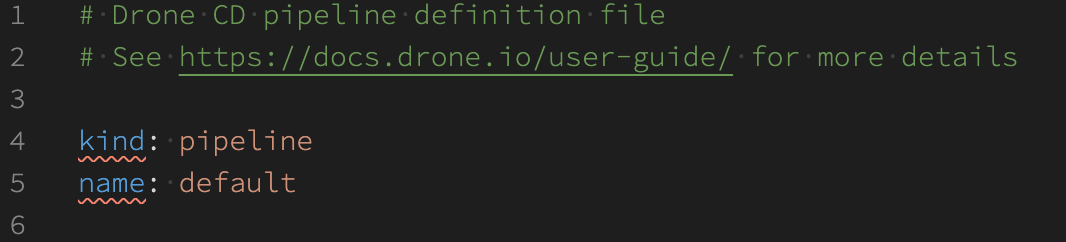
@HitLuca could you please reopen this bug as it's not solved.
 iatsiuk
on 13 Mar 2020
iatsiuk
on 13 Mar 2020
AH! I finally figured it out. It ended up being a schema issue but this was one of the oddest bugs I've had to track down.
So it turns out that the drone schema sets additionalProperties to false for the root object: https://github.com/SchemaStore/schemastore/blob/master/src/schemas/json/drone.json#L4
According to the json schema spec:
The additionalProperties keyword is used to control the handling of extra stuff, that is, properties whose names are not listed in the properties keyword.
In the schema there is no root properties keyword, meaning that everything is considered an additional property and that's why the errors appear.
I'm going to send a PR to the json schema store and close this issue.
JPinkney
on 3 Apr 2020
Thanks @JPinkney! Looks like this is your PR: https://github.com/SchemaStore/schemastore/pull/993
It's already been merged, so will that update show up automatically in VSCode for me or does something need to be bumped in this repo to start pulling in the new version?
 jeffwidman
on 10 Apr 2020
jeffwidman
on 10 Apr 2020
@jeffwidman It should automatically update if you restart VSCode
JPinkney
on 11 Apr 2020
Perfect thx
jeffwidman
on 11 Apr 2020
@JPinkney - thanks for the details, I had a similar issue when I tried to use environment in pipeline_docker so I created an issue and a PR - https://github.com/SchemaStore/schemastore/issues/1129
I was wondering if anyone else is experiencing the same issue
 unfor19
on 6 Jul 2020
unfor19
on 6 Jul 2020
I'm.
 julioflima
on 13 Feb 2021
julioflima
on 13 Feb 2021
@julioflima this was already resolved. If you experience the same thing, please provide more details
unfor19
on 13 Feb 2021
Follow my version of VS Code:
Version: 1.53.2
Commit: 622cb03f7e070a9670c94bae1a45d78d7181fbd4
Date: 2021-02-11T11:48:44.518Z
Electron: 11.2.1
Chrome: 87.0.4280.141
Node.js: 12.18.3
V8: 8.7.220.31-electron.0
OS: Linux x64 5.4.70-amd64-desktop
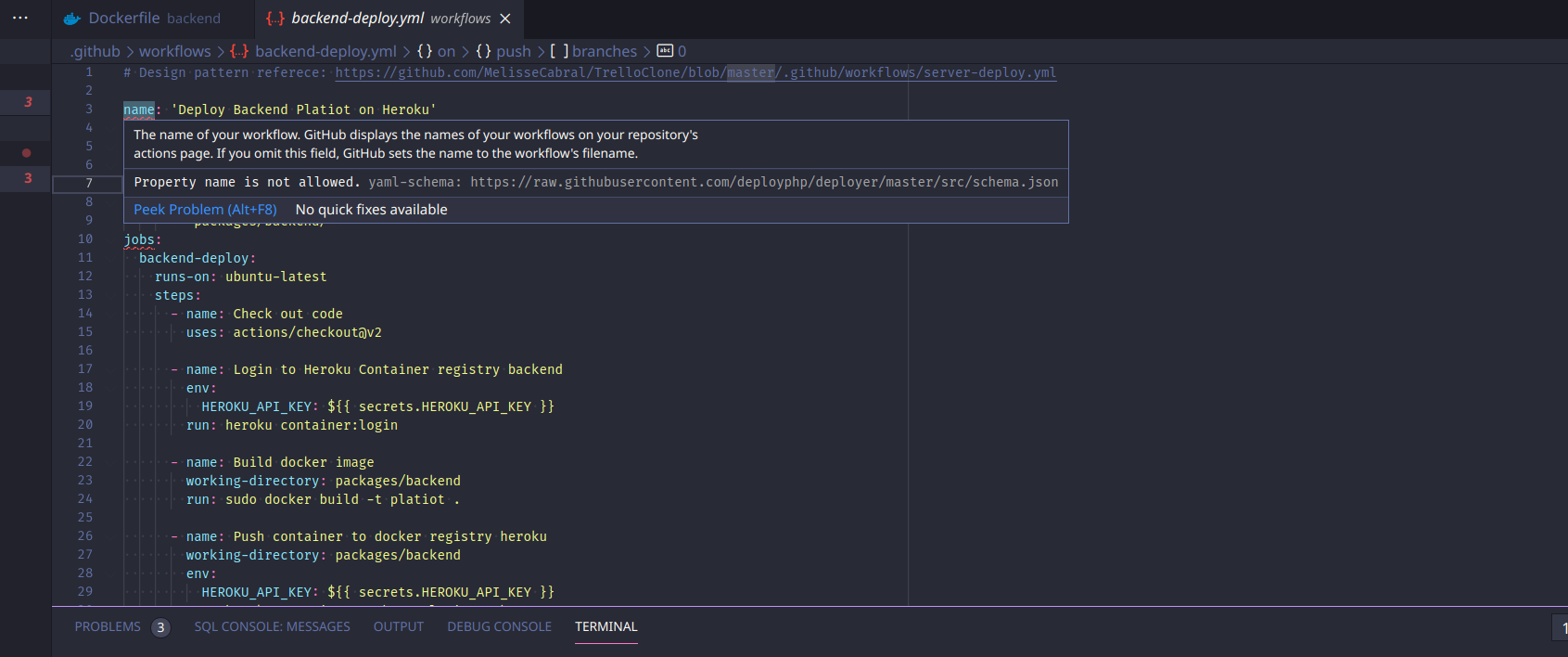
Follow in below my example of yml.
https://github.com/julioflima/Platiot/blob/master/.github/workflows/backend-deploy.yml
I've tried schemas, with no good.
julioflima
on 13 Feb 2021
@julioflima It's not related to the issue, you're talking about a different schema.json (deployphp/deployer), this issue talks about Drone CI's schema.
Make sure your filename is .drone.yml
unfor19
on 13 Feb 2021
I realized it right now.
julioflima
on 13 Feb 2021
But maybe you should give me a solution. Maybe the problem is the name.
julioflima
on 13 Feb 2021
Related issues
 remcohaszing
·
4Comments
remcohaszing
·
4Comments
 matus-cuper
·
5Comments
matus-cuper
·
5Comments
 tracker1
·
5Comments
tracker1
·
5Comments
 hppsc1215
·
7Comments
hppsc1215
·
7Comments
 Chagrilled
·
4Comments
Chagrilled
·
4Comments
Most helpful comment
@HitLuca Upon closer inspection it might be an issue for here after all. The schema file in schemastore repo seems up to date (was last pushed only a couple weeks ago) and I've had luck with validating my own drone.yml file by modifying the schema slightly. Specifically, the lack of a top level "properties" key seems to be causing the validator issues, even though an array of them is defined under "oneOf".
It could be because the drone schema implements the latest version of JSON spec which may not be fully implemented yet in vscode-yaml (https://github.com/redhat-developer/vscode-yaml/issues/222).
It's either that or the schemastore spec for drone is incorrectly written -- I don't have the knowledge to tell either way.