Vscode-vsce: Error: Part URI cannot contain a Fragment component.
any more info could help?
 atian25
All 19 comments
Yes. Where and how did you see this?
 joaomoreno
on 20 Nov 2017
joaomoreno
on 20 Nov 2017
https://github.com/eggjs/vscode-eggjs
just publishing my extension with npm run vspub
➜  vscode-eggjs git:(master) ✗ n vsce --version
1.33.2

➜  vscode-eggjs git:(master) ✗ npm run vspub

> [email protected] vspub /Users/tz/Workspaces/github/vscode-eggjs
> vsce publish

Executing prepublish script 'npm run vscode:prepublish'...

> [email protected] vscode:prepublish /Users/tz/Workspaces/github/vscode-eggjs
> tsc -p ./

Publishing [email protected]...
Error: Part URI cannot contain a Fragment component.
npm ERR! code ELIFECYCLE
npm ERR! errno 1
npm ERR! [email protected] vspub: `vsce publish`
npm ERR! Exit status 1
npm ERR!
npm ERR! Failed at the [email protected] vspub script.
npm ERR! This is probably not a problem with npm. There is likely additional logging output above.

npm ERR! A complete log of this run can be found in:
npm ERR!     /Users/tz/.npm/_logs/2017-11-20T07_31_14_612Z-debug.log
Ok. What does that return? The full output.
joaomoreno
on 20 Nov 2017
@joaomoreno sorry, update above
atian25
on 20 Nov 2017
@modigrv What can be wrong?
joaomoreno
on 20 Nov 2017
Is there a file/folder name in the Vsix being published having a # in the name? From my search this error comes when there are some unusual characters like # in any filename or folder name.
 modigrv
on 21 Nov 2017
modigrv
on 21 Nov 2017
not, don't have.
https://github.com/eggjs/vscode-eggjs
➜  tmp git clone github://eggjs/vscode-eggjs
Cloning into 'vscode-eggjs'...
remote: Counting objects: 201, done.
remote: Compressing objects: 100% (13/13), done.
remote: Total 201 (delta 2), reused 7 (delta 2), pack-reused 186
Receiving objects: 100% (201/201), 3.07 MiB | 338.00 KiB/s, done.
Resolving deltas: 100% (88/88), done.
➜  tmp cd vscode-eggjs
➜  vscode-eggjs git:(master) npm i
npm WARN deprecated [email protected]: to-iso-string has been deprecated, use @segment/to-iso-string instead.
npm WARN deprecated [email protected]: Jade has been renamed to pug, please install the latest version of pug instead of jade
npm WARN deprecated [email protected]: Please update to minimatch 3.0.2 or higher to avoid a RegExp DoS issue
npm WARN deprecated [email protected]: Please update to minimatch 3.0.2 or higher to avoid a RegExp DoS issue

> [email protected] postinstall /Users/tz/Workspaces/tmp/vscode-eggjs
> node ./node_modules/vscode/bin/install

Detected VS Code engine version: ^1.17.0
Found minimal version that qualifies engine range: 1.17.0
Fetching vscode.d.ts from: https://raw.githubusercontent.com/Microsoft/vscode/be377c0faf7574a59f84940f593a6849f12e4de7/src/vs/vscode.d.ts
vscode.d.ts successfully installed!

added 656 packages in 24.095s
➜  vscode-eggjs git:(master) npm run vspub

> [email protected] vspub /Users/tz/Workspaces/tmp/vscode-eggjs
> vsce publish

Executing prepublish script 'npm run vscode:prepublish'...

> [email protected] vscode:prepublish /Users/tz/Workspaces/tmp/vscode-eggjs
> tsc -p ./

Publishing [email protected]...
Error: Part URI cannot contain a Fragment component.
npm ERR! code ELIFECYCLE
npm ERR! errno 1
npm ERR! [email protected] vspub: `vsce publish`
npm ERR! Exit status 1
npm ERR!
npm ERR! Failed at the [email protected] vspub script.
npm ERR! This is probably not a problem with npm. There is likely additional logging output above.

npm ERR! A complete log of this run can be found in:
npm ERR!     /Users/tz/.npm/_logs/2017-11-21T05_34_48_643Z-debug.log
atian25
on 21 Nov 2017
@joaomoreno Is there something written during prepublish/publish in any of the files, during Vsix creation? Do we put any urls of github/latest changes? one doubt that I have is that the code repo's one of the latest commits have a name which contains a #.
If not, @atian25 can you please provide me the vsix fix generated during the process, it will help us find where is the publish failing actually?
modigrv
on 21 Nov 2017
sure, just pack out dir ?
atian25
on 21 Nov 2017
atian25
on 21 Nov 2017
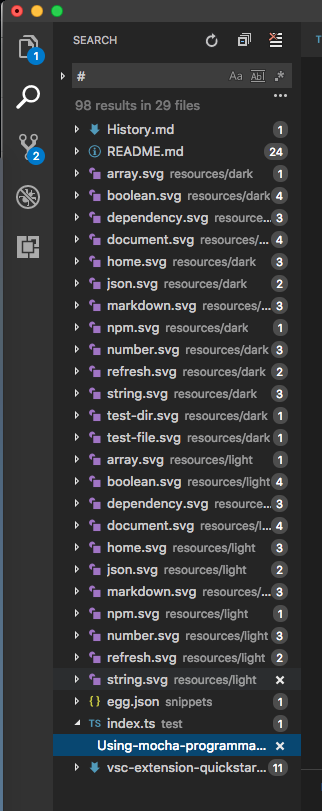
I checked by actually packaging from the source code. In of the node modules there is a file with having name containing #. The path is "node_modules\recast\lib#fast-path.js#". This is creating a problem. The unzipping seems to be failing for a file having # in the name.
modigrv
on 21 Nov 2017
... so maybe we have to change the unzip lib ?
atian25
on 21 Nov 2017
Is this file really needed? If not, you can get unblocked by removing it before packaging.
Changing the lib is not that straightforward for us as a service.
I will file a bug in Marketplace for this anyways.
modigrv
on 21 Nov 2017
not, it's not my code, but facebook, import by jscodeshift.
modify the node_modules files is a bad smell.
atian25
on 21 Nov 2017
I am not sure but from the name, it looks like it is included by mistake or not named correctly. All other files in that folder are .js files. Can you contact the author of the module?
modigrv
on 21 Nov 2017
atian25
on 21 Nov 2017
Excellent, great catch @modigrv, thanks a lot! Closing the issue, since it's not inherent to vsce.
joaomoreno
on 21 Nov 2017
but # is a valid character in file name, it should be allowed... this is now happening with more and more packages...
 shahata
on 17 Jan 2018
shahata
on 17 Jan 2018
I has no idea why #extension.js# appears in my out folder. Just removed it to solve this problem.
 Jasonlhy
on 20 Jan 2018
Jasonlhy
on 20 Jan 2018
Related issues
joaomoreno
·
6Comments
joaomoreno
·
4Comments
 vfonic
·
6Comments
vfonic
·
6Comments
 pmahend1
·
4Comments
pmahend1
·
4Comments
 felixfbecker
·
6Comments
felixfbecker
·
6Comments