Vscode-terraform: High CPU Usage
I notice when this extension running for intellisense, CPU usage gets higher and take long time to show suggestions
 kasunsjc
All 23 comments
Thanks for your bug report. Are there special actions you can narrow it down to which trigger this behavior?
Can you share your templates?
Kind regards, Mikael
 mauve
on 9 Aug 2018
mauve
on 9 Aug 2018
I've also experienced the same issue. This is how it manifested itself:
- I was adding a new resource to an existing *.tf file
- I was about to add the
tagsproperty to it - As soon as I typed the first character of the tag key - all keyboard input in VSCode stopped responding. I could still click around - but VSCode completely was not accepting any keyboard input.
Here is the tf snippet I was editing:
user_data = "${data.template_cloudinit_config.cloudinit.rendered}"
tags{
  Name = "tf_instance01"
  managed_by = "terraform"
}
The only way I remedied this is by Disabling the plugin - Restarting VSCode - Enabling the plugin.
I am running this on VSCode version 1.25.1 on Mac OS X Sierra.
 darko-mesaros
on 9 Aug 2018
darko-mesaros
on 9 Aug 2018
As @darko-mesaros mentioned when I try to add tags this happens so I need to disable vscode and restart again
kasunsjc
on 10 Aug 2018
I've experienced this as well. Sometimes reindexing is hanging after, have to restart several times. It looks like I have 3 processes in activity monitor (code helper) all hitting the same CPU. Maybe this is a file locking issue?
Mac OS X 10.13.6 (17G65)
VsCode Version 1.25.1 (1.25.1)
1dfc5e557209371715f655691b1235b6b26a06be
2018-07-11T15:27:07.646Z
I've just disabled indexing for now.
 zachncst
on 10 Aug 2018
zachncst
on 10 Aug 2018
Thanks for the bug reports, I am working on a fix but it will take a few more days as it seems I need to do some larger changes. Thanks for the patience and the thanks for using my extension.
mauve
on 16 Aug 2018
@mauve Thanks I really like this extension hope to see the fix soon !!
kasunsjc
on 17 Aug 2018
I've noticed the same thing happening in locals blocks. As soon as you start typing, it looks like it's firing the parser which hangs (because the statement isn't complete yet. Right after typing
locals {
  s # hangs right after entering the first char
This is an error message I got:
key 's' expected start of object ('{') or assignment ('=')
 thefotios-enigma
on 18 Aug 2018
thefotios-enigma
on 18 Aug 2018
@mauve any updates on this issue? I'm having the same problem as @thefotios-enigma:
resource "aws_alb_listener" "main" {
  default_action {
    type = "redirect"

    redirect {
      p
    }
  }
}
Essentially as soon as I type something into a resource block (ie. here when I try to type "protocol" in the redirect block) it hangs on the first character. The moment that happens I can't type anything (or even undo the change), the CPU for the Code Helper goes straight to 100% and the fan in my laptop makes a noise like it's about to launch into outer space.
The only solution is to kill the Code Helper process but as soon as I type something into the block it does the same thing all over again.
As you may imagine that makes the extension unusable :(
Any help much appreciated.
 n1te1337
on 2 Sep 2018
n1te1337
on 2 Sep 2018
I'm having similar issue. CPU does not jump to 100% but goes to ~40%, enough where my laptop fan comes on.
 marrik96
on 5 Sep 2018
marrik96
on 5 Sep 2018
having exact same issue as @n1te1337 except I'm adding a timeout block to a resource. CPU spikes to 100% . Looks like the plugin isn't handling non key value declarations inside resources?
 deric4
on 7 Sep 2018
deric4
on 7 Sep 2018
Same as above, including when at 100% CPU the entire plugin subsystem seems to freeze, meaning my vim controls stopping editing and moving. My attempt to mitigate with config doesn't work it seems:
    "[terraform]": {
        "editor.formatOnSave": true,
    },
    "terraform.indexing": {
        "enabled": false,
        "liveIndexing": false,
        "delay": 5000,
        "exclude": [
            ".terraform/**/*",
            ".terraform/*",
            "terraform.tfstate.d/*",
            ".mypy_cache/**/*",
            "**/.terraform/**/*"
        ]
    },
    "terraform.codelens.enabled": false,
    "terraform.templateDirectory": "terraform/files",
 gregburek
on 7 Sep 2018
gregburek
on 7 Sep 2018
I just started running into this as well. Been using the Terraform plugin and locals for a while now, so this must have been introduced in a recent update.
I seem to be able to avoid the spike by adding a label after the locals keyword (like one would when declaring a variable). Obviously, this is not syntactically valid and will cause Terraform to complain, _but_ it will allow me to fill in the keys+values that I need without killing the editor. Once I've filled in the values I need, I can delete the label and go about my business.
Example below:
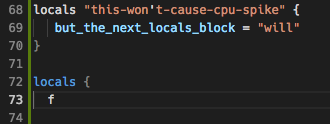
This seems to be consistent with what this user and this user are experiencing - instances of a key / keyword followed by { will cause a CPU spike and force a restart after the next character is entered inside the curly braces.
Hopefully that will help narrow things down.
 michaelmoussa
on 11 Sep 2018
michaelmoussa
on 11 Sep 2018
I dug a bit deeper and managed to come up with a solution.
The issue was introduced in version 1.3.3 by this block:
The block was added to address a completion-provider: Failed to provide completions TypeError: Cannot read property 'args' of undefined error that was introduced in 1.3.0; however, it results in an infinite loop because argumentsLength doesn't get decremented.
The easiest fix is to change:
            if (!field)
              continue;
to:
            if (!field) {
              argumentsLength--;
              continue;
            }
You can fix this yourself while you wait for an updated plugin version by editing ~/.vscode/extensions/mauve.terraform-1.3.4/out/src/autocompletion/completion-provider.js and modifying the affected line. (Note: replace 1.3.4 with whichever version you have installed).
michaelmoussa
on 11 Sep 2018
Thank you @michaelmoussa for the temp fix! I have not been writing much HCL lately but this was kind of a painful bug.
marrik96
on 11 Sep 2018
Thanks @michaelmoussa !!
kasunsjc
on 11 Sep 2018
I'm still having this issue. I made the changes that @michaelmoussa pointed out and they worked for about a day. Are there other places this can be fixed? Is it possible to turn off the autocomplete functionality?
 arush0
on 24 Sep 2018
arush0
on 24 Sep 2018
@arush0 I am not able to reproduce this locally at all, since you are already running a plugin version which you have built locally, next time when you hit this problem can you just break in the debugger and tell me where the stacktrace?
mauve
on 25 Sep 2018
@michaelmoussa thanks for your fix, your commit was:
              if (!field)
+               argumentsLength--;
                continue;
The commit was missing braces which means you hit the continue path unconditionally. In my version I "had to" fix it to be:
            if (!field) {
              argumentsLength--;
              continue;
            }
As I cannot reproduce this issue locally any help would be much appreciated.
mauve
on 25 Sep 2018
Anyway version 1.3.5 is coming today which contains _at least_ the fix from @michaelmoussa. In the meantime you can help by sending my a link to the templates which break this behavior, if you cannot post them publically, you can always email me at mikael.[email protected]
If you send me templates which break it, please also hint at _where_ _exact_ you triggered auto-completion for the behavior to trigger.
Thanks in advance.
mauve
on 25 Sep 2018
My issues were in "aws_iam_policy_document" types, in the "statement {}" sections. But updating to 1.3.5 resolved the issue. Thanks!
arush0
on 25 Sep 2018
Oh wow, thanks for catching that @mauve - sorry for the oversight! Your correction _is_ what I meant to submit. I've since upgraded to 1.3.5 and can confirm I'm not seeing the high CPU behavior and freezing any longer.
michaelmoussa
on 25 Sep 2018
I guess the issues have been solved by the fix made by @michaelmoussa, I will try and add some regression tests around this.
In the meantime I will close this bug. Feel free to open again.
Thanks for using my plugin and thanks for taking the time to open bug reports.
mauve
on 5 Oct 2018
I am still facing this issue.
It happens when I just keep around 6+ tf files in vscode
 joshtharakan
on 10 Apr 2020
joshtharakan
on 10 Apr 2020
Related issues
 LogicNinja
·
3Comments
LogicNinja
·
3Comments
 vfab
·
4Comments
vfab
·
4Comments
 visokoo
·
3Comments
visokoo
·
3Comments
 tillig
·
4Comments
tillig
·
4Comments
 vazkarvishal
·
5Comments
vazkarvishal
·
5Comments
Most helpful comment
Thanks for the bug reports, I am working on a fix but it will take a few more days as it seems I need to do some larger changes. Thanks for the patience and the thanks for using my extension.