Vscode-sqltools: Driver not found but installed
Describe the bug
On a mysql connection, I have installed the mysql driver from the vscode marketplace, but, after a reboot, the driver is not recognized.
To Reproduce
Steps to reproduce the behavior:
1 - Install the driver with the new way
2 - Reboot your computer
3 - Try connect to existing mysql connection
4 - The popup message Driver MySQL is not installed. is shown
Expected behavior
The driver should be recognized even after a reboot
Screenshots

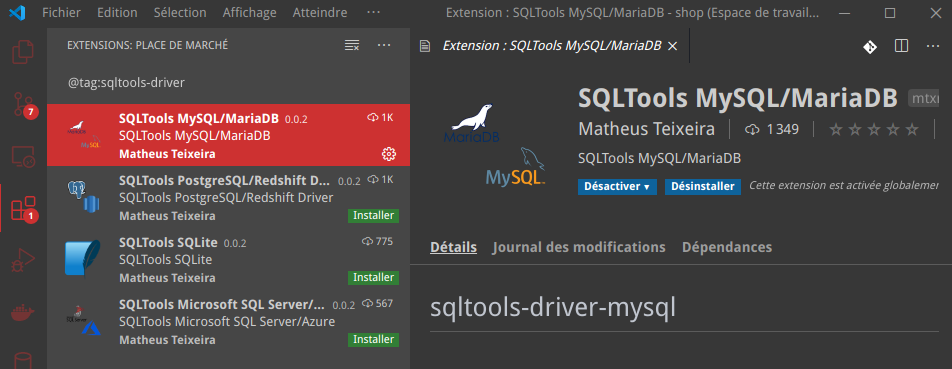
Desktop:
Version : 1.45.1
Commit : 5763d909d5f12fe19f215cbfdd29a91c0fa9208a
Date : 2020-05-14T08:27:22.494Z
Electron : 7.2.4
Chrome : 78.0.3904.130
Node.js : 12.8.1
V8 : 7.8.279.23-electron.0
OS : Linux x64 5.6.14-300.fc32.x86_64
 PapsOu
All 12 comments
I have exact the same issue

Info:
Version: 1.45.1
Commit: 5763d909d5f12fe19f215cbfdd29a91c0fa9208a
Date: 2020-05-14T08:27:22.494Z
Electron: 7.2.4
Chrome: 78.0.3904.130
Node.js: 12.8.1
V8: 7.8.279.23-electron.0
OS: Linux x64 5.3.0-53-generic (Ubuntu 18.04, vscode installed from microsoft repo and not by snaps)
I could use yesterday only installing the drivers, today I can't I suspect it's related with new version 0.22.3
 antherkiv
on 2 Jun 2020
antherkiv
on 2 Jun 2020
Same thing, v0.22.3 introduces this with postgres even with the driver installed.
 Fmstrat
on 2 Jun 2020
Fmstrat
on 2 Jun 2020
For Postgres, I had to roll back both the SQLTools extension and the postgres driver to the version from 4 days ago.
Fmstrat
on 2 Jun 2020
The exact same problem.
The driver does not work.
MySQL, Postgresql, Oracle, SQLite.
He does not see them.
SQLTools 0.22.3
Version: 1.45.1 (user setup)
Commit: 5763d909d5f12fe19f215cbfdd29a91c0fa9208a
Date: 2020-05-14T08: 27: 35.169Z
Electron: 7.2.4
Chrome: 78.0.3904.130
Node.js: 12.8.1
V8: 7.8.279.23-electron.0
OS: Windows_NT x64 10.0.18363
 DarkPerl
on 2 Jun 2020
DarkPerl
on 2 Jun 2020
Same problem: SQLTools v0.22.3, MysqlDriver 0.0.2
But MysqlDriver v0.0.1 still working fine.
 timsolov
on 2 Jun 2020
timsolov
on 2 Jun 2020
Same problem: PostgreSQL/Redshift Driver 0.0.2
SQLTools 0.22.3
Ubuntu 20.04 LTS (tried with vscode installed from both snapcraft and MS store)
 n0vice
on 2 Jun 2020
n0vice
on 2 Jun 2020
@Fmstrat How do I roll back the postgres driver version exactly?
 bSolt
on 2 Jun 2020
bSolt
on 2 Jun 2020
Also Same Problem:
- SQLTools v0.22.3
- PostgreSQL/Redshift Driver 0.0.2
    Virtualization: vmware
  Operating System: CentOS Linux 7 (Core)
       CPE OS Name: cpe:/o:centos:centos:7
            Kernel: Linux 3.10.0-957.21.3.el7.x86_64
      Architecture: x86-64
Same problem,
mtxr.sqltools-driver-pg 0.0.2
mtxr.sqltools 0.22.3
Win 10 64x "Корпоративная"
 samthesuperhero
on 2 Jun 2020
samthesuperhero
on 2 Jun 2020
@Fmstrat How do I roll back the postgres driver version exactly?
I had to role back the SQLTools extension 0.21.7 works for me. You can right click on the extension and find the older versions there.
 ihenry
on 2 Jun 2020
ihenry
on 2 Jun 2020
@Fmstrat How do I roll back the postgres driver version exactly?
I had to role back the SQLTools extension 0.21.7 works for me. You can right click on the extension and find the older versions there.
Yes, this works!
samthesuperhero
on 2 Jun 2020
It seem to work now, Thanks @mtxr !
PapsOu
on 4 Jun 2020
Related issues
 ladychili
·
7Comments
ladychili
·
7Comments
 abenhamdine
·
6Comments
abenhamdine
·
6Comments
 steffan-c
·
7Comments
steffan-c
·
7Comments
 bergamin
·
3Comments
bergamin
·
3Comments
 h4ckt1v1st
·
4Comments
h4ckt1v1st
·
4Comments
Most helpful comment
I had to role back the SQLTools extension 0.21.7 works for me. You can right click on the extension and find the older versions there.