Vscode-sqltools: Add option to force the path to the Oracle client
Is your feature request related to a problem? Please describe.
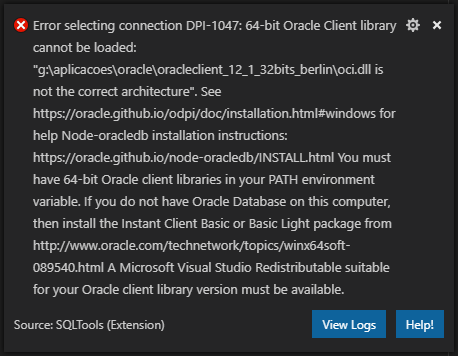
At work I normally use a 32 bits Oracle (I don't know why. The environment comes ready for every new employee and it targets a shared drive), but SQLTools requires 64 bits, giving me the following error when I try to connect:
Describe the solution you'd like
it would be great to have a setting to override the environment variable and set it like this:
"sqltools.oracle_home": "Path I want SQLTools to use instead of the default environment variable"
Describe alternatives you've considered
I have both changed the path and oracle_home variables and the message keeps being shown with the wrong path in it. It is still trying to connect to the old path, so may be a bug as well?
Additional context
EDIT
I found out why it wasn't working. I had two environment variables called Path. My suggestion for overriding though, is still valid.
 bergamin
All 3 comments
Node-oracledb driver used in extension doesn't include pre-built 32-bit binaries at the moment unfortunatelly.
But setting ORACLE_HOME could be done through process.env.ORACLE_HOME from setting as you suggested. (https://github.com/oracle/node-oracledb/issues/185)
 mickeypearce
on 8 Jul 2019
mickeypearce
on 8 Jul 2019
Just added a config that allows you to achieve this.
This is the text added to the docs:
If you want to use 32bits drivers or set a different ORACLE_HOME to be used with the node driver, you can achieve this using the sqltools.languageServerEnv.
{
  ...
  "sqltools.languageServerEnv": {
    "ORACLE_HOME": "YOUR PATH HERE"
  },
  ...
}
 mtxr
on 11 Aug 2019
mtxr
on 11 Aug 2019
Thank you so much.
It helps me to fix another issue with another database.
 ira-gordin-sap
on 27 Nov 2019
ira-gordin-sap
on 27 Nov 2019
Related issues
 abenhamdine
·
6Comments
abenhamdine
·
6Comments
 komalbb
·
5Comments
komalbb
·
5Comments
 BrendanSimon
·
3Comments
BrendanSimon
·
3Comments
 benyaminl
·
5Comments
benyaminl
·
5Comments
 tchase56
·
4Comments
tchase56
·
4Comments
Most helpful comment
Just added a config that allows you to achieve this.
This is the text added to the docs:
If you want to use 32bits drivers or set a different ORACLE_HOME to be used with the node driver, you can achieve this using the
sqltools.languageServerEnv.