Vscode-sqltools: Can't add connection, settings.json also ignored
Describe the bug
A clear and concise description of what the bug is.

Hello, I have a problem, I already set the config on settings.json refer to https://vscode-sqltools.mteixeira.dev/driver/mysql, but there's no list of DB like on 0.21 before. I tried to reinstall, clean, etc still having the problem.
The button that I click, is doing nothing (add connection, create new sql file, or open file for create query as above.
Any clue about how to solving this? Thank you :)
To Reproduce
Steps to reproduce the behavior:
- Settings.json config
- set connection
- refresh the database on sql tools sidebar
- nothing error
Expected behavior
Should work normally
Screenshots

Desktop (please complete the following information):
- SQLTools Version 0.22.2
- VSCode Version: 1.45.1 (System Setup)
- Driver Used/Version: MySQL
- OS: Windows 10 1909 18363.778
Additional context
Found this if using ctrl+shift+p
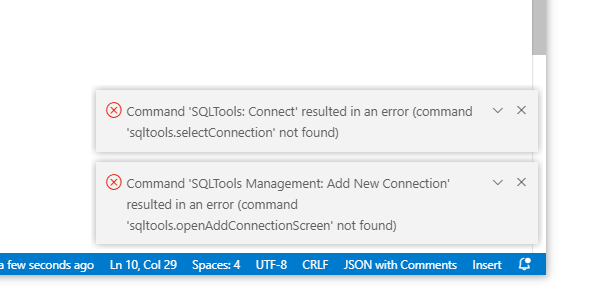
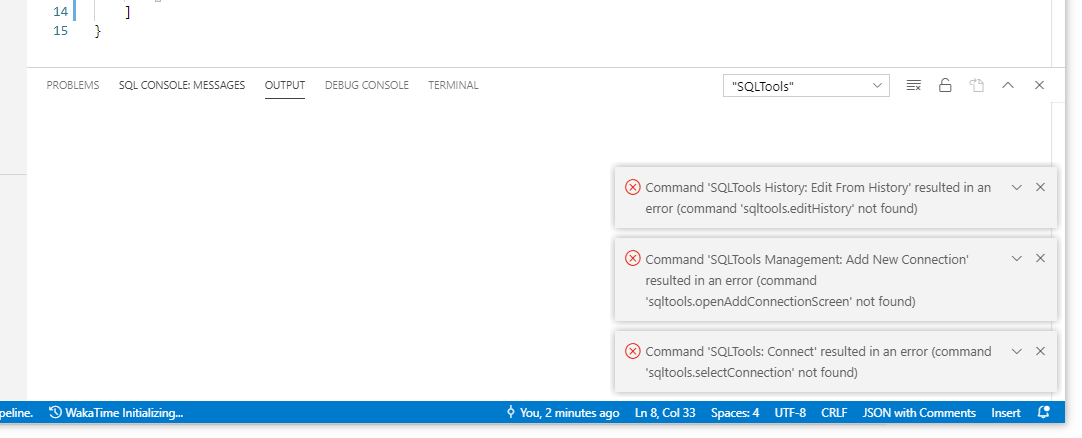
 benyaminl
All 5 comments
@benyaminl this is fixed on newer version. I had a broken package on v0.22.2, did you try the new ones?
 mtxr
on 10 Jun 2020
mtxr
on 10 Jun 2020
@benyaminl this is fixed on newer version. I had a broken package on v0.22.2, did you try the new ones?
yes yes, I did, now it's 0.22.7 still broken
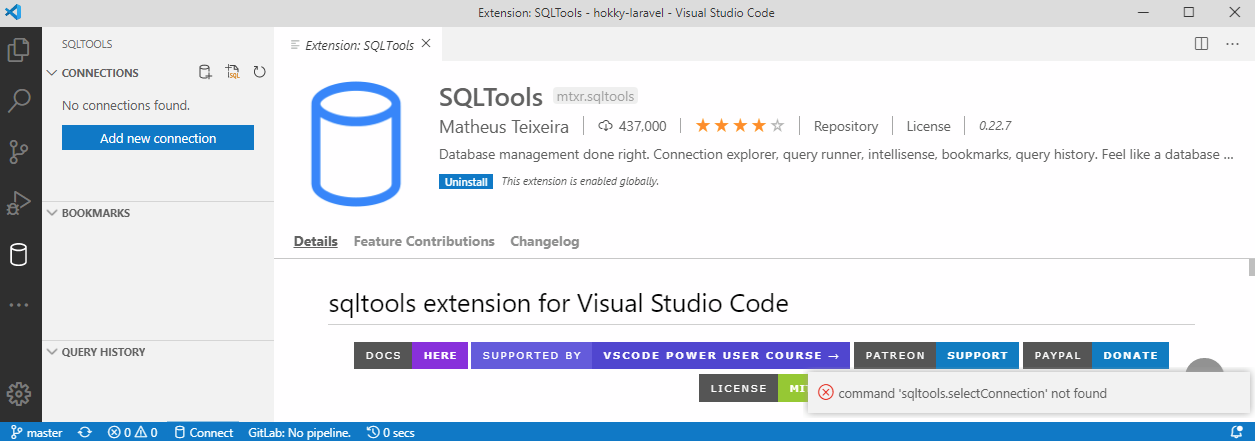
Any ideas maybe to debug? I tried to find the option but can't find it sadly. :'(
But between user installed and system installed app isn't different right? They should both work right?
edit : I got some on output long window
[2020-06-10 19:19:34.137] [renderer1] [error] command 'sqltools.openAddConnectionScreen' not found: Error: command 'sqltools.openAddConnectionScreen' not found
    at e._tryExecuteCommand (file:///C:/Program Files/Microsoft VS Code/resources/app/out/vs/workbench/workbench.desktop.main.js:3681:135)
    at file:///C:/Program Files/Microsoft VS Code/resources/app/out/vs/workbench/workbench.desktop.main.js:3681:16
    at processTicksAndRejections (internal/process/task_queues.js:85:5)
    at async e.open (file:///C:/Program Files/Microsoft VS Code/resources/app/out/vs/workbench/workbench.desktop.main.js:1703:34)
    at async e.open (file:///C:/Program Files/Microsoft VS Code/resources/app/out/vs/workbench/workbench.desktop.main.js:1704:808)
[2020-06-10 19:19:35.602] [renderer1] [error] command 'sqltools.openAddConnectionScreen' not found: Error: command 'sqltools.openAddConnectionScreen' not found
    at e._tryExecuteCommand (file:///C:/Program Files/Microsoft VS Code/resources/app/out/vs/workbench/workbench.desktop.main.js:3681:135)
    at file:///C:/Program Files/Microsoft VS Code/resources/app/out/vs/workbench/workbench.desktop.main.js:3681:16
    at async e.open (file:///C:/Program Files/Microsoft VS Code/resources/app/out/vs/workbench/workbench.desktop.main.js:1703:34)
    at async e.open (file:///C:/Program Files/Microsoft VS Code/resources/app/out/vs/workbench/workbench.desktop.main.js:1704:808)
also Extension Host
[2020-06-10 19:19:31.467] [exthost] [info] ExtensionService#_doActivateExtension mtxr.sqltools {"startup":false,"extensionId":{"value":"mtxr.sqltools","_lower":"mtxr.sqltools"},"activationEvent":"*"}
[2020-06-10 19:19:31.468] [exthost] [info] ExtensionService#loadCommonJSModule file:///c:/Users/Ben/.vscode/extensions/mtxr.sqltools-0.22.7/extension.js
[2020-06-10 19:19:31.723] [exthost] [error] Activating extension mtxr.sqltools failed due to an error:
[2020-06-10 19:19:31.725] [exthost] [error] Error: EPERM: operation not permitted, open 'C:\Users\Ben\AppData\Roaming\vscode-sqltools\Config\runningInfo.json'
    at Object.openSync (fs.js:447:3)
    at Object.func (electron/js2c/asar.js:140:31)
    at Object.func [as openSync] (electron/js2c/asar.js:140:31)
    at Object.writeFileSync (fs.js:1206:35)
    at SerializableStorage.write (c:\Users\Ben\.vscode\extensions\mtxr.sqltools-0.22.7\extension.js:22:258378)
    at SerializableStorage.save (c:\Users\Ben\.vscode\extensions\mtxr.sqltools-0.22.7\extension.js:22:258342)
    at Object.getlastRunInfo (c:\Users\Ben\.vscode\extensions\mtxr.sqltools-0.22.7\extension.js:22:256973)
    at SQLToolsExtension.activate (c:\Users\Ben\.vscode\extensions\mtxr.sqltools-0.22.7\extension.js:22:4776)
    at exports.activate (c:\Users\Ben\.vscode\extensions\mtxr.sqltools-0.22.7\extension.js:22:12137)
    at Function._callActivateOptional (c:\Program Files\Microsoft VS Code\resources\app\out\vs\workbench\services\extensions\node\extensionHostProcess.js:824:355)
    at Function._callActivate (c:\Program Files\Microsoft VS Code\resources\app\out\vs\workbench\services\extensions\node\extensionHostProcess.js:824:6)
    at c:\Program Files\Microsoft VS Code\resources\app\out\vs\workbench\services\extensions\node\extensionHostProcess.js:822:960
    at runMicrotasks (<anonymous>)
    at processTicksAndRejections (internal/process/task_queues.js:85:5)
    at async Promise.all (index 0)
    at h.$activate (c:\Program Files\Microsoft VS Code\resources\app\out\vs\workbench\services\extensions\node\extensionHostProcess.js:829:539)
but the installation did work
[2020-06-10 19:19:30.726] [sharedprocess] [info] Downloaded extension: mtxr.sqltools c:\Users\Ben\AppData\Local\Temp\368c4f97-d37f-4fe2-8bc5-159da056e1bf
[2020-06-10 19:19:31.026] [sharedprocess] [info] Extracted extension to c:\Users\Ben\.vscode\extensions\.mtxr.sqltools-0.22.7: mtxr.sqltools
[2020-06-10 19:19:31.028] [sharedprocess] [info] Renamed to c:\Users\Ben\.vscode\extensions\mtxr.sqltools-0.22.7
[2020-06-10 19:19:31.031] [sharedprocess] [info] Installation completed. mtxr.sqltools
[2020-06-10 19:19:31.040] [sharedprocess] [info] Extensions installed successfully: mtxr.sqltools
and I have full permission on the file. Hmm..
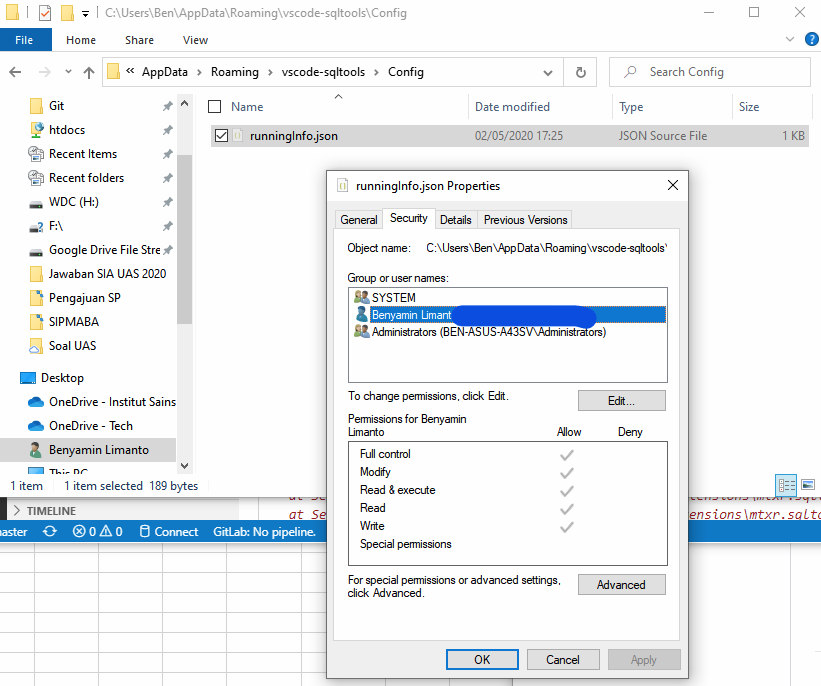
I even run it as administrator, strange. hmm.. why it refer to the same error . hmm..
see (https://github.com/Microsoft/vscode/issues/13920#issuecomment-337444035)
Okay After I rename the file, and rerun the VS Code, it's working, I really don't have any clue about this, but seems it's broken when your extension can't read the runningInfo.json (and this's the file content)
{"numericVersion":2107,"releaseNotes":"https://vscode-sqltools.mteixeira.dev/changelog#v-0-21-7","run":1588415126766,"updated":false,"version":"0.21.7","lastNotificationDate":1587116253865}
I really have no idea why it can't read the file(even after it ran as administrator, hmm..., administrator should root user right, it can touch any file except windows special TrustedInstaller file, which is strange, zzzzz)
It's now solved, but in case someone seen this, this should be VS Code wrong doing, really I hate this zzzz..
benyaminl
on 10 Jun 2020
Thanks @benyaminl ! Awesome researching and debug!
mtxr
on 10 Jun 2020
Thanks @benyaminl ! Awesome researching and debug!
I Think maybe you can bypass the error read file, so if this problem rise, it won't stop this extension compeletly sir, it's very annoying how VS Code work. ugh.
benyaminl
on 10 Jun 2020
will do. I will add a notification whenever we have problems to read. But
I'll let it continue to start correctly
On Wed, Jun 10, 2020 at 10:39 AM Benyamin Limanto notifications@github.com
wrote:
Thanks @benyaminl https://github.com/benyaminl ! Awesome researching
and debug!I Think maybe you can bypass the error read file, so if this problem rise,
it won't stop this extension compeletly sir, it's very annoying how VS Code
work. ugh.—
You are receiving this because you commented.
Reply to this email directly, view it on GitHub
https://github.com/mtxr/vscode-sqltools/issues/593#issuecomment-642016203,
or unsubscribe
https://github.com/notifications/unsubscribe-auth/AAFMX2I5FLQ5S7ANLXZNEELRV6EKBANCNFSM4NPB5IQA
.
mtxr
on 10 Jun 2020
Related issues
 ransagy
·
5Comments
ransagy
·
5Comments
 BrendanSimon
·
3Comments
BrendanSimon
·
3Comments
 cstyve
·
3Comments
cstyve
·
3Comments
 abenhamdine
·
6Comments
abenhamdine
·
6Comments
 sstirlin
·
7Comments
sstirlin
·
7Comments
Most helpful comment
will do. I will add a notification whenever we have problems to read. But
I'll let it continue to start correctly
On Wed, Jun 10, 2020 at 10:39 AM Benyamin Limanto notifications@github.com
wrote: