Vscode-sqltools: Schemas are not supported (postgresql)
This is a guideline to help us to understand SQLTools Issues.
You don't need to stick to this, but please try to guide us to reproduce the errors or understand your feature requests.
Issue Type
- [ ] Feature Request
- [x ] Bugfix/Errors
- [ ] Questions
- [ ] Other
Prerequisites (For bugfixes)
- [x ] Are you running the latest version?
- [ ] Did you check the logs?
- [ ] Did you check the Setup?
Description
[Description of the bug or feature]
I have a database where all tables belons to different schemas. This extension lists all tables as if they are in database (root schema)
Steps to Reproduce (For bugfixes)
- [First Step]
- [Second Step]
- [and so on...]
Expected behavior: [What you expected to happen]
Actual behavior: [What actually happened]
Versions
- Version: vX.Y.Z
- OS: ...
- SGDB: MySQL, PostgresSQL...
You can get this information from executing SQLTools: Version from VSCode Quick Open.
 Yanpas
All 17 comments
75 seems to be the same.
I've created a milestone to fix this problem.
 mtxr
on 23 Sep 2018
mtxr
on 23 Sep 2018
Related to this. All our tables are inside schemas. We see the tables in the sidebar, but when clicking to view a table, we get an error of the kind
ERROR: Error:  relation "customer" does not exist
ERROR: Error:  { [Error: Request connection/RunCommandRequest failed with message: relation "customer" does not exist
Indeed, customer does not exist, it should be core.customer - so the extension is ignoring the schema when running the query.
 jpincas
on 22 Mar 2019
jpincas
on 22 Mar 2019
@jpincas which version were you using?
mtxr
on 6 Apr 2019
Hey - I ended up uninstalling it, so I'm afraid I can't answer your question. Is there a version that supports schemas?
jpincas
on 7 Apr 2019
For Oracle dialect I "abused" the "tableName" property so that it includes schema name:
https://github.com/mtxr/vscode-sqltools/blob/334074324f980397e0d233d162e269ff0bdf778c/packages/core/dialect/oracle/index.ts#L139
https://github.com/mtxr/vscode-sqltools/blob/334074324f980397e0d233d162e269ff0bdf778c/packages/core/dialect/oracle/index.ts#L149-L153
@mtxr , maybe it could be an option as a quick fix for other dialects also, before providing proper schema support.
 mickeypearce
on 7 Apr 2019
mickeypearce
on 7 Apr 2019
I'd love for this to happen in general, Intellisense, etc. If the dialect supports schemas, prepend it to the table name whenever its inserted somewhere. Not sure if that's still in the realms of a "quick fix"/phase 1 of this.
 ransagy
on 7 Apr 2019
ransagy
on 7 Apr 2019
It is. Schema is then part of the tableName, so instead of "customer", you get "schema.customer" everywhere.
The only thing is missing is a proper hierarchy in tree explorer as it support only two nodes for now:
- Tables
- schema.customer
IF you have a schema node you can easely collapse schemas:
- Tables
- schema
- customer
- schema
But other then that, I think schema should be part of table name :)
mickeypearce
on 7 Apr 2019
The only thing is missing is a proper hierarchy in tree explorer as it support only two nodes for now:
I think @mtxr is working on this right now: https://github.com/mtxr/vscode-sqltools/commits/feature/sidebar-tree-enhanced , 👍
mickeypearce
on 7 Apr 2019
@jpincas, sorry you had to uninstall.
But I sure you will be happy if you give it another chance once this PR is got packaged, next version will support multiple schemas and databases, the same way DataGrip, Dbeaver and some other tools handle it.
@ransagy I'ld love too. I started to work hard on intellisense and I felt I should complete this task first.
It's a first step, but I'll roll it out this first, then intellisense.
@mickeypearce actually I just completed this hierarchical feature, I assigned you as a reviewer for the PR, also I wrote some comments we need you to complete to fix this for Oracle.
If everything goes well, I'm releasing it today/tomorrow.
Thanks guys!
mtxr
on 7 Apr 2019
@mtxr Definitely will reinstall and test it out. Still looking for a way to improve my plpgsql workflow from within vscode rather than switching constantly between vscode and postico.
jpincas
on 7 Apr 2019
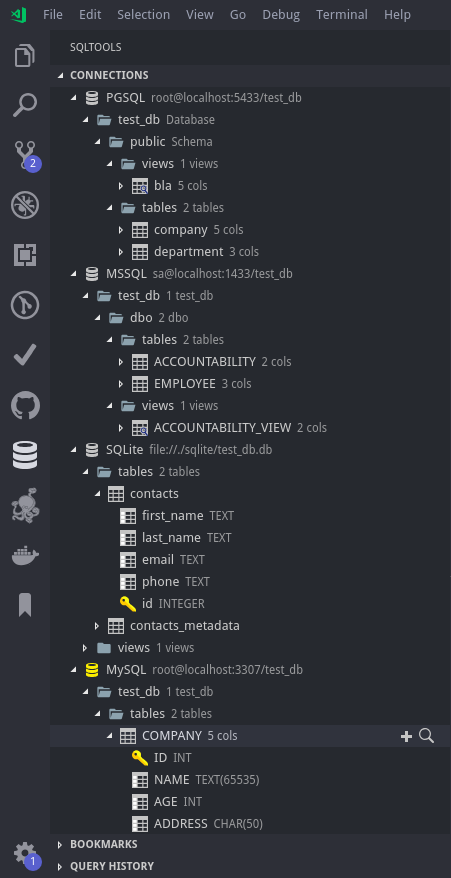
mtxr
on 8 Apr 2019
But the release version will flatten tree elements with only one child
mtxr
on 8 Apr 2019
@mtxr Just to be sure - the current change is only relevant for the tree display, right? Not Intellisense/"Generate Insert Query"/"Show Table Records" etc?
I know you're planning/working in those, Just making sure I'm not missing something.
ransagy
on 8 Apr 2019
Which RDBMS dialect are you using?
mtxr
on 8 Apr 2019
Take a look here. We had some improvements on Generate Insert queries and show records, but mostly for PostgreSQL, MySQL and SQLite.
If you feel there's some feature missing, please open an issue for me. Besides the insellisense, everything should be easier and quicker to develop now
mtxr
on 8 Apr 2019
I use (Azure) MSSQL almost exclusively. I was just wondering since this issue was seemingly about schema support everywhere, Hence why i wondered if its still a WIP for Intellisense and other places that don't directly insert the schema name with the table one.
If that's out of scope for this issue, I'll open new one(s).
ransagy
on 8 Apr 2019
Hey guys try the latest version. Most of the issues were fixed. Let me know how is it going for you.
If you like the project, please consider a donation or reviewing it on VSCode marketplace. That you help it to keep evolving.
Thanks!
mtxr
on 12 Apr 2019
Related issues
 benyaminl
·
5Comments
benyaminl
·
5Comments
 Maransatto
·
3Comments
Maransatto
·
3Comments
 PixelT
·
6Comments
PixelT
·
6Comments
 h4ckt1v1st
·
4Comments
h4ckt1v1st
·
4Comments
 sstirlin
·
7Comments
sstirlin
·
7Comments
Most helpful comment
@jpincas, sorry you had to uninstall.
But I sure you will be happy if you give it another chance once this PR is got packaged, next version will support multiple schemas and databases, the same way DataGrip, Dbeaver and some other tools handle it.
@ransagy I'ld love too. I started to work hard on intellisense and I felt I should complete this task first.
It's a first step, but I'll roll it out this first, then intellisense.
@mickeypearce actually I just completed this hierarchical feature, I assigned you as a reviewer for the PR, also I wrote some comments we need you to complete to fix this for Oracle.
If everything goes well, I'm releasing it today/tomorrow.
Thanks guys!