Vscode-spell-checker: cSpell is activated before reading settings.
Hi @Jason-Rev
vscode: 1.15
os: Manjaro Linux KDE Gellivara
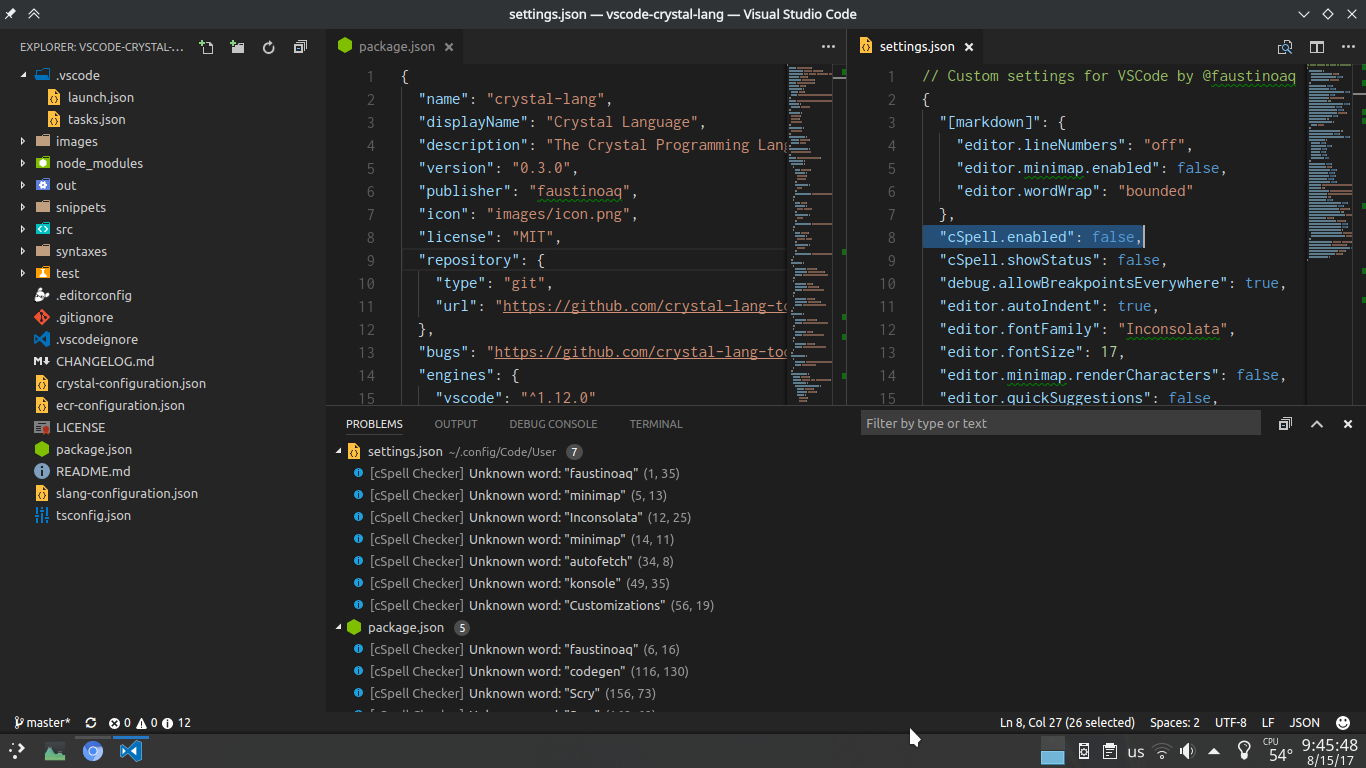
I set "cSpell.enabled": false on settings.json but it keep analyzing files even when is disabled.
It only happens when I open a workspace with opened documents previously. If I open a empty workspace it won't happen. Seems that cSpell has a small delay reading settings.json so opened files are analized before.
Also I can see cSpell is always activated because this: #L31 (same issue as https://github.com/editorconfig/editorconfig-vscode/pull/159
BTW, thanks for this extension :smile:
 faustinoaq
All 9 comments
Thank you.
Do you have an idea how long this has been happening?
 Jason3S
on 16 Aug 2017
Jason3S
on 16 Aug 2017
Well, It happen from day one I installed the extension. :sweat_smile: , I didn't realize because the errors disappear when you open another file or close the open one.
faustinoaq
on 16 Aug 2017
I need to disable cSpell because I use it for specific workspaces only. By example: documents and papers in Markdown and Latex, or sometimes for Yaml and Json. Also I write in English and Spanish. So many configurations in differents workspaces. :sweat_smile:
faustinoaq
on 16 Aug 2017
Do you remember when you started using the extension? I am trying to determine when this behavior might have started.
I recently added a Spanish dictionary: Spell Checker for Spanish. I would appreciate any feedback on how well it works for you.
Jason3S
on 16 Aug 2017
As a work around, you can disable cspell in your user settings, then only enable it in each workspace.
Jason3S
on 16 Aug 2017
As a work around, you can disable cspell in your user settings, then only enable it in each workspace.
Exactly what I'm doing
BTW, Spanish extension works like a charm, npm package cspell-dict-es-es is not needed now :+1:
faustinoaq
on 16 Aug 2017
Got it. I can see how this could happen. It is a race condition on startup.
Jason3S
on 17 Aug 2017
I have pushed out a new version that should help with this issue.
But there are some more things going on. VS Code opens some files in the background. Only it isn't easy to tell that these files are in the background. The settings.json file is an example. So is package.json.
Jason3S
on 24 Aug 2017
This bug is fixed with your latest version. Thanks you very much! :smile:
faustinoaq
on 25 Aug 2017
Related issues
 romines
·
3Comments
romines
·
3Comments
 blackwind
·
3Comments
blackwind
·
3Comments
 floatingpurr
·
5Comments
floatingpurr
·
5Comments
 mgroves
·
5Comments
mgroves
·
5Comments
 gandalfsaxe
·
5Comments
gandalfsaxe
·
5Comments
Most helpful comment
I have pushed out a new version that should help with this issue.
But there are some more things going on. VS Code opens some files in the background. Only it isn't easy to tell that these files are in the background. The
settings.jsonfile is an example. So ispackage.json.