Vscode-spell-checker: Spelling not being checked (on .adoc file)
I'm not sure when this stopped working, but spell checking does not seem to be working when I'm editing .adoc files anymore.
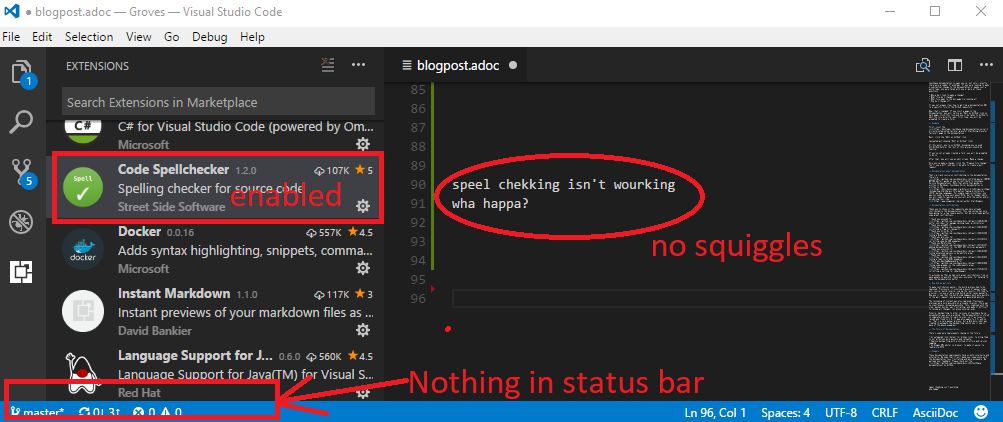
I thought maybe the File Type had been dislodged during an update or something (I'm on 1.13.1 of VSCode). But now I don't see a Spell Checker status in the status bar anymore. Is there some other way to make sure that this extension is included in the spell check?
I've attached a screenshot, hopefully that will help. Is there any other information that might be helpful?
 mgroves
All 5 comments
Thank you. I'll see if I can reproduce the issue.
 Jason3S
on 1 Jul 2017
Jason3S
on 1 Jul 2017
Looks like the extension may have crashed or wasn't able to load. This can happen if vscode reloads.
Try exiting vscode and see if there are any vscode processing still running. You might need to kill them.
Jason3S
on 1 Jul 2017
Please let me know if you are still seeing this issue.
Jason3S
on 3 Jul 2017
Hmm, I didn't see any VSCode processes running, but it must have been something like that. A reboot and spell checking is working correctly again. Thanks!
mgroves
on 4 Jul 2017
Thank you. I'll close this.
Jason3S
on 4 Jul 2017
Related issues
 gandalfsaxe
·
6Comments
gandalfsaxe
·
6Comments
 floatingpurr
·
5Comments
floatingpurr
·
5Comments
 ghost
·
6Comments
ghost
·
6Comments
 alallier
·
3Comments
alallier
·
3Comments
 lucamartinetti
·
3Comments
lucamartinetti
·
3Comments