Vscode-restclient: Copy Request
Sometimes I would like to copy the request that will sent over the wire to show someone what I am sending in my request so that they can understand it even if they are not familiar with this extension which supports variables, etc.
I'm thinking this could be solved in several ways:
- A feature to copy a request with the variables inlined
- A feature to do a dry-run where instead of showing the response in a new tab it shows the resolved request instead.
- A feature to inline variables in the editor (which can be done via the normal undo features of VSCode) so that I can inline all variables, copy the text, and then undo that change but now I have the text to send to someone who understands HTTP, etc.
I think the simplest solution would be to add a button called "Copy Full Response" to the .http/.rest file editor (similar to the the "Save Full Response", "Save Response body", and "Copy Response Body" buttons available on the response view).
P.S. I am aware of the "Copy Request as cURL" feature but I don't want all the headers, etc. that will be send I just want what I have in my editor for an HTTP request but with variables resolved based on my environment, etc. Thanks!
 mfulton26
All 6 comments
This would also be useful to me. Some more ideas around the UX (I don't have a clear favorite):
- There could be a "Copy Request" lens – next to the current "Send Request" button.
- BTW, "Copy Request As cURL" could be added there as well for better discoverability.
- There could be a toggle button in the Response tab, leading to something like this:
# -------------- Request --------------

POST https://example.com/graphql
Accept: application/json
User-Agent: vscode-restclient

{
  demo
}

# -------------- Response --------------

HTTP/1.1 200 OK
Server: nginx

{
  "data": {
    "demo": "hello"
  }
}
- The Request History could have its own panel, a bit like Git History, which would give more room than the quick pick UI and I'd be able to copy from there.
 borekb
on 27 Nov 2019
borekb
on 27 Nov 2019
Id also like this feature. When a request sent with generated data , its difficult to see exactly what was sent.
 ricjhill
on 14 Jan 2020
ricjhill
on 14 Jan 2020
I also really need this feature to debug requests and to be sured that request is crafted correctly. This could save a lot of time.
 bogem
on 15 Apr 2020
bogem
on 15 Apr 2020
Visualizing the actual request that went out would be very useful, especially to verify you built it properly.
On multiple occasions today, either the variable was not properly set, or I tried splitting a curl request over multiple lines and forgot the \ character to denote that the statement continues on the next line. Problem is you only suddenly see an error popup but nowhere see the debug showing what is actually getting sent.
 saelfaer
on 25 May 2020
saelfaer
on 25 May 2020
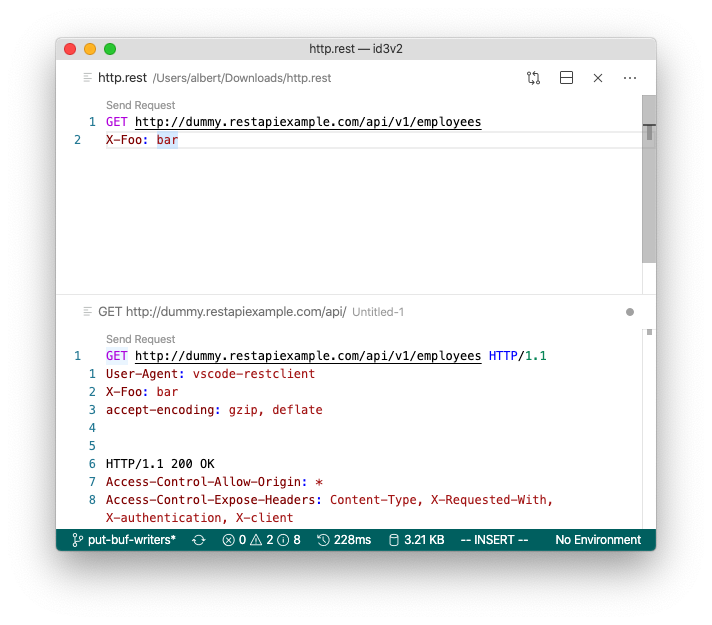
There is now the rest-client.previewOption setting, that you can set to:
- full | Default. Full response is previewed
- headers | Only the response headers(including status line) are previewed
- body | Only the response body is previewed
- exchange | Preview the whole HTTP exchange(request and response)
Seems like changing this setting to exchange would provide the desired request, right?
Should this issue be closed?
 jackbravo
on 22 Jun 2020
jackbravo
on 22 Jun 2020
@jackbravo Oh yes. Thank you!
bogem
on 23 Jun 2020
Related issues
 abenedykt
·
18Comments
abenedykt
·
18Comments
 wboyle-erwin
·
43Comments
wboyle-erwin
·
43Comments
 johnbeynon
·
23Comments
johnbeynon
·
23Comments
 lldata
·
13Comments
lldata
·
13Comments
 Odonno
·
22Comments
Odonno
·
22Comments
Most helpful comment
There is now the
rest-client.previewOptionsetting, that you can set to:Seems like changing this setting to
exchangewould provide the desired request, right?Should this issue be closed?