Vscode-restclient: Variables in variables?
So reading the docs it seems like this should work...
First up a token request...
# @name login
POST {{host}}/oauth/token HTTP/1.1
content-type: application/json

{
    "grant_type": "password",
    "email": {{username}},
    "password": {{password}}
}
and then set a variable with the resulting access token
@accessToken = {{login.response.body.access_token}}
At that point mousing over {{login.response...}} shows the value of the access token received in the response and yet:
GET {{host}}/boats HTTP/1.1
Authorization: Bearer {{accessToken}}
fails - mousing over {{accessToken}} shows {{login.response...}} not the value of the token itself, nor is the token passed to the server.
Am I misreading the docs?
 johnbeynon
All 23 comments
You need to be retrieving the access token via the body as JSON, so changing the acess_token line to {{login.response.body.$.access_token}} should work.
 galicea-gn
on 25 Nov 2018
galicea-gn
on 25 Nov 2018
@johnbeynon have you triggered the login request before you verify the file varaible references.
 Huachao
on 26 Nov 2018
Huachao
on 26 Nov 2018
Hi, I've tried {{login.response.body.$.access_token}} and {{login.response.body.access_token}} - mousing over the line that sets accessToken shows me the value I'd expect.
I have a subsequent request that looks like:
GET {{host}}/boats HTTP/1.1
Authorization: Bearer {{login.response.body.access_token}}
which works just fine. So it's just when I try and use the value set from the response via the variable {{accessToken}} that doesn't seem to work.
johnbeynon
on 26 Nov 2018
@johnbeynon does you get the right response when you use the file variable accessToken, what's your extension version?
Huachao
on 26 Nov 2018
Hi @Huachao
No, when I use
GET {{host}}/boats HTTP/1.1
Authorization: Bearer {{accessToken}}
I don't get a response. I see the request going to my server as:
SELECT "oauth_access_tokens".* FROM "oauth_access_tokens" WHERE "oauth_access_tokens"."token" = $1 LIMIT $2 [["token", "{{login.response.body.$.access_token}}"], ["LIMIT", 1]]
Extension version is 0.20.3.
johnbeynon
on 26 Nov 2018
Could you please provide me with the minimum repro http request file, thanks in advance
Huachao
on 26 Nov 2018
@host = http://localhost:5000
@accessToken = {{login.response.body.$.access_token}}

###
# @name login
POST {{host}}/oauth/token HTTP/1.1
content-type: application/json

{
    "grant_type": "password",
    "email": "MYUSERNAME",
    "password": "MYPASSWORD"
}

###

GET {{host}}/boats HTTP/1.1
content-type: application/json
Authorization: Bearer {{accessToken}}
@johnbeynon I am sorry that I still can't reproduce your issue, I prepared a version of mine based on your code snippet,
@host = http://httpbin.org
@accessToken = {{login.response.body.$.json.password}}

###
# @name login
POST {{host}}/post HTTP/1.1
content-type: application/json

{
    "grant_type": "password",
    "email": "MYUSERNAME",
    "password": "MYPASSWORD"
}

###

GET {{host}}/get HTTP/1.1
content-type: application/json
Authorization: Bearer {{accessToken}}
Can you confirm that after you kick off the second request listed above, the Authorization header in the response contains the word MYPASSWORD?
Huachao
on 26 Nov 2018
when I run that exact sample I get:
HTTP/1.1 200 OK
Connection: keep-alive
Server: gunicorn/19.9.0
Date: Mon, 26 Nov 2018 16:07:51 GMT
Content-Type: application/json
Content-Length: 353
Access-Control-Allow-Origin: *
Access-Control-Allow-Credentials: true
Via: 1.1 vegur

{
  "args": {},
  "headers": {
    "Accept-Encoding": "gzip, deflate",
    "Authorization": "Bearer {{login.response.body.$.json.password}}",
    "Connection": "close",
    "Content-Type": "application/json",
    "Host": "httpbin.org",
    "User-Agent": "vscode-restclient"
  },
  "origin": "81.109.135.160",
  "url": "http://httpbin.org/get"
}
notice that the Authorization head uses the string value of the variable.
johnbeynon
on 26 Nov 2018
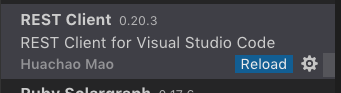
and I'm definitely using 0.20.3
johnbeynon
on 26 Nov 2018
I think you need to reload the extension or restart VSCode instance to make the new version available,
Huachao
on 26 Nov 2018
Yeah, of course I've tried all that. Interestingly when I install via marketplace I only get version 0.18.4 so to get 0.20.3 I have to download the .vsix file directly
johnbeynon
on 27 Nov 2018
Hmm, what's your version of VSCode? Normally you can't download the right version in marketplace is that your version of VSCode does not meet the extension's requirement.
Huachao
on 27 Nov 2018
well that's interesting.
"Check for updates" was showing fully up to date, "No updates available" and I was seeing the October 2018 release notes so I thought I was up to date. But "About VS Code" showed as 1.22, checking the VSCode website I saw 1.29 as the current release - so I've grabbed 1.29 from the website, all my extensions updated and your extension started working as expected!
Thanks for listening!
johnbeynon
on 28 Nov 2018
@johnbeynon It's a pleasure to help you :)
Huachao
on 28 Nov 2018
Thanks for the graceful extension @Huachao
Single http request file works fine. But when I try to add the second one it won't work
@predictorId = {{login.response.body.$.body.userId}}
@defaultFeedId = {{feedBox.response.body.$.body.selectedFeed}}

### @name login
POST {{host}}/token
Content-Type: application/json

{
    "credentials": "my-credentials",
    "providerUserId": "provider-id"
}

### @name feedBox
GET {{host}}/predictors/{{predictorId}}/feeds/box
Content-Type: application/json
access-token: {{accessToken}}
 arambekverdyan
on 16 Dec 2018
arambekverdyan
on 16 Dec 2018
@arambekverdyan what do you mean that after adding the second request it won't work? Can you provide more details?
Huachao
on 16 Dec 2018
@Huachao sorry for belated.
When I declare single variable like this:
@userId = {{login.response.body.$.body.userId}}
@accessToken = {{login.response.body.$.body.accessToken}}

### @name login
POST {{host}}/token
Content-Type: application/json

{
    "credentials": "my-credentials",
    "providerUserId": "provider-id"
}
Its work perfecly, I can use the userId and accessToken variable in my feature requests by puting in the path variable or i request body.
But when i try to add the second one:
@userId = {{login.response.body.$.body.userId}}
@accessToken = {{login.response.body.$.body.accessToken}}
@defaultFeedId = {{feedBox.response.body.$.body.selectedFeed}}

### @name login
POST {{host}}/token
Content-Type: application/json

{
    "credentials": "my-credentials",
    "providerUserId": "provider-id"
}

### @name feedBox
GET {{host}}/predictors/{{userId}}/feeds/box
Content-Type: application/json
access-token: {{accessToken}}
Its mark the {{feedBox.response.body.$.body.selectedFeed}} as warning and when i navigate to this line it says:
Request 'feedBox' has not been sent
(Even after when i make the request and get successful response).
PS:
When i reverse the places of requests like this:
@userId = {{login.response.body.$.body.userId}}
@accessToken = {{login.response.body.$.body.accessToken}}
@defaultFeedId = {{feedBox.response.body.$.body.selectedFeed}}

### @name feedBox
GET {{host}}/predictors/{{userId}}/feeds/box
Content-Type: application/json
access-token: {{accessToken}}

### @name login
POST {{host}}/token
Content-Type: application/json

{
    "credentials": "my-credentials",
    "providerUserId": "provider-id"
}
the same warning appears for login request.
Think the extension understand only the first one.
arambekverdyan
on 17 Dec 2018
BTW:
I made the changes according to examples in README file:
@remote-server = http://api.myhost.com

# @name login
POST {{remote-server}}/token
Content-Type: application/json

{
    "accessToken": "my-token",
    "providerUserId": "my-user",
    "clientFingerprint": "androidX",
    "loginProvider": "NATIVE"
}

###
@accessToken = {{login.response.body.$.body.accessToken}}

###
@userId = {{login.response.body.$.body.userId}}

### @name package
GET {{remote-server}}/predictors/{{userId}}/packages/temp
Content-Type: application/json
access-token: {{accessToken}}

###
@ownerId = {{package.response.body.$.body.ownerId}}
But the same issue was occured.
arambekverdyan
on 17 Dec 2018
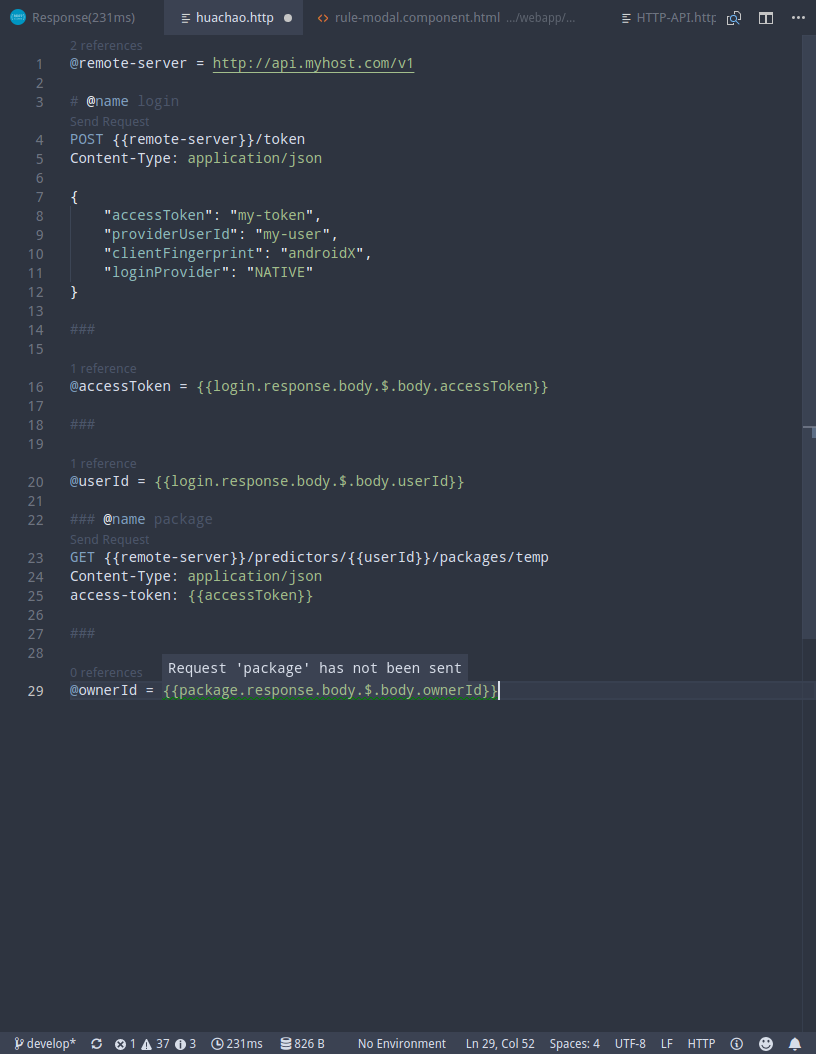
This is the Screenshot of the .http file
Environment:
OS: Manjaro 4.14.83-1
VSCode: 1.30.0
RestClient: 0.20.4
arambekverdyan
on 17 Dec 2018
@arambekverdyan in line 22, you have two extra leading #, one is appropriate
Huachao
on 17 Dec 2018
Perfect!!! Works fine. Thank you very much
arambekverdyan
on 18 Dec 2018
Thank all of you!!
I have been troubled by this problem for a long time.
 cool21540125
on 3 Apr 2019
cool21540125
on 3 Apr 2019
Related issues
 codepunkt
·
29Comments
codepunkt
·
29Comments
 lldata
·
13Comments
lldata
·
13Comments
 Fed29
·
13Comments
Fed29
·
13Comments
 chewlm86
·
13Comments
chewlm86
·
13Comments
 mtxr
·
13Comments
mtxr
·
13Comments
Most helpful comment
@arambekverdyan in line 22, you have two extra leading #, one is appropriate